12 Best A/B Testing Tools for Solo Marketers Who Need a No-Code Setup


As a solo marketer, you don’t have developers on standby or massive budgets to play with. You need tools with a simple setup, clear reporting, and pricing that doesn’t make you wince.
Thankfully, there are A/B testing tools built exactly for that. This guide breaks down the ones that make sense for solo marketers today, with a focus on what they actually help you do, not bells and whistles.
What Should Solo Marketers Look for in an A/B Testing Tool?
As a solo marketer, time is your most scarce resource. You can’t spend hours wrestling with statistical models; you need clear, dependable reporting that surfaces winners without guesswork. You may not have a developer on hand, so no-code editors and visual test builders aren’t optional.
And your A/B testing budget is probably tight. If a tool isn’t free or offers a free trial, it’s tough to justify when you’re juggling so many hats.
The tools we cover here are chosen with those constraints in mind. So when making your choice, keep these in mind:
- No-code setup: You shouldn’t need to touch JavaScript to change a headline or button color. And you can’t always bring in a developer for every test. A drag-and-drop visual editor is a must.
- Clear reporting: Results should be explained in plain language: uplift, probability to win, revenue impact. Not buried in p-values and other A/B testing statistics, you probably don’t have the bandwidth to get into.
- Affordable pricing: Transparent, self-service pricing, free tiers, or starter plans you can actually afford. No “contact sales” walls.
- Small traffic support: Bayesian engines, sequential testing, or dynamic traffic allocation help you get insights faster without millions of visitors.
- Stack compatibility: Easy integrations with GA4, Shopify, WordPress, or HubSpot. Your tools should talk to each other without headaches.
- All-in-one extras: Heatmaps, session recordings, popups, surveys. Because the less tool-sprawl, the better.
- Strong support and resources: You’ll hit roadblocks, but that shouldn’t stop you because you’re a small team. Tools with responsive support and clear documentation save you hours of frustration.
Heard Google Optimize was “the best place to start” and then found out it’s gone? You’re not stuck. There are plenty of Google Optimize alternatives designed for solo marketers — and several are in this list.
A/B Testing Software for Solo Marketers: Comparison Table
| Tool | Pricing (billed annually, 50K tested users)* | No-Code Visual Editor | Heatmaps / Replays | Bayesian / Sequential Stats | Free Plan / Trial | Key Integrations | |||||||||||||||||||||||||||||||||||
|---|---|---|---|---|---|---|---|---|---|---|---|---|---|---|---|---|---|---|---|---|---|---|---|---|---|---|---|---|---|---|---|---|---|---|---|---|---|---|---|---|---|
| Convert | $299/month (up to 100K monthly tested users) | ✅ | ✅ | ✅ | ✅ | GA4, Shopify, Hotjar, Crazy Egg, Google Tag Manager, HubSpot, Webflow, WordPress | |||||||||||||||||||||||||||||||||||
| Convertize | $199/month (up to 100K visitors per month) | ✅ | ❌ | ✅ | ✅ | Google Tag Manager, Mixpanel, WordPress, Shopify, Wix, Magento | |||||||||||||||||||||||||||||||||||
| Crazy Egg | $99/month (up to 150K pageviews per month) | ✅ | ✅ | Unknown | ✅ | Zapier, GA4, Google Tag Manager | |||||||||||||||||||||||||||||||||||
| Instapage | $239/month | ✅ | ✅ | Unknown | ✅ | Zapier, GA4, Google Tag Manager, Hotjar, HubSpot, Shopify | |||||||||||||||||||||||||||||||||||
| Landingi | $64/month (Professional plan with A/B testing) | ✅ | Scroll Map | Unknown | ✅ | Zapier, GA4, Hotjar | |||||||||||||||||||||||||||||||||||
| Nelio A/B Testing | $148/month | ✅ | ✅ | Unknown | ❌ | WordPress | |||||||||||||||||||||||||||||||||||
| OptiMonk | $44/month | ✅ | ❌ | ✅ | ✅ | GA4, Zapier, Shopify, MailChimp, WordPress | |||||||||||||||||||||||||||||||||||
| Plerdy | Free | ✅ | ✅ | Unknown | ✅ | Shopify, WordPress, OpenCart, GA4 | |||||||||||||||||||||||||||||||||||
| Shoplift | $74/month | ✅ | ❌ | ✅ | ✅ | Shopify, Shogun, Microsoft Clarity, Hotjar, GA4 | |||||||||||||||||||||||||||||||||||
| SplitHero | $29/month | ✅ | ❌ | Unknown | ✅ | WordPress | |||||||||||||||||||||||||||||||||||
| Unbounce | Unbounce $187/month | ✅ | ❌ | ❌ (Frequentist) |
✅ | Zapier, MailChimp, HubSpot, Hotjar, Google Tag Manager, GA4 | |||||||||||||||||||||||||||||||||||
| Zoho PageSense | $120/month | ✅ | ✅ | ✅ | ✅ | Google Tag Manager, GA4, Zapier, OpenAI, Intercom, KISSmetrics |
*All starting prices are based on the same scale of 50K monthly tested users and billed annually, for comparison purposes. Only the pricing tiers that include A/B testing are compared here.
How We Chose Each Tool
Every tool in this article is chosen to meet the needs that matter most to solo marketers.
To make this list, we started by researching what’s popular among one-person marketing teams. We also applied our experience in the CRO industry to identify others, then dug deeper into each one. We looked into:
- current product overviews
- the features they have
- official documentation
- real user feedback to validate the feature claims and positioning
For tools with free trials, we took them for a spin to see how they look and work under the hood.
We also checked how low the barrier to experimentation was for each tool and whether it supports the independence expectations of the smallest teams.
12 Best A/B Testing Tools for Solo Marketers
- Convert: Best for A/B testing at a self-service pricing and strong support
- Convertize: Best for psychology-driven testing with automation on a budget
- Crazy Egg: Best for visual behavior insight with lightweight testing
- Instapage: Best for paid acquisition and landing page A/B testing at scale
- Landingi: Best for landing page creating, testing, and automating
- Nelio A/B Testing: Best for WordPress-native experiments
- OptiMonk: Best for popup and on-site messaging experimentation
- Plerdy: Best free starter toolkit combining analytics and A/B testing
- Shoplift: Best for Shopify-native, no-code theme and block testing
- SplitHero: Best for WordPress landing page testing with simple, affordable pricing
- Unbounce: Best for campaign and landing page optimization
- Zoho PageSense: Best for budget-conscious solo teams
Need to explore more experimentation tools used by marketers? Check out our curated Top A/B Testing Tools for Actionable Marketing Insights.
1. Convert Experiences
Who this tool is for: Solo marketers and small ecommerce or SaaS marketing teams with limited resources who want to run reliable experiments and personalization independently.
Pricing: Paid plans start at $299/month (billed yearly) for up to 100,000 tested users, with all features included. Convert offers a 15-day free trial (no credit card required).
What is Convert Experiences?
Convert Experiences is a full-stack experimentation and personalization platform built for teams that want balanced testing capabilities without the enterprise pricing hoops.
It supports client-side and server-side testing, advanced segmentation, and feature flagging, all while being privacy-first and transparent on pricing.
Convert’s Key Features
- Visual, no-code editor: Make on-page changes with a WYSIWYG drag-and-drop interface. No coding needed to test headlines, copy, image, and layout tweaks.
- Instant changes: With Convert Deploy, you can publish no-code edits and test winners directly on your site without developer help, with version control and rollback safety.
- Advanced targeting: 40+ segmentation filters (traffic source, behavior, device, location, etc.) with API access for custom conditions.
- Full-stack experiments: Run web, app, and server-side tests, plus manage feature flags and rollouts.
- Flexible stats engines: Frequentist, Bayesian, and Sequential Testing, with built-in SRM (Sample Ratio Mismatch) detection.
- Native heatmaps and session recordings: See where visitors click, tap, and scroll on each variation with built-in heatmaps and Convert Signals® no separate tool or extra script.
- QA and test management: Collision prevention, versioning, Live Logs for debugging, and unlimited projects/variations.
- 90+ integrations: GA4, Shopify, WordPress, HubSpot, Hotjar, FullStory, Segment, and more.
Pros and Cons of Convert for Solo Marketers
| Pros | Cons |
||||||||||
|---|---|---|---|---|---|---|---|---|---|---|---|
| Easy setup and intuitive UI, quick to launch experiments | Some advanced reporting features are limited | ||||||||||
| Flicker-free implementation keeps tests valid | $299/mo entry point can feel steep for very small sites | ||||||||||
| Strong privacy stance (first-party cookies, GDPR) | Complex tests may require support resources | ||||||||||
| Transparent, all-features-included pricing | SPA (React/Vue) testing has some limitations | ||||||||||
| Fast, responsive support |
Why Convert is a Fit for Solo Marketers
Convert gives solo marketers advanced tools usually reserved for enterprise teams, but in a self-serve package with transparent pricing. You don’t need a developer to run basic A/B tests, and when things get tricky, support is fast and hands-on. For marketers worried about test validity, Convert’s flicker-free delivery and SRM detection ensure you can trust your results.
See how marketers use Convert to drive measurable impact.
What Users Say About Convert
Positive:
Convert Experiences strikes a great balance between power and usability. The visual editor is fast and reliable, even on complex pages, and the experiment setup is clear and flexible without feeling overwhelming. We especially like the transparency around data and privacy (no sampling, GDPR-friendly), which gives us confidence in the results. On top of that, their support team is knowledgeable and responsive, and the documentation makes it easy to get advanced quickly.
Source: G2
Critical:
Sometimes revenue tracking can be a little bit more difficult, and I think a simpler way to pull revenue in from maybe GA4 or some other typically used tool would be helpful.
Source: G2
2. Convertize
Who this tool is for: Small-to-midsize marketing teams who want behaviour-focused A/B testing with no-code setup and psychology-driven suggestions.
Pricing: Solo plan starts you out with $49/month (billed annually) for up to 20K visitors per month. Convertize offers a 14-day free trial with usage-based pricing.
What is Convertize?
Convertize is a conversion optimization tool built around behavioral science. It lets marketers run A/B tests using a visual editor, while also offering features like “Autopilot” traffic allocation, persuasion tactic suggestions, dynamic text, and smart notifications.
What are Convertize’s Key Features?
- SmartEditor™ (visual editor): Change page elements (text, images, layout) without touching code.
- Autopilot traffic management: Automatically directs more traffic toward better-performing variants.
- Hybrid Statistics engine: Combines statistical methods to declare winners faster and more reliably.
- Dynamic content: Inject personalized messaging, geolocation-based text, persuasive banners or notifications.
- Suggested test ideas/tactic library: Offers a library of persuasion principles and test templates to help marketers who are less experienced.
Pros and Cons of Convertize
| Pros | Cons |
||||||||||
|---|---|---|---|---|---|---|---|---|---|---|---|
| Intuitive and easy-to-use interface | Support responsiveness has been criticized by some users | ||||||||||
| Suitable for smaller team budgets compared to bigger platforms | Bug reports, variant not always displayed or under-tracked traffic in some tests. | ||||||||||
| Behavioral guidance and test idea library helps less-experienced users plan meaningful experiments | Lack of deeper analytics or insight depth compared to specialist tools | ||||||||||
| Visual editing and smart traffic allocation reduce manual optimization friction | Some users say JavaScript / global script boxes cause occasional tracking issues |
Why Convertize is a Fit for Solo Marketers
If your mindset is “I want to test smarter, not harder,” Convertize gives you behavioral nudges and test suggestions. The visual editor and autopilot let you launch tests with minimal developer handholding. Its statistical automation helps reduce analysis friction.
What Users Say About Convertize
Positive:
Convertize offers a very solid product and fantastic, thorough resources to help guide marketers and testers to increase conversions and optimize their sites.
Source: Trustpilot
Critical:
I was previously a long-time user of VWO. Convertize is a good tool but lacking many advanced features including any kind of insights.
Source: Capterra
3. Crazy Egg
Who this tool is for: Solo marketers and early-stage teams in ecommerce, small SaaS, and content-driven sites who want behaviour insights plus simple A/B testing.
Pricing: With a 30-day free trial, Crazy Egg’s costs start at $29/month for 5,000 tracked pageviews, heatmaps, recordings, and basic A/B testing. Important note: Billing is only available annually; you can’t opt for a monthly-only plan.
What is Crazy Egg?
Crazy Egg is a visual analytics and optimization platform. It combines behavior mapping tools (heatmaps, scroll maps, confetti maps), session recordings, and built-in A/B testing to help you see how visitors interact with your pages and validate improvements.
Crazy Egg’s Key Features
- Heatmaps and scroll maps: Visualize where visitors click, how far they scroll, and what they ignore (click, scroll, confetti, overlay, list maps).
- Session recordings: Replay individual visitor sessions to see where users stumble or abandon your site.
- Code-free A/B testing: Use a visual editor to build page variants and let the tool allocate traffic toward winners.
- Conversion and goal tracking: Track when visitors click specific elements, land on pages, submit forms, or trigger custom scripts or ad pixels.
- Segmentation and filtering: Filter behavior and test results by device, traffic sources, and custom variables.
- Error tracking: Monitor technical issues or friction points that arise during sessions.
Pros and Cons of Crazy Egg
| Pros | Cons |
||||||||||
|---|---|---|---|---|---|---|---|---|---|---|---|
| Easy setup and intuitive use | Some reviews mention struggles filtering reports or integrating with GA | ||||||||||
| Strong heatmap / visual insights; users praise click/scroll maps as intuitive and helpful | Limited advanced analytics and depth | ||||||||||
| Responsive, helpful support (in many cases) | Annual-only billing model limits flexibility, you can’t pay month-to-month | ||||||||||
| Good value for combining visual analytics and testing under one roof |
Why Crazy Egg is a Fit for Solo Marketers
It gives you both visual insight and testing capability in one tool, saving you from juggling separate analytics and experimentation platforms. It’s a lightweight tool, so you can go into optimization with Crazy Egg without prior experience and dev support.
What Users Say About Crazy Egg
Positive:
Crazy Egg is so intuitive. It’s quick and easy to set up heatmaps and split tests. It gives us the ability to do more testing and get significantly better data than our landing page platform allows for.
Source: G2
Critical:
Support is sometimes a little slow to respond in some cases.
There are some technical issues or quirks that aren’t described in their documentation, so I had to investigate them myself.
Source: G2
4. Instapage
Who this tool is for: Small-to-mid marketing teams focused on landing page optimization and campaign conversion with a drag-and-drop builder that comes with A/B testing.
Pricing: Instapage costs start at $79/month for 15,000 unique monthly visitors. As you scale up in tier and unique monthly visitors, the cost climbs up to $159/month and custom pricing.
What is Instapage?
Instapage is a landing page creation and optimization tool built for marketers who want to design, test, and iterate landing pages without relying on devs.
Instapage’s Key Features
- Built-in A/B testing (server-side split testing): You can test different page versions (variants) for the same URL, track performance, and decide a winner.
- Analytics and heatmaps: See where visitors click, scroll, and engage across variations.
- Template library and Instablocks: Choose from 100+ conversion-focused layouts, reuse sections across pages, and speed up variant creation.
- Dynamic text replacement and personalization: Adjust content based on visitor segments or source to match the message more closely.
- Real-time collaboration and version control: Teams can comment, review, and adjust pages together without duplicating work (though for solo marketers, this is less critical).
Instapage Pros and Cons
| Pros | Cons |
||||||||||
|---|---|---|---|---|---|---|---|---|---|---|---|
| Ease of use and quick landing page creation | Expensive relative to alternatives | ||||||||||
| Seamless integrations: leads and conversion data flow into CRMs and ad systems easily | Restrictions on layout flexibility, design controls, or account caps | ||||||||||
| Built-in analytics and heatmap reports help validate variant insights inside the same platform | Account billing or support issues when needing adjustments | ||||||||||
| Great tool when your conversion strategy is landing page-centric | Less competitive for full-site or multi-page experimentation use cases |
Why Instapage is a Fit for Solo Marketers
Instapage’s strength lies in letting you build, test, and optimize landing pages all in one place. The A/B testing is also baked in. The template and block reuse makes creating test variants faster. For campaigns where landing pages are the conversion driver (PPC, lead gen), it reduces friction in swapping variants and measuring wins.
That said, it has limitations. Some users report restrictions on customization, especially in templates, and that analytics depth isn’t always as robust as standalone analytics platforms. Also, its pricing and features skew toward heavier users.
What Users Say About Instapage
Positive:
I love the flexibility of the editor. You can basically create whatever you can imagine. And if there aren’t the right components for you, you can still build your solutions with custom scripts. Apart from that the support team is outstanding. They are doing everything to resolve a problem quickly.
Source: G2
Critical:
The UX has always frustrated me; I struggle to do simple things like change fonts. Tools are never in the place I assume they will be.
Source: G2
5. Landingi
Who this tool is for: Marketers who want to create, test, publish, optimize, and automate landing pages in one place.
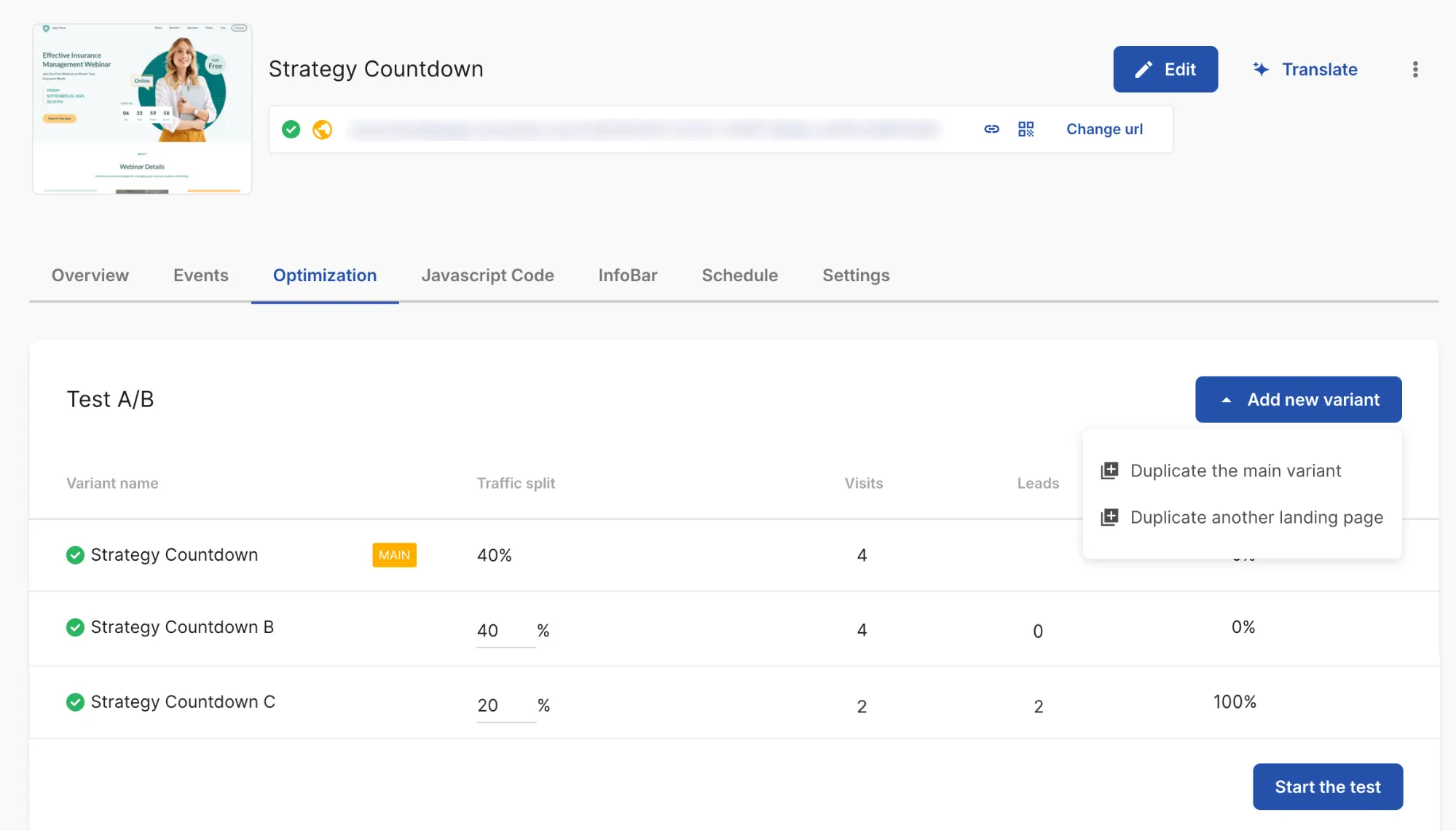
Pricing: Landingi offers a 14-day free trial across plans. Paid plans start at $24/month (Lite) when billed annually, followed by Professional at $64/month and Enterprise at $1,150/month. In Landingi, A/B testing is available from the Professional plan upward, which also unlocks more advanced optimization and automation features for landing page campaigns.
What is Landingi?
Landingi is a landing page automation platform. Instead of treating A/B testing as a standalone feature, it combines a no-code builder, server-side experimentation, landing page personalization, behavioral tracking, and workflow automation around the page itself. That makes it a particularly strong fit when landing pages are a core acquisition channel and you want to improve them without stitching together several separate tools.
Landingi’s Key Features
- Drag-and-drop pixel-perfect builder: Create and edit landing pages without code, using a visual builder and a library of 400+ templates.
- Server-side A/B testing: Run landing page experiments directly inside the platform, compare variants, and optimize based on conversion data.
- EventTracker: Track clicks, scrolls, form activity, and other micro-conversions.
- Solis AI: Solis analyzes data and generates suggestions, discoveries, and alerts related to landing page performance, engagement, and potential friction points.
- Automation and scale features: Smart Sections let you update repeated sections across pages, while Programmatic Landing Pages help you generate pages in bulk from one master layout and dynamic data.
- Integrations catalog: 170+ connections with CRMs, analytics, ecommerce tools, and marketing workflows.
Landingi Pros and Cons
| Pros | Cons |
||||||||||
|---|---|---|---|---|---|---|---|---|---|---|---|
| Intuitive drag-and-drop builder and easy setup for non-technical users | Mobile view sometimes requires manual adjustments | ||||||||||
| Pixel-precise editor with flexible design control | The editor requires a short learning curve | ||||||||||
| Smart Sections and page duplication make scaling landing pages faster | Some advanced features (forms, pop-ups) may require integrations or extra setup |
Why Landingi is a Fit for Solo Marketers
Landingi works well for solo marketers because it brings landing page creation, A/B testing, behavioral tracking, and optimization into one workflow. That means less tool switching and less dependence on developers.
It makes the most sense for marketers whose conversion work happens mainly on landing pages rather than across an entire website. As campaigns grow, Landingi also scales well with more advanced testing, automation, and user and page management features.
What Users Say About Landingi
Positive:
The UX of the application and editor is really intuitive and feels just very natural to work with.
Source: G2
Critical:
There are two main frustrations for me. First of all, its mobile optimization workflow. And, second thing, traffic limits and pricing.
Source: G2
6. Nelio A/B Testing
Who this tool is for: WordPress-centric marketing teams and site owners who want a native A/B testing and behaviour insights tool directly inside their CMS.
Pricing: Billed yearly, Nelio starts at $39/month, but that’s only for 5K monthly views. If you want up to 50K monthly views with session recording included, you’ll pay $1,776/year ($148/month).
What is Nelio A/B Testing?
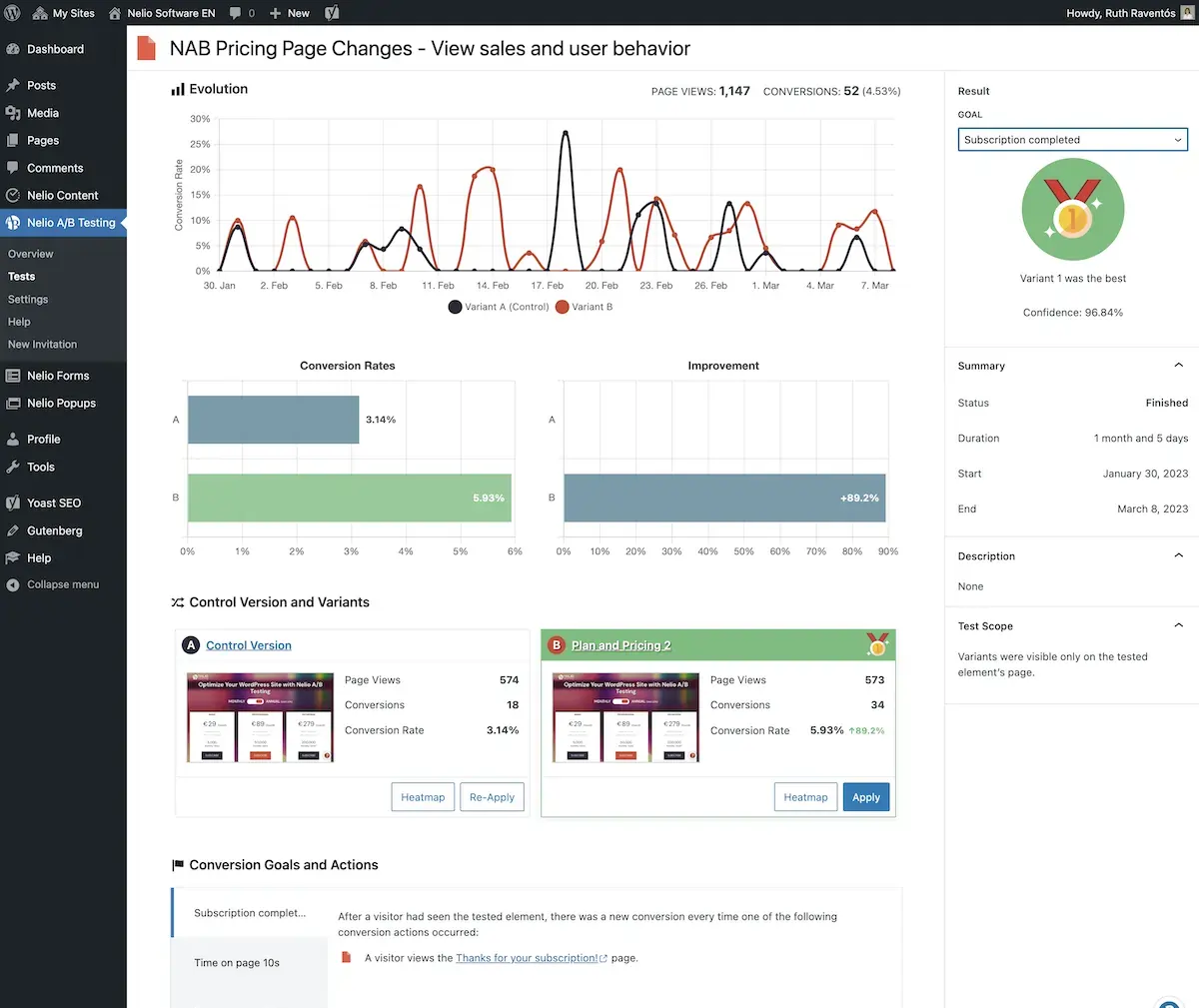
Nelio A/B Testing is a WordPress-native plugin that allows you to run split tests, multivariate tests, and split-URL tests directly from your WordPress dashboard.
It’s built so you don’t have to leave WordPress to build or monitor experiments. It also includes heatmaps, scrollmaps, confetti maps, and integrated test suggestions via Nelio AI.
Nelio A/B Testing’s Key Features
- Test everything from within WordPress: Pages, posts, menus, widgets, CSS rules, JavaScript, themes, and WooCommerce product content.
- Heatmaps, scrollmaps and confetti maps: Visualize user behavior on variants to inform test hypotheses.
- Nelio AI suggestions and templates: The plugin can scan your site and history to propose experiments (e.g., headline, CSS tweaks).
- One-click winner application: Once a variant wins, you can make it the default version instantly.
- Segmentation and targeting: Segment by referrer, device, time, cookie, language, etc., to limit which users see a variant.
- Cloud tracking and offloading server load: All heavy analytics/tracking is handled by Nelio’s cloud, so your WordPress server isn’t overburdened.
Nelio A/B Testing’s Pros and Cons
| Pros | Cons |
||||||||||
|---|---|---|---|---|---|---|---|---|---|---|---|
| High ease of use and intuitive interface | Potential limitations in free version for traffic and features | ||||||||||
| Strong integration inside WordPress | Some overlap or pressure to upgrade if your testing needs grow | ||||||||||
| Good support and responsiveness in community forums | Advanced tests (outside WordPress) not supported | ||||||||||
| AI features and test suggestion tool help generate ideas | More complex workflows may need external tools | ||||||||||
| Minimal performance impact since heavy work runs in the cloud |
Why Nelio A/B Testing is a Fit for Solo Marketers
Because it lives inside WordPress, you don’t need to manage external scripts, dashboards, or tag setups. For a solo marketer running a WordPress site or WooCommerce shop, it reduces tool sprawl and friction. The AI suggestions help when you’re not sure where to start. And being able to test many parts of your site beyond just pages gives you leverage for small but meaningful gains.
On the downside, the feature set is not suited for non-WordPress setups, and advanced experimentation (e.g., external app testing) is out of scope. Also, in high-traffic contexts, you may bump against view or quota limits depending on your plan.
What Users Say About Nelio A/B Testing
Positive:
I am now able to run several detailed tests throughout my website each month and slowly chip away at getting a better and better conversion rate.
Source: WordPress Plugin Forum
Critical: Couldn’t find a recent critical review.
7. OptiMonk
Who this tool is for: Marketers working with conversion rate optimization of landing pages, popups, and on-site campaigns, with segmentation and personalization.
Pricing: Free plan up to 10,000 pageviews/month (1 domain). Paid plans start at $19/month (annual) for 20,000 pageviews. Higher tiers increase pageview limits and domains.
What is OptiMonk?
OptiMonk is an all-in-one conversion platform for on-site pop-ups, personalization, and A/B testing.
Non-technical marketers use it to launch targeted pop-ups, personalize page content, and run A/B tests, with AI-assisted options and a template library.
OptiMonk’s Key Features
- A/B testing for on-site experiences: Create and compare variants (copy, images, offers) in a visual editor; OptiMonk can automate deciding and showing winners.
- Advanced audience targeting: Trigger campaigns by traffic source, device, behavior, and custom events; connect third-party data via built-in integrations.
- Multi-campaign journey testing: Orchestrate and test sequences (e.g., welcome to cart-recovery to post-purchase) to lift funnel conversion.
- Real-time performance tracking: Attribute orders/revenue, track custom metrics, and push data to GA4/analytics tools.
- Integrations catalog: 100+ connections across ecommerce/CMS, email/SMS, and CRMs (Shopify, WooCommerce, HubSpot, Klaviyo, Zapier, and more).
OptiMonk’s Pros and Cons
| Pros | Cons |
||||||||||
|---|---|---|---|---|---|---|---|---|---|---|---|
| Easy to use once set up | Learning curve/logic can feel complex for some teams | ||||||||||
| Customer support is frequently praised | Setup/integration can be difficult in higher-traffic or page-specific targeting scenarios | ||||||||||
| Campaign management and creation are flexible with a strong template library | Data handling/exports and integration depth could be stronger | ||||||||||
| A/B testing and personalization in one place | Pageview-based pricing means costs can rise with scale |
Why OptiMonk is a Fit for Solo Marketers
It gives you fast, visual control over on-site messages and pop-ups, plus native A/B testing, so you can ideate, launch, and learn without leaning on devs. The template library and AI helpers shorten build time, and the integrations keep your data flowing to the tools you already use.
There are trade-offs, though. The platform is strongest for pop-up and on-site messaging use cases (not whole-page redesigns), and pageview-based pricing can climb on high-traffic sites. Setup and integrations can feel heavy at scale, per some users.
What Users Say About OptiMonk
Positive:
Versatile platform with lots of campaign customization, and diverse integration. Good support team.
Source: G2
Critical:
Sometimes changing colors and fonts gets tricky to find the right place to do so.
Source: G2
8. Plerdy
Who this tool is for: Ecommerce and SMB marketing teams who want a conversion optimization suite including heatmaps and session replay with basic A/B testing.
Pricing: Plerdy starts free (and can stay free forever). Paid plans start at $21/month (billed annually) for more generous limits.
What is Plerdy?
Plerdy is a conversion-optimization and UX analytics platform that bundles heatmaps, session recordings, SEO auditing, pop-ups, and A/B testing into a single tool.
Its goal is to help marketers see where users interact (or don’t), diagnose friction, and validate changes, without needing a dozen separate tools.
Plerdy’s Key Features
- Heatmaps and click maps: Visualize where users click, how far they scroll, and which parts of the page are ignored.
- Session recordings: Replay user sessions to see how users navigate your site and where they get stuck.
- A/B testing: Run experiments on page variants to test hypotheses directly within Plerdy’s platform.
- SEO and page audit tools: Automatically detect technical SEO issues, on-page SEO anomalies, and broken links.
- Pop-ups and forms: Create behavior-triggered pop-up campaigns or lead capture forms to test messaging or offers.
- Conversion funnels and event tracking: Track how users move through funnel steps, set goals, and analyze drop-offs.
- Integrations and modular add-ons: Works with Google Analytics, SEO add-ons, and you can upgrade limits or add features independently.
Plerdy’s Pros and Cons
| Pros | Cons |
||||||||||
|---|---|---|---|---|---|---|---|---|---|---|---|
| Ease of use and exceptional, quick setup | Learning curve/feature overload | ||||||||||
| Strong heatmap and visual insights for UX and conversion decisions | Some report performance impact or quotas limiting usage on mobile or large sites | ||||||||||
| Comprehensive feature set (SEO, CRO, pop-ups) reduces the need for multiple tools | Interface or navigation can feel less intuitive to new users | ||||||||||
| Support is responsive and often praised in reviews | Some features (e.g., API/webhooks) are missing or limited in lower tiers |
Why Plerdy is a Fit for Solo Marketers
Plerdy offers a lot of capability in one platform. For solo marketers, that means fewer tools to manage, fewer integration headaches, and a central place to act on heatmap, funnel, and experiment insights. On the free plan, you already get access to its A/B testing capabilities, which doesn’t happen often with all-in-one CRO tools.
Some users warn of a steeper learning curve due to the suite’s breadth. Inexperienced users may feel overwhelmed by all available features. Also, in higher traffic or more complex sites, limitations on heatmap/session quotas might require upgrades.
What Users Say About Plerdy
Positive:
Bought it and didn’t use it as there were no sites. As soon as I started building sites, I started connecting the tool to them and using it very often. At first I didn’t understand it a bit, then I got into it and started to understand the customer journey. Where there were misunderstandings, the responsive support team helped a lot so there was an ease of implementation as well as ease of integration to my Search Console.
Source: G2
Critical:
Plerdy could improve their dashboard. They offer many services, which has made their dashboard a little busy and confusing, and the learning curve could be challenging at the beginning.
Source: G2
9. Shoplift
Who this tool is for: Shopify merchants, DTC brands, and online retail brands focused on storefront experimentation and template/theme testing with minimal coding.
Pricing: Shoplift’s pricing tiers run from $74/month (for 50K monthly store visitors) up to $699/month (both billed annually). They offer a free 14-day trial.
What is Shoplift?
Shoplift is a Shopify‐native A/B testing and CRO tool built specifically for storefronts. It lets marketers run split tests directly on Shopify theme templates, no external code editors or fragile scripts required.
Shoplift’s Key Features
- Template and theme testing: Test individual templates (product pages, collection pages) or sitewide theme changes.
- Lift Assist™ recommendations: AI suggests test ideas and sections to try based on your store metrics and brand style.
- Audience and segmentation targeting: Segment by device, traffic source, user behavior, and cohorts.
- One-click variant application: Apply winning variants directly to your Shopify theme with minimal fuss.
- Reporting and analytics: Tracks conversions, funnels, revenue attribution, and gives insight into test performance.
Shoplift’s Pros and Cons
| Pros | Cons |
||||||||||
|---|---|---|---|---|---|---|---|---|---|---|---|
| Highly intuitive and fast to set up | Occasional technical failures | ||||||||||
| Responsive, strategic support | Some limitations in audience segmentation (e.g., inability to segment by customer tag) | ||||||||||
| Strong Shopify integration and theming compatibility | Higher cost relative to general CRO tools, especially at lower Shopify store volumes |
Why Shoplift is a Fit for Solo Marketers
You can spin up tests quickly, even on custom themes, thanks to direct integration and theme-aware editing. The idea of applying winning variants with one click removes friction. Also, its AI-driven recommendations help you pick good test ideas without having to guess.
On the flip side, the pricing is higher than some generic tools, and a few users report occasional technical issues (like 502 errors) when the dashboard is under load. But overall, the alignment with Shopify makes it a strong fit for solo e-commerce marketers.
What Users Say About Shoplift
Positive:
Very intuitive and easy to use app! Suitable for both beginners in the world of A/B testing and for more complex tests.
Source: Shopify App Store
Critical:
I would stay away from using this software; their business model is like a trap, and without giving you any result, it just keeps asking you to upgrade for no reason.
Source: Shopify App Store
10. SplitHero
Who this tool is for: Freelancers, solo marketers, and small WordPress-based businesses that want ultra-simple A/B split testing for landing pages or site content without coding.
Pricing: SplitHero starts at $29/month for unlimited page views, but only 1 active campaign. Limits increase with the price tier. There’s a 14-day free trial.
What is SplitHero?
SplitHero is a lightweight WordPress-centric A/B testing plugin and cloud service tailored for solo marketers and small teams. It allows you to test up to 4 variants per page (control + 3) and supports conversion measurement, including WooCommerce checkout flows.
SplitHero’s Key Features
- Variant testing (up to 4 versions): Easily compare page variations from your WordPress site.
- WooCommerce integration: Track actual order completions as conversion goals for e-commerce stores.
- Cloud reporting and external dashboard: The plugin offloads analytics and reporting to the SplitHero cloud, minimizing load on your site.
- Compatibility with page builders: Works alongside Gutenberg, Elementor, and other builders without interfering.
- Unlimited visitors and guest access: There’s no visitor cap, and you can invite collaborators or share reports with clients.
SplitHero’s Pros and Cons
| Pros | Cons |
||||||||||
|---|---|---|---|---|---|---|---|---|---|---|---|
| Intuitive setup and speed | Integration challenges reported by some users when using custom or complex setups | ||||||||||
| Reports are cloud-hosted so your WordPress site remains lightweight | No deep analytics or segmentation compared to enterprise tools | ||||||||||
| WooCommerce support for measuring orders as conversion goals | Some users mention missing integrations (e.g., ThriveCart) as a gap; it’s on the roadmap | ||||||||||
| Unlimited visitors and guest access add flexibility |
Why SplitHero is a Fit for Solo Marketers
Since it’s a WordPress plugin, you get to use it in familiar territory. You can launch simple experiments (headlines, button text, layouts) quickly, track real conversions, and iteratively improve your pages. The WooCommerce integration is especially useful if you run an online store and want to test product pages or checkout elements.
That said, it’s not as full-featured as larger experimentation platforms. You’ll miss advanced segmentation, deep analytics, or cross-platform tests. But for WordPress-built web pages, it’s a clean, non-disruptive tool that makes testing easy.
What Users Say About SplitHero
Positive:
I love how easy Split Hero is to use! Time is money and being able to set up and run A/B split testing campaigns quickly and easily adds massive value to my clients. Time is money and I don’t want to waste it trying to figure out how to set up my split tests.
Source: Capterra
Critical: We didn’t find a recent critical review.
11. Unbounce
Who this tool is for: Small-to-mid marketing teams and agencies in ecommerce, SaaS, or lead generation who prioritize landing page optimization and campaign ROI.
Pricing: Unbounce offers a 14-day free trial, with pricing starting at $74/month (annual billing). Plan tiers scale by visitors/conversions.
What is Unbounce?
Unbounce is one of the most recognized landing page builders and optimization platforms. Its drag-and-drop editor makes it easy to build and launch landing pages without developer support, while built-in A/B testing lets you validate page variants quickly.
Unbounce’s Key Features
- Drag-and-drop builder: Build conversion-focused landing pages without code; duplicate variants quickly to test headlines, CTAs, layouts.
- A/B testing: Create variants and split traffic to measure which version converts better.
- Smart Traffic (AI): After a short learning phase, automatically routes each visitor to the variant they’re most likely to convert on; includes reporting (Audience Insights).
- Integrations: Connect to tools like HubSpot, Salesforce, WordPress, and Zapier from the integrations catalog.
Pros and Cons of Unbounce
| Pros | Cons |
||||||||||
|---|---|---|---|---|---|---|---|---|---|---|---|
| Intuitive drag-and-drop builder for creating landing pages easily | Pricing and caps feel restrictive | ||||||||||
| Quick duplication and easy integrations | Difficult cancellations and support | ||||||||||
| Built-in A/B testing helps validate what content resonates | Template/design flexibility has constraints | ||||||||||
| Smart Traffic routes traffic to higher-converting variants |
Why Unbounce is a Fit for Solo Marketers
It’s genuinely fast to build and publish landing pages, then run simple A/Bs or turn on Smart Traffic. The visual editor minimizes dev dependency, and integrations make hand-offs (CRM, ESP, analytics) straightforward.
But Unbounce isn’t a full CRO suite. For deeper behavior analytics or more advanced A/B tests, you’ll still rely on outside tools.
What Users Say About Unbounce
Positive:
Unbounce is super intuitive, the drag-and-drop builder that makes creating landing pages simple, even for those without coding experience like me.
Source: G2
Critical:
While Unbounce has many strengths, I did run into some challenges with ease of integration into my CRM. The setup wasn’t always as seamless as I’d hoped, and it required extra effort to connect everything the way I needed. I also felt that gathering user behavior insights for optimization depended too much on outside tools, which added complexity. Overall, it’s a good platform, but for my use case, I found other solutions worked better.
Source: G2
12. Zoho PageSense
Who this tool is for: Startups, small-to-mid-sized businesses, and solo marketers in ecommerce, service sites, and content brands who want one suite for optimization.
Pricing: Zoho PageSense only offers A/B testing in the Optimize tier, which starts at $30/month for 10,000 monthly visitors, when billed annually.
What is Zoho PageSense?
Zoho PageSense is a conversion optimization suite intended to give marketers insight into visitor behavior while also enabling testing. It’s positioned as an “all under one roof” platform that reduces tool churn and helps you optimize without jumping between multiple apps.
What are Zoho PageSense’s Key Features?
- Web analytics and metrics tracking: Monitor key website metrics like pageviews, conversions, traffic sources, and user paths.
- Heatmaps and session recording: See where users click, how far they scroll, and playback sessions to see real behavior.
- Form analytics: Analyze form-level behavior, field hesitation, abandonment rates, interactions vs submissions.
- Funnel analysis: Map conversion paths and detect drop-off steps.
- A/B and split URL testing: Run experiments on page variations to identify what converts better.
- Personalization: Dynamically surface content or layout tweaks based on visitor behavior, demographics, or other segmentation criteria.
- Integrations and tagging setup: Works with Google Analytics, Google Tag Manager, Zoho’s own ecosystem, and more.
Pros and Cons of Zoho PageSense
| Pros | Cons |
||||||||||
|---|---|---|---|---|---|---|---|---|---|---|---|
| Ease of use for non-technical users | Communication and support delays | ||||||||||
| Broad set of behavior and analytics features bundled | Event recording and heatmap visualization can take time | ||||||||||
| Great pricing for starters in A/B testing | Inadequate or shallow analytics in some areas | ||||||||||
| Some parts of the interface aren’t explained well or are confusing |
Why Zoho PageSense is a Fit for Solo Marketers
Zoho PageSense bundles behavior analytics and testing in one platform, which gives you fewer tools to manage. For non-technical users, it’s no-code and straightforward. Because it’s feature-rich from the start, you get to manage your budget as your needs grow. Plus, if you’re already a part of Zoho’s ecosystem (Zoho CRM, Zoho Analytics, etc.), it will reduce friction for you.
What Users Say About Zoho PageSense
Positive:
Zoho PageSense is a very good tool to track website performance and understand the user’s engagement with our web pages. I’ve done a lot of AB testing as well for my landing pages and it did help a lot.
Source: G2
Critical:
Its limited third-party integrations may pose constraints for advanced users.
Source: G2
Wrapping Up
You don’t need a giant budget or an army of developers to run meaningful experiments. Solo marketers have an unfair advantage in agility: lighter processes, faster iterations, and less internal friction. The tools and advice in this guide are built around that reality.
If there’s one thing I want you to take away, it’s this: experimentation is a skill you build. Every test, especially small ones, teaches you something about your audience. Over time, these incremental insights compound.
Here’s what you should hold onto:
- Start small. You don’t need to rebuild your homepage first. Test buttons, headlines, and microcopy.
- Use a tool that doesn’t slow you down. Go for self-serve pricing, good support, and minimal overhead.
- Treat “no significant result” as an opportunity to learn. It tells you what doesn’t move the needle.
- Keep a test log. Hypotheses, timelines, results. They all matter.
- Build a cadence. Optimize, learn, iterate, repeat.
The tools you choose matter, but your mindset matters more. This list gives you 12 worthwhile paths forward. Pick one. Run your first test this week. Then the next. Over time, you won’t just pick winners, you’ll build your intuition, backed by data.
Want a deep, step-by-step A/B testing guide? Check out What Is A/B Testing? The Complete Guide.
Frequently Asked Questions: No-code, Affordable A/B Testing Software for Small Teams
Q1. Do I need coding skills for A/B testing as a solo marketer?
Short answer: not necessarily.
Many tools come with visual editors and point-and-click variation creation, so you don’t need to touch code for basic tests. But you may need light dev help when:
- You want to test deep site logic or server-side features
- You need custom integrations or event tracking
- Your site framework is complex (SPAs, headless setups)
If your tool offers access to APIs or server-side SDKs (e.g., Convert Experiences), that’s bonus flexibility. But it’s not mandatory for launching valid tests.
Need a tool with strong support? Here are the best A/B testing tools with good customer support.
Q2. What’s the best free A/B testing tool?
“Best” depends on your use case, but a few tools stand out:
- Zoho PageSense often comes up for its free trial or lower-tier pricing with key features, and
- Plerdy is also praised for offering enough features at the entry level to get started.
Use the free versions to validate your hypothesis and test behavior before investing in premium plans. As a matter of fact, 95% of the A/B testing tools we curated for solo marketers in this article have a free trial period you can use to assess them.
Q3. Can I A/B test if my site doesn’t get much traffic?
Yes, though with caveats. Low-traffic sites need patience and a smart choice of tests. Strategies include:
- Use Bayesian or sequential statistics engines (many modern tools like Convert support this) to gain insight with fewer visitors
- Target high-traffic pages or sections (e.g., homepage, landing pages)
- Run simpler tests (CTA, headlines) rather than full redesigns
- Combine longer test durations with segmentation to isolate signal
According to CRO best practices, what matters most is minimizing variance and letting the test run until statistical reliability, not cutting it short.
Q4. Which tools work best with Shopify or WordPress?
For Shopify, look for experimentation tools that integrate natively with Shopify themes or allow block-level changes (e.g., Convert’s Shopify App and Shoplift in the list).
For WordPress, use plugins that run inside WP (e.g., Nelio, SplitHero). They let you manage experiments from your admin dashboard with minimal external setup.
In both cases, seamless integration means less friction and faster testing. Always double-check that the tool supports your theme, content blocks, and e-commerce setup.
Q5. What should I test first as a solo marketer?
Start with high-leverage micro changes that are fast to build yet impactful. Some strong options to get you started:
- Headline messaging variants
- CTA button text, color, or placement
- Hero image vs alternative
- Form field labels or reduction
- Microcopy tweaks in benefit statements
These tests often surface insights fast, giving you confidence and momentum for bigger experiments later.
Q6. How long should I run an A/B test before trusting results?
There’s no one-size-fits-all answer. It depends on traffic, effect size, and variance. But here are guidelines:
- Wait until your tool confirms statistical reliability (e.g.,> 95% confidence or Bayesian threshold)
- Avoid ending tests early (too little data) — you risk false positives
- Resist letting tests run too long, which invites external noise (seasonal changes, campaign shifts)
- Most small-to-medium sites will find reliable results in 1-4 weeks when testing clear, high-impact changes
Also, segment your results (mobile vs desktop, source) before rolling out broadly.
Q7. Is A/B testing worth it for a small website?
Yes, but with the right expectations and approach.
At low traffic volumes, it’s tough to reach classical “statistical significance” thresholds. In many cases, you ideally want ~10,000 visitors per variant and around 1,000 conversions to draw strong, reliable conclusions. Yet that doesn’t mean small sites should shelve testing altogether.
Learn More: How to A/B Test on Low Traffic Sites
Here’s how to make testing worth it when traffic is limited:
- Test big-impact, low-effort elements (headlines, calls-to-action, messaging) rather than full redesigns.
- Be comfortable detecting larger lifts first; subtle changes may be impossible to validate until traffic grows.
- Run tests in email, ads, or segmented audiences where volumes are more concentrated.
- Even inconclusive tests teach you to look at data, form hypotheses, and prioritize experimentation as traffic scales.
- Personalization doesn’t require the same sample size rigor because you’re optimizing the experience for known segments, not comparing unknown variants. It’s a “traffic-proof” way to experiment when traffic is low.
In short: Yes, it’s worth it. Maybe not for deep, enterprise-style CRO yet, but for gaining insights, building a testing culture, and preparing for when your traffic grows, small-site A/B testing is a smart move.
Q8. What’s the cheapest A/B testing tool?
That depends on how you define “cheapest” (free, lowest ongoing cost, or lowest cost per feature).
- Free options do exist, particularly with limited traffic or basic features. We’ve mentioned examples like Plerdy.
- Freemium tools (like Plerdy, which has a free-forever tier) often allow you to start testing at zero cost or with minimal overhead.
- Among paid tools, Convert’s pricing is more than twice cheaper than the closest competitor while offering more features.
If your priority is an absolute low or zero cost, start with open-source/freemium tools. As your needs grow (more traffic, segmentation, integrations), a low-cost paid tool may offer better ROI than a “cheap” tool that limits crucial functionality.
Written By
Uwemedimo Usa
Edited By
Carmen Apostu