Optimizely Alternatives: Top A/B Testing Platforms to Consider for 2026


You’re comparing Optimizely alternatives because you want robust experimentation, without the cost, bloat, and enterprise lock-in. You’re not alone. According to data from Vendr, the average Optimizely contract is close to $80,000 per year, and real users on Reddit and G2 report deals with 2-year lock-ins, opaque renewals, and support that fades after you sign.
Here are the top options to consider in 2026, sorted by best use case, comparison tables, and features you care about. If MVT capability is on your checklist, see what full multivariate testing support looks like in Convert.
Optimizely Alternatives Comparison Table
| Tool | Starting Price | A/B, Split URL, and Multivariate Tests | Server-side Tests | Full-stack Experiments |
Content Personalization |
Transparent pricing | Stats Engine |
|---|---|---|---|---|---|---|---|
| Optimizely | Contact sales |
✅ | ✅ | ✅ | ✅ | ❌ | Sequential testing |
| Convert Experiences | $299/mo (paid annually) or $399/mo (paid monthly) – for 100k MTUs |
✅ | ✅ | ✅ | ✅ | ✅ | Bayesian and Frequentist |
| Kameleoon | Contact sales |
✅ | ✅ | ✅ | ✅ | ❌ | Bayesian and Frequentist |
| Omniconvert | $350 per month – for 100k MTUs |
✅ | ✅ | ✅ | ✅ | ✅ | Bayesian and Frequentist |
| VWO | Contact sales
|
✅ | ✅ | ✅ | ✅ | ✅ | Bayesian |
| Unbounce | $249/month for 50K visitors (Custom pricing for more visitors) |
Yes with limited MVT | ✅ | ❌ | ✅ | ✅ | Frequentist |
| Launch Darkly | $1,000/month for 100K MAU |
✅ | ✅ | ✅ | ✅ | ✅ | Bayesian and Frequentist |
| Crazy Egg | $119/mo (paid annually) – for 150k MTUs |
✅ | ❌ | ❌ | ❌ | ✅ | Undisclosed |
| Dynamic Yield | Contact sales |
✅ | ✅ | ✅ | ✅ | ❌ | Bayesian |
| Adobe Target | Contact sales |
✅ | ✅ | ✅ | ✅ | ❌ | Frequentist |
| GrowthBook | $40/seat/month |
✅ | ✅ | ✅ | ❌ | ✅ | Bayesian and Frequentist |
| PostHog | Based on usage |
✅ | ✅ | ✅ | ❌ | ✅ | Bayesian |
*MTU = Monthly tested users
Looking for a head-to-head breakdown? See Convert vs. Optimizely for a full comparison of pricing, power, and real-world use.
Top 11 Optimizely Alternatives in 2026
- Convert Experiences: Best for mid-market and enterprise teams looking for full-stack experimentation, strong privacy compliance, and secure AI automations.
- Kameleoon: Best for privacy-focused teams in healthcare, finance, or the EU that need full-stack testing with HIPAA and GDPR baked in.
- Omniconvert: Best for CRO teams in ecommerce who want integrated surveys, segmentation, and testing in one platform.
- VWO: Best for teams seeking a broad, all-in-one experimentation suite with decent analytics and a lower price than enterprise tools.
- Unbounce: Best for marketers running quick landing page tests without heavy developer involvement.
- Launch Darkly: Best for engineering-led orgs that need enterprise-grade feature flagging with some light experimentation layered on.
- Crazy Egg: Best for small teams and startups looking for a low-cost way to combine heatmaps with simple A/B tests.
- Dynamic Yield: Best for retailers and consumer brands running personalization at scale with strong recommendation capabilities.
- Adobe Target: Best for large enterprises already using Adobe Experience Cloud who need tight integration with personalization and analytics.
- GrowthBook: Best for developer-first teams who want an open-source experimentation stack they can fully control, extend, and self-host.
- PostHog: Best for product teams who want full-stack experimentation tightly integrated with product analytics, session replay, and event tracking.
Need to explore more experimentation tools? Check out our curated Top A/B Testing Tools for 2026.
The tools in this guide weren’t chosen at random. They reflect what experimentation teams consistently ask for when Optimizely no longer fits:
- Transparent pricing that doesn’t balloon with usage or hide behind sales calls
- Flexibility to run both client-side and server-side experiments depending on your stack
- Balance between marketer-friendly UIs and developer-grade SDKs
- Strong privacy and compliance practices to meet enterprise standards, and
- Proven reliability with adoption across real teams, not just on paper.
One thing worth saying upfront: we’re the team behind Convert Experiences. We’ve included it on this list, alongside other tools we’d actually recommend over it for certain teams and use cases. The order reflects fit, not favorites. Pick what works for you.
1. Convert Experiences
Best For: Best for mid-market and enterprise teams looking for full-stack experimentation, strong privacy compliance, and secure AI automations.
What is Convert Experiences?
Us! Also known as Convert.com.
Convert Experiences is a privacy-conscious, full-stack experimentation platform built for teams who want powerful testing capabilities without the opaque pricing, vendor lock-in, or bloated features.
Convert offers transparent pricing and full access to its powerful testing engine. It supports both client-side and server-side testing, along with a sophisticated targeting engine, flicker-free variation delivery, and built-in SRM detection.
Convert is for optimization teams who value precision, control, and clean integrations with the tools they already use. It’s a strong fit for mid-sized to enterprise orgs that want to scale experimentation while keeping budgets, test quality, and compliance in check.
Who Uses Convert?
- Marketers and growth teams who want to learn what works through client-side and full stack (site, store, web app, mobile app) experimentation.
- E-commerce optimizers who use Shopify, advanced builds like Magento and headless stacks. They can run front-end price and shipping rate tests in a few clicks, as well as go deep and technical with 6 SDKs.
- CRO agencies that value client relationships and like to work with tools that become their growth partners.
How Does Convert Compare to Optimizely?
| Feature | Convert | Optimizely |
|||||||||||||||
|---|---|---|---|---|---|---|---|---|---|---|---|---|---|---|---|---|---|
| A/B and multivariate testing
Run experiments to compare versions of your site, app, or content. |
✅ | ✅ | |||||||||||||||
| Visual editor (No-code) Build test variations with drag-and-drop editing instead of coding. |
✅ | ✅ | |||||||||||||||
| Server-side & Full-stack testing Test backend changes and logic across web, mobile, and APIs. |
✅ | ✅ | |||||||||||||||
| Personalization & targeting Deliver tailored experiences by audience, behavior, or segments. |
✅ | ✅ | |||||||||||||||
| Feature experimentation Roll out new features to subsets of users and measure impact safely. |
✅ | ✅ | |||||||||||||||
| AI/ML Capabilities Use AI to build and edit tests, navigate the platform, and run experiments based on 17 years of knowledge |
✅ | ✅ | |||||||||||||||
| Statistical Methods Is this public? If yes, what statistical engine powers the experiment results? |
✅ (Frequentist, Bayesian, Sequential testing) |
✅ (Sequential testing, FDR control) |
|||||||||||||||
| Experiment program management Tools for managing backlogs, workflows, approvals, and reporting. |
✅ | ✅ | |||||||||||||||
| Behavioral analytics tools Extra insights like heatmaps, surveys, or session recordings. |
✅ | ❌ | |||||||||||||||
| APIs & extensibility Availability of APIs and SDKs for integration and custom workflows. |
✅ | ✅ | |||||||||||||||
| Analytics & reporting Dashboards, custom metrics, and integrations with BI/analytics tools. |
✅ | ✅ | |||||||||||||||
| Integrations Pre-built connections to CDPs, analytics, CMS, and marketing platforms. |
✅ | ✅ | |||||||||||||||
| Transparent pricing Self-service pricing where you don’t need to talk to sales. |
✅ | ❌ | |||||||||||||||
| Free trial Whether the vendor offers a free trial or sandbox. |
✅ | ✅ (Sales-request sandbox) |
Convert’s Most Notable Features
- Full stack experimentation: Supports experimentation on the server- and client-side of your tech stack with feature flagging features.
- Personalization: Gives your audience an experience that matches their unique needs and interests.
- Advanced targeting capabilities: Enables precise audience segmentation through 40+ filter conditions and a comprehensive targeting engine.
- Native heatmaps and session recordings: Convert Signals® and native heatmaps show where visitors click, tap, and scroll on each page and variation built in, with no third-party script.
- Secure AI workflows that obey: We allow you to automate your experimentation program as much as you want. Or as little! We give you the choice of both a hosted MCP server (acting as a connector) and a local server to deploy independently. This set allows you to build, edit, analyze, summarize, learn, and report across tests – using know-how and patterns we have picked up over 17 years. Want it all but in-app? That’s Convert Intelligence® for you. Each path can be layered with granular approval flows.
- Privacy-first, GDPR-compliant: Doesn’t use personal data to run experiments, avoids cross-site tracking, and relies on anonymized, first-party cookies with a 6-month default lifespan to recognize visitors consistently.
How Much Does Convert Cost?
Convert offers transparent, self-serve pricing. If billed monthly, plans start at $399/month (that’s $299/month billed yearly). No modules or add-ons. You get everything you need in each tier to run experiments at your maturity level. No sales rep conversation needed. In fact, you can start a 15-day free trial right now.
Why Do Companies Use Convert?
Eight strong reasons:
- Convert is not just another tool capitalizing on the current AI hype. We’ve been a trusted experimentation platform for well over 15 years, proudly founded in 2009.
- We operate a conscious business with a clear commitment to sustainability and meaningful contributions to the planet.
- Because Convert is bootstrapped, we have the freedom to honor legacy pricing and support our customers without investor pressure.
- We are not chasing an exit or acquisition, which means our focus remains squarely on long-term customer success.
- We offer simple, all-in-one plans starting at $399 per month (billed monthly). Straightforward and transparent.
- There are no add-ons or modules. Everything you need is included.
- Pricing is predictable and won’t balloon with increased usage, so you can peacefully scale your testing programs.
- We pledged never to offer in-house services. That means we never compete with the agencies and partners that rely on us.
Convert vs Optimizely Score
Based on G2 reviews, here’s how Convert and Optimizely compare today:
| Category | Convert | Optimizely |
|||||||||||||||
|---|---|---|---|---|---|---|---|---|---|---|---|---|---|---|---|---|---|
| Overall Rating | ⭐ 4.6 / 5 (98 reviews) | ⭐ 4.2 / 5 (407 reviews) | |||||||||||||||
| Most Cited Pros | Ease of use, easy setup, quick implementation, experimentation focus | Ease of use, experimentation, easy setup, user interface, and features | |||||||||||||||
| Most Cited Cons | Missing features, occasional tracking or bug issues | Expensive, testing difficulties, difficulty of use, learning curve, difficult learning |
(Also comparing lightweight tools? See Convert vs Mida.)
2. Kameleoon
Best For: Privacy-focused teams in healthcare, finance, or the EU that need full-stack testing with HIPAA and GDPR baked in.
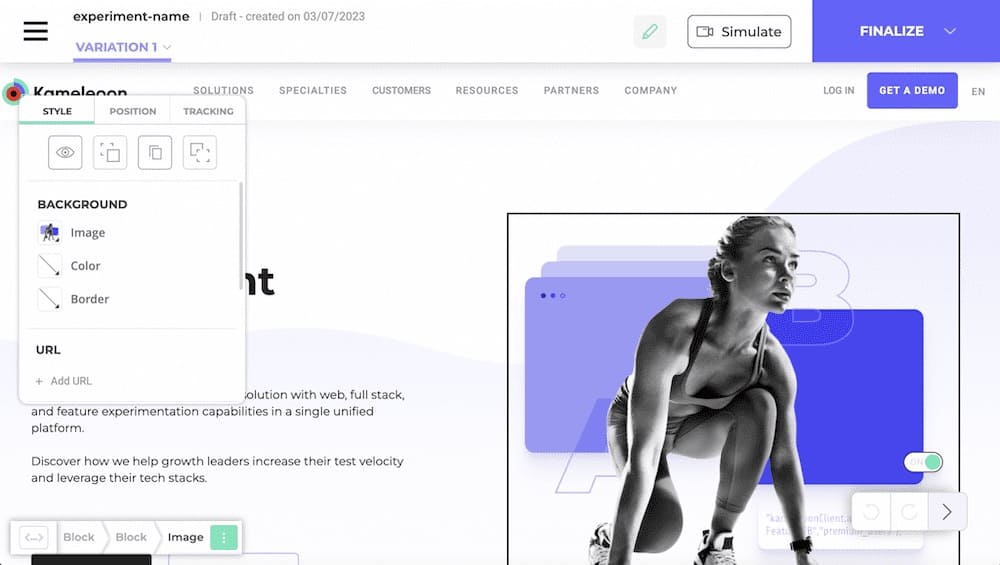
What is Kameleoon?
Kameleoon is a full-stack experimentation platform designed with privacy and compliance in mind.
With support for both client-side and server-side testing, it caters to teams that operate in highly regulated industries like healthcare and finance. Its standout feature is native support for GDPR, HIPAA, and ISO standards. This makes it one of the few platforms truly built for data-sensitive environments.
Who Uses Kameleoon?
- CRO, growth, and web analytics teams running frequent A/B tests and personalizations
- Data-sensitive industries (e.g., insurance/financial services) that call out GDPR/security and vendor support as priorities
- Engineering and frontend devs who want code-level control, SDKs, and reliable targeting
How Does Kameleoon Compare to Optimizely?
| Feature | Kameleoon | Optimizely |
|||||||||||||||
|---|---|---|---|---|---|---|---|---|---|---|---|---|---|---|---|---|---|
| A/B and multivariate testing
Run experiments to compare versions of your site, app, or content. |
✅ | ✅ | |||||||||||||||
| Visual editor (No-code) Build test variations with drag-and-drop editing instead of coding. |
✅ | ✅ | |||||||||||||||
| Server-side & Full-stack testing Test backend changes and logic across web, mobile, and APIs. |
✅ | ✅ | |||||||||||||||
| Personalization & targeting Deliver tailored experiences by audience, behavior, or segments. |
✅ | ✅ | |||||||||||||||
| Feature experimentation Roll out new features to subsets of users and measure impact safely. |
✅ | ✅ | |||||||||||||||
| AI/ML Capabilities Use machine learning for recommendations, traffic allocation, or insights. |
✅ | ✅ | |||||||||||||||
| Statistical Methods Is this public? If yes, what statistical engine powers the experiment results? |
✅ (Frequentist, Bayesian) |
✅ (Sequential testing, FDR control) |
|||||||||||||||
| Experiment program management Tools for managing backlogs, workflows, approvals, and reporting. |
❌ | ✅ | |||||||||||||||
| Behavioral analytics tools Extra insights like heatmaps, surveys, or session recordings. |
❌ | ❌ | |||||||||||||||
| APIs & extensibility Availability of APIs and SDKs for integration and custom workflows. |
✅ | ✅ | |||||||||||||||
| Analytics & reporting Dashboards, custom metrics, and integrations with BI/analytics tools. |
✅ | ✅ | |||||||||||||||
| Integrations Pre-built connections to CDPs, analytics, CMS, and marketing platforms. |
✅ | ✅ | |||||||||||||||
| Transparent pricing Self-service pricing where you don’t need to talk to sales. |
❌ | ❌ | |||||||||||||||
| Free trial Whether the vendor offers a free trial or sandbox. |
✅ (Limited to feature management tool) |
✅ (Sales-request sandbox) |
Kameleoon’s Most Notable Features
- Unified platform for web & feature testing: Run both client-side and server-side experiments, plus manage feature flags all in one interface.
- Real-time AI personalization engine: Predicts each visitor’s conversion intent and automatically serves the best variant or content.
- Predictive opportunity detection: Identifies which segments are most likely to respond to experiments or personalizations, so you can focus efforts where ROI is highest.
- Compliance by default: Meets strict privacy requirements out of the box, including full audit trails, anonymized data processing, and dedicated EU servers.
How Much Does Kameleoon Cost?
Kameleoon is quote-based. You must contact sales to receive a quote. You can use Kameleoon’s feature experimentation product for free for 30 days.
Why Do Companies Use Kameleoon?
- Strong customer support and hands-on CSM guidance
- Flexible build options, which include no-code visual edits, a code editor for complex changes, and 12+ SDKs
- Deep targeting (20-40+ conditions), real-time analytics, and advanced reporting/raw export
- Personalization and AI modules to deliver targeted experiences
Kameleoon vs Optimizely Score
Based on G2 reviews, here’s how Kameleoon and Optimizely compare:
| Category | Kameleoon | Optimizely |
|||||||||||||||
|---|---|---|---|---|---|---|---|---|---|---|---|---|---|---|---|---|---|
| Overall Rating | ⭐ 4.6 / 5 (130 reviews) | ⭐ 4.2 / 5 (407 reviews) | |||||||||||||||
| Most Cited Pros | Customer support, ease of use, A/B testing, easy setup, analytics | Ease of use, experimentation, easy setup, user interface, and features | |||||||||||||||
| Most Cited Cons | Developer dependency, difficult learning/learning curve, difficulty of use, coding difficulty | Expensive, testing difficulties, difficulty of use, learning curve, difficult learning |
3. Omniconvert
Best For: CRO teams in ecommerce who want integrated surveys, segmentation, and testing in one platform.
What is Omniconvert?
Omniconvert is an experimentation and optimization platform with a clear focus on ecommerce conversion.
What makes it stand out is its integrated approach: A/B testing, on-site surveys, personalization, and RFM segmentation are all bundled into one tool. It’s built to help ecommerce teams dig into customer behavior and take action using both qualitative and quantitative data.
Who Uses Omniconvert?
- Marketers and growth teams who want A/B testing, on-site personalization, overlays, and surveys in one tool
- E-commerce managers who value Shopify/GA4/GTM integrations
- CRO practitioners and agencies/consultants who need granular targeting plus an open code/visual editor
How Does Omniconvert Compare to Optimizely?
| Feature | Omniconvert | Optimizely |
|||||||||||||||
|---|---|---|---|---|---|---|---|---|---|---|---|---|---|---|---|---|---|
| A/B and multivariate testing
Run experiments to compare versions of your site, app, or content. |
✅ | ✅ | |||||||||||||||
| Visual editor (No-code) Build test variations with drag-and-drop editing instead of coding. |
✅ | ✅ | |||||||||||||||
| Server-side & Full-stack testing Test backend changes and logic across web, mobile, and APIs. |
❌ | ✅ | |||||||||||||||
| Personalization & targeting Deliver tailored experiences by audience, behavior, or segments. |
✅ | ✅ | |||||||||||||||
| Feature experimentation Roll out new features to subsets of users and measure impact safely. |
❌ | ✅ | |||||||||||||||
| AI/ML Capabilities Use machine learning for recommendations, traffic allocation, or insights. |
❌ | ✅ | |||||||||||||||
| Statistical Methods Is this public? If yes, what statistical engine powers the experiment results? |
✅ (Frequentist, Bayesian) |
✅ (Sequential testing, FDR control) |
|||||||||||||||
| Experiment program management Tools for managing backlogs, workflows, approvals, and reporting. |
❌ | ✅ | |||||||||||||||
| Behavioral analytics tools Extra insights like heatmaps, surveys, or session recordings. |
✅ (Surveys) |
❌ | |||||||||||||||
| APIs & extensibility Availability of APIs and SDKs for integration and custom workflows. |
✅ | ✅ | |||||||||||||||
| Analytics & reporting Dashboards, custom metrics, and integrations with BI/analytics tools. |
✅ | ✅ | |||||||||||||||
| Integrations Pre-built connections to CDPs, analytics, CMS, and marketing platforms. |
✅ | ✅ | |||||||||||||||
| Transparent pricing Self-service pricing where you don’t need to talk to sales. |
✅ | ❌ | |||||||||||||||
| Free trial Whether the vendor offers a free trial or sandbox. |
✅ |
✅ (Sales-request sandbox) |
Omniconvert’s Most Notable Features
- Multi-stat engine: Run unlimited tests with multiple variations using Frequentist and Bayesian models, ideal for advanced CRO workflows that need flexibility and statistical rigor.
- Built-In Website Surveys & Exit Popups: Capture real-time feedback and intent with behaviorally triggered surveys and overlays to understand why users convert or why they don’t.
- Customer analytics platform: Track customer lifetime value, cohorts, and RFM segmentation from the same toolset.
How Much Does Omniconvert Cost?
Omniconvert starts free for 50K tested users. Then 100K tested users begin at $350/month with a 30-day free trial.
Why Do Companies Use Omniconvert?
- All-in-one experimentation tool to run A/B tests, personalization, overlays, and on-site surveys
- Rich targeting & control, including extensive segment builder (URL/UTM, device/OS, geo, behavior, RFM/CRM, etc.), mutually-exclusive experiments, and API access
- User reviews repeatedly cite responsive, helpful CSMs and fast answers
Omniconvert vs Optimizely Score
Based on G2 reviews:
| Category | Omniconvert | Optimizely |
|||||||||||||||
|---|---|---|---|---|---|---|---|---|---|---|---|---|---|---|---|---|---|
| Overall Rating | ⭐ 4.6 / 5 (112 reviews) | ⭐ 4.2 / 5 (407 reviews) | |||||||||||||||
| Most Cited Pros | Ease of use, customer support, A/B testing, testing efficiency | Ease of use, experimentation, easy setup, user interface, and features | |||||||||||||||
| Most Cited Cons | Learning curve, bug issues, complexity, complex reporting, editing issues | Expensive, testing difficulties, difficulty of use, learning curve, difficult learning |
4. VWO
Best For: Teams seeking a broad, all-in-one experimentation suite with decent analytics and a lower price than enterprise tools.
What is VWO?
VWO (Visual Website Optimizer) offers one of the most comprehensive all-in-one testing platforms on the market.
It spans web experimentation, behavioral analytics, server-side testing, and even engagement tools like push notifications, all from a single dashboard.
While it doesn’t go as deep into dev-first experimentation as some other tools on our list, its breadth makes it a popular choice for mid-sized teams that want a bit of everything.
Who Uses VWO?
- Marketers and product teams that want to launch tests quickly without a heavy developer lift
- Analytics and CRO teams who want built-in behavioral insights (heatmaps, recordings, funnels) to explain “what” and “why”
- Companies running frequent tests across multiple brands/domains that need straightforward GA4/GTM integrations
How Does VWO Compare to Optimizely?
| Feature | VWO | Optimizely |
|||||||||||||||
|---|---|---|---|---|---|---|---|---|---|---|---|---|---|---|---|---|---|
| A/B and multivariate testing
Run experiments to compare versions of your site, app, or content. |
✅ | ✅ | |||||||||||||||
| Visual editor (No-code) Build test variations with drag-and-drop editing instead of coding. |
✅ | ✅ | |||||||||||||||
| Server-side & Full-stack testing Test backend changes and logic across web, mobile, and APIs. |
✅ | ✅ | |||||||||||||||
| Personalization & targeting Deliver tailored experiences by audience, behavior, or segments. |
✅ | ✅ | |||||||||||||||
| Feature experimentation Roll out new features to subsets of users and measure impact safely. |
✅ | ✅ | |||||||||||||||
| AI/ML Capabilities Use machine learning for recommendations, traffic allocation, or insights. |
✅ | ✅ | |||||||||||||||
| Statistical Methods Is this public? If yes, what statistical engine powers the experiment results? |
✅ (Bayesian) |
✅ (Sequential testing, FDR control) |
|||||||||||||||
| Experiment program management Tools for managing backlogs, workflows, approvals, and reporting. |
✅ | ✅ | |||||||||||||||
| Behavioral analytics tools Extra insights like heatmaps, surveys, or session recordings. |
✅ | ❌ | |||||||||||||||
| APIs & extensibility Availability of APIs and SDKs for integration and custom workflows. |
✅ | ✅ | |||||||||||||||
| Analytics & reporting Dashboards, custom metrics, and integrations with BI/analytics tools. |
✅ | ✅ | |||||||||||||||
| Integrations Pre-built connections to CDPs, analytics, CMS, and marketing platforms. |
✅ | ✅ | |||||||||||||||
| Transparent pricing Self-service pricing where you don’t need to talk to sales. |
✅ | ❌ | |||||||||||||||
| Free trial Whether the vendor offers a free trial or sandbox. |
✅ |
✅ (Sales-request sandbox) |
Note: Personalization, feature experimentation, and behavioral analytics are only available as separately-priced products in VWO. The costs can add up fast that way.
VWO’s Most Notable Features
- AI-powered copilot for campaign setup: Create test variations, targeting rules, and audience segments using plain English prompts or voice commands.
- Behavior analytics suite (heatmaps, recordings, funnels): Understand where users click, drop off, or rage-click with visual data overlays and session replays.
- Feature rollouts with guardrails: Launch new features to segments with built-in monitoring of critical KPIs and automatic rollbacks if things go south.
- Hyper-personalization rules engine: Deliver different messages, layouts, or offers based on dozens of parameters including device, location, referral source, and behavioral triggers.
How Much Does VWO Cost?
VWO no longer publishes open pricing you’ll need to contact their sales team for a quote. Note that personalization (VWO Personalize) and feature testing (VWO Feature Experimentation) are separately-priced products, so total costs can add up.
Why Do Companies Use VWO?
- Supports faster test velocity as non-technical teammates can spin up tests quickly
- Reports, segmentation, and recordings provide clear insights
- Flexible setup that works across multiple domains/brands; integrates smoothly with existing analytics stacks
VWO vs Optimizely Score
| Category | VWO | Optimizely |
|||||||||||||||
|---|---|---|---|---|---|---|---|---|---|---|---|---|---|---|---|---|---|
| Overall Rating | ⭐ 4.4 / 5 (929 reviews) | ⭐ 4.2 / 5 (407 reviews) | |||||||||||||||
| Most Cited Pros | Ease of use, customer support, A/B testing, easy setup, testing efficiency | Ease of use, experimentation, easy setup, user interface, and features | |||||||||||||||
| Most Cited Cons | “Limitations,” “missing/limited features,” learning curve, complex features | Expensive, testing difficulties, difficulty of use, learning curve, difficult learning |
5. Unbounce
Best For: Marketers running quick landing page tests without heavy developer involvement.
What is Unbounce?
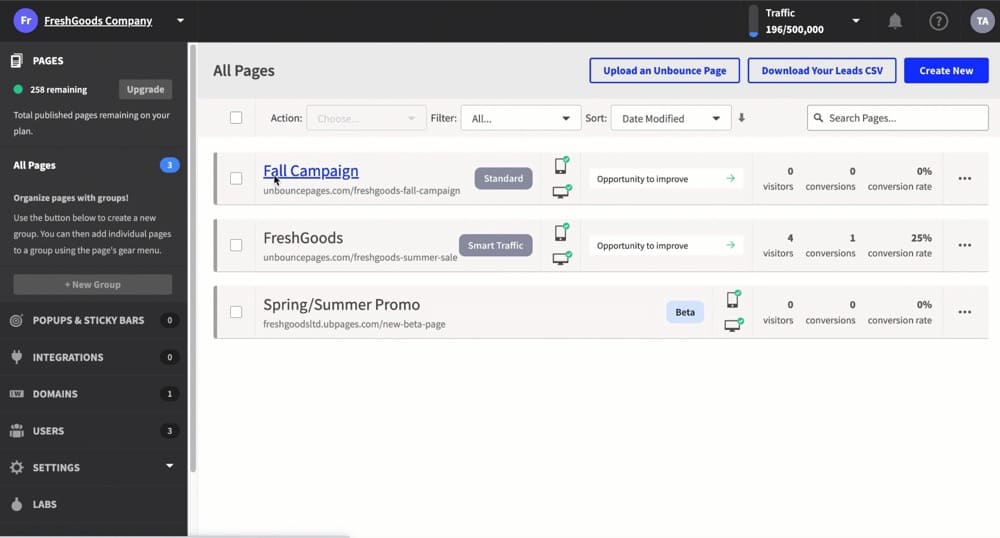
Unbounce is likely the most popular landing page builder with built-in A/B testing features. It is created for marketers who need to launch and test pages fast without developer support.
Its drag-and-drop editor, Smart Traffic routing, and AI copy generation make it a great deal for small teams running time-sensitive campaigns or lead gen experiments at scale.
Who Uses Unbounce?
- Marketers and growth teams that need to spin up and A/B test landing pages fast, without developers
- Paid media teams running high-velocity campaigns that rely on page variants, popups, and sticky bars
- Small businesses and agencies that want a no-code builder with native A/B testing and plug-and-play integrations
How Does Unbounce Compare to Optimizely?
| Feature | Unbounce | Optimizely |
|||||||||||||||
|---|---|---|---|---|---|---|---|---|---|---|---|---|---|---|---|---|---|
| A/B and multivariate testing
Run experiments to compare versions of your site, app, or content. |
✅ | ✅ | |||||||||||||||
| Visual editor (No-code) Build test variations with drag-and-drop editing instead of coding. |
✅ | ✅ | |||||||||||||||
| Server-side & Full-stack testing Test backend changes and logic across web, mobile, and APIs. |
❌ | ✅ | |||||||||||||||
| Personalization & targeting Deliver tailored experiences by audience, behavior, or segments. |
✅ | ✅ | |||||||||||||||
| Feature experimentation Roll out new features to subsets of users and measure impact safely. |
❌ | ✅ | |||||||||||||||
| AI/ML Capabilities Use machine learning for recommendations, traffic allocation, or insights. |
✅ | ✅ | |||||||||||||||
| Statistical Methods Is this public? If yes, what statistical engine powers the experiment results? |
✅ (Frequentist) |
✅ (Sequential testing, FDR control) |
|||||||||||||||
| Experiment program management Tools for managing backlogs, workflows, approvals, and reporting. |
❌ | ✅ | |||||||||||||||
| Behavioral analytics tools Extra insights like heatmaps, surveys, or session recordings. |
❌ | ❌ | |||||||||||||||
| APIs & extensibility Availability of APIs and SDKs for integration and custom workflows. |
✅ | ✅ | |||||||||||||||
| Analytics & reporting Dashboards, custom metrics, and integrations with BI/analytics tools. |
✅ | ✅ | |||||||||||||||
| Integrations Pre-built connections to CDPs, analytics, CMS, and marketing platforms. |
✅ | ✅ | |||||||||||||||
| Transparent pricing Self-service pricing where you don’t need to talk to sales. |
✅ | ❌ | |||||||||||||||
| Free trial Whether the vendor offers a free trial or sandbox. |
✅ |
✅ (Sales-request sandbox) |
Unbounce’s Most Notable Features
- Smart traffic routing: Uses machine learning to send each visitor to the variant most likely to convert for them, not just whichever wins the A/B test.
- Dynamic text replacement (DTR): Automatically swaps text on the landing page based on ad keywords or UTM parameters, boosting message match and Quality Scores for PPC campaigns.
- AI-powered landing page builder: Smart Builder suggests high-performing layouts, sections, and content based on your industry and goals, making it easy to build and iterate without design or dev help.
How Much Does Unbounce Cost?
Current plans start at around $99/month ($74/month when billed annually), but costs can climb quickly based on traffic, number of published pages, or usage caps.
Why Do Companies Use Unbounce?
- Great for marketers who need speed to build and launch campaigns without waiting on developers
- Unbounce helps align ad campaigns with dedicated, conversion-focused landing pages
- It is an affordable, easy-to-learn tool for landing page testing
- Ecommerce and SaaS companies use it to run quick A/B tests to boost lead generation and conversion rates
Unbounce vs Optimizely Score
Based on G2 reviews, here’s how Unbounce and Optimizely compare currently:
| Category | Unbounce | Optimizely |
|||||||||||||||
|---|---|---|---|---|---|---|---|---|---|---|---|---|---|---|---|---|---|
| Overall Rating | ⭐️ 4.3 / 5 (383 reviews) | ⭐ 4.2 / 5 (407 reviews) | |||||||||||||||
| Most Cited Pros | Ease of use, landing pages, A/B testing, integrations, intuitive UI | Ease of use, experimentation, easy setup, user interface, and features | |||||||||||||||
| Most Cited Cons | Poor customer support, expensive, learning curve, limitations, limited design flexibility | Expensive, testing difficulties, difficulty of use, learning curve, difficult learning |
6. Launch Darkly
Best For: Engineering-led orgs that need enterprise-grade feature flagging with some light experimentation layered on.
What is LaunchDarkly?
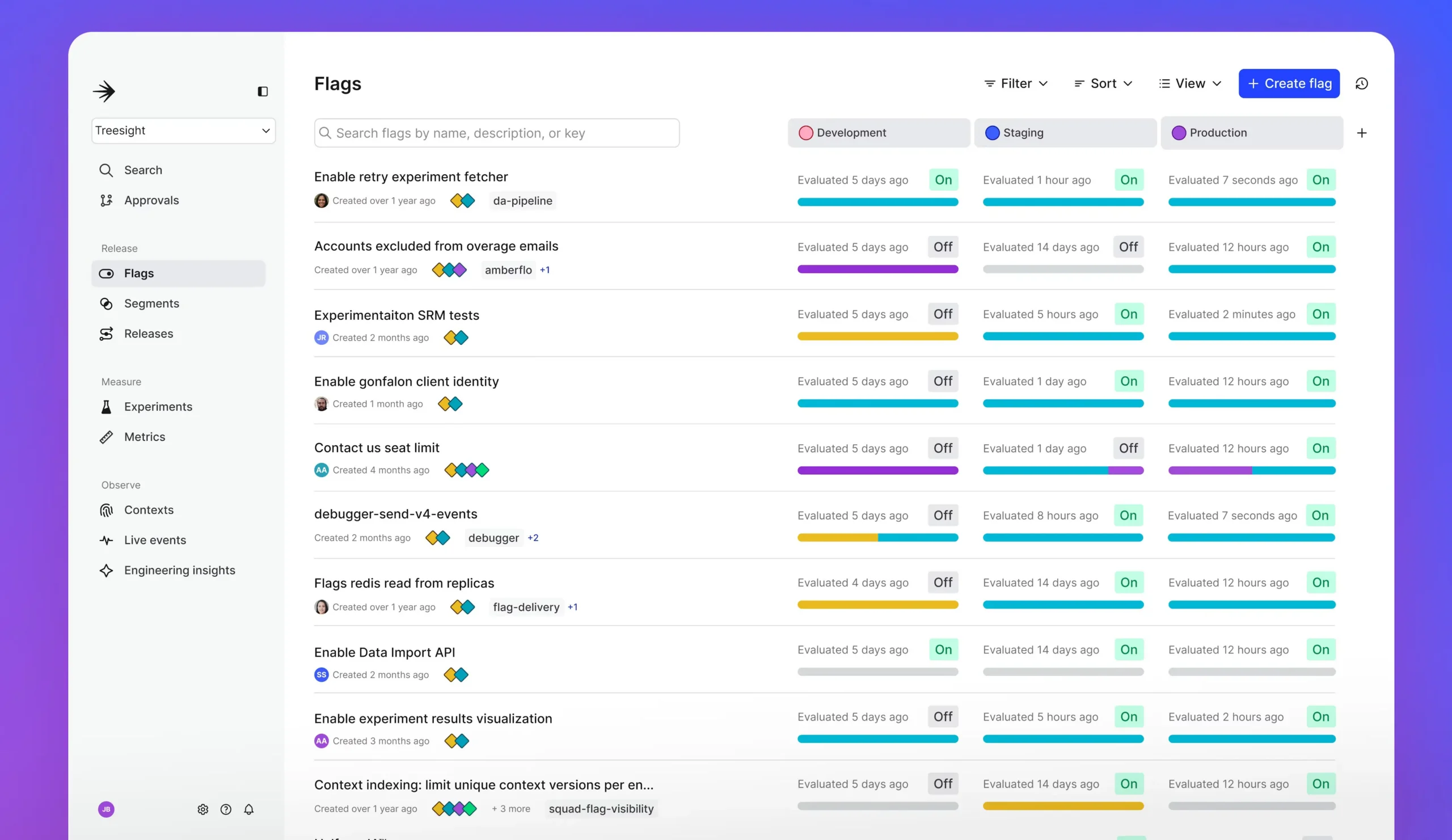
LaunchDarkly is a feature management and experimentation platform aimed squarely at product teams.
It’s best known for robust feature flagging capabilities that help developers safely release, test, and roll back new features without redeploying code.
It’s not designed for visual tests, but it shines when experimentation needs to happen deep in the stack.
Who Uses LaunchDarkly?
- Engineering teams that want full control over feature rollouts and the ability to instantly disable problematic releases
- Product managers who need to test new functionality safely with targeted user groups and collect insights before a wide release
- Organizations adopting DevOps/continuous delivery that need fast, reliable, and reversible feature releases
How Does LaunchDarkly Compare to Optimizely?
| Feature | Launch Darkly | Optimizely |
|||||||||||||||
|---|---|---|---|---|---|---|---|---|---|---|---|---|---|---|---|---|---|
| A/B and multivariate testing
Run experiments to compare versions of your site, app, or content. |
✅ | ✅ | |||||||||||||||
| Visual editor (No-code) Build test variations with drag-and-drop editing instead of coding. |
❌ | ✅ | |||||||||||||||
| Server-side & Full-stack testing Test backend changes and logic across web, mobile, and APIs. |
✅ | ✅ | |||||||||||||||
| Personalization & targeting Deliver tailored experiences by audience, behavior, or segments. |
✅ | ✅ | |||||||||||||||
| Feature experimentation Roll out new features to subsets of users and measure impact safely. |
✅ | ✅ | |||||||||||||||
| AI/ML Capabilities Use machine learning for recommendations, traffic allocation, or insights. |
✅ | ✅ | |||||||||||||||
| Statistical Methods Is this public? If yes, what statistical engine powers the experiment results? |
✅ (Frequentist, Bayesian) |
✅ (Sequential testing, FDR control) |
|||||||||||||||
| Experiment program management Tools for managing backlogs, workflows, approvals, and reporting. |
✅ | ✅ | |||||||||||||||
| Behavioral analytics tools Extra insights like heatmaps, surveys, or session recordings. |
❌ | ❌ | |||||||||||||||
| APIs & extensibility Availability of APIs and SDKs for integration and custom workflows. |
✅ | ✅ | |||||||||||||||
| Analytics & reporting Dashboards, custom metrics, and integrations with BI/analytics tools. |
✅ | ✅ | |||||||||||||||
| Integrations Pre-built connections to CDPs, analytics, CMS, and marketing platforms. |
✅ | ✅ | |||||||||||||||
| Transparent pricing Self-service pricing where you don’t need to talk to sales. |
✅ | ❌ | |||||||||||||||
| Free trial Whether the vendor offers a free trial or sandbox. |
✅ |
✅ (Sales-request sandbox) |
LaunchDarkly’s Most Notable Features
- Advanced feature flag management: Toggle features on or off for specific users, segments, or environments.
- Built-in experimentation: Run A/B/n and multivariate experiments directly through feature flags. Define goals, assign traffic splits, and analyze results using LaunchDarkly’s integrated stats engine.
- Enterprise release workflows: Create structured release pipelines with approval gates, scheduling, and audit logs.
How Much Does LaunchDarkly Cost?
The developer plan is free forever (usage-capped). Then, the foundation plan costs $12/month per service connection + $10 per 1K client-side MAU / month.
Why Do Companies Use LaunchDarkly?
- Supports full-stack experimentation. You can run A/B/n and funnel tests with mutual exclusion and audience filtering, tied to the same flags used for releases
- Strong developer experience with broad SDK coverage, quick integration, and clear visibility into flag states
- Many users highlight hands-on, fast help from CSMs and product teams
Learn more: Product Experimentation Handbook For Beginners
LaunchDarkly vs Optimizely Score
Based on user reviews on G2, here’s how LaunchDarkly and Optimizely compare:
| Category | LaunchDarkly | Optimizely |
|||||||||||||||
|---|---|---|---|---|---|---|---|---|---|---|---|---|---|---|---|---|---|
| Overall Rating | ⭐ 4.5 / 5 (567 reviews) | ⭐ 4.2 / 5 (407 reviews) | |||||||||||||||
| Most Cited Pros | Ease of use, feature flags, rich features, easy setup, integrations | Ease of use, experimentation features, user interface, broad feature set | |||||||||||||||
| Most Cited Cons | Feature flag issues/management at scale, confusing UI for some, complex features | Steep learning curve, difficulty of use, cost concerns, testing complexities |
7. Crazy Egg
Best For: Small teams and startups looking for a low-cost way to combine heatmaps with simple A/B tests.
What is Crazy Egg?
Crazy Egg is a lightweight tool that combines heatmaps, scrollmaps, and A/B testing to help small teams understand and optimize user behavior on their websites.
While it’s not built for deep experimentation or advanced stats, it’s a go-to for quick visual insights and simple tests without technical complexity.
Who Uses Crazy Egg?
- Marketing teams that want visual insights (heatmaps, scrollmaps, click data) for landing pages and campaigns
- Web designers and developers who use real user data to inform redesigns or mockups
- UX researchers aiming to understand user behavior and present evidence to decision-makers or leadership
- Small to mid-sized businesses, agencies, and teams that value ease of setup, affordability, and a straightforward toolset
How Does Crazy Egg Compare to Optimizely?
| Feature | Crazy Egg | Optimizely |
|||||||||||||||
|---|---|---|---|---|---|---|---|---|---|---|---|---|---|---|---|---|---|
| A/B and multivariate testing
Run experiments to compare versions of your site, app, or content. |
✅ | ✅ | |||||||||||||||
| Visual editor (No-code) Build test variations with drag-and-drop editing instead of coding. |
✅ | ✅ | |||||||||||||||
| Server-side & Full-stack testing Test backend changes and logic across web, mobile, and APIs. |
❌ | ✅ | |||||||||||||||
| Personalization & targeting Deliver tailored experiences by audience, behavior, or segments. |
✅ | ✅ | |||||||||||||||
| Feature experimentation Roll out new features to subsets of users and measure impact safely. |
❌ | ✅ | |||||||||||||||
| AI/ML Capabilities Use machine learning for recommendations, traffic allocation, or insights. |
❌ | ✅ | |||||||||||||||
| Statistical Methods Is this public? If yes, what statistical engine powers the experiment results? |
❌ | ✅ (Sequential testing, FDR control) |
|||||||||||||||
| Experiment program management Tools for managing backlogs, workflows, approvals, and reporting. |
❌ | ✅ | |||||||||||||||
| Behavioral analytics tools Extra insights like heatmaps, surveys, or session recordings. |
✅ | ❌ | |||||||||||||||
| APIs & extensibility Availability of APIs and SDKs for integration and custom workflows. |
❌ | ✅ | |||||||||||||||
| Analytics & reporting Dashboards, custom metrics, and integrations with BI/analytics tools. |
✅ | ✅ | |||||||||||||||
| Integrations Pre-built connections to CDPs, analytics, CMS, and marketing platforms. |
✅ | ✅ | |||||||||||||||
| Transparent pricing Self-service pricing where you don’t need to talk to sales. |
✅ | ❌ | |||||||||||||||
| Free trial Whether the vendor offers a free trial or sandbox. |
✅ |
✅ (Sales-request sandbox) |
Crazy Egg’s Most Notable Features
- Visual editor with A/B testing: Quickly launch and manage A/B tests using a drag-and-drop visual editor.
- Heatmaps and scrollmaps: Visualize where users click, scroll, and move across your pages. Identify high- and low-engagement zones at a glance, helping prioritize what to test next.
- Session recordings: Replay user sessions to understand behavior in real time with rage clicks, hesitations, and navigation paths.
How Much Does Crazy Egg Cost?
Crazy Egg $119/mo (paid annually) for 150k MTUs. All plans are billed annually and come with a 30-day free trial.
Why Do Companies Use Crazy Egg?
- Easy to implement and intuitive for non-technical users
- Affordable compared to enterprise experimentation platforms
- Useful visual insights (heatmaps, recordings) for quick UX wins
- Helps small and mid-sized teams run A/B tests without heavy developer input
Crazy Egg vs Optimizely Score
Based on G2 reviews, here’s how Crazy Egg and Optimizely compare:
| Category | Crazy Egg | Optimizely |
|||||||||||||||
|---|---|---|---|---|---|---|---|---|---|---|---|---|---|---|---|---|---|
| Overall Rating | ⭐ 4.2 / 5 (121 reviews) | ⭐ 4.2 / 5 (407 reviews) | |||||||||||||||
| Most Cited Pros | Ease of use, heatmaps, A/B testing, insights | Ease of use, experimentation, easy setup, user interface, and features | |||||||||||||||
| Most Cited Cons | Limited features, filtering issues, search/reporting quirks | Expensive, testing difficulties, difficulty of use, learning curve, difficult learning |
8. Dynamic Yield
Best For: Retailers and consumer brands running personalization at scale with strong recommendation capabilities.
What is Dynamic Yield?
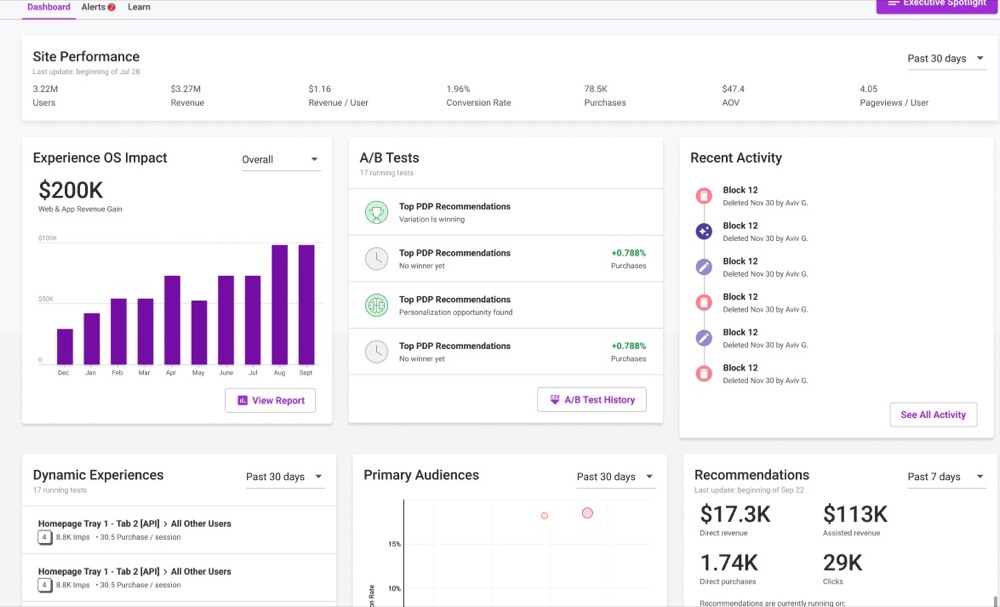
Dynamic Yield is a personalization-first platform with strong A/B testing capabilities baked in. Designed for retailers and consumer brands, it offers powerful product recommendations, audience segmentation, and omnichannel orchestration.
It’s less about raw experimentation and more about turning customer data into personalized experiences that drive revenue.
Who Uses Dynamic Yield?
- Enterprise and multi-brand retailers seeking to unify and scale personalization across web, mobile, and email for consistent omnichannel experiences
- Marketing and e-commerce leaders focused on segmentation, targeted campaigns, and measurable business results
- Digital experience and CRO specialists who rely on A/B and multivariate testing to optimize customer journeys, but who may work closely with development teams due to the tool’s complexity
- Teams that need enterprise customer support and proactive guidance for advanced experimentation and personalization programs
How Does Dynamic Yield Compare to Optimizely?
| Feature | Dynamic Yield | Optimizely |
|||||||||||||||
|---|---|---|---|---|---|---|---|---|---|---|---|---|---|---|---|---|---|
| A/B and multivariate testing
Run experiments to compare versions of your site, app, or content. |
✅ | ✅ | |||||||||||||||
| Visual editor (No-code) Build test variations with drag-and-drop editing instead of coding. |
✅ | ✅ | |||||||||||||||
| Server-side & Full-stack testing Test backend changes and logic across web, mobile, and APIs. |
✅ | ✅ | |||||||||||||||
| Personalization & targeting Deliver tailored experiences by audience, behavior, or segments. |
✅ | ✅ | |||||||||||||||
| Feature experimentation Roll out new features to subsets of users and measure impact safely. |
✅ | ✅ | |||||||||||||||
| AI/ML Capabilities Use machine learning for recommendations, traffic allocation, or insights. |
✅ | ✅ | |||||||||||||||
| Statistical Methods Is this public? If yes, what statistical engine powers the experiment results? |
✅ (Bayesian) |
✅ (Sequential testing, FDR control) |
|||||||||||||||
| Experiment program management Tools for managing backlogs, workflows, approvals, and reporting. |
❌ | ✅ | |||||||||||||||
| Behavioral analytics tools Extra insights like heatmaps, surveys, or session recordings. |
❌ | ❌ | |||||||||||||||
| APIs & extensibility Availability of APIs and SDKs for integration and custom workflows. |
✅ | ✅ | |||||||||||||||
| Analytics & reporting Dashboards, custom metrics, and integrations with BI/analytics tools. |
✅ | ✅ | |||||||||||||||
| Integrations Pre-built connections to CDPs, analytics, CMS, and marketing platforms. |
✅ | ✅ | |||||||||||||||
| Transparent pricing Self-service pricing where you don’t need to talk to sales. |
❌ | ❌ | |||||||||||||||
| Free trial Whether the vendor offers a free trial or sandbox. |
❌ |
✅ (Sales-request sandbox) |
Dynamic Yield’s Most Notable Features
- Multi-touchpoint experimentation engine: Run A/B and multivariate tests across web, mobile apps, email, and kiosks to optimize the entire customer journey.
- Predictive product recommendations: Use machine learning to automatically surface high-converting product suggestions based on user behavior, popularity, and contextual signals.
- Visual experience editor: Launch personalization campaigns and UI tests without dev support using a point-and-click interface and flexible modular templates.
- Real-time segmentation and targeting: Build dynamic audiences using 100+ filters, including purchase history, onsite behavior, geolocation, and affinity scores to serve highly tailored experiences.
How Much Does Dynamic Yield Cost?
Dynamic yield provides custom pricing. To find out what it costs for your needs, you have to contact sales.
Why Do Companies Use Dynamic Yield?
- Dynamic Yield scales personalization across brands and channels with strong templates
- Excellent CSM/TAM support, which some users praise as proactive, hands-on guidance
- It blends testing + recommendations to drive measurable revenue impact
- Flexible data model that’s easy to integrate with ecommerce/CMS/BI stacks
Dynamic Yield vs Optimizely Score
Based on G2 reviews, here’s how Dynamic Yield and Optimizely compare:
| Category | Dynamic Yield | Optimizely |
|||||||||||||||
|---|---|---|---|---|---|---|---|---|---|---|---|---|---|---|---|---|---|
| Overall Rating | ⭐ 4.5 / 5 (156 reviews) | ⭐ 4.2 / 5 (407 reviews) | |||||||||||||||
| Most Cited Pros | Customer support, ease of use, personalization, helpful CSMs, strong testing tools | Ease of use, experimentation, easy setup, user interface, and features | |||||||||||||||
| Most Cited Cons | Slow performance at times, integration issues, analytics/reporting limitations | Expensive, testing difficulties, difficulty of use, learning curve, difficult learning |
9. Adobe Target
Best For: Large enterprises already using Adobe Experience Cloud who need tight integration with personalization and analytics.
What is Adobe Target?
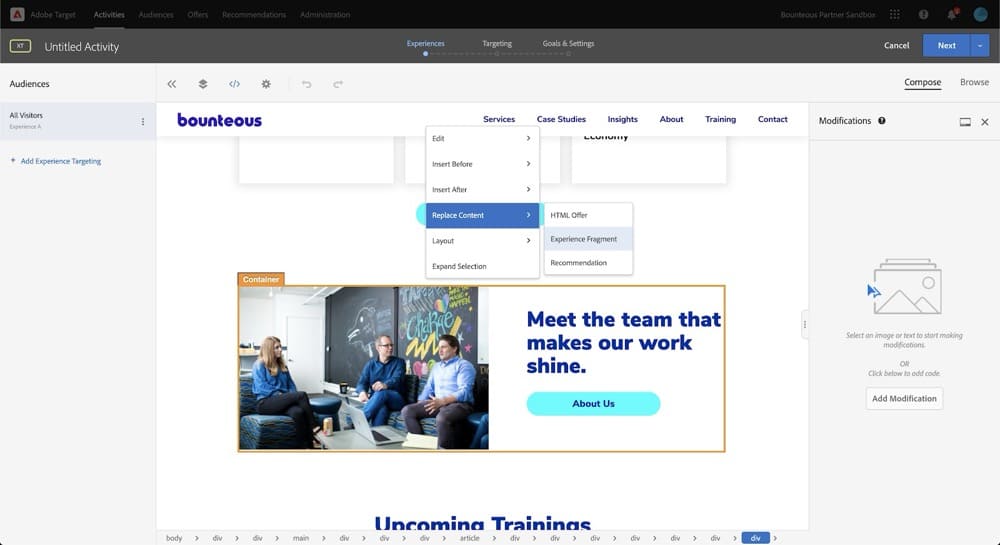
Adobe Target is part of the Adobe Experience Cloud and is built for enterprise teams running omnichannel personalization at scale.
It offers robust A/B testing, multivariate testing, and AI-powered recommendations, but really shines when tightly integrated with Adobe Analytics and other tools in the Adobe ecosystem. Best suited for teams already deep in Adobe’s stack.
Who Uses Adobe Target?
- Enterprise marketing teams operating across multiple channels (web, mobile, email) who need strong personalization, targeting, and integrated experimentation at scale
- Organizations that already use the Adobe Experience Cloud (Analytics, Audience Manager, AEM, Campaign) who benefit from tight integration and data flow.
How Does Adobe Target Compare to Optimizely?
| Feature | Adobe Target | Optimizely |
|||||||||||||||
|---|---|---|---|---|---|---|---|---|---|---|---|---|---|---|---|---|---|
| A/B and multivariate testing
Run experiments to compare versions of your site, app, or content. |
✅ | ✅ | |||||||||||||||
| Visual editor (No-code) Build test variations with drag-and-drop editing instead of coding. |
✅ | ✅ | |||||||||||||||
| Server-side & Full-stack testing Test backend changes and logic across web, mobile, and APIs. |
✅ | ✅ | |||||||||||||||
| Personalization & targeting Deliver tailored experiences by audience, behavior, or segments. |
✅ | ✅ | |||||||||||||||
| Feature experimentation Roll out new features to subsets of users and measure impact safely. |
❌ | ✅ | |||||||||||||||
| AI/ML Capabilities Use machine learning for recommendations, traffic allocation, or insights. |
✅ | ✅ | |||||||||||||||
| Statistical Methods Is this public? If yes, what statistical engine powers the experiment results? |
❌ | ✅ (Sequential testing, FDR control) |
|||||||||||||||
| Experiment program management Tools for managing backlogs, workflows, approvals, and reporting. |
✅ (Limited) |
✅ | |||||||||||||||
| Behavioral analytics tools Extra insights like heatmaps, surveys, or session recordings. |
❌ | ❌ | |||||||||||||||
| APIs & extensibility Availability of APIs and SDKs for integration and custom workflows. |
✅ | ✅ | |||||||||||||||
| Analytics & reporting Dashboards, custom metrics, and integrations with BI/analytics tools. |
✅ | ✅ | |||||||||||||||
| Integrations Pre-built connections to CDPs, analytics, CMS, and marketing platforms. |
✅ | ✅ | |||||||||||||||
| Transparent pricing Self-service pricing where you don’t need to talk to sales. |
❌ | ❌ | |||||||||||||||
| Free trial Whether the vendor offers a free trial or sandbox. |
❌ |
✅ (Sales-request sandbox) |
Adobe Target’s Most Notable Features
- AI-powered personalization engine: Use Adobe Sensei to automatically deliver the most relevant content, offers, or layouts to each user based on behavioral data and intent signals.
- A/B, multivariate, and auto-allocate testing: Run rigorous experiments across websites, mobile apps, and connected devices, with auto-allocation directing traffic to top-performing variations in real time.
- Omnichannel experience optimization: Test and personalize across web, mobile, IoT, call centers, and more.
- Deep Adobe Experience Cloud integration: Seamlessly connect with Adobe Analytics, Adobe Experience Manager, and Customer Journey Analytics for unified data and optimization.
How Much Does Adobe Target Cost?
Adobe Target features custom pricing. That means, you need to contact sales for enterprise-level contracting.
Why Do Companies Use Adobe Target?
- Users praise its ability to run A/B + multivariate tests across channels, plus powerful targeting and audience segmentation to deliver personalized content
- The connection to Adobe Analytics, Campaign, and other parts of Adobe’s stack is seen as a major advantage, enabling fuller data insight and more cohesive campaigns.
- Advanced automation and AI-features are a fan favorite. Users like its Auto-Target, recommendations and ML-powered delivery of content or offers
- It handles large enterprise needs and complex experiments well
Adobe Target vs Optimizely Score
Here’s how Optimizely compares to Adobe Target on G2 today:
| Category | Adobe Target | Optimizely |
|||||||||||||||
|---|---|---|---|---|---|---|---|---|---|---|---|---|---|---|---|---|---|
| Overall Rating | ⭐ 4.1 / 5 (76 reviews) | ⭐ 4.2 / 5 (407 reviews) | |||||||||||||||
| Most Cited Pros | Personalization, A/B testing, targeting, ease of use | Ease of use, experimentation, easy setup, user interface, and features | |||||||||||||||
| Most Cited Cons | Learning curve, complex setup, bug issues, not intuitive | Expensive, testing difficulties, difficulty of use, learning curve, difficult learning |
10. GrowthBook
Best For: Developer-first teams who want an open-source experimentation stack they can fully control, extend, and self-host.
What is GrowthBook?
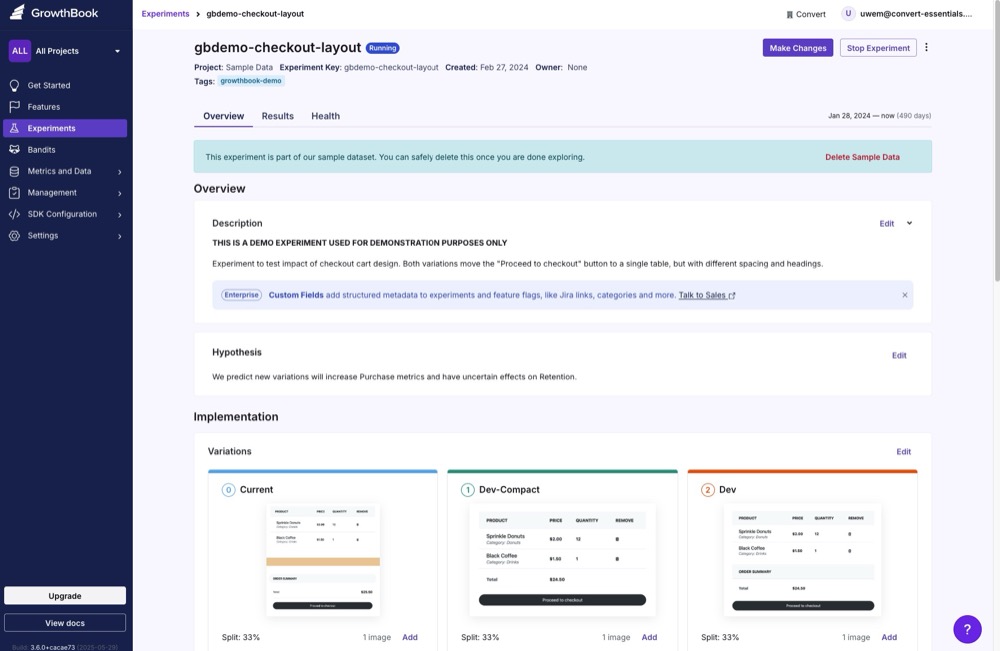
GrowthBook is an open-source experimentation platform designed for developers who want complete control over their testing infrastructure. It offers SDKs for multiple languages, integrates easily with your existing data stack, and supports both client-side and server-side testing.
GrowthBook is particularly appealing to engineering teams looking to self-host or scale experimentation with flexibility and transparency.
Who Uses GrowthBook?
- Small businesses and mid-market software/web product teams who want control and flexibility in experimentation
- Developers and engineering-led teams, because GrowthBook is open-source/self-hostable, making it easier to integrate with existing stacks
- Teams seeking a lightweight experimentation + feature flagging tool rather than a full enterprise suite
How Does GrowthBook Compare to Optimizely?
| Feature | GrowthBook | Optimizely |
|||||||||||||||
|---|---|---|---|---|---|---|---|---|---|---|---|---|---|---|---|---|---|
| A/B and multivariate testing
Run experiments to compare versions of your site, app, or content. |
✅ | ✅ | |||||||||||||||
| Visual editor (No-code) Build test variations with drag-and-drop editing instead of coding. |
✅ | ✅ | |||||||||||||||
| Server-side & Full-stack testing Test backend changes and logic across web, mobile, and APIs. |
✅ | ✅ | |||||||||||||||
| Personalization & targeting Deliver tailored experiences by audience, behavior, or segments. |
✅ | ✅ | |||||||||||||||
| Feature experimentation Roll out new features to subsets of users and measure impact safely. |
✅ | ✅ | |||||||||||||||
| AI/ML Capabilities Use machine learning for recommendations, traffic allocation, or insights. |
✅ (Limited) |
✅ | |||||||||||||||
| Statistical Methods Is this public? If yes, what statistical engine powers the experiment results? |
✅ (Bayesian, Frequentist, Sequential) |
✅ (Sequential testing, FDR control) |
|||||||||||||||
| Experiment program management Tools for managing backlogs, workflows, approvals, and reporting. |
✅ (Limited) |
✅ | |||||||||||||||
| Behavioral analytics tools Extra insights like heatmaps, surveys, or session recordings. |
❌ | ❌ | |||||||||||||||
| APIs & extensibility Availability of APIs and SDKs for integration and custom workflows. |
✅ | ✅ | |||||||||||||||
| Analytics & reporting Dashboards, custom metrics, and integrations with BI/analytics tools. |
✅ | ✅ | |||||||||||||||
| Integrations Pre-built connections to CDPs, analytics, CMS, and marketing platforms. |
✅ | ✅ | |||||||||||||||
| Transparent pricing Self-service pricing where you don’t need to talk to sales. |
✅ | ❌ | |||||||||||||||
| Free trial Whether the vendor offers a free trial or sandbox. |
✅ |
✅ (Sales-request sandbox) |
GrowthBook’s Most Notable Features
- Open-source experimentation framework: Fully customizable A/B testing platform that can be self-hosted, giving teams complete control over data privacy, architecture, and feature development.
- Feature flags with instant rollouts: Toggle features on or off, run canary deployments, and gradually release new updates.
- Warehouse-native analytics: Run experiments directly on your own data in Snowflake, BigQuery, Redshift, or Postgres.
- Customizable metrics and analysis engine: Define your own success metrics, segments, and statistical settings for maximum flexibility in analysis and reporting.
How Much Does GrowthBook Cost?
GrowthBook is free and open-source (self-hosted). Cloud plans start at $40/month.
Why Do Companies Use GrowthBook?
- GrowthBook is often praised for their customer support, quick resolutions, and community (open-source discussions)
- People like that it’s relatively straightforward to configure experiments, define goals, and get results.
- Users value GrowthBook’s ability to connect to their own data warehouses/analytics tools. They like bringing their own data and not being locked in
- GrowthBook lets teams use flags and run experiments, which helps with gradual rollouts and testing new features safely.
GrowthBook vs Optimizely Score
According to G2 user reviews, here’s how GrowthBook compares to Optimizely:
| Category | GrowthBook | Optimizely |
|||||||||||||||
|---|---|---|---|---|---|---|---|---|---|---|---|---|---|---|---|---|---|
| Overall Rating | ⭐ 4.6 / 5 (24 reviews) | ⭐ 4.2 / 5 (407 reviews) | |||||||||||||||
| Most Cited Pros | A/B testing, customer support, ease of use, features, documentation | Ease of use, experimentation, easy setup, user interface, and features | |||||||||||||||
| Most Cited Cons | Integration issues, lack of API integration, poor documentation, feature flags issues, learning curve | Expensive, testing difficulties, difficulty of use, learning curve, difficult learning |
11. PostHog
Best For: Product teams who want full-stack experimentation tightly integrated with product analytics, session replay, and event tracking.
What is PostHog?
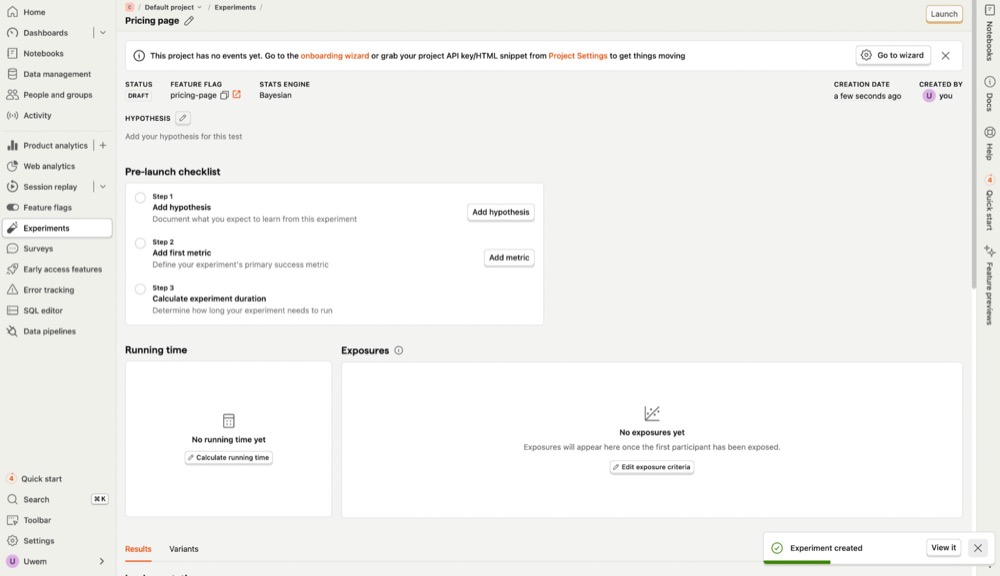
PostHog is a product analytics platform that brings experimentation, session replay, and event tracking into one tightly integrated package.
Originally open source and now available in hosted and self-hosted versions, PostHog appeals to product teams that want deep insight into user behavior—and the power to act on it—all without leaving the same platform.
Who Uses PostHog?
- Engineers, product teams, and small-to-mid-sized software/web apps who want to combine analytics + experimentation + feature flags in one place
- Startup / scale-ups and developer-led orgs, especially ones that appreciate open-source, self-hosting, or retaining data control
- Teams needing behavior tracking (funnels, retention), session replays, and product-usage insights rather than just marketing metrics
How Does PostHog Compare to Optimizely?
| Feature | PostHog | Optimizely |
|||||||||||||||
|---|---|---|---|---|---|---|---|---|---|---|---|---|---|---|---|---|---|
| A/B and multivariate testing
Run experiments to compare versions of your site, app, or content. |
✅ | ✅ | |||||||||||||||
| Visual editor (No-code) Build test variations with drag-and-drop editing instead of coding. |
✅ | ✅ | |||||||||||||||
| Server-side & Full-stack testing Test backend changes and logic across web, mobile, and APIs. |
✅ | ✅ | |||||||||||||||
| Personalization & targeting Deliver tailored experiences by audience, behavior, or segments. |
❌ | ✅ | |||||||||||||||
| Feature experimentation Roll out new features to subsets of users and measure impact safely. |
✅ | ✅ | |||||||||||||||
| AI/ML Capabilities Use machine learning for recommendations, traffic allocation, or insights. |
❌ | ✅ | |||||||||||||||
| Statistical Methods Is this public? If yes, what statistical engine powers the experiment results? |
✅ | ✅ (Sequential testing, FDR control) |
|||||||||||||||
| Experiment program management Tools for managing backlogs, workflows, approvals, and reporting. |
❌ | ✅ | |||||||||||||||
| Behavioral analytics tools Extra insights like heatmaps, surveys, or session recordings. |
✅ | ❌ | |||||||||||||||
| APIs & extensibility Availability of APIs and SDKs for integration and custom workflows. |
✅ | ✅ | |||||||||||||||
| Analytics & reporting Dashboards, custom metrics, and integrations with BI/analytics tools. |
✅ | ✅ | |||||||||||||||
| Integrations Pre-built connections to CDPs, analytics, CMS, and marketing platforms. |
✅ | ✅ | |||||||||||||||
| Transparent pricing Self-service pricing where you don’t need to talk to sales. |
✅ | ❌ | |||||||||||||||
| Free trial Whether the vendor offers a free trial or sandbox. |
✅ |
✅ (Sales-request sandbox) |
PostHog’s Most Notable Features
- Integrated experimentation and product analytics: Run A/B tests natively alongside session replays, funnels, and feature usage metrics for unified decision-making.
- Event-based targeting and analysis: Trigger experiments and measure impact based on custom events tracked in PostHog, enabling precise behavior-based testing.
- Visual editor for feature flags: Manage flags with conditions like user property, cohort, or random sampling, no deploy required.
- Self-hosting and privacy-first deployment: Option to fully self-host PostHog for GDPR/CCPA compliance, or use their cloud offering for convenience.
How Much Does PostHog Cost?
PostHog has a free tier that includes 1M events/month. Paid plans with experimentation features start at $2.00 per 1,000 events/month. Self-hosting is free with optional paid support.
Why Do Companies Use PostHog?
- Many users say PostHog replaces a stack of tools (analytics + session replay + feature flags + experiments) so they don’t need to manage multiple products
- The free-tier is popular; pricing that scales with usage, startup programs, and self-serve aspects are appreciated
- Users highlight the ability to instrument events quickly, auto-capture, intuitive dashboards, and fast onboarding.
- Organizations that need control over data, compliance, or want open-source or self-hosted deployment tend to choose PostHog
PostHog vs Optimizely Score
This is how PostHog compares to Optimizely on G2:
| Category | PostHog | Optimizely |
|||||||||||||||
|---|---|---|---|---|---|---|---|---|---|---|---|---|---|---|---|---|---|
| Overall Rating | ⭐ 4.5 / 5 (895 reviews) | ⭐ 4.2 / 5 (407 reviews) | |||||||||||||||
| Most Cited Pros | Ease of use, easy setup, analytics, insights, session recordings | Ease of use, experimentation, easy setup, user interface, and features | |||||||||||||||
| Most Cited Cons | Learning curve, not intuitive, missing features, dashboard issues | Expensive, testing difficulties, difficulty of use, learning curve, difficult learning |
Key Considerations When Choosing a Replacement for Optimizely
Switching A/B testing platforms isn’t just a feature-by-feature comparison. It’s a bet on how you want to run experiments moving forward. If you’re considering leaving Optimizely, here’s what to think about before jumping into a new tool.
1. Transparent, Predictable Pricing
One of the biggest complaints about Optimizely is pricing that feels opaque and unpredictable. Annual contracts. Charges per visitor. Expensive overages.
When evaluating alternatives, look for platforms that make it easy to understand:
- What you’re paying for
- How pricing scales with traffic and usage
- Whether you’ll be penalized for going over limits
Tools like Convert and GrowthBook stand out here for publishing clear pricing and avoiding billing “gotchas.”
2. Vendor Lock-In and Flexibility
Optimizely can be hard to leave once you’re deep into their ecosystem, because of those enterprise contracts.
Look for platforms that:
- Don’t gate exports or data access
- Let you host your own code snippets
- Use standard methodologies (so your team doesn’t need to relearn the basics)
Open-source or developer-first platforms like PostHog and GrowthBook excel here. Convert and OmniConvert also give you full control over audience segmentation, stats models, and QA workflows.
3. Quality of Support (Not Just Sales)
Another frequent gripe: support that disappears once you sign a long-term contract.
During trials and demos, pay attention to:
- How responsive support is when you ask real implementation questions
- Whether documentation actually matches product behavior
- If there’s dedicated onboarding or migration help
Convert has a reputation for high-quality human support, especially post-sale. So do mid-market-friendly tools like Convert and Omniconvert.
4. Team Fit: Who’s Actually Using It?
Most teams switching from Optimizely are marketers or product folks with limited dev resources. You need a tool that doesn’t require re-engineering your app to launch a simple CTA test.
Your tool should also allow technical users to run backend or API-based experiments when needed.
Convert, of course, and VWO strike a good balance between self-serve UIs and advanced flexibility.
5. Stack Compatibility
Don’t underestimate this one. If your new tool doesn’t play nice with GA4, Segment, your CDP, or your CMS, the switch will drag and your team will resent it.
Check:
- Does it integrate natively with your analytics and data stack?
- Can it pass experiment data to reporting dashboards and CRMs?
- Will devs need to build custom bridges just to sync data?
Platforms like Convert (with 90+ integrations), VWO, and LaunchDarkly offer broad integration libraries.
PostHog and Statsig are stronger if you’ve already centralized experimentation data internally.
Why Are Teams Moving Away from Optimizely?
Optimizely is powerful, but the people who use it most often flag the same sticking points. These patterns come up again and again in reviews, and they’re usually what push teams to look at alternatives.
Pricing bloat
“We pay $50k/year” is a common refrain. For many, Optimizely’s costs have ballooned far beyond the value delivered, especially for teams with high traffic and modest conversion rates.
Custom pricing, yearly contracts, and surprise overages make it hard to plan, especially for teams growing their program incrementally.
Support concerns
For a premium tool, the support experience often feels slow, templated, or out of step with urgent testing needs.
One former user said on Reddit:
“Once you commit to a 2-year contract, all you get is generic answers and no proper help with your requests. To me, it looks like they don’t care to help because if we churn after 2 years, they will get another client.”
Another user on G2 said they received “difficult support to get in the platform”.
Over-Complexity & Unused Features
Optimizely has grown into a full digital experience platform (DXP). For many CRO and product teams, that means paying for modules they don’t actually use, like CMS or advanced personalization, just to access core experimentation features.
One user on G2 said:
“Dependent on the change, your tech stack needs to be able to work with Optimizely. Some of the tests that you feel could easily be accomplished in Optimizely Web, prove to be more difficult, and there is a reasonable learning curve to understand what can be feasibly achieve in the platform and what cannot be.” Even within testing, users say the “no-code” promise doesn’t always hold up. Setting up advanced experiments, working with SPAs, or customizing metrics often requires developer help.
Switching from Optimizely Without Breaking Your Program
Switching platforms doesn’t need to derail your experimentation. Also, you don’t want to stick to something you don’t like because you dread the move.
Here’s how to move fast when migrating from Optimizely without losing momentum:
- Audit what’s running: List all live experiments, goals, targeting rules, feature flags, and SDK usage. Know what to migrate, pause, or skip.
- Start with simple wins: Rebuild basic tests first. High-traffic, low-risk experiments that help you validate tracking and confidence in the new tool.
- Export EVERYTHING: Before your contract ends, pull reports, export data, and screenshot key results. Don’t rely on continued access.
- Reset tracking + goals: Align on KPIs, conversion definitions, and stats engine differences. Expect some variance in how results read.
- Rally your team: Get everyone aligned on new processes, responsibilities, and QA. Use the switch to improve how your team experiments.
If you haven’t already, consider using this opportunity to start an experimentation learning repository. It’s an industry best practice that comes with compounding benefits for your experimentation program.
Conclusion
Now that you have 11 viable Optimizely alternatives, you can explore the best A/B testing tool to replace Optimizely.
If you want more, check out our full tool comparison.

Frequently Asked Questions
Optimizely is a digital experience platform best known for its A/B testing and experimentation tools. Originally launched in 2010 by ex-Googlers Dan Siroker and Pete Koomen, Optimizely was one of the first SaaS platforms to make web experimentation accessible to marketers and product teams, paving the way for mainstream adoption of A/B testing.
Over time, Optimizely expanded its offerings into two core products:
Optimizely Web: For client-side testing, personalization, and experience optimization
Optimizely Full Stack: For server-side experimentation and feature flagging, often used by engineering teams
Today, Optimizely is positioned as an enterprise-grade solution for complex experimentation and digital optimization at scale. However, it has faced criticism for its high cost, lack of transparent pricing, and rigid support model, prompting many companies to explore more flexible alternatives.
Some of the best and most cited Optimizely alternatives by conversion rate optimization experts and insiders include Convert Experiences, VWO, Kameleoon, LaunchDarkly, PostHog, and others.
These tools offer varied strengths from full-stack experimentation and transparent pricing to advanced targeting and privacy features. The best fit depends on your experimentation goals, development resources, and budget flexibility.
Optimizely can be worth it for large enterprises running advanced, high-traffic experimentation programs. It’s built to support complex workflows, a broad digital experience platform, and deep integrations with content and commerce tools.
However, many growing or mid-sized teams find that the high costs, opaque pricing, and rigid contracts outweigh the value. Modern, more agile alternatives now offer similar features at lower prices.
Optimizely is owned by Optimizely Inc., formerly known as Episerver. In 2020, Episerver acquired Optimizely and later rebranded under its name. The acquisition brought together Episerver’s content and commerce tools with Optimizely’s experimentation platform, forming the unified Digital Experience Platform (DXP) known today as Optimizely. In 2021, they also acquired the customer data platform Zaius, further expanding their offering.
Optimizely uses a custom pricing model with no public pricing tiers. Costs vary based on your traffic volume, team size, and feature needs and can exceed $80,000/year, according to public benchmarks.
While it once offered plans starting at $17/month, Optimizely has since shifted toward enterprise-only contracts, removed self-serve tiers, and eliminated grandfathered pricing. Users have also reported unpredictable price hikes, charges per visitor or event, and no free trial, which makes budgeting difficult.
Using Optimizely poses some cost objections to a lot of CMOs and CROs. However, there are instances when it could be a fit for your team.
For example:
If you have the testing budget of enterprise marketing departments starting at $100,000 a year, then Optimizely is right within your reach.
If you’re running a mature optimization program. It only makes sense to use this A/B testing software when you’ve proven the ROI of testing to C-suite execs.
If your A/B testing program is for product testing & decision making.
If your website traffic is over 250K unique visits per month. Then you’ll be able to implement the various tools Optimizely offers you to run a lot of experiments.
If these don’t sound like you, it’s best to check out other options for A/B testing.
Optimizely counts each person once per experiment. If the same user visits multiple times and eventually converts, that still tracks back to a single unique visitor for that test.
Convert also tracks unique visitors, but with more consistency. A visitor is recognized across sessions for up to six months with cookies and is only counted when they actually load the experiment. That prevents double-counting and keeps reports tied to real people rather than sessions.
Look for transparent, monthly pricing; no lock-ins; and bills that won’t spike with normal experimentation. A base subscription tier should cover everything you need for regular experiments. Convert honors legacy pricing and keeps essentials in one plan, so you don’t pay extra just to run a standard testing workflow.
Prioritize fast setup, data-rich goals, and precise triggering. Convert’s Shopify app streamlines installation, goals cover common ecommerce outcomes out of the box, and audience/behavior triggers don’t require paid add-ons. So you can target “add-to-cart” cohorts without inflating traffic costs.
You want vendor neutrality, account structures built for multi-client management, and predictable pricing across portfolios. Here at Convert, we’ve made a pledge not to sell competing services. Rather, we enable our agency users to grow their business with features like support for multi-client setups within one umbrella, the ability to export and import experiment data, and more. We also avoid per-module upsells that complicate retainers
Learn more: The Best AB Testing Tool for CRO Agencies
Common friction points include SPA complexity, selector reliability, SSO and identity assumptions, and client-side performance trade-offs on heavy pages. Teams that need tighter control often prefer platforms with mature server-side/full-stack options and clear SDKs.
Expect a learning curve for non-trivial tests, occasional UI/editor quirks, and the need to pair vendor dashboards with your analytics stack for deeper revenue or cohort analysis. If you’re running fast cycles with limited support, prioritize tools with simpler setup, reliable preview/QA flows, and goals that map cleanly to your KPIs.
Each experimentation platform uses its own terms for similar features. Understanding how Optimizely labels core functionality helps you compare apples to apples when you evaluate alternatives.
Below are some of the most important features Optimizely offers, and what you’ll often see them called elsewhere:
Check table
| Feature | What Optimizely calls it | What other platforms often call it |
|||||||||||||||
|---|---|---|---|---|---|---|---|---|---|---|---|---|---|---|---|---|---|
| Client-side A/B or multivariate testing | Web Experimentation | Web Experiments, Visual Editor | |||||||||||||||
| Feature flags / Server-side testing | Feature Experimentation / SDKs | Feature Flags, Full-Stack Experiments | |||||||||||||||
| User targeting / Audiences | Audiences (conditions/attributes) | Targeting Rules, Cohorts, Segments | |||||||||||||||
| Conversion tracking & metric goals | Events, Metrics, Goals | Primary/Secondary Metrics, KPI Goals | |||||||||||||||
| Personalization campaigns / experiences | Personalization | Targeted Content, Audience-based Variants | |||||||||||||||
| Visual editor / WYSIWYG interface | Visual Editor | Drag & Drop Editor, Page Builder | |||||||||||||||
| Statistics engine (significance, sequential, bandit) | Stats Engine / Stats Accelerator | Frequentist Tests, Bayesian, Multi-armed Bandit Options | |||||||||||||||
| Edge delivery or performance-focused delivery | Performance Edge | Edge / CDN-based Testing (where available) | |||||||||||||||
| Governance / QA / preview tools | Preview Mode, Variation Forcing, Holdouts | Rollbacks, Feature Holdouts, Approval Rooms |
Written By
Uwemedimo Usa
Conversion Rate Optimization, Conversion Copywriting, B2B SaaS Content Marketing +3 more
Conversion Rate Optimization, Conversion Copywriting, B2B SaaS Content Marketing, A/B Testing Tools Evaluation, Generative Engine Optimization, A/B Testing Statistics Show less
Edited By
Carmen Apostu