What Is Feature Experimentation? Feature Testing Explained (And How to Do It for Free)


Feature testing enables you to optimize features by comparing variations, gathering user feedback, and making data-driven decisions on which versions to deploy.
Key points:
- Feature experimentation, also called feature testing, compares variations of a feature with real users to find which performs best against a chosen metric. Convert Experiences is one of nine feature experimentation tools compared here.
- Product teams use feature experiments to decide what to build, lower release risk, validate feature fit, and gather user feedback before a full rollout.
- Convert Experiences runs feature experiments through Fullstack projects, with six SDKs covering JavaScript, PHP, Python, Ruby, iOS and Android, and Fullstack is included from the Pro plan.
- As of August 2026, feature experimentation tools bill on five different meters, so comparing prices means comparing what each one counts.
The future of experimentation is product.
Experimenters have long focused on optimizing conversion rates for marketing. But the game is changing, and they’re breaking new ground.
Ruben de Boer, Lead Conversion Manager at Online Dialogue, and John Ostrowski, Director of Product and Experimentation at Wise Publishing, are witnessing this shift firsthand.
Some CROs have expanded their influence across the entire customer journey and carry real weight in product optimization.
John dubbed them ‘conversion product managers’ (spicy take!). These professionals ideate, validate, build, and optimize features and products, using testing as a critical tool in the discovery and delivery tracks.
Ruben and John described this shift as very young when they spoke in 2024. It has moved on since, and it still gives CROs room to expand their horizons and take on more strategic influence within their organizations.
As Ruben and John highlight in their 2024 discussion below, feature experimentation is the linchpin in the arsenal of these professionals.
What Is Feature Experimentation?
Feature experimentation (also called feature testing) is the process of comparing variations of a feature with real users to see which variation performs best against a predetermined user experience or business metric. Teams run these comparisons as live A/B/n tests in production, then use the results to decide which variation to keep, refine, or kill.
The term is easy to confuse with feature testing in software development, which is the quality assurance job of confirming a feature works as programmed (“I built this feature to print ‘Hello World.’ Does it print ‘Hello World’?”). Feature experimentation asks a further question. Once a feature works, which variation of it performs best?
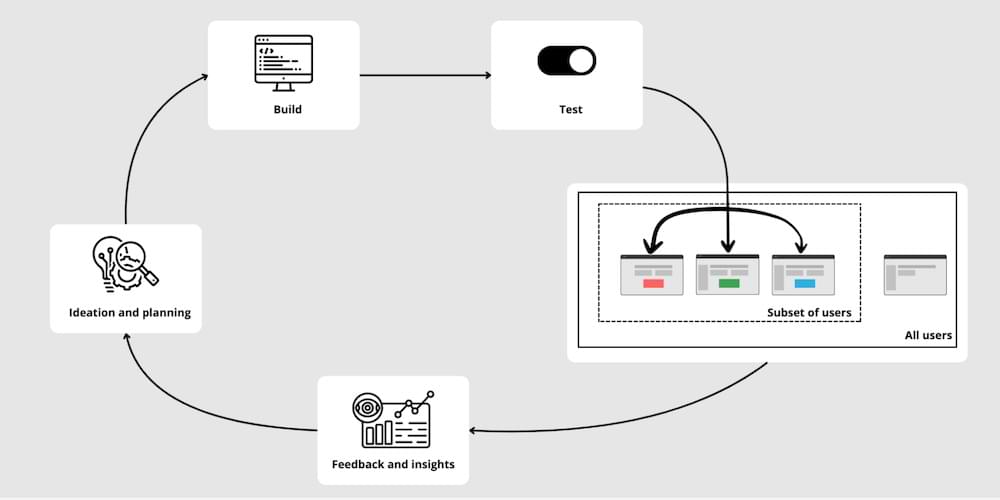
How Is Feature Experimentation Different From Feature Testing in Software Development?
The short answer: feature testing in software development verifies that a feature works as programmed before launch, and is owned by QA.
Feature experimentation measures which variation of a working feature performs best with real users in production, and is owned by the product or CRO team.
This sounds like there’s a divide between the two connotations of feature testing (one for software developers and the other for product optimizers), but that’s not the entire story:
There is a significant difference between feature testing in product experimentation and software development, yet a fundamental similarity. You see, testing is testing, but the scope and objectives of each type here differ, which is why the execution often falls to different experts.
In product experimentation, the focus is on validating the impact of a feature on user behavior and business metrics through live A/B testing. A CRO typically manages testing to evaluate this. Conversely, in software development, the objective is to ensure the feature functions correctly within the application, focusing on technical stability and performance, and the QA specialists’ job is to ensure this. Despite these differences, the core activity of testing—ensuring features meet their intended criteria—remains consistent.
For a practical look at the QA side, see how experts approach QA for client-side and server-side experiments.
The product experimenter’s approach to feature testing, which we’re focusing on in this article, helps validate assumptions, gather feedback, and measure a feature’s usability, performance, and accessibility in real production environments. That’s a powerful tool for developers, product managers, UX designers, and even marketers.
What Do Product Teams Use Feature Experiments For?
Product teams use feature experiments in five main ways: to make product development decisions, lower rollout risk, validate feature fit, explore feature-product relationships, and gather user feedback. Each one works the same way in Convert Experiences and in any other tool that runs feature flags through an SDK. Let’s dig into each:
1. Make product development decisions
With sound feature tests, product teams get real-world user data and measured impact to inform product decisions. David Sanchez del Real articulates it best:
Whenever we’re building products, we are faced with constant decisions.
Wherever there are decisions to be made, there are assumptions.
Since experiments are simply a robust way to validate (or invalidate) assumptions, they are a key tool for decision makers.
When building products, these decisions come in many different flavors, from exploring completely new ideas to getting an early understanding of their viability before resources are committed to them (exploring) to refining the execution of existing features (exploiting) or even measuring things that couldn’t be measured in any other way.
And as decisions come in many flavors, so do experiments: There are many ways to experiment and A/B tests are only one.
Working in digital products presents the advantage of making A/B testing very accessible, but you should always choose the right tool for the right job.
David Sanchez del Real, Head of Optimisation at AWA Digital
Testing multiple variations of a feature allows your team to validate the most effective design, configuration, or user experience to develop.
Alternatively, testing a single variation of a new feature before releasing it to all users—a practice known as gradual rollout—ensures that the feature performs well in real-world conditions without exposing the entire user base to potential risks.
What’s a more thoughtful and safer way to know what works best than putting the feature in the hands of your users?
An iterative feature testing process brings you closer to your desired outcomes faster.
2. Mitigate risks
Feature flags, a core component of feature testing, enable developers to release new features without permanent changes to the codebase—i.e., reversible changes. This allows for continuous delivery and reduces the risk of disrupting the user experience if things go sideways.
If issues arise due to a newly released feature, feature flags act like a switch to turn it off. This reverts the software to its previous state and minimizes the impact, just like CTRL+Z (or CMD+Z for Mac people) for feature releases.
Tim Donets gives us an example of how he has used feature tests to manage the risk of significantly impacting website performance:
Feature testing came in handy when we needed to test an alternative logic of a feature. Sometimes, entirely different backend services would be used, or a significantly changed flow using the same service.
For example, I once managed a migration from an in-house piece of software handling engagement elements on a website (think banners, pop-ups) to a third-party software. Using feature testing we were able to test whether the underlying logic of all engagement elements would work on a set of real users and if using a 3rd party would cause any significant drop in the website performance.
Tim Donets, Fractional Head of Product
3. Validate feature fit
Validating feature fit is the one feature test that doesn’t involve comparing variations of a feature.
Here, the feature might be released in beta to a segment of users. The product experimenter then tracks guardrail metrics such as usage, user engagement, or revenue generated by the feature.
This process helps determine if the new feature is a valuable addition and a good fit for the product. But it can also reveal usability and functionality issues, informing decisions about whether to release the feature or refine it further.
An added advantage of this use case for feature testing is that it ties feature releases to measurable outcomes, demonstrating the product team’s impact and guiding future development priorities.
4. Explore feature-product relationships
Feature tests are used to explore complex relationships between different product variables and features.
When properly executed, these controlled experiments remove the impact of randomness, helping you isolate cause-and-effect relationships between the changes introduced by the feature you’re testing and your product as a whole.
For example, let’s say you’ve added a search bar at the top of the screen. You’d want to know how this impacts user navigation, workflow speed, and feature discovery.
With insights like these, imagine the possibilities for improving your product.
5. Gather user feedback
A key element in the iterative feature testing process is collecting insights and feedback.
Feature testing provides an excellent opportunity for product experiments to collect valuable user feedback throughout the development process of a specific feature, which aligns perfectly with the principles of the lean methodology.
Let’s face it, features alone rarely create loyal customers. Instead, we need to shift the focus to understanding the “jobs to be done” for our user base.
Deeply empathize with their struggles, aspirations, and unmet needs.
This customer-centricity becomes the guiding light for innovation, ensuring we build products that solve real problems, not just add bells and whistles.” — Gopalakrishnan V., Product Manager at App0, in this LinkedIn Post
This user feedback turns into qualitative insights that can help:
- Validate assumptions
- Identify areas for improvement
- Guide decisions about feature improvement
- Suggest new feature ideas to explore
Using user feedback, developers can release new versions of the feature to test as they gradually approach the most user-centric variation.
The core benefit of feature testing for product teams is moving from intuition-based development to a hypothesis- or data-driven approach. Here, your decisions take root in real-world user data and measured impact.
What this means for your product is:
- More efficient use of development resources
- Faster time-to-market for the best-performing features (according to the metrics that matter to the business) and
- Continuous cycle of product optimization based on your users’ needs and the overarching business goals.
How to Conduct Feature Testing in Convert Experiences?
The five things product experimenters do with feature testing have gotten you excited. Here’s how you can start feature testing in Convert Experiences today.
Feature tests run in a Fullstack project, which is a separate project type from Convert Experiences’ Web Testing projects. Web Testing works through a browser tracking script and covers visual changes and split-URL tests. Fullstack works through an SDK your application calls directly, which is what lets you test a feature living in server code, a mobile app, or an API response. The two can sit in the same Convert account.
Here’s a video demo:
Step 1: Setup and initialization
Install the Convert SDK for whichever language your application runs in. As of August 2026, Convert Experiences ships six Fullstack SDKs (JavaScript/TypeScript, PHP, Python, Ruby, iOS and Android) along with an edge SDK for Cloudflare Workers. All six share one architecture, one data model, and one bucketing algorithm, so a visitor bucketed into a variation by the PHP SDK lands in the same variation under the iOS one.
While the walkthrough below uses the JavaScript SDK, the same steps apply to whichever of the six you install. The concepts and method names carry across, and only the syntax changes.
Then create an SDK key under Configuration → SDK Config & Keys. Keys come in two types: public keys are safe to ship in a browser bundle, while authenticated keys carry a secret alongside the key and belong in server-side or edge code only. And each key is scoped to one of your project’s environments, which prevents a staging integration from writing to live experiment data.
Convert Experiences also emits SDK lifecycle events your code can subscribe to, which is useful while you are building an integration or if you want SDK activity in your own analytics.
Learn More: The Convert developer documentation covers installation, initialization and configuration for all six SDKs.
Step 2: Define Locations and Features
Next, specify the product areas or locations in your application where you’ll conduct the feature tests. For example, you may want to target the search bar in the dashboard area.
Now create the feature itself. A feature in Convert is a named configuration item that your application queries at runtime. It carries a key, an on-or-off status, and a set of typed variables such as boolean, integer, float, string, or JSON. That range lets one feature act as a simple switch while another carries a full configuration payload, such as a JSON object containing a product list.
Your application reads the status and the variables, then decides what to do with them. Convert Experiences returns the values, and your code decides what to do with them.
$feature = $context->runFeature('dark-mode');


if ($feature !== null && $feature->status === FeatureStatus::Enabled) {

    $theme = $feature->variables['theme'] ?? 'dark';

}
Recommended Resource: Convert PHP SDK quickstart
Step 3: Create Experiments and Variations
In Convert, set up your experiment by defining different variations of the feature. For instance, you can test a sticky search bar against a non-sticky search bar. You can customize these variations with specific logic to create unique experiences for different user segments.
Convert’s Fullstack SDKs support two experience types; which one you want depends on whether you need a comparison. An a/b_fullstack experience has an original and one or more test variations, and it measures them against each other. A feature_rollout has a single non-original variation with no control arm, so it ramps the feature to an increasing share of traffic (5%, then 20%, then 50%) while you watch for problems. Both use the same features and traffic allocation controls, so a rollout can later become a test without rebuilding it.
The experience is also where targeting lives. A feature attaches to a variation, while the experience above it decides who is eligible, through audiences and Locations.
Step 4: Define Goals and Track Conversions
Define the goals that decide the outcome of the test, such as a signup, a purchase, or a trial start. Then, call the SDK’s conversion method wherever that outcome actually happens in your code. In a Fullstack project, your application reports the conversion at the moment of the business event, so a purchase tracked inside a checkout handler counts the same whether the visitor arrived through a browser, a mobile app, or a background job.
The method name follows each language’s own convention. It’s camelCase in JavaScript, PHP, Kotlin and Swift, snake_case in Ruby and Python:
userContext.trackConversion('goal-key');

context.track_conversion("goal-key")
Conversions are deduplicated per visitor per goal, so a double-submitted form counts once.
Recommended Resource: Convert conversion tracking documentation.
Step 5: Run the Experiment
Check that everything is configured as needed and launch. Live Preview Links give you a shareable link or QR code for walking through a variation before it goes live, and preview sessions stay out of your reporting.
Convert uses a bucketing mechanism, in which users are randomly yet deterministically assigned to different variations based on their specific context. The same visitor ID always hashes to the same variation for a given experiment, and that holds across all six SDKs.
Step 6: Monitor and Analyze Results
As the experiment runs, Convert tracks user interactions and conversions. This is provided in detailed analytics in the Reports tab.
Notice who owns which part. Engineers do the integration work. They install the SDK for their language, define features and their typed variables in code, and call the conversion method where the business outcome happens.
From there, the release runs from the Convert dashboard, where product and marketing teams launch the experiment, adjust how much traffic each variation receives, and read results in the Reports tab without filing an engineering ticket or waiting on a deploy. The code ships once, and the decision about who sees the feature stays adjustable afterward, which is what lets engineering and marketing work on the same rollout from opposite ends.
Which Tools Offer Feature Experimentation, and What Do They Cost?
Feature experimentation reaches you from two directions. A/B testing vendors offer it as a separate product or as a feature within their existing experimentation tools. Feature-flag platforms built for engineering teams have added measurement on top of the flags they already ran. Both ends of that range are below. For a side-by-side view of how eight vendors handle full-stack features, see the full-stack tools comparison.
The setup is broadly the same wherever you land. You install the SDK for your language, define your flags or features, decide who sees them, set the goals that settle the outcome, and read the results. What separates these tools is what they meter, whether they publish a price, and how much you get before you pay for anything.
There’s been two huge changes in this category in 2026. VWO and AB Tasty merged in January under Everstone Capital and are converging on the Wingify brand, with both suites still sold separately and existing contracts carrying over unchanged. And in May, Amplitude took over the Statsig brand, platform, and customer base, while the Statsig engineering team stayed at OpenAI.
How these tools were selected
Every tool here offers feature flags with measurement attached, sells to product or engineering teams rather than to marketers alone, and was live and actively developed in August 2026.
Prices come from each vendor’s own pricing page where one is published, and from Vendr’s contract data where it is not. Tools were included on the basis of appearing in search results for feature experimentation or of a 2026 ownership change that affects buyers.
| Feature experimentation tool | Pricing published? | Entry price, August 2026 |
Billed on |
Permanent free tier |
|||||||||||||||||||||||||
|---|---|---|---|---|---|---|---|---|---|---|---|---|---|---|---|---|---|---|---|---|---|---|---|---|---|---|---|---|---|
| PostHog | Yes | Free to 1M flag requests/mo, then $0.0001 per request | Feature flag requests | Yes, 1M requests/mo | |||||||||||||||||||||||||
| Statsig | Yes | Free tier, then Pro at $150/mo | Metered events | Yes, 2M events/mo | |||||||||||||||||||||||||
| LaunchDarkly | Partly | Developer free; Foundation $10 per service connection/mo plus $8.33 per 1,000 client-side MAU/mo | Service connections and monthly active users | Yes, 100K experimentation MAU/mo | |||||||||||||||||||||||||
| Unleash | Partly | $75 per seat/mo, 5-seat minimum self-hosted | Seats | Open-source edition only | |||||||||||||||||||||||||
| Convert Experiences | Yes | $599/mo, or $420/mo billed annually ($5,040/yr on Pro) | Tested users | No, 15-day trial | |||||||||||||||||||||||||
| Kameleoon | Partly | $495/mo for PBX Starter web experimentation; feature management quoted | Visitors and credits | No, 30-day trial | |||||||||||||||||||||||||
| Optimizely | No | Quoted. Free Rollouts tier available | Event volume | Yes, Rollouts | |||||||||||||||||||||||||
| VWO + AB Tasty (Wingify) | No | Quoted | MTU (VWO); average traffic or MAU (AB Tasty) | No | |||||||||||||||||||||||||
| Harness (formerly Split) | No | Quoted, Enterprise tier only | Not published | No |
Note: Prices retrieved from each vendor’s pricing page in August 2026. Where a vendor does not publish figures, contract values are drawn from Vendr, a procurement platform that reports from software contracts it has negotiated. Billing meters are not equivalent across vendors. For example, a monthly active user, a flag request, a metered event, a seat, and a tested user each count something different.
Can You Run Feature Experimentation for Free?
How much does feature testing cost? And can you run feature tests for free?
The short answer is yes.
For the long answer, “free” means various things depending on where you’re looking.
Several tools now run permanently free tiers rather than trials. PostHog gives you a million feature flag requests a month, Statsig gives two million metered events with unlimited flag checks, and LaunchDarkly’s Developer plan covers 100,000 experimentation monthly active users with unlimited seats. Optimizely runs a free tier called Rollouts that includes flags and a single A/B test, and Unleash’s open-source edition is free to self-host.
Those allowances are generous when your traffic is low, and each one is metered differently, so the comparison changes as you grow.
Kameleoon publishes a floor of $495 a month for its PBX Starter plan, which covers 10 experiments and 50,000 visitors a month for web experimentation. Feature Management and Rollout sits alongside it as a paid add-on with no published price, or comes bundled into Enterprise, which is quoted per account. There is a 30-day free trial.
AB Tasty keeps its pricing private. Pricing is based on average traffic over the past 12 months or on monthly active users. Procurement platform Vendr, which negotiates software contracts and reports from the deals it handles, put the average annual AB Tasty contract at $66,500 as of February 2026, and lists a band of $15,000 to $45,000 a year for accounts in the 50,000-250,000 session range, though Vendr does not disclose how many AB Tasty contracts that average draws on. A free trial is available.
Optimizely quotes every plan individually and publishes no figures. Vendr’s February 2026 data shows the median annual Optimizely contract at $81,447 across 126 purchases, though this spans Optimizely’s entire product line rather than Feature Experimentation alone. The free Rollouts tier is the only published price point.
VWO withdrew its public pricing in 2026, so its figures now sit behind registration and an in-app checkout. Vendr’s February 2026 data shows the median annual VWO contract value is $16,660 across 101 purchases. Feature experimentation remains a separately priced module from VWO’s other products, and a free trial is available.
Then, there’s Convert Experiences Fullstack. You get a 15-day free trial with no credit card, and Fullstack experimentation is included during the trial. After that, Fullstack and feature flags are included in the Pro plan: $599 per month, or $420 per month when billed annually, which comes to $5,040 per year for 100,000 tested users per month.
The comparison table above sets those figures side by side, along with what each vendor meters and what it gives away free.
Wrapping Up on Feature Testing (and Avoiding a Common Pitfall)
As full-stack experimentation becomes more accessible and CRO skills continue to extend beyond marketing and permeate the entire organization, we’ll see more feature testing.
Product experimenters will validate feature-product fit, mitigate risks, make product development decisions, gather user feedback, and more with feature experiments.
Aside from driving data-driven product growth and optimization decisions, the culture of experimentation will thrive more in such environments.
However, feature testing needs to be managed carefully. Teams risk creating technical debt when feature flags used for feature testing aren’t removed after they’ve served their purpose. This leads to a cluttered codebase that makes further development and maintenance difficult.
You can prevent this by setting clear rules about feature flag lifecycles (when to create and retire flags) and removing flags immediately after completing experiments.
Frequently Asked Questions
Feature experimentation is A/B testing applied to application features: split the traffic, measure a goal, pick a winner. The difference is where the change lives. Feature experiments run in server code, mobile apps, or API responses through an SDK, while a classic A/B test changes what the browser renders.
As of August 2026, most A/B testing tools include feature flags, so a separate flag platform is often unnecessary. Convert Experiences, Optimizely, Kameleoon, and VWO all ship feature flagging inside their experimentation products, while LaunchDarkly, Unleash, and Harness come at it from the flag side and have added measurement on top. The questions worth asking are which meter you get billed on and whether the tool covers the runtimes your application uses, because a testing tool with no mobile SDK cannot run an experiment inside your iOS app.
A returning visitor can move to a different variation when a running experiment changes, because adding a variation, removing one, or re-weighting the split all alter the calculation. Convert Experiences buckets visitors deterministically based on a hash of their ID, so a stable user ID keeps the assignment steady for as long as the configuration itself remains stable. Configuring a persistent DataStore writes each decision to durable storage, which keeps a visitor on the same variation even when the experiment configuration changes underneath them.
You can increase traffic to a running feature experiment without disturbing the visitors already in it. Convert Experiences added Dynamic Traffic Adjustment in July 2026, which increases the share of visitors entering a running Fullstack experiment while those already assigned keep their variation. That matters during a gradual rollout, where the sequence usually runs 5%, then 20%, then 50%, and reshuffling participants partway through would compromise the results already collected.
Compare the billing meter before comparing the number, because feature experimentation tools count different things. As of August 2026, Convert Experiences bills on tested users, PostHog on feature flag requests, Statsig on metered events, LaunchDarkly on service connections and monthly active users, and Unleash on seats. Optimizely, VWO, AB Tasty, and Harness publish no figures at all, so a like-for-like comparison means normalizing each meter to your own traffic and asking those four for a quote at that volume. Two vendors quoting different numbers may simply be counting different events.
Feature experiments run in native mobile apps through a mobile SDK, which decides at runtime which screen, onboarding flow, paywall, or feature a user receives. Convert Experiences shipped its Android and iOS SDKs in June 2026, covering Android from minSdk 24 and Swift on iOS 15, macOS 12, and tvOS 15 upward. Because the decision happens inside the app itself, mobile feature experiments reach things a browser-based A/B test cannot, such as a native paywall or a background sync behavior.
Check a feature variation in a non-production environment first, then confirm it with a preview link before launch. Convert Experiences scopes each SDK key to a project environment, so a staging integration writes nowhere near live experiment data, and Live Preview Links, added in July 2026, give you a shareable link or QR code to walk through a variation, with the preview session excluded from reporting. The QR code is what makes this practical for mobile feature experiments, where someone has to open the variation on a real handset.
The sample size a feature experiment needs depends on your baseline conversion rate, the smallest lift you want to detect, and how many variations you are running, so there is no universal number. A test on a 2% baseline chasing a 10% relative lift needs far more traffic than the same relative lift on a 20% baseline. Work the figure out before launch with a sample size and test duration calculator, and stop where you planned to stop, because watching results accumulate and calling it at the first significant reading is how false positives reach production.


Written By
Uwemedimo Usa
Conversion Rate Optimization, Conversion Copywriting, B2B SaaS Content Marketing +3 more
Conversion Rate Optimization, Conversion Copywriting, B2B SaaS Content Marketing, A/B Testing Tools Evaluation, Generative Engine Optimization, A/B Testing Statistics Show less
Edited By
Carmen Apostu