Convert Experiences: This is What Advanced A/B Testing at Transparent, Affordable Prices Looks Like


We’re always busy.
Year after year, we add the pieces that make experimentation smoother, faster, and easier to scale across teams.
What you’ll see below reflects that arc. The list starts with the foundations teams have relied on for a long time, then moves on to newer releases shaping how Convert fits into modern experimentation stacks.
AI shows up more prominently now as well. At Convert, we’re weaving it in where it actually helps. No generic copilot bolted on for show (a simple connector to your favorite LLM could do that).
The AI upgrades we’re shipping are technical in the best way, giving teams a smarter foundation for improving test builds, strengthening data sharing and learning, and making life easier for optimizers who work with both product and growth inside the same tool.
Here’s everything that’s new (and why it matters).
All the Recent Feature and Product Updates in Convert
From earlier updates to the newest additions:
Native GA4 Integration
GA4 is the analytics home base for many teams, so we built our integration to feel like it naturally belongs there.
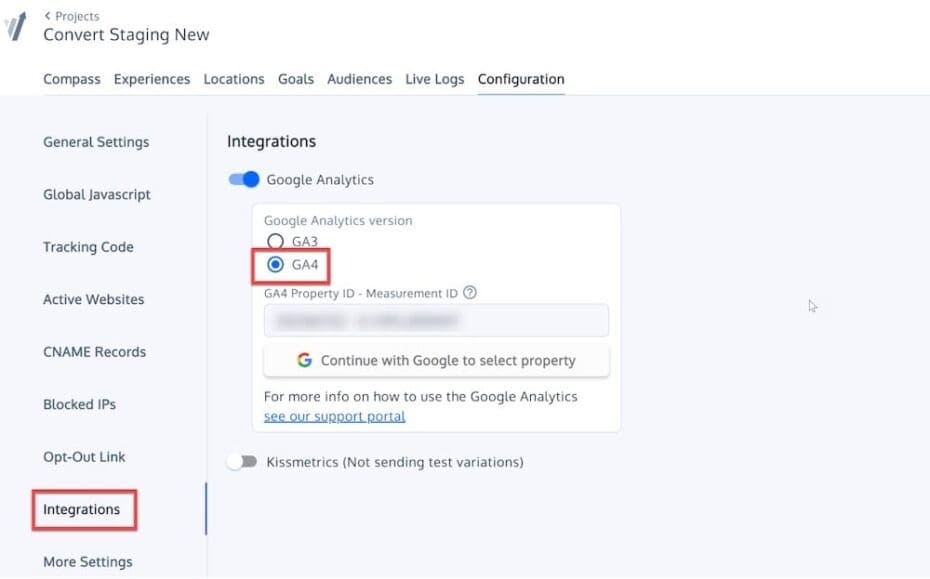
With this integration, you can seamlessly connect your Convert Experiences with GA4, making it easier than ever to track and analyze your experiments.
Connect a project once, and your experiments start showing up inside GA4 without any workaround code. It feels almost suspiciously smooth the first time you use it.
When an experiment goes live, Convert sends variation data straight into GA4 and creates the audiences you need for proper segmentation. Suddenly, your experiments appear right alongside the reports your teams already spend time with — acquisition, engagement, revenue, the whole spread.
You can explore how variations behave across campaigns, devices, geographies, and user journeys without bouncing between dashboards. Plus, the integration lets you import your existing GA4 conversion events directly into Convert. Revenue tracking syncs automatically too, so Convert uses the total revenue collected by GA4 as the basis of its own revenue reports and Average Revenue per User (ARPU) calculations.
The best part is how this expands your understanding of a test. Instead of staring at a top-level lift number and moving on, you can follow how a variation changed behavior deeper in the funnel or influenced returning visits.
GA4 Explorations make this especially insightful. You see paths, funnels, and engagement patterns that reveal the why behind your results. If your org uses Looker Studio, those variation audiences plug right in there too.
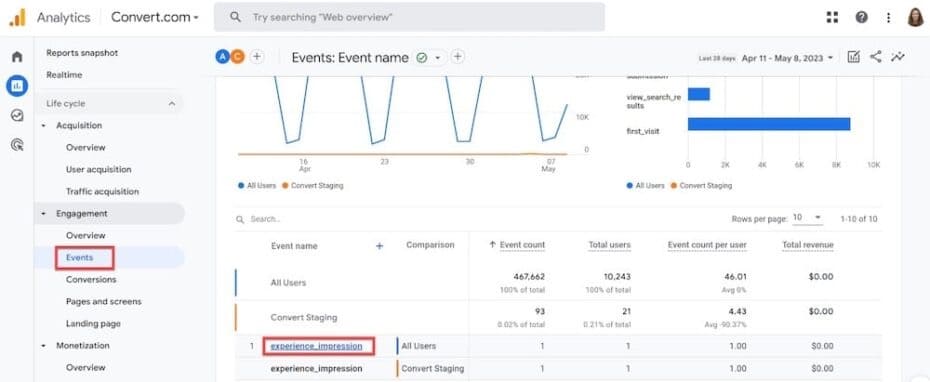
Teams running feature-flag or full-stack tests tend to light up when they try this.
If your goal is to tighten the loop between testing, behavior analysis, and decision-making, this integration pulls those pieces together in a way that feels natural.
Convert is one of the first A/B testing providers to have an official functional integration with GA4. So, you’re not just getting a cutting-edge feature, you’re getting a trailblazing solution from a trusted vendor. Get all the details in our official announcement.
API V2
API V2 opens the entire experimentation lifecycle to your scripts, workflows, and internal tools, so anything you do in the UI can be done programmatically too.
You can:
- create an experiment programmatically,
- run custom analysis on experiment results,
- build customized integrations and workflows,
- create feature flags from an automated script,
- build custom dashboards of feature test results,
- connect your experiments to other project management tools, and more.
It’s both flexible and predictable, so you can shape Convert around your workflows.
Whether you want to automate large parts of your testing program or stitch experimentation deeper into your product and engineering systems, API V2 gives you the room to do it.
Locations
Site Area, your familiar tool for specifying the exact places where your experiments trigger, is now Locations.
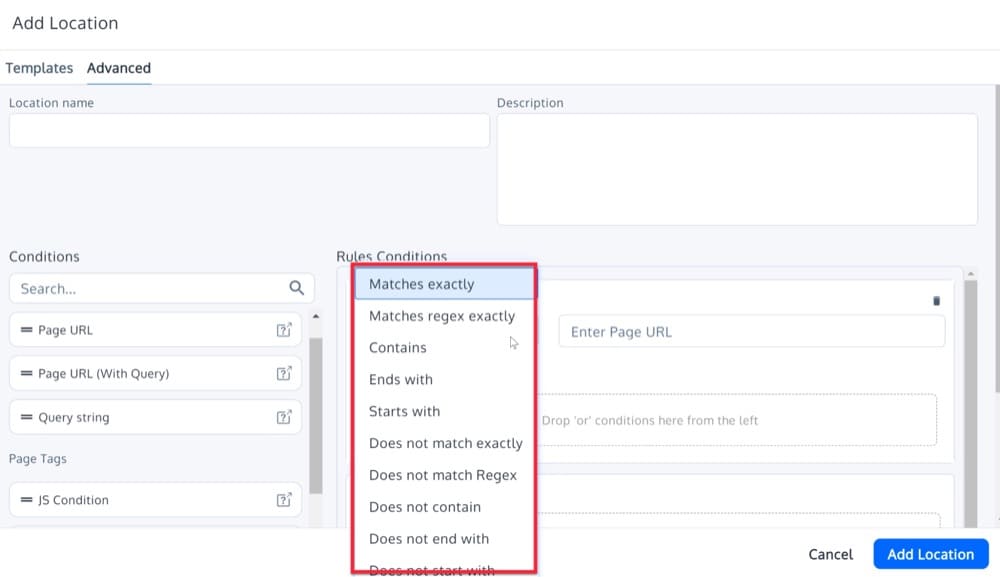
With the new Locations, instead of defining where an experiment runs every single time, you can save and use them across multiple experiences. Old experiences still work as they are, but anything new benefits from a setup that’s easier to maintain and far more consistent.
This change helps teams move faster. You spend less time rebuilding targeting rules and more time focusing on launching tests, learning from them, and keeping your program organized as it grows.
Visual Editor Updates
Our Visual Editor now handles changes at the DOM level, which makes editing much smoother. You can adjust or remove individual updates without rewriting entire blocks of code, and everything stays easier to revisit later.
This upgrade removes a lot of the friction that used to slow down quick iterations. Small fixes, layout adjustments, and copy tweaks become lighter work, so teams can spend more time validating ideas and less time wrangling markup.
You also get more precision when working with styles. Units like px, em, %, and vw are now built in, along with text values such as “auto” or “inherit.”
It’s a simple improvement that makes the editor feel more natural for both developers and non-technical testers.
Custom Pop-ups in the Visual Editor
Custom pop-ups allow you to A/B test pop-ups directly in the Convert Visual Editor.
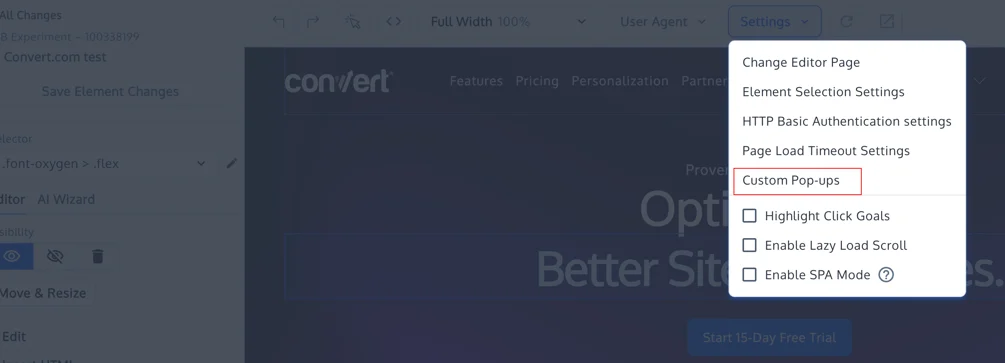
With this feature, you can:
- Add a pop-up, even if your site has no existing pop-up solution installed
- Design the pop-up visually (title, body, image, button, close “X”)
- Trigger it on first visit / page load or when a visitor clicks an element or on scroll to an element.
- Track performance using standard Convert goals (clicks, submissions, revenue, etc.)
It is compatible with any tools that you may already use — like Poptin or Ouibounce.js.
Custom pop-ups have the same depth of analytics the entire Convert Experiences tool is known for.
Each element is robustly customizable & trackable.
Buttons on the pop-up may:
- Close the display (purely for messaging)
- Take the visitor to a designated URL
- Run JavaScript to fire custom goals, interact with another widget, or even trigger on-page behavior.
Customizable Bayesian & Frequentist Stats Engines
Your stats engine should work the way your program works, not the other way around.
We’ve opened up both Bayesian and Frequentist settings so you can choose the approach that fits your decision-making style and the rigor your team prefers.
Frequentist users can choose one-, two-tailed, and sequential test types, along with comparison corrections like Bonferroni and Sidak and their desired confidence level. We’ve recently expanded these capabilities further by allowing users to specify left-tailed or right-tailed tests for one-tailed test types, improving statistical precision for specific test scenarios.
Bayesian users can focus on the Chance to Win instead of the more traditional Confidence value. With Bayesian reports, you also get Risk and Expected Uplift metrics, providing deeper insights into experiment performance and decision-making.
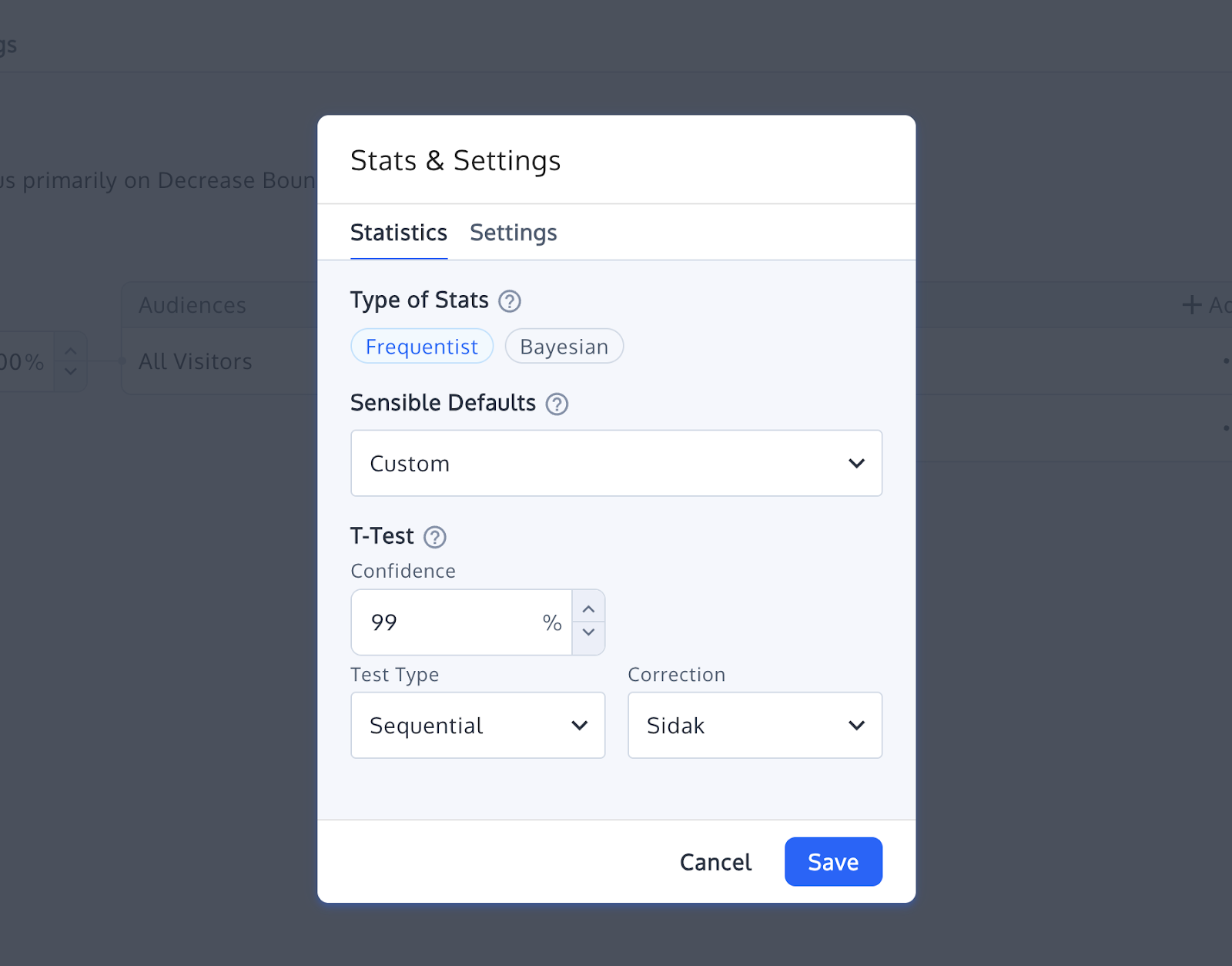
Convert’s Customizable Bayesian and Frequentist Stat Engines
This gives you more control. Different teams prioritize different signals, and experimentation shouldn’t force everyone into the same statistical model.
With configurable engines, you get a testing environment that adapts to your workflow and supports faster, more confident decisions.
Sequential Testing
Sequential testing adds more flexibility to Frequentist workflows.
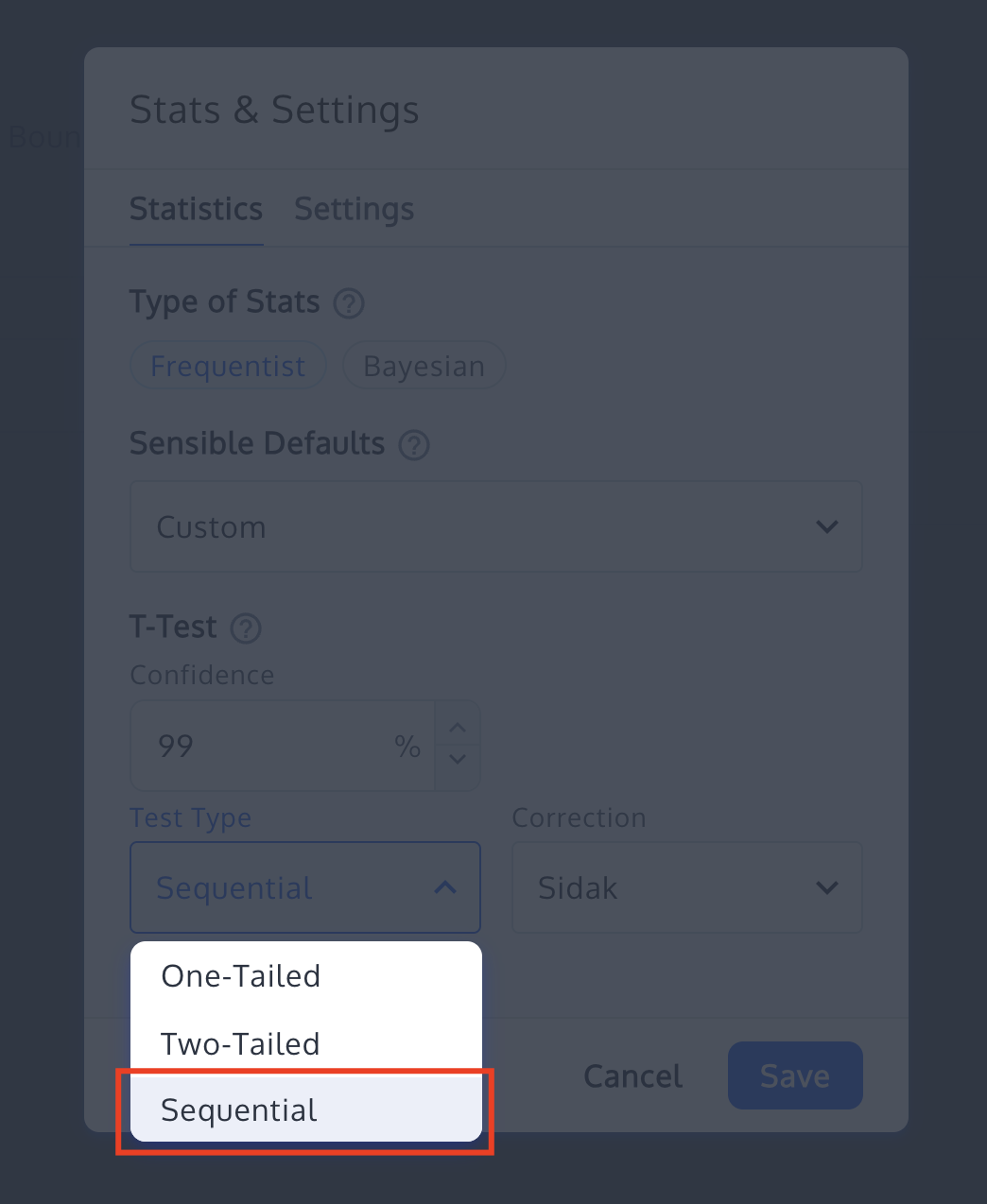
Instead of waiting for a fixed sample size, you can monitor results as they come in while maintaining proper error control. It supports faster decision-making when traffic patterns or business pressures call for earlier reads.
For teams that want the rigor of Frequentist methods with a bit more agility, sequential testing gives you a structured way to move quickly without sacrificing trust in the results.
Full Stack Experimentation
Full stack experimentation has moved from a “nice-to-have” to a standard part of modern testing programs.
It gives teams the ability to validate not just UI changes, but deeper product logic, backend behavior, and feature releases that shape the entire customer journey.
We built our full stack tools for teams that want that level of control.
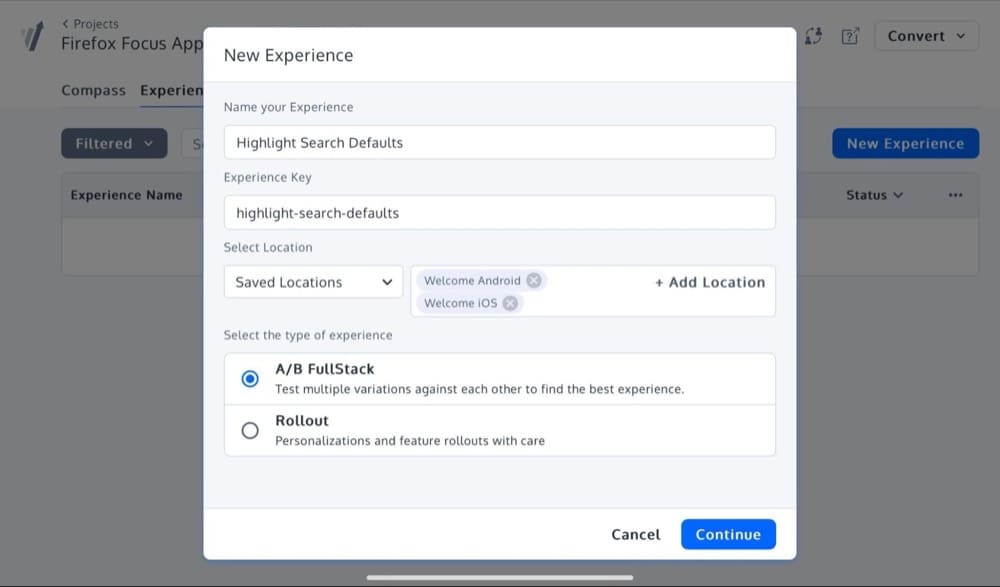
You can run server-side experiments, manage feature flags, and roll out new ideas gradually to the audiences you choose. When you want to release something to a percentage of traffic, observe how it behaves, and expand with confidence, full-stack makes that possible.
It also brings product and engineering teams into the same experimentation loop as growth. You get a single platform where decisions about features, pricing, onboarding flows, and UI refinements live together, rather than being spread across disconnected systems.
Our SDKs support the languages and frameworks teams use today, with predictable APIs that keep bucketing and tracking consistent between client and server.
It’s a flexible way to extend experimentation into parts of the stack that front-end tools can’t reach, while keeping everything aligned inside Convert.
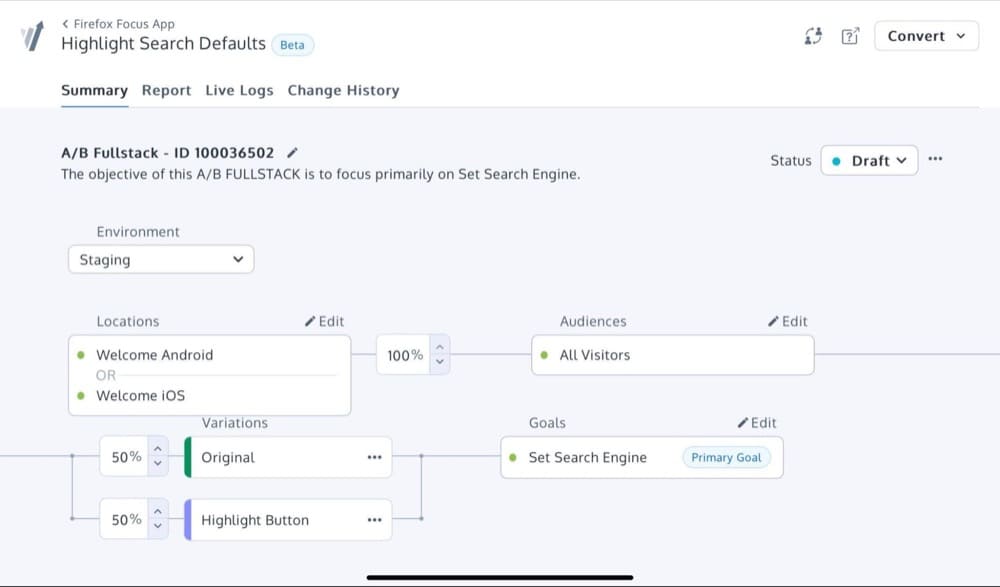
Full stack experimentation gives you a broader view of how changes influence customers across devices, channels, and touchpoints.
And as your testing program grows, it becomes a powerful way to evaluate product ideas earlier and reduce the risk that comes with launching features blindly.
New Shopify App
Our Shopify app makes it easier for merchants to run dependable A/B tests without touching templates or chasing scripts.
Installation is automatic, tracking is handled through secure API connections, and everything stays aligned across product pages, carts, and checkout.
We wanted to give Shopify teams a testing setup that behaves reliably, respects store performance, and fits the pace of their merchandising and campaign cycles. And we did.
AI Wizard
AI Wizard was our first step into generative AI inside the Visual Editor. It sits alongside your page elements and surfaces alternative copy options based on established persuasion and behavior models.
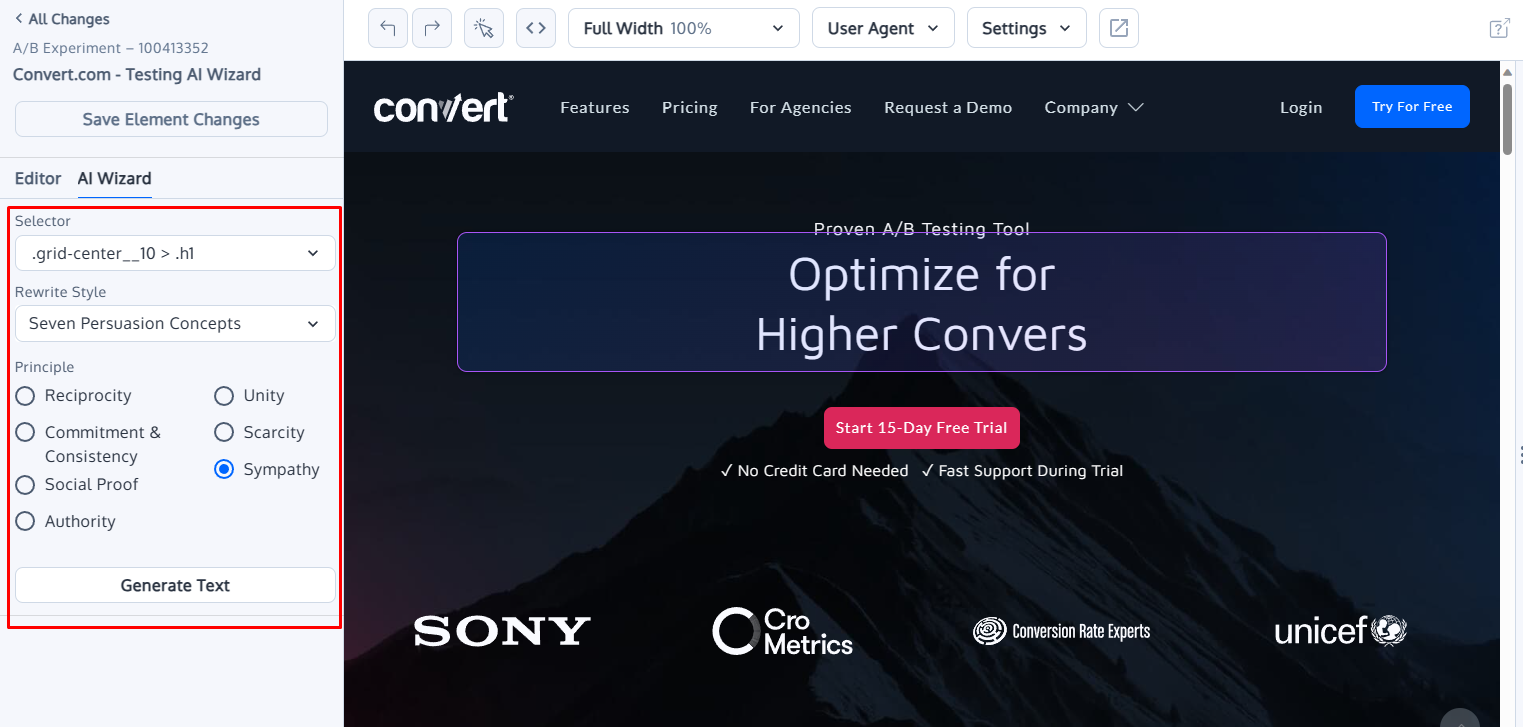
Convert’s AI Wizard in the Beta Visual Editor
When you need quick angles to explore—headline variations, supporting text, or new messaging directions—the Wizard gives you starting points without interrupting your workflow.
The AI Wizard is there to keep momentum high, help you explore more possibilities, and make copy iteration feel lighter during test creation.
Dynamic Triggers
Dynamic Triggers give you precise control over when an experiment activates. Instead of firing a test as soon as a page loads, you can launch it only when the visitor reaches the part of the experience that actually matters.

Teams use it to ensure results come from people who genuinely encountered the tested element.
Triggers can respond to scroll depth, time on page, button interactions, or specific events in your application. For more advanced flows, they can also react to JavaScript events so tests stay aligned with dynamic UIs.
This creates cleaner data and sharper insights. You avoid polluting results with visitors who never saw the change, and you gain the flexibility to shape experiments around real user behavior rather than assumptions.
It is available on both Convert’s Growth and Pro plans, with the Pro plan offering the full complement of dynamic triggers — the likes of which you need to pay extra to access in most of the other A/B testing tools.
Live Duration Insights®
Guessing when your test will reach completion is a thing of the past. With our new Live Duration Insights® and Live Duration Estimator, you have real-time visibility into how close your test is to reaching statistical significance.
This tool is for users who want to stay in the loop and know exactly how the final test results are trending.
With clear completion estimates, you can prepare in advance—with a measure of confidence—for changes to make based on the final test results as soon as they become ready. You can make decisions whether to stay the course, make adjustments, or pivot as results start to solidify. This can come in handy when a variation is clearly making you lose money.
If you want this transparency and want to sleep better at night in high-stakes testing situations, you should definitely give Live Duration Insights® in Convert a spin.
With this set, you can evaluate the results of your A/B tests at any point after reaching a minimum number of visitors.
This minimum number of visitors, a tuning parameter you can edit, ensures you can make faster decisions without risking premature conclusions. It still maintains statistical rigor with a stringent error rate control, so you can trust the findings from your tests.
This is huge because, with sequential testing, you can deploy winning variants faster or shut down variants that are unlikely to outperform the control. That earns more revenue for you as you deploy a winner in one case and stop burning money in the other.
Knowledge Base
Convert’s Knowledge Base is your living library of insights, turning each test—regardless of outcome—into a reusable asset.
It becomes your single source of truth. Tested and proven hypotheses automatically find a home here, a repository of your completed tests for maximum learning impact.

You can see exactly who proposed each idea, when it was added, and how it was tested. With tagging and filtering, finding a specific test takes a few clicks, so your experimentation history is easily accessible to you and your team.

This way, your experiments evolve into true learning tools, inspiring more tests, and greasing a really efficient experimentation flywheel with solid A/B testing meta-analysis.
With Knowledge Base, you and your team find it easy to stay on track with your experimentation goals and optimization roadmap, so you can:
- Avoid repetitive testing
- Go from spaghetti testing to strategic experimentation and
- Build on the success of work you’ve already done
Not to mention, it’s a productivity booster that’ll improve your testing velocity and impact.
Observations
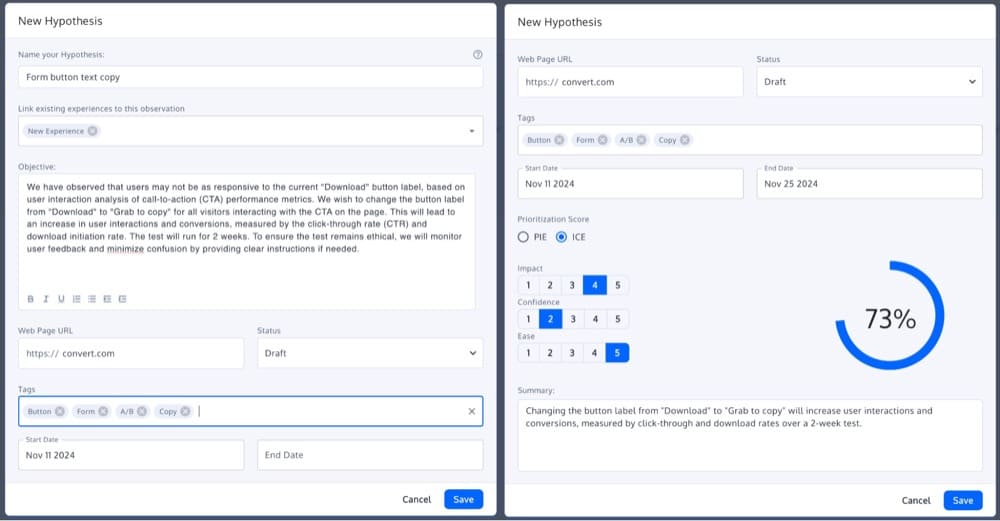
Convert’s Observations feature makes it easy to manage and prioritize your test ideas. It’s a centralized, flexible repository designed to store and tag every test idea (or observation) right in your project dashboard under the Compass tab.
When you’re ready to use these ideas, you can make them a Hypothesis (also in the Compass tab) so you can refine and pass them through a prioritization framework and, when the time is right, act on your best ideas.

You can tag each test idea by the site area you intend to run it on, metrics of interest, and other criteria, creating a smart, searchable catalog of potential experiments.
And if any idea feels like it’s ready for the next step, you can link it directly to a new or existing hypothesis. How neat is that? Set objectives, track progress, and once you’ve proven a hypothesis, convert it into an objective for easy access in your Knowledge Base (another new feature).
QA Overlay
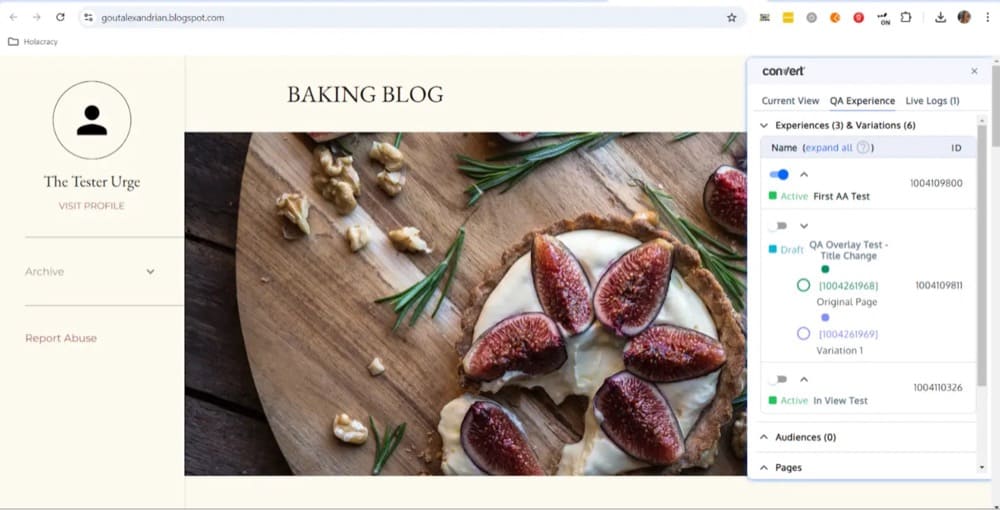
You want your experimentation quality assurance to be quick, intuitive, and entirely within reach of your testing tool. We made it happen.
Say goodbye to toggling between screens, tabs, and tools to guarantee the integrity of your tests. With our new QA tool, you have a one-stop overlay for validating your experiments in a live environment.
Need to preview different test variations? Just click or scan a QR code, and you can switch between original and variant setups on the fly. Catch bugs, mismatches, or rendering issues before they impact real users across devices.
This QA tool gives you the data that matters. See which experiments are running, track your audience targeting, monitor active goals and access live logs with real-time updates of all your variations.
You can also use the status overview within the QA Overlay to verify your tracking code installation, how in sync it is, and if your experiments are actually running so you can roll out tests with confidence.
And if you’ve got multiple projects running, the panel (which can adjust to your preferred size) lets you validate each one in a single QA window. Get a clear view of which experiences are active, which are in draft, and what goals have been triggered—all in real time.
Now, QA within your favorite A/B testing tool, Convert Experiences, has gotten even more powerful. As of February 2025, the QA Overlay can be used without needing the Chrome Extension, making it easier to validate experiments across browsers.
Environments
Think of instances where you’ve wanted to run a test in different testing environments—staging, development, or production—within one project but couldn’t. Now you can.
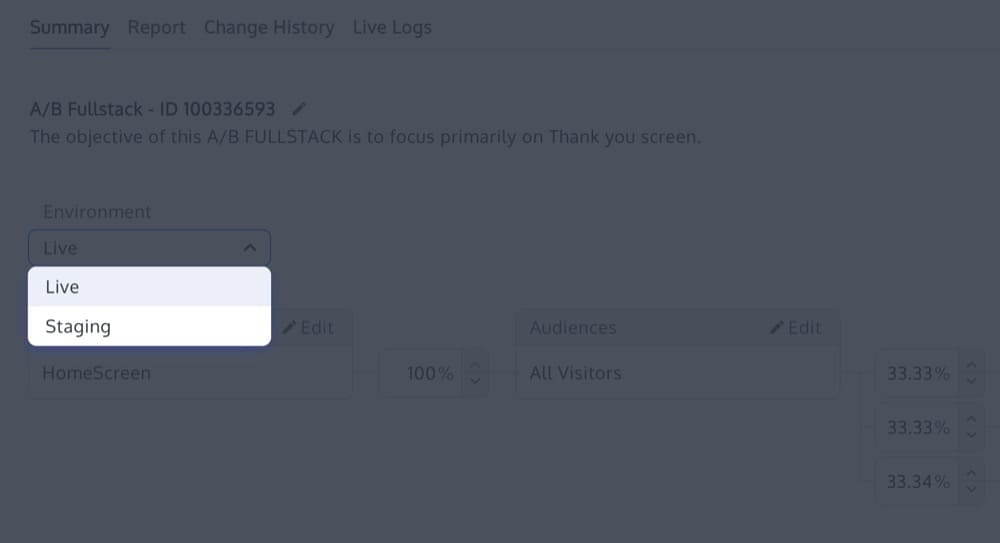
Convert’s Environments give you the flexibility to launch experiments exactly where you want them, regardless of domain, which is a quality assurance dream come true.
Each environment gets its own tracking code specific to its domain. Select the environment you need, copy the tracking code, and place it on the corresponding site. This way, experiment data is kept isolated in the environment in which it is running and computed without lag.
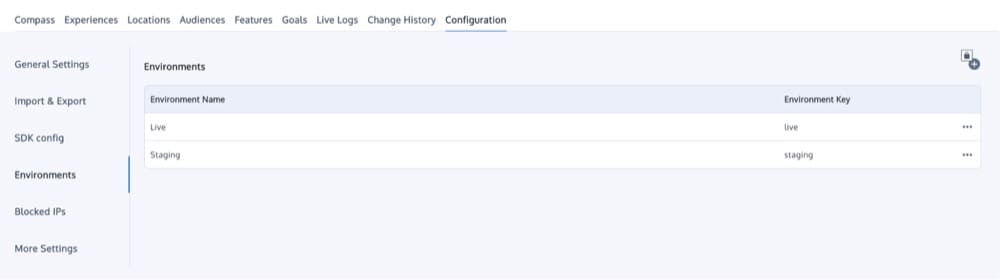
Convert’s Environments make it easy to ensure that you have the flexibility to run isolated tests before going live. You can set up multiple environments – depending on your plan.
Convert Signals™
Convert Signals™ reimagines session recordings with privacy at its core, selectively capturing and displaying only the moments where users genuinely struggle. Unlike other recording tools that overwhelm you with playbacks of random interactions, Signals zeroes in on meaningful user frustrations, errors, and usability issues.
Each captured session includes duration, pages visited, location data, and precise timestamps, all accessible directly within your Convert Experiences reports. The advanced filtering system lets you isolate patterns based on visit depth, session length, or geographic location.

As with anything we do, privacy is built in. Passwords and personal inputs are automatically masked, and the client-side tracking only kicks in when there’s a meaningful interaction that lasts at least 5 seconds.
The true power of Signals lies in its integration with your testing ecosystem. User frustrations are right there alongside your test data, creating an immediate feedback loop between qual and quant data– complete with shareable URLs that let teammates see exactly what you’re seeing.
Multi-Armed Bandit (MAB) & Auto-Allocation
MAB is a traffic allocation method that dynamically directs more visitors toward outperforming variations, rather than waiting until the end to implement winners.
Auto-Allocation can be enabled from either the Experience Level (under Summary tab > Stats & Settings) or the Project Level (under Projects > Configuration > Stats Settings).
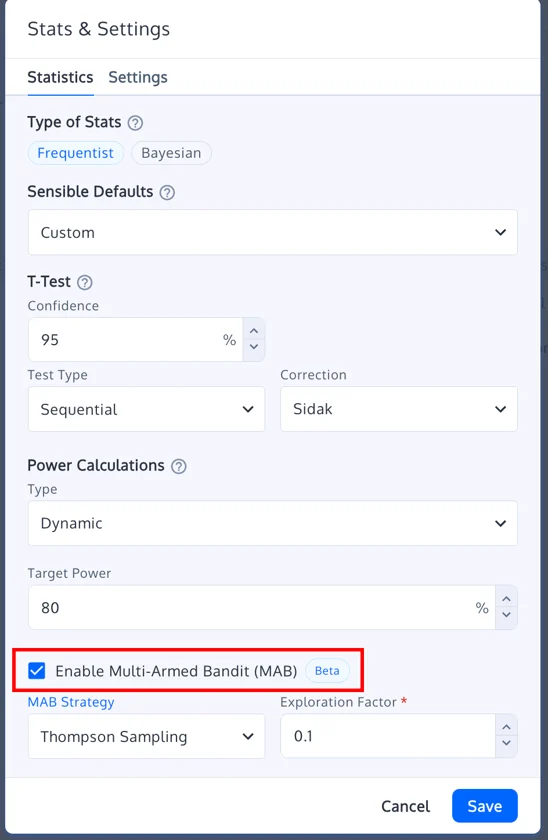
You can select from three algorithmic approaches:
- Thompson Sampling (default)
- Epsilon-Greedy
- UCB (Upper Confidence Bound)
Worth noting:
- You’ll need to commit to one primary metric (CR, RPV, or APPV) for MAB to optimize against. You’re locked into that choice once MAB is enabled on a live experience.
- Works great with A/B and Multivariate tests across both Web and Full Stack setups.
- Does not work for A/A tests or Deploys.
This feature is for teams wanting to optimize in real time based on user feedback, especially when resources are limited.
Import and Export Templates
If you manage multiple client accounts, the last thing you want to do is rebuild your experimentation setup from scratch… again and again.
Convert’s Import/Export feature streamlines your workflows by letting you save and reuse core components of your CRO playbook across accounts, projects, and even teams. You can export and import:
- Goals
- Audiences
- Experiences
- Hypotheses
- Locations and rules

All in clean, structured JSON format. So whether you’re spinning up a new client account or replicating a successful test setup across similar businesses, you never start from scratch.
Let’s say your agency uses a testing framework like DEXTER. You can create a blueprint project in Convert with predefined audiences (like mobile visitors from Google), goals (like clicks on a CTA button), reusable hypotheses, and experience templates.
Export it once. Import it across every new client project. Tweak what you need, keep what works. This approach supports repeatability, speeds up deployment, and gives your team more time to focus on strategy over setup.
Some agencies also use this feature as a lightweight version control system. Before major changes, export the config. If something breaks or needs reversing, you’re covered.
When you start seeing this pop up everywhere else, remember who started it ;). We love being a pacesetter in our industry.
Tracking Script Version Control
Convert’s new Version Control gives you visibility, control, and peace of mind when it matters most. It provides full transparency into which version of the tracking script is live on each of your projects, with the ability to upgrade or roll back in a single click.

Here’s what Version Control brings to your testing setup:
- Each project now shows the exact script version it’s running. It also comes with release notes so you know what’s changed.
- If an issue slips through, just roll back to the last stable version instantly.
- Updates are batched every two weeks and rolled out gradually over 48 hours. That means fewer surprises, more stability, and time to catch issues early.
This doesn’t change your day-to-day test management. You can still launch, run, and analyze your tests the same way.
Version control is just a safety net giving you the peace of mind that comes with knowing exactly what’s running and the power to fix it fast if anything goes wrong.
Remove Report Data
Sometimes test data goes sideways. A broken tag, a rogue traffic spike, or a QA session hitting production can throw off your results.
Now you can fix it right inside Convert.
The Remove Report Data feature lets you delete skewed data from your experiment reports, without canceling the test or contacting support. You can surgically remove data:
- For specific date ranges or full durations
- By time of day
- By event type (views, conversions, or transactions)
- By goal
This comes in handy when:
- Internal traffic sneaks into your experiment
- A third-party script inflates conversion counts
- A campaign launches mid-test and floods your traffic
You keep your test running and preserve valid results. No need to start over.

We understand experimentation isn’t always perfect and want to give you the cleanup tools for those times when things go off-track.
MCP Servers & AI Integration
Until recently, connecting AI to your experimentation workflows meant wrangling APIs, building brittle middleware, and accepting that any vendor change could break your setup overnight. It worked, kind of.
Now there’s a better way.
Convert now supports MCP (Model Context Protocol), Anthropic’s 2024 standardized interface that lets AI models like ChatGPT, Claude, or Cursor interact with tools like Convert through simple plug-and-play setup.

Our official self-hosted MCP server, called @convertcom/mcp-server, exposes the full Convert API to any AI assistant. With this integration, AI tools can securely:
- Query experiment performance across goals, segments, or lift thresholds
- Detect statistically significant variants in real time
- Summarize reports in natural language
- Pause or modify underperforming experiences
- Launch new A/B tests using your chosen statistical engine
Everything happens on your terms. Credentials stay local, permissions are explicit, and access stays contained.
Teams use it in different ways:
- Optimizers get faster reads on what’s working
- PMs and growth teams get shared visibility without chasing links or exports
- Developers get a simple API layer that fits neatly into their IDE
- Agencies move between client accounts more efficiently because AI can gather the state of each project in seconds.
It’s a practical step toward an AI-enhanced workflow.
Bring Your Own ID (BYOID)
Most testing tools assign their own visitor IDs and call it a day. That works until you need clean attribution or a consistent identity across your entire stack. BYOID gives you that control.
With BYOID, you can use a stable identifier from your own systems to bucket visitors in Convert. It aligns experiment identity with the IDs your CRM, CDP, or app already relies on, which makes downstream analysis and data joins much easier. Persistence follows your rules, not ours, so behavior stays consistent across domains and apps.
It’s simple, it’s privacy-safe, and it helps your experiment data fit naturally into the rest of your analytics ecosystem.

Price Testing
Pricing tests used to be messy. Duplicate products, theme edits, checkout mismatches, all the busywork that makes a simple idea harder than it should be. Convert’s Shopify app fixes that.
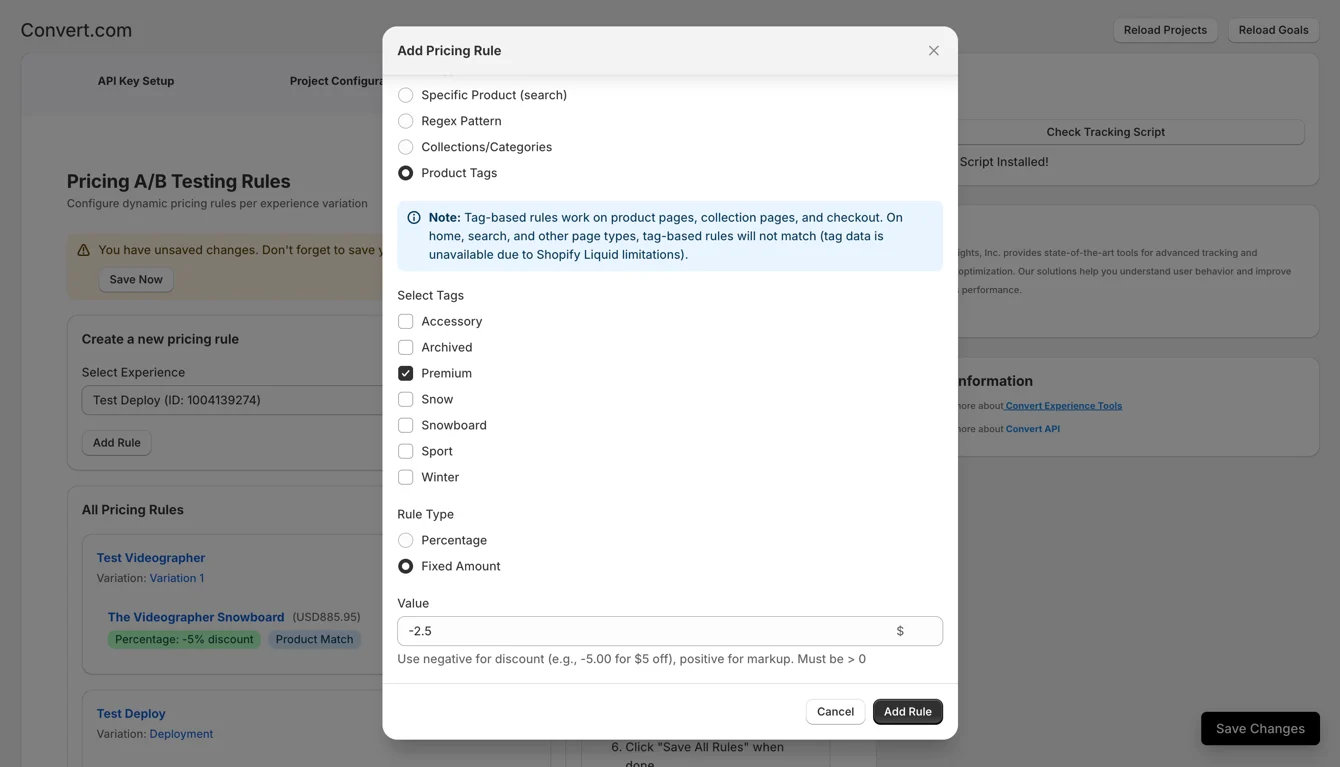
Price testing lets you experiment with real prices across product pages, collections, search, cart, and checkout without touching code. Pick the products you want to test, set your adjustments, and the app updates prices everywhere they appear, including the final checkout amount.
It fits naturally into your existing Shopify setup. You can match products by handle, collection, tags, or patterns, and apply multiple rules when needed. Variants stay aligned, and the right price follows the shopper through their entire journey.
Pricing is one of the strongest levers for revenue and margin, and this feature gives you a reliable way to validate changes without rebuilding your catalog or relying on workarounds.
Nexus
Meet Convert’s newest: Nexus! Here to make personalization at scale refreshingly simple.
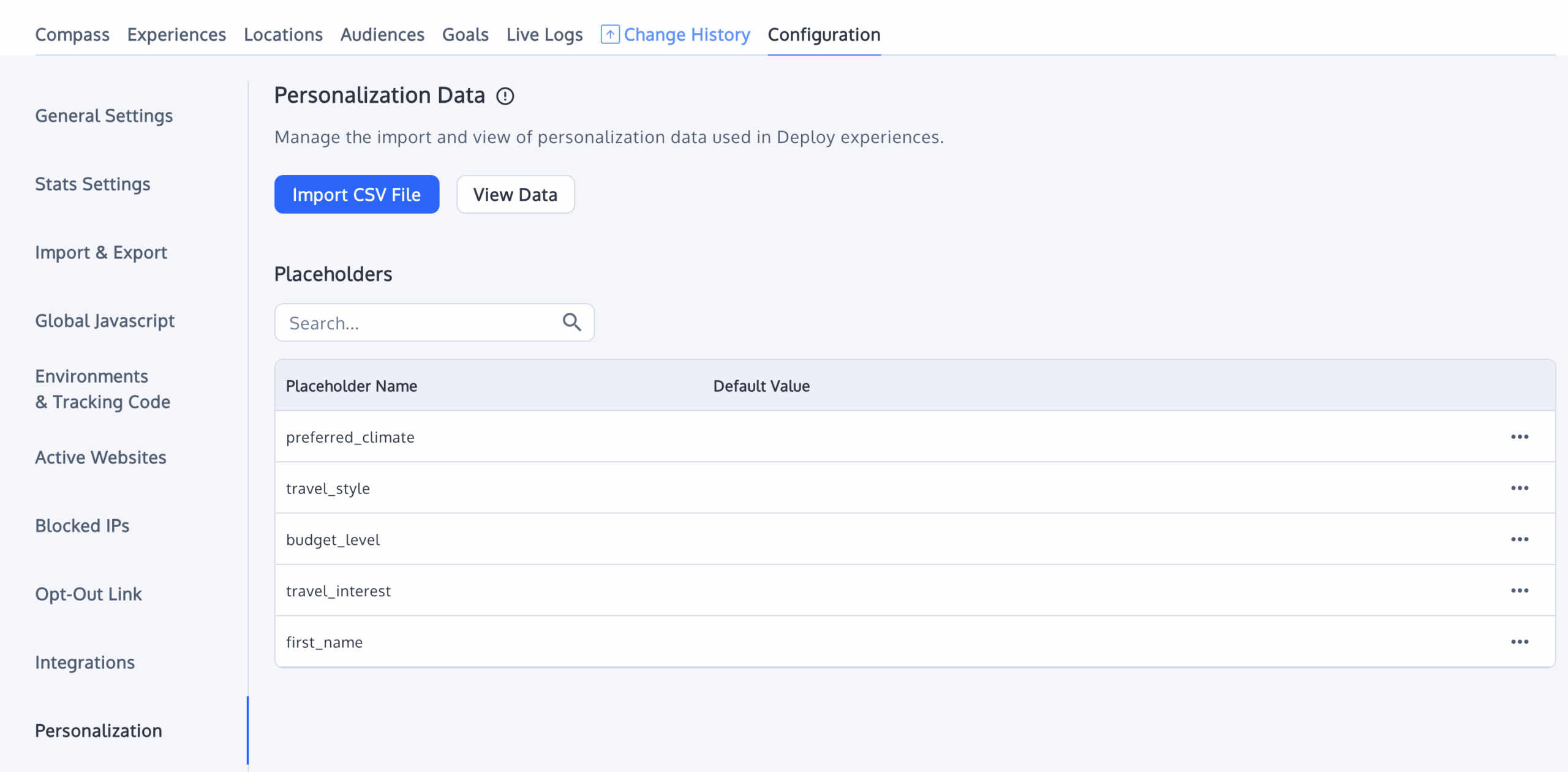
Nexus turns your data into dynamic landing pages without requiring code or a redesign. Upload a simple CSV or connect the systems you already use, and it generates unique, data-driven versions of your page for each visitor or account.
Growth teams, ABM programs, and sales motions get a straightforward way to deliver 1:1 experiences that match their outreach.
Everything happens inside Convert. You can change text, images, CTAs, or entire sections and control how those elements appear based on the fields in your dataset.
Each personalized page uses a secure, hashed URL, so sharing them across email, ads, and sales channels stays safe and predictable.
Nexus fits alongside your experimentation workflow. Convert helps you learn what resonates, and Nexus lets you deliver it at scale.
For teams tired of building one-off pages or waiting on engineering, it creates a faster path from idea to personalized experience, with the reliability Convert has built over the years of supporting high-volume testing programs.
Privacy & Compliance
Privacy has always shaped how we build. We support consent-aware tracking, integrations with common CMPs, anonymization controls, privacy-focused session recording, and identity options like BYOID. These give teams a responsible foundation for experimentation without slowing anything down.
We surface guidance where it helps. If a segmentation pattern might introduce GDPR risk, we show a warning. Our documentation covers DPIAs, consent flows, cookie behavior, and data minimization so teams have clarity on how our features behave in regulated environments.
BYOID contributes to that foundation. You can use pseudonymous, first-party IDs from your own stack without pushing personal data into our systems. Signals follows the same philosophy, capturing only anonymized friction moments instead of full session recordings.
Across client-side, server-side, and analytics integrations, we design with responsible data practices in mind. Every feature reflects that commitment.
And to further strengthen it, we’re ISO 27001:2022 certified and SOC 2 compliant, so you can scale experimentation with the confidence that independently verified safeguards protect your data and workflows.
Convert Says: Experimentation Is Human Nature™
We say this because experimentation is a cycle that is ubiquitous in our daily lives.
We observe a set of events, suspect a causal link, hypothesize why this link exists, and then take action. This cycle of observation, hypothesis, and action is present in everything we do, from switching to a ‘better’ workout routine or tweaking a cooking recipe. It’s like climbing a mountain of wins.
All human progress can be traced back to curiosity and experimentation. We are curious about meaning and purpose. This compels us to understand why things happen the way they do.
That’s why we see the same in businesses run by humans—experimentation in marketing, sales, product development, customer experience, pricing, etc. (Not like I’ve seen any business run by aliens but I bet they would do the same).
Hence, any platform or tool that wants to support proper experimentation should:
Free up resources (funds) for people and processes
Your testing tool is just one part of your experimentation program. And it is not even the most important part.
As Steph Le Prevost points out below (and many other experts concur), people and processes are the bedrock of validation and causal relationship-seeking culture.
In our “How to Optimize Each Stage of Your Experimentation Journey” event, Jeremy Epperson also argued that tool choice should not be the first consideration. Instead, the focus should be on the skills, process, and team building of how we actually execute against experimentation.
Allow for testing across all growth channels and motions
Here’s a bit of context to grasp what this means:
Elena Verna emphasizes the importance of leveraging all growth motions and levers in your growth model. And experimentation plays a role in all three growth motions.
- Product-led growth: To identify which product features drive user engagement and retention
- Marketing-led growth: To find the most effective marketing strategies or campaigns that drive user acquisition and conversion
- Sales-led growth: To find the most effective sales tactics/strategies — such as what pricing model increases the average deal size or close rate
Experimentation is, after all, an amplifier — improving what’s already working, spotting ideas that aren’t worth rolling out, and unearthing innovation to revamp what’s effective but gradually regressing to the mean.
All of which are elements driven by a comprehensive experimentation approach that permeates every aspect of your business and product. This is also known as full stack experimentation.
If your experimentation tool is built with your business’s best interest at its core, it should be able to support testing across all these growth motions.
Shorten the time from observation to insight to knowledge
This may manifest in exploration tools like heatmaps that don’t just show “what’s happening”, but also connect the “why it’s happening” to actionable next steps (i.e., ideas to test).
It also involves giving you the power to unlock data from any touchpoint along the customer’s journey, even if it is a 3rd party platform.
Simplify test deployment
This can be achieved by offering hyper fast response times, so you and your team aren’t left twiddling your thumbs through inordinately long waits and then subjected to frustrating scripted fluff responses.
Instead, your tool should increase time to action/learning; or slash the time you take to launch a test and get back results — an important program efficiency metric.
It should stay one step ahead of privacy issues which add a layer of hesitation to running tests because of either skewed results, steep fines, or heavy criticism (like in the case of Facebook’s infamous 2012 experiment).
At Convert, we’ve worked extensively on this aspect, as detailed in our blog post on respecting visitor privacy during experimentation.
Conclusion
In lieu of a conclusion, we’ve drawn upon insights from Ton Wesseling and Jonny Longden’s thought-provoking LinkedIn posts, which provide guidance for selecting a suitable experimentation tool vendor.
So, if you’re wondering what to consider when making such a choice and if Convert is the right choice, here’s what you need to know:
Pricing Structure: Understand the pricing structure of the tool. Is it cost-effective for your organization’s needs?
Convert provides flexible self-service pricing. Plus, we don’t force you into an annual plan and our pricing is significantly more affordable compared to what’s popular out there. On top of that, we give you a free 15-day trial with no commitments.
Integrations: The tool should have the ability to integrate with other platforms, particularly data integrations. API capabilities are also important.
Our API V2 is out and we’ve got over 90+ integrations with tools in your martech stack.
Support Availability and Quality of Documentation: Good customer support and comprehensive documentation are crucial for troubleshooting and understanding how to use your experimentation tool effectively.
Besides our comprehensive support resources, you can reach our responsive support team from inside our platform in just 2 clicks.
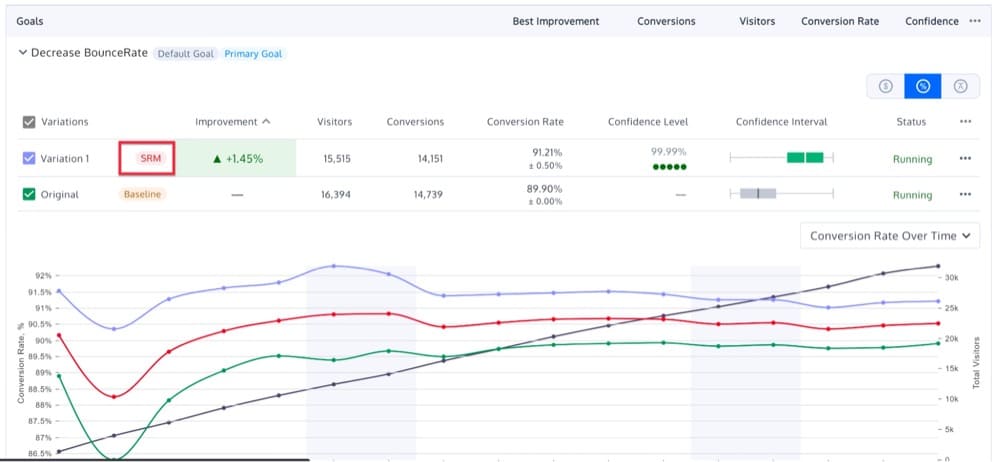
Data Quality: The tool should provide high-quality data, including SRM (sample ratio mismatch) aspects.
Convert Experiences comes with a useful SRM checker. Once enabled, the tag will look like this:
Transparency on Statistical Models & Ability to Run Your Own Stats Calculations:
The tool should provide clear information about its statistical models to ensure trustworthiness. It should also allow you to perform custom statistical calculations.
We’re very open about a lot of things. This one is no exception: Here are the statistical models we use.
Plus, Convert’s A/B testing significance calculator supports revenue metrics like AOV & ARPV.
Server-side Solutions: The tool should offer server-side testing capabilities. Our full stack testing feature allows you to test both front-end and back-end aspects of your product. We support both server-side and client-side testing.
GDPR Compliance and Strict Cookie Policies: The tool should be compliant with GDPR and other relevant data privacy regulations. We’ve been the forerunner of data privacy, security, and compliance for many years now. We’re GDPR and CCPA compliant and ISO 27001:2022 certified.
Ability to Influence Product Roadmap: The tool should allow for user feedback and influence on its product roadmap. We maintain close relationships with our users and agencies who use our product. We listen and use your feedback to evolve Convert.
Targeting and Segmentation Functionalities: The tool should offer robust targeting and segmentation options.
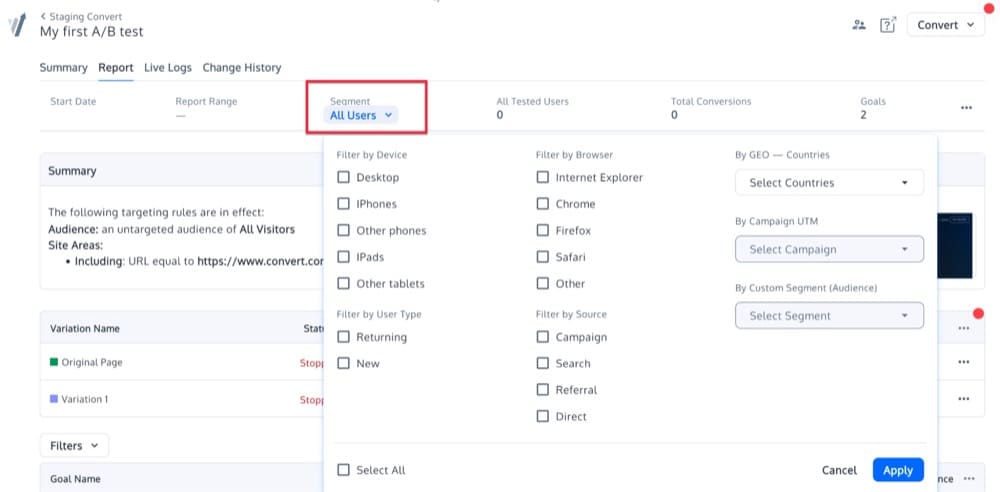
Convert offers an advanced targeting engine with 40+ stackable filters, and the flexibility to use data locked in 3rd party systems. Plus, after your experiment starts receiving traffic, you can access the advanced post segmentation feature:
Load Time / Flickering: The tool should have minimal load time and prevent flickering issues. We have super fast loading times and solved the flickering problem years ago, back when it was still a luxury.
Anti-flicker technology has always been baked in our tool at no additional cost.
Ease of Use / UX: The tool should be user-friendly and manageable, even with multiple accounts/tests. We have countless reviews praising our “idiot-proof” UI.
Consistency and Predictability of Traffic Volumes: The tool should be able to handle consistent and predictable traffic volumes.
Visual Editor and Code Editor Feature: The tool should provide both a What You See Is What You Get (WYSIWYG) editor and a code editor.
Convert’s robust Visual Editor is usually one of the first features our users fall in love with — and the code editor features give you extra flexibility in building tests with custom JS and CSS.


Written By
Uwemedimo Usa
Edited By
Carmen Apostu