15 Top Website Optimization Tools for 2026


Website performance drives conversions and user experience, but “website optimization” covers at least four jobs, and no single tool does all of them. A technical SEO crawler won’t tell you why your checkout leaks. A heatmap won’t fix your Largest Contentful Paint.
This guide compares the leading website optimization tools across conversion rate optimization, SEO and AI visibility, analytics, and site speed. Every claim below was checked against the vendor’s own feature page or documentation in August 2026.
Website optimization tools comparison chart
| Product | Starting Price | Free Trial? | Key Features |
|---|---|---|---|
| Convert | $399/mo, or $299/mo billed annually | Yes, 15 days | A/B tests, multivariate tests, native heatmaps & session recordings, Convert Signals®, feature flags, MCP server |
| Unbounce | $99/mo (Build), ~$74/mo annually | Yes, 14 days | No-code landing page builder, analytics. A/B testing starts at $149/mo. |
| Mouseflow | $31/mo billed annually | Free, 500 sessions/mo | Session replay, heatmapping, friction score |
| Hotjar (Contentsquare) | €39/mo, or €49/mo annually (Growth) | No, but offers a limited free plan | Heatmaps, session recordings |
| Figma | $20/mo per Full seat, $16 annually | Starter plan, 3 files | Real-time collaboration, design and interactive prototyping, analytics integration |
| Ahrefs | $129/mo, or $108/mo billed annually | No, but offers free SEO tools | SEO tools, competitor analysis, backlink tracking |
| Screaming Frog | $279 per year | No, but offers 500-URL crawls free | SEO audit tools, site crawling, building XML sitemaps |
| Moz Pro | $49/mo billed annually | Yes, 7 days | SEO tools, site audits, rank tracking |
| Yoast SEO | $118.80/year | No, but offers a limited free plugin | SEO analysis, keyword optimization, SEO content insights. AI+ tier at 358.80/yr. |
| Semrush (Adobe) | $139.95/mo, or $117.33/mo annually | Limited free account | SEO tools, keyword research, competitor analysis, AI visibility track |
| Google Analytics (GA4) | Free | No | Data analysis, website tracking, customizable reports |
| Google Search Console | Free | No | Query and impression data, performance monitoring, indexing status |
| Google PageSpeed Insights | Free | No | Performance scoring, optimization recommendations |
| GTmetrix | $5.99/mo, or $4.99/mo billed annually | No | Performance reports, page analytics, recommendations |
| Pingdom (SolarWinds) | Starts at $16.5/mo for synthetic monitoring, $16.5/mo for real user monitoring, billed annually | Yes, 30 days | Uptime monitoring, performance insights, real user monitoring |
15 best website optimization tools in 2026
- Convert: Best for full-stack experimentation and conversion rate optimization
- Unbounce: Best for non-technical marketers optimizing conversions
- Mouseflow: Best for website optimization specialists
- Hotjar: Best for UX optimization specialists
- Figma: Best for design teams
- Ahrefs: Best for competitive SEO analysts
- Screaming Frog: Best for technical SEO professionals
- Moz Pro: Best for SEO-focused marketing teams
- Yoast SEO: Best for optimization-focused website teams
- Semrush: Best for all-in-one performance marketing analysis
- Google Analytics: Best for digital marketing analysts
- Google Search Console: Best for marketing analysts optimizing SEO
- Google PageSpeed Insights: Best for performance-focused web developers
- GTmetrix: Best for international performance optimizers
- Pingdom: Best for website performance tests and monitoring
Conversion rate optimization tools
A good CRO tech stack needs A/B testing or multivariate testing, heatmaps, session recordings, and form analysis. These four five cover that.
1. Convert
Best For: Full-stack experimentation and conversion rate optimization
Convert is an A/B testing and personalization platform built for teams that want to run experiments without their bill scaling unpredictably. It has been developed by the same self-funded company since 2009, and the pricing model reflects that: flat-rate plans, no feature modules bolted on as add-ons, and legacy plans honored rather than force-upgraded.

Key Features:
- A/B, multivariate, split URL and multipage testing: Remove constraints and explore endless experiments to elevate conversion strategies.
- Advanced segmentation: Tailor tests using sophisticated segmentation based on user actions, cookies, location, device, language, and more, ensuring precise targeting.
- Native heatmaps and session recordings: Convert Signals® and built-in heatmaps show where visitors click, tap, and scroll on the pages and variations in your experiments no third-party script required.
- Full stack experimentation: Run experiments beyond your website with server-side experimentation, A/B testing across both web & apps, feature flagging & rollouts to build and release better products, faster.
- Convert MCP Server: lets an AI assistant query your experiment data directly. New in the current release across Growth, Pro and Enterprise.
- Multi-Arm Bandit (Auto-Allocate): shifts traffic toward better-performing variations automatically. Pro and Enterprise.
- Frequentist and Bayesian stats engines, SRM checks, sequential testing: the statistical plumbing is exposed rather than hidden.
Pros:
- Provides clear and straightforward pricing without hidden fees, enabling businesses to plan their budgets effectively.
- Displays QA results in a single modal with the QA overlay to reduce context switching and make troubleshooting hassle-free.
- Offers dedicated customer support, ensuring users receive personalized assistance to maximize the effectiveness of their optimization strategies.
- 90+ native integrations, EU-based servers in Frankfurt, first-party cookies only, and ISO 27001 / SOC 2 Type 2 certification.
- Committed to ethically and socially conscious business practices like DEI, carbon neutrality, and donating top line revenue to climate initiatives.
Cons:
- Complex A/B testing setups can be initially overwhelming without proper guidance.
Pricing: Growth is $399/month month-to-month, or $299/month billed annually. 15-day free trial, no credit card required.
2. Unbounce
Best For: Non-technical marketers optimizing conversions
Unbounce is a no-code platform designed to cater to non-technical marketers seeking to build and optimize landing pages. With an intuitive drag-and-drop editor, it empowers users to create landing pages and manage A/B tests without a developer.

Key Features:
- Simple drag-and-drop landing page builder: Unbounce simplifies the landing page design and development process with WYSIWYG tools.
- No-code A/B testing for marketers on the Experiment plan: Unbounce features an no-code toolkit to help you build A/B tests and experiment with headlines, CTAs, imagery, and more.
- AI-powered insights: Use AI to optimize your conversion rate, track industry-specific conversion benchmarks, and identify new audience opportunities.
- Multiple integrations: Plug Unbounce into dozens of popular tools, including Salesforce, HubSpot, Mailchimp, and Zapier.
Pros:
- Fastest path from brief to live page for a marketer with no dev support.
- Includes AI tools like an AI copywriter and AI optimization.
- Smart Traffic is a real differentiator at paid-media volume, where it typically outperforms an even split once you have several variants and meaningful traffic.
Cons:
- A/B testing is not on the entry Build plan. It starts at Experiment, $149/month. Smart Traffic doesn’t appear until Optimize, $249/month. The $99 plan is a builder, not an optimization tool.
- Doesn’t allow for complex experimentation, such as multivariate testing. Teams that need it commonly pair Unbounce with Convert.
- Advanced features require technical skills such as HTML, CSS, and JavaScript.
Pricing: Starts at $74 per month when paid annually and offers a 14-day free trial.
3. Mouseflow
Best For: Diagnosing friction on a specific page or funnel
Mouseflow gives you session replays, seven heatmap types, funnels and form analytics, priced on recorded sessions rather than pageviews, which keeps the cost tied to the thing you actually use.

Key Features:
- Friction score: Highlights usability issues by identifying frustration points such as slow load times or unclear navigation paths.
- Conversion funnel analysis: Provides insights into user behavior changes across variants to refine optimization strategies.
- Integration with A/B testing platforms: Pair Mouseflow with A/B testing tools like Convert, AB Tasty, and Kameleoon, as well as popular tools like HubSpot, Shopify, and Zendesk.
Pros:
- Provides comprehensive reports on user activity, including session replay and detailed click behavior.
- Simplifies the analysis of large datasets for identification of UX bottlenecks and fixes.
- Unlimited users on every plan.
Cons:
- Restricts the number of websites for entry-level plans, with the lowest cost plan allowing only one website project.
- Basic and underdeveloped forms analytics feature limits data collection capabilities.
Pricing: Starts at $31 per month when paid annually and offers a limited free plan.
4. Hotjar
Best For: UX optimization specialists
Hotjar is a comprehensive tool designed for UX optimization specialists, marketers, and product managers who aim to dive deep into user behavior to enhance website or product performance. The platform offers a variety of tools to dig into granular visual data of website engagement through heatmaps and scrollmaps, quickly showcasing user signals that you can communicate to stakeholders.

Key Features:
- Heatmaps and session recordings: Track user behavior with click, move, and scroll heatmaps to spot interaction patterns or watch detailed user sessions to understand visitor engagement and site usage.
- Interviews and user testing: Collect user feedback through interviews with over 200,000 participants from all over the world or launch a customizable user test.
- Integration with A/B testing tools: Seamlessly combine with tools like AB Tasty, Optimizely, and Convert for deeper data analysis.
Pros:
- Intuitive interface for easy navigation and understanding of your heatmap results.
- Diverse heatmap options deliver rich user insights, ranging from engagement zones, scrolling, mouse movements, rage clicks, and more.
- Accessible training and support resources with the help center and Hotjar Learning interactive courses.
Cons:
- Lacks predictive analytics for forecasting based on current data trends.
Pricing: Offers a free plan for up to 200k monthly sessions. Paid plans start at €39 per month when paid annually, or €49/month billed monthly.
5. Figma
Best For: Design teams prototyping changes before they get built
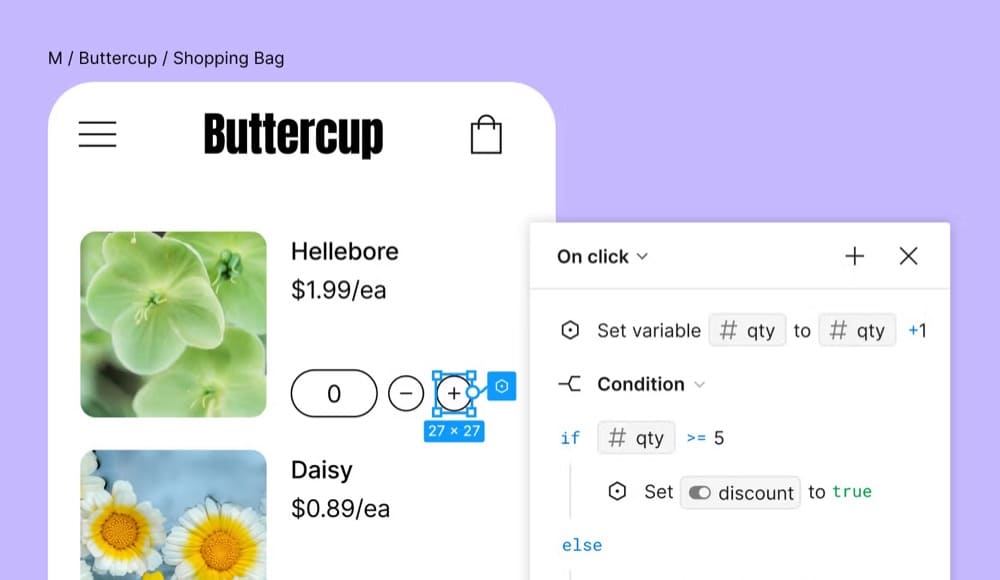
Figma is a collaborative design tool for building meaningful products. The product stands out for designers and testing teams seeking a robust platform for collaborative creation and iterative improvement. The tool also excels in creating interactive prototypes that simulate user journeys, assisting teams in visualizing and refining user interactions.
Key Features:
- Real-time multiplayer editing with commenting and version history. Dev Mode for design-to-code handoff.
- Interactive prototyping for testing user flows pre-build.
- Shared design systems and component libraries.
Pros:
- Facilitates real-time collaboration among team members and improves handoff with design systems.
- Allows creation of interactive prototypes and user flow visualization for comprehensive testing.
- Includes 300+ templates, wireframe kits, plugins, and more to make it easier to get started.
Cons:
- Complex interface results in a steep learning curve.
- Organization and Enterprise are annual-commitment only, with no monthly option.
- AI credits are a second meter running on top of the seat cost.
Pricing: Offers a limited free plan. Professional: Full seat $20/month ($16 annually), Dev seat $15/month ($12 annually), Collab seat $5/month ($3 annually). Organization $55/Full seat and Enterprise $90/Full seat, both annual only.
If design capability is the bottleneck: Platforms like crowdspring offer professional web design by helping businesses create visually effective, high-performing websites, which is often a faster route to a better-converting page than adding another licence to the stack.
SEO and AI visibility tools
Search visibility now has two halves: ranking in classic results, and being cited in AI answers. These five tools cover the first well, and are racing to cover the second.
6. Ahrefs
Best For: Competitive SEO analysts
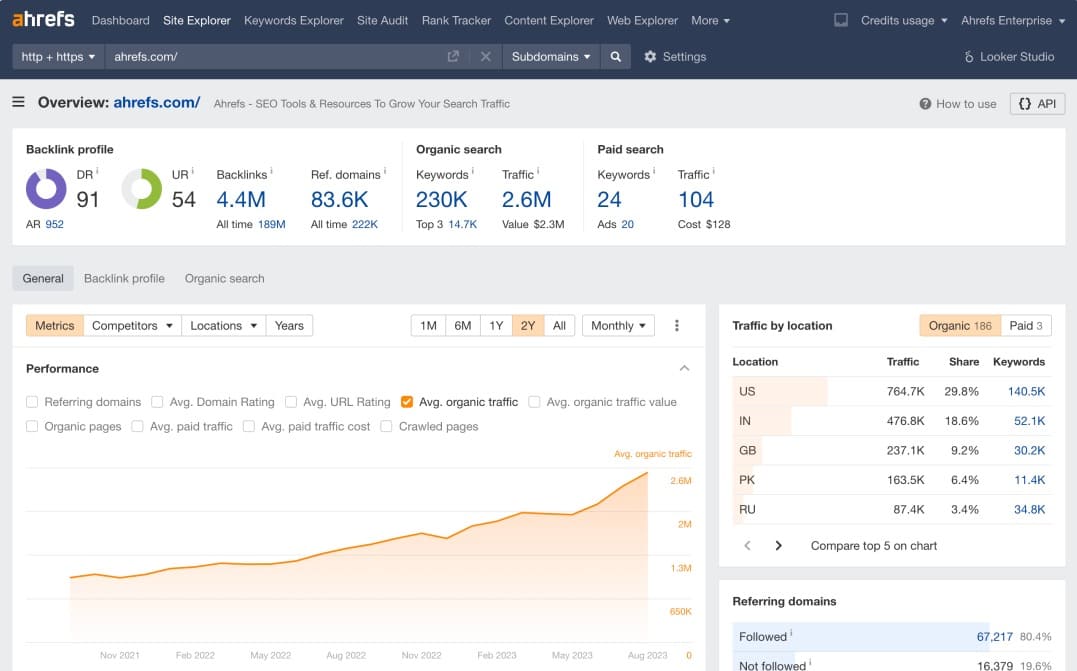
Ahrefs is one of the most popular and powerful SEO platforms in the industry today. It’s beloved by SEO analysts and digital marketers broadly, offering a wealth of insights to outmaneuver competitors in the organic arena. From technical SEO audits to individual keyword tracking and more, it’s got pretty much everything a smart SEO needs to drive performance and monitor organic growth progress.
Key Features:
- Site Explorer: Analyze any website’s backlink profile and organic search traffic to understand its SEO performance.
- Keywords Explorer: Discover and evaluate relevant keywords, including their search volume and difficulty, to inform your content strategy.
- Site Audit: Conduct comprehensive technical SEO audits to identify and fix issues that may affect your site’s performance.
- AI-Powered Tools: AI features like Content Helper and Content Grader to optimize content creation and improve topical coverage.
Pros:
- Excellent keyword data with a plethora of ideas based on seed keywords.
- Easy navigation with insightful visual reports.
- Highly filterable results for precise SEO research.
Cons:
- Requires a learning curve, potentially challenging for users short on time.
- Pricing concerns and add-on pricing frustrations for smaller teams.
Pricing: Offers free Webmaster Tools (Site Explorer and Site Audit). Lite $129/month (~$108 annually), Standard $249, Advanced $449, Enterprise from $1,499.
7. Screaming Frog
Best For: Technical SEO professionals
Screaming Frog is the go-to technical SEO tool, an indispensable tool for technical SEO professionals, offering a thorough approach to enhancing website performance and user experience. It helps uncover critical SEO issues like broken links and server errors that can hinder site effectiveness. The tool’s detailed visualizations assist in optimizing site structure, while its integration with Google services provides valuable insights for refining SEO strategies.

Key Features:
- Site visualization: Map out website architecture to identify areas for improvement, spot duplicate content, or uncover internal linking opportunities.
- Integrates with Google tools: Connect Screaming Frog to Google Analytics, Google Search Console, and Google PageSpeed Insights to gain deeper, data-driven insights.
- Audit behind-the-scenes SEO: Take a look at your page titles and meta data, find and fix broken links, and even double-check redirects to ensure users get the best experience on your site.
Pros:
- Comprehensive website crawling and analysis for all site sizes and even JavaScript-rich sites.
- Detailed insights into meta tags, keyword elements, and response codes.
- Customization with Google API integrations provides additional context and data.
Cons:
- Steep learning curve due to a complex interface for beginners.
- Higher costs for the paid version may be a roadblock for small businesses or teams.
Pricing: Offers a limited free plan that crawls up to 500 URLs. The paid plan is $279 per year.
8. Moz Pro
Best For: SEO-focused marketing teams
Moz Pro is a comprehensive SEO toolset that has been around for ages. This powerful suite provides actionable insights and effective competitive analysis, combining these with user-friendly interfaces and community support. With its proprietary metrics like Domain Authority, Moz Pro empowers teams to refine their strategies, optimize workflows, and enhance online presence for increased conversions.

Key Features:
- Uncover opportunities: Analyzes SERPs and competing content to help you decide which keywords and topics to pursue.
- Domain overview: Keep your eyes on the prize with a dashboard of data like Domain Authority, inbound links, and ranking keywords.
- On-page recommendations: Use Moz Pro to optimize your content for target keywords and continue tracking your content’s score even after you publish.
Pros:
- The gentlest on-ramp in the category, backed by Moz’s long-standing educational content and community.
- Comprehensive toolkit covering diverse SEO needs.
- Easy-to-use interface and customizable reports for helpful insights.
- In-depth keyword analysis for strategic targeting.
Cons:
- Subscription required for advanced features like scheduled and branded reports.
- The free trial is now 7 days, not 30. Budget your evaluation accordingly.
Pricing: Offers a 7-day free trial. Plans start at $49 per month when paid annually.
9. Yoast SEO
Best For: WordPress teams who want on-page hygiene automated
Yoast SEO is the #1 WordPress plugin for SEO. It offers real-time analysis and suggestions for content optimization, guiding users to align with SEO best practices without interrupting their creative flow. Effectively, Yoast SEO streamlines a ton of mundane SEO tasks that, done manually, are headaches. These are things like page redirects and URL slug changes, meta descriptions, and identifying dead links and 404 pages. This one is a huge time saver for SEOs and content creators.

Key Features:
- On-page optimization: Analyzes paragraph structure for improved readability and user engagement and monitors keyword density to optimize content performance—without excess.
- Meta data helper: Helps create compelling meta descriptions to enhance click-through rates.
- Double-checks the basics: Yoast tracks internal and external links, image alt attributes, schema markup, and more.
Pros:
- User-friendly interface simplifies setup and use.
- Includes comprehensive on-page and technical SEO tools for content planning, optimization, and audits.
Cons:
- Green light feature may encourage keyword stuffing.
Pricing: Offers a limited free plugin. Premium 118.80/year per site. Yoast SEO AI+ 358.80/year.
10. Semrush
Best For: All-in-one performance marketing analysis
Semrush is a comprehensive suite of research and analysis tools focusing on search engine marketing and social media. It became an Adobe company in 2026. Primarily, it’s an SEO platform akin to Ahrefs, with features for keyword research, backlink analysis, and website technical audits.
It also includes paid acquisition analysis and competitive intelligence to benchmark yourself against organic and paid competitors and uncover gaps and opportunities for your acquisition strategy.

Key Features:
- Audience insights: Dive into detailed demographics and behavioral data for in-market audiences to pinpoint topics that attract the most users.
- Content help: Use Semrush to identify content topics, headlines, and questions, then choose between the SEO Content Template, Writing Assistant, or ContentShake AI to create and publish.
- Keyword Strategy Builder: Don’t just throw a spaghetti-bowl of keywords against the wall. Semrush helps you customize a full SEO content strategy from seed keywords to pillar pages.
Pros:
- Gain insights from several competitors to identify key opportunities and track performance as their SEO strategy evolves.
- Includes tools for every step of your strategy, including PPC, local SEO, and AI-generated content.
- Prioritize critical SEO improvements with Semrush’s powerful site audit tool.
Cons:
- Some users may find the interface complex initially.
- The cost may be prohibitive for entry-level users and teams.
- Contracts auto-renew and cancellation is not self-service.
Pricing: Plans start at $139.95/mo, or $117.33/mo annually.
Web analytics tools
Need to diagnose a website performance issue or figure out why users take a specific action? Web analytics tools can help by revealing insights into how visitors interact with your website.
11. Google Analytics (GA4)
Best For: Digital marketing analysts
Google Analytics is a must-have tool for digital marketing analysts aiming to refine their audience targeting and understand website and marketing performance.
The platform is the most widely used web analytics tool and for good reason. It provides deep insights into demographic and behavioral data, acquisition channels, and conversion tracking. Google Analytics provides the quantitative measurement layer to identify improvement areas in the funnel. You can customize the setup to your imagination’s content, and when coupled with BigQuery and Looker Studio, the possibilities for website insights are endless.

Key Features:
- Segmented data: Ability to segment audiences and gather data for building personalized user experiences.
- Comprehensive toolkit: Includes analytics and reporting tools for informed decision-making, as well as integration with other Google tools like Tag Manager, Search Console, and Looker Studio.
- Conversion path visualization: Visualize conversion routes and gather in-depth user data to identify areas where you can improve user experience within your funnel.
- BigQuery export for unsampled analysis.
Pros:
- Provides a free and widely accessible analytics dashboard.
- Collect data from diverse online platforms and sources.
- BigQuery export removes sampling limits for teams with SQL capability.
- Integrates with essentially every tool in this article, including Convert.
Cons:
- GA4’s event model is a real conceptual shift from Universal Analytics, and the learning curve is steep.
- Data thresholding can suppress rows in smaller segments.
- Consent-mode and privacy configurations add complexity in the EU.
Pricing: Free.
12. Google Search Console
Best For: Understanding how Google actually sees your site
Google Search Console is an invaluable asset for marketing analysts focused on optimizing SEO. It delivers foundational SEO metrics and detailed analytics on content performance, search terms and visibility, and technical website health. It would be rare to find a single SEO professional who doesn’t open Google Search Console at least on a weekly basis if not daily.

Key Features:
- Audience insights: Understand user demographics, devices, and channels to refine strategies.
- User interaction metrics: Measure clicks, impressions, and CTRs to assess engagement levels.
- Page positioning and benchmarking: Track keyword-specific rankings and create site snapshots to facilitate continuous optimization.
Pros:
- Provides free access to a suite of powerful SEO and site performance tools.
- Reveals deep insights into how Google indexes and ranks your site.
- Includes comprehensive data on clicks, impressions, CTR, and SERP positioning.
Cons:
- Lacks built-in competitor analysis tools.
- The complex interface may be challenging for SEO novices.
Pricing: Free
Performance and speed optimization tools
A slow-loading or unresponsive webpage is costly. These tools are essential for increasing and maintaining site speed and, in turn, improving your SEO, user experience, and conversion rates.
13. Google PageSpeed Insights
Best For: Performance-focused web developers
Google PageSpeed Insights is a free tool offered by Google to check website performance across desktop and mobile experiences and suggest fixes to improve speed and user experience.
It identifies bottlenecks like resource utilization and image optimization, enabling developers and CRO professionals to identify the highest-impact bugs and performance issues on a website. Page speed is very important from an SEO standpoint as well as a CRO standpoint, with deliberate slowdown studies suggesting incremental conversion rate and revenue drops for every second of delay.

Key Features:
- Performance metrics: Offers detailed metrics such as First Contentful Paint (FCP) and Time to Interactive (TTI) to guide improvements in speed and responsiveness.
- Core Web Vitals assessment: Provides crucial insights on metrics that directly impact user engagement, such as Largest Contentful Paint (LCP) and Time to First Byte (TTFB).
- Actionable recommendations: Provides specific suggestions based on site performance ensuring that developers can quickly identify and address areas needing improvement.
Pros:
- Free to use with reliable data directly from Google.
- Compatible with other Google tools for streamlined optimization.
- Trustworthy insights into factors potentially affecting site rankings.
Cons:
- Scores may vary due to external factors, such as internet traffic or browser extensions.
- Some generic recommendations may not be applicable to specific site setups, particularly WordPress and Shopify.
Pricing: Free
14. GTmetrix
Best For: Testing performance from specific geographies
GTmetrix is a powerful pagespeed and performance monitoring tool. It identifies, diagnoses, and addresses page load issues like heavy images and sluggish scripts, which helps inform website optimization roadmaps. Its ability to test websites from multiple international locations makes it perfect for businesses with a worldwide presence. With automated, recurring tests and robust metrics analysis, it equips teams to refine strategies, drive conversions, and boost user experience.

Key Features:
- Custom audits: Test page performance in 22 different global locations and on 40 different simulated devices and browsers.
- Automated notifications: Set up alerts for drops in page performance so you can troubleshoot issues right away.
- Unique scoring system: The GTmetrix Grade assesses both your front-end structure and the actual performance your user sees on their end to provide accurate reports.
Pros:
- Provides thorough optimization suggestions based on Core Web Vitals and Lighthouse metrics.
- Report history makes before-and-after comparisons straightforward.
Cons:
- Uses outdated Google Lighthouse versions that may skew performance scores.
- Lacks actual user data for insights on diverse devices and regions
Pricing: Paid plans start at $4.99 per month when paid annually.
15. Pingdom
Best For: Uptime and transaction monitoring
Pingdom (a SolarWinds product) is a powerful tool for eCommerce and SaaS platforms, providing comprehensive performance monitoring to ensure seamless user experiences.
With its ability to simulate real-world scenarios through automated browser tests, users can proactively identify issues before they impact site visitors. This is particularly beneficial for in-house A/B testers and CRO professionals who are looking after website speed and performance or website infrastructure.

Key Features:
- Uptime monitoring: Provides continuous website availability tracking with alerts and detailed reports from various global locations.
- Performance insights: Analyze performance metrics like load time and customer satisfaction to get a well-rounded view of user experience.
- Real User Monitoring (RUM): Offers real-time insights into actual user experiences, highlighting geographic and device-specific performance.
Pros:
- Offers a user-friendly interface that helps visualize performance data.
- Includes comprehensive global performance monitoring for uptime, speed, and transactions.
- Allows you to customize alert notifications—including sending alerts through apps like Slack and PagerDuty.
- Combines synthetic and real-user data in one place.
Cons:
- Pingdom’s complexity may challenge newcomers due to the wide range of features.
- Pricing may become complex and even costly depending on your monitoring needs.
Pricing: Offers a 30-day free trial. Plans start at $16.5/mo for synthetic monitoring, $16.5/mo for real user monitoring, billed annually.
What is website optimization?
Website optimization is the ongoing practice of improving a website’s performance across several dimensions: speed, discoverability, user experience, and conversion rate. It spans distinct disciplines – search engine optimization, conversion rate optimization and experimentation, web performance engineering, and product design – that are often owned by different people in the same organization.
That fragmentation is why this list covers four tool categories rather than one. A site can rank first and still convert badly. A site can convert beautifully and be invisible in search.
Website optimization features that enhance testing processes for marketing and growth teams
Website optimization tools have transformed how marketing and growth teams enhance user journeys.
You can take advantage of dynamic triggers to personalize user interactions in real-time. Imagine a visitor intrigued by a product but hasn’t hit that buy button yet. With dynamic triggers, you can engage them with timely offers or friendly nudges, potentially lowering drop-off rates during pivotal moments.
Think about user segmentation capabilities as well.
By segmenting users by actions or demographics, you ensure the right message hits the right folks at the right time. This targeted approach can skyrocket engagement and push conversion rates through the roof. Plus, real-time analytics give you instant insights into user actions post-engagement, letting you make quick strategic adjustments. This means that A/B testing isn’t just faster—it’s smarter and more effective in delivering results.
Don’t overlook the value of robust reporting dashboards, either.
These dashboards provide key metrics on user interactions and conversion channels, helping you visualize trends and pinpoint any sticking points in your funnel. This clarity empowers rapid decision-making and optimization strategies. For growth teams focused on reducing abandonment rates and unlocking conversion potential, optimizing the user journey is essential.
Finally, the world of website optimization, and the role of websites, is constantly evolving. Artificial intelligence is currently causing upheaval and innovation in how we do everything from collecting data and analyzing it, implementing personalization rules, and even how users are finding and engaging with products and information.
CRO is about more than just A/B testing: Learn how to balance data analysis, human research, and experimentation to optimize your site—even if you can’t A/B test.
How to choose a website optimization tool: 6 criteria
Navigating the ocean of website optimization tools can make you feel a bit adrift. Here’s how to find your anchor:
1. Usability: Opt for tools that are a breeze for you as well as your team to navigate. This reduces the learning curve and speeds up the testing and analysis phases, giving you more time to focus on crafting great experiences.
2. Integration capabilities: Look for tools that seamlessly mesh with your existing tech—analytics platforms, CRM systems, CMS—you name it. This integration ensures your workflows stay smooth and your data stays accurate.
3. Scalability: As your online footprint grows, so do your optimization needs. Choose tools that scale with ease, handling bigger crowds and more intricate tests without dropping the ball.
4. Special features: Depending on your specific needs, prioritize features that align with your goals. If personalization tops your list, focus on tools offering detailed user segmentation and dynamic content. If speed is your game, seek tools with fast deployment and real-time feedback.
Consider your site needs as well. If you’re optimizing product pages on a Shopify site, you’ll likely want a tool that integrates directly with the Shopify platform.
Similarly, agencies may need specialty CRO tools to handle specific client needs like data privacy, compliance, and security.
5. Customer support and resources: Strong support can be a lifeline. Choose tools backed by responsive support and a rich knowledge base to help you overcome unique in-house testing challenges.
6. Pricing: It goes without saying, but pricing is a key dimension for consideration. Of course, you’ll have a budget window, but also consider the costs of scaling, especially when it comes to A/B testing or personalization software. Some products start out cheap, but as your business grows, your software bill becomes unwieldy.
Need more guidance? Discover which tools offer the most value in our comprehensive A/B testing tool price breakdown.
What changed in the website optimization tool market this year
Three shifts matter when you compare features:
The SEO category got absorbed into bigger platforms. Adobe completed its acquisition of Semrush on April 28, 2026, folding it into Adobe’s customer experience portfolio. Hotjar now sits under Contentsquare, and legacy Hotjar plans run alongside newer unified Contentsquare tiers. Consolidation usually means packaging changes before it means feature changes, so confirm which entity you’re actually buying from at checkout.
“SEO tool” now increasingly means “AI visibility tool.” Ahrefs sells Brand Radar AI as a separate add-on for tracking mentions in AI answers. Semrush has an AI-visibility track. Adobe’s stated reason for buying Semrush was generative engine optimization. If part of your traffic problem is that AI answers summarize your content without sending a click, classic rank tracking won’t measure it.
Entry tiers got thinner. Several tools moved their headline feature up a tier. Unbounce’s cheapest plan no longer includes A/B testing. Moz’s free trial shortened. Read the tier gates carefully.
Frequently asked questions
What is the best tool for website optimization?
There isn’t a single best tool, because website optimization spans four different jobs. For experimentation and conversion rate optimization, Convert. For technical SEO, Screaming Frog. For competitive keyword research, Ahrefs. For understanding user behavior, Mouseflow or Hotjar. For measurement, Google Analytics and Search Console – both free.
What is the best website optimization tool for enterprises?
Enterprises typically need three things smaller teams don’t: data segregation, SSO and role-based permissions, and the ability to run experiments across a complex architecture without a shared traffic pool. Convert’s Enterprise plan covers unlimited projects, Bring Your Own ID, data segregation and redlined contracts. Pair it with Screaming Frog for crawl depth on large sites, since cloud crawlers meter by URL.
Which optimization tools work for websites with complex architectures?
Look for server-side or full-stack capability rather than client-side-only tools. Convert offers full-stack experimentation and feature flags on Pro and Enterprise, so you can test across web, apps and backend logic. For crawling a complex site, Screaming Frog handles JavaScript rendering and unlimited URLs on a desktop licence, whereas cloud tools charge per crawled URL.
What are the best free website optimization tools?
Google Search Console, Google Analytics 4, PageSpeed Insights, Microsoft Clarity, and the free Screaming Frog licence (500 URLs). Together, these cover measurement, technical SEO, behavior and performance. The one gap is A/B testing, where no meaningful free option remains since Google Optimize was discontinued.
What is the best alternative to Google Optimize?
Google Optimize was retired in September 2023 with no free successor. For teams that want comparable functionality with a real statistical engine, Convert is the closest like-for-like replacement and offers a migration path; other options include VWO, Zoho and Visually. Convert publishes an interactive comparison covering pricing, features and privacy across the main platforms.
Do I need separate SEO and CRO tools?
Usually yes. SEO tools optimize for acquisition, a.k.a. being found. CRO tools optimize for what happens after arrival. They measure different things and are typically operated by different people. The overlap is technical performance: page speed affects both rankings and conversion rates, which is why Core Web Vitals tools sit in both stacks.
How much should a website optimization stack cost?
A small team can run a credible stack for under $150/month: a free analytics layer, a $31/month behavior tool, and one paid SEO tool. Add experimentation and you’re at $300–$500/month. Enterprise stacks with full-stack testing, enterprise SEO and monitoring commonly run $2,000–$5,000/month. The largest single variable is traffic volume, since most tools meter on it.
Conclusion
Choosing the right website optimization tool is key for driving better website performance and user experience. Depending on your business and maturity, these tools could include SEO research and analytics tools, conversion rate optimization and A/B testing tools, qualitative and user experience research products, or general website performance and speed monitoring.
Often, the simple features, well done, will go a long way. But modern platforms also offer customization and more advanced features like dynamic triggers, segmentation, and intuitive reporting to streamline your testing processes and increase conversions.
Feeling curious about how to elevate your optimization game? Dive into Convert with a free trial and experience firsthand the testing solutions that can accelerate your path to higher conversion rates.
Written By
Alex Birkett
Edited By
Carmen Apostu