How to Evaluate Language Models at Scale With LLM-as-a-Judge


Reduce cost and pick the right model for your use case
Manual vibe-checks are a great way to explore and benchmark language models. They help us choose models that are not just performant but also ethical, open, and energy-efficient. I described the process in a previous article and showed how it can also reduce costs.
There is a problem, though. Manual vibe-checking doesn’t scale. I mean, the process involves picking prompts to use as benchmarks, defining what “good” output looks like, selecting the models we want to compare, and then manually comparing the output. Imagine if you wanted to benchmark across ten models with ten benchmarks. That’s a lot of work, so we may not do it as often as we’d like or need to.
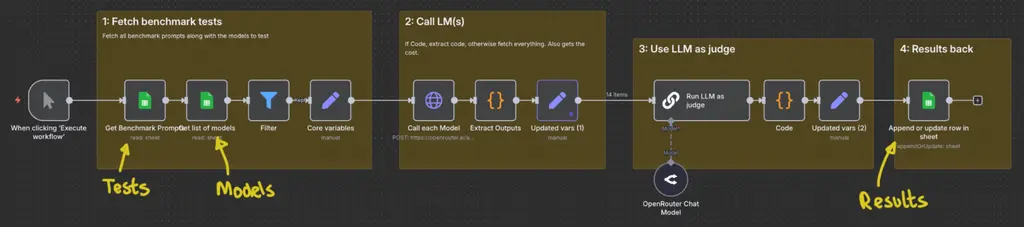
The solution is to leverage language models to judge the output (aka “LLM-as-a-judge”). Specifically, this approach uses my n8n workflow to automate the whole process. Here’s what the workflow looks like:
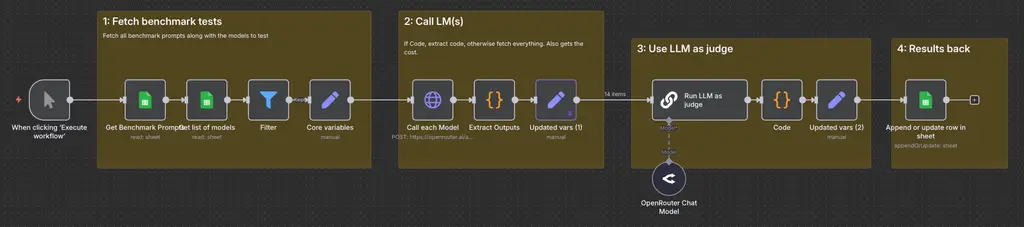
In this guide, I’ll walk you through the n8n workflow above, teach you about evaluation rubrics, and show you how to create these rubrics quickly. I’ll also show you how this simple Google Sheet of three tabs (Models, Tests, and Results) drives the entire workflow.

If you want to follow along, you’ll need access to n8n, Google Sheets, and OpenRouter, along with a copy of my workflow (download link below).
To get started, we need to fill out the Google Sheet, so let’s do this now.
Step 1: Prepare the Models Sheet
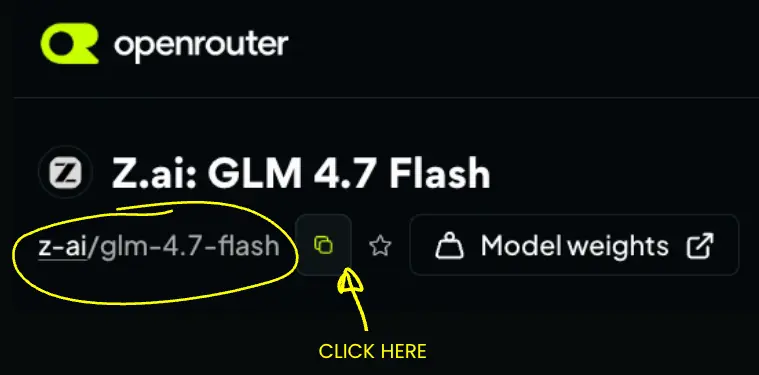
Our n8n workflow needs a list of language models to feed into the workflow. You’ll need the exact OpenRouter model path for these models, so visit each model’s details page and click the “Copy” icon under the model name:
Then add each model to the sheet under a column named “Model”:
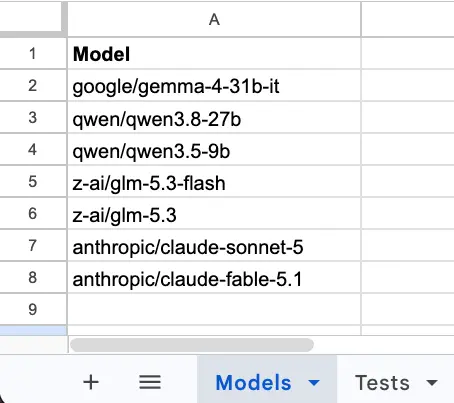
My previous article has some advice on picking those models, but you can also use the list above as a starting point.
Step 2: Prepare the Tests Sheet
The Tests tab contains the benchmarks that will be fed into the n8n workflow. There are three columns on this sheet:
- Test: A unique label for the benchmark (e.g., Test A, Test B).
- Prompt: The core prompt to be tested and sent to each model.
- Evaluation Rubrics: The structured rules and scoring criteria used by the judge model. More on this in a bit.
Once set up, the n8n workflow consumes this tab and runs every test against every model defined in Step 1.
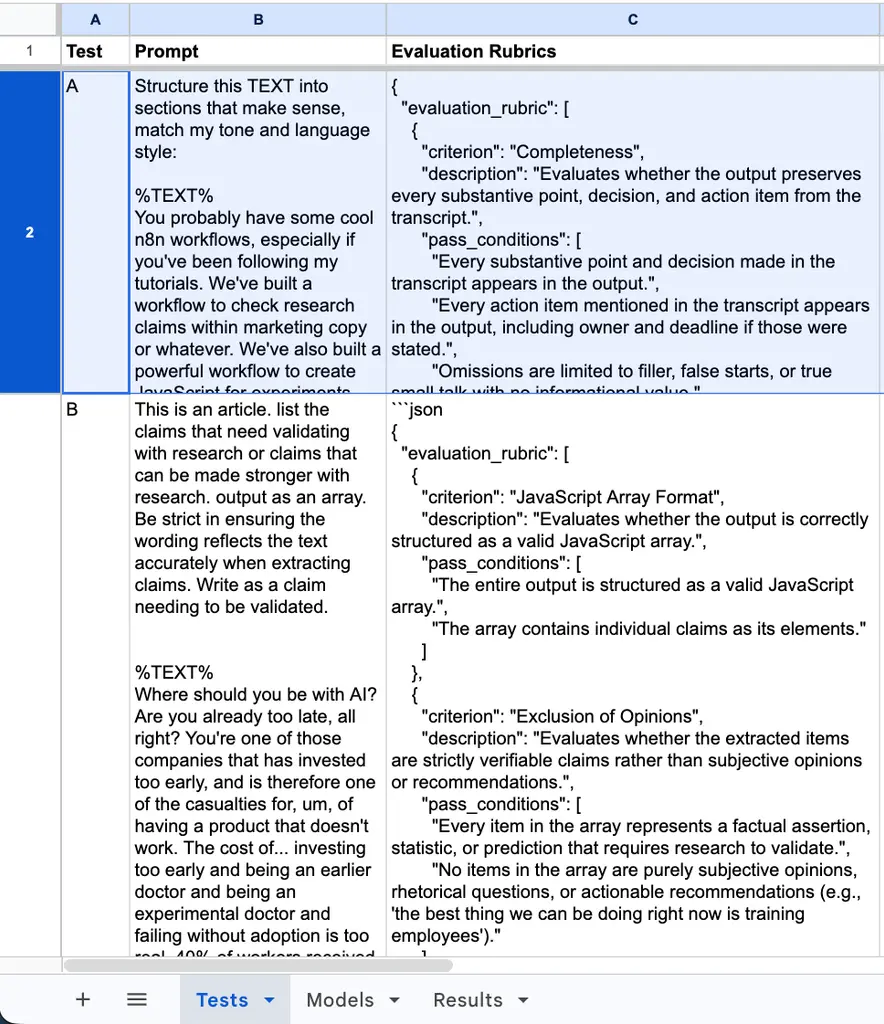
I covered picking benchmark tasks in my previous article, so I won’t go into detail here. For this walkthrough, we’ll focus on two practical, non-coding use cases:
- Test A: Claim extraction. Take a raw, imperfect voice transcript and identify “claims” that need fact-checking. This will test how well models understand context while filtering out noise.
- Test B: Thought organisation. Take a rambling transcript and give it a logical structure, all while preserving the original tone and staying concise.
Defining Evaluation Rubrics
To move from manual vibe-checks of output to language-model judging, we need a formal structure for our evaluation criteria. Evaluation rubrics are that. They define clear, objective standards for scoring and critiquing model output. Like prioritisation frameworks such as PIE and PXL, these rubrics need unambiguous scoring criteria and must ensure reproducible scores across evaluation runs.
This can get quite involved, especially if we incorporate “golden datasets” to ground scoring. But let’s keep this simple for now: just write down what matters most for each task in plain English.
For example, for Test A (Claim extraction), I have this:
The list should be a JavaScript-compliant array of items. The list should comprise things that are claims that need to be validated, not parts of the article that are opinion. The text and numbers should accurately represent the original text.
For Test B (Thought organisation), I have this:
Have all relevant points from the transcription been captured? Have the points been captured faithfully? Are the created sections faithful to the original order? Is the language and tone faithful to the transcript?
Tip: Don’t worry about perfection at this stage. We just need a functional baseline to iterate over.
Now, using these written descriptions, we can use the following prompt to create our structured rubrics.
Prompt:
You are an expert evaluation designer for language models. Your task is to convert a description of quality into a precise, objective evaluation rubric for an LLM Judge.
Evaluation criteria need to be verifiable. For each criterion:
Define what success looks like based on the Quality Description.
Provide clear binary (Pass/Fail) or checklist conditions to minimise judge ambiguity.
%OUTPUT FORMAT%:
Output ONLY a JSON object structured as follows:
JSON
{

  "evaluation_rubric": [

    {

      "criterion": "Criterion Name",

      "description": "What this evaluates",

      "pass_conditions": ["Condition 1", "Condition 2"]

    },{...additional rubrics...}

  ]

}
%MY DESCRIPTION%
[Put your description here]
Note: Replace ‘Put your description here’ with whatever you have as your description. You’ll get a response like this:
``json

{

  "evaluation_rubric": [

    {

      "criterion": "JavaScript Array Format",

      "description": "Evaluates whether the output is correctly structured as a valid JavaScript array.",

      "pass_conditions": [

        "The entire output is structured as a valid JavaScript array.",

        "The array contains individual claims as its elements."

      ]

    },

    {

      ... etc. ...

    },
Why the JSON format? JSON is convenient. It’s easy to read, works well in scripts, and language models are familiar with it. Anyway, iterate over these rubrics until satisfied, then add to the Google Sheet under the “Evaluation Rubrics” column.
Step 3: Prepare the Results Sheet
The final tab in the Google Sheet records the judge model’s evaluation, so ensure the Results sheet contains the necessary columns:
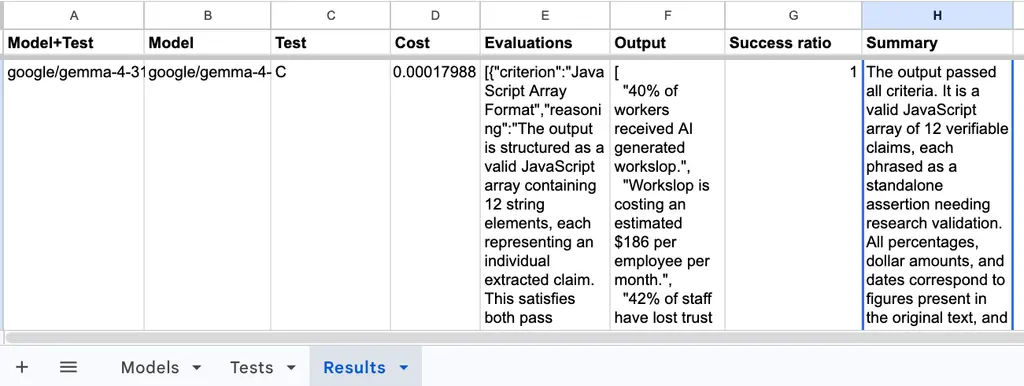
- Model+TestA: A unique key identifying the evaluation run (e.g., Gemma4-31b+Test-A).
- Model: The model under evaluation.
- Test: The benchmark test
- Cost: The API run cost returned by OpenRouter.
- Evaluations: The raw text breakdown of evaluations.
- Output: The raw response generated by the model (useful for manual spot-checks).
- Success ratio: The ratio of passed criteria versus total criteria evaluated.
- Summary: The judge’s high-level explanation for its decisions.
The Sheet is ready. Let’s automate this!
Step 4: Run the n8n Workflow
Here’s the n8n workflow again:
To get this working, you need to ensure that each of the Google Sheets nodes is connected to the corresponding Sheet. So, for Document (1), select your Google Sheet, and for Sheet (2), select the relevant tab/sheet.
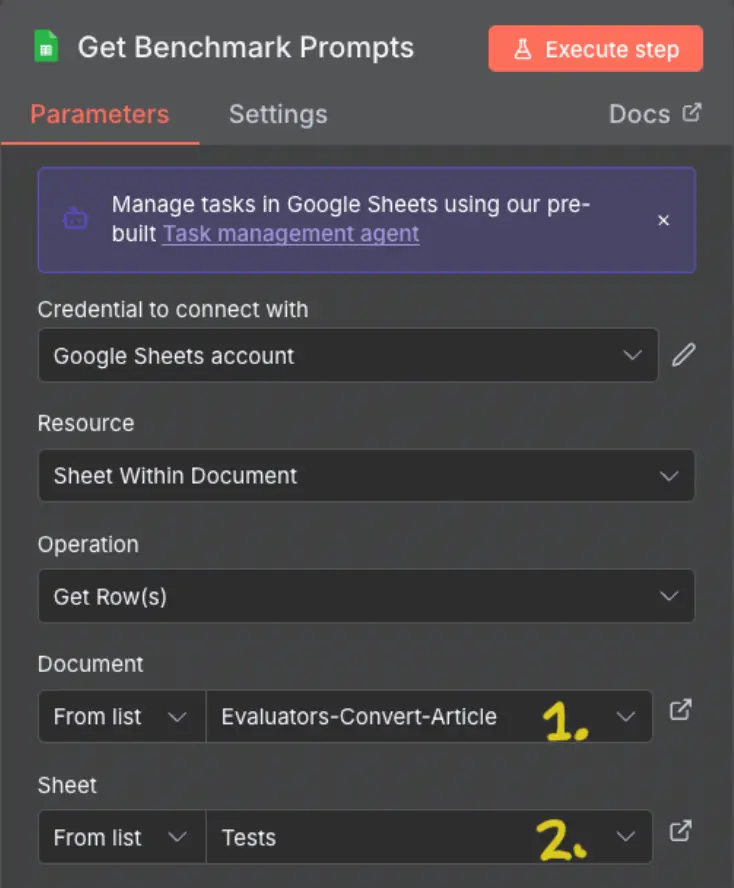
Update each Sheet node accordingly (keep the rest the same):
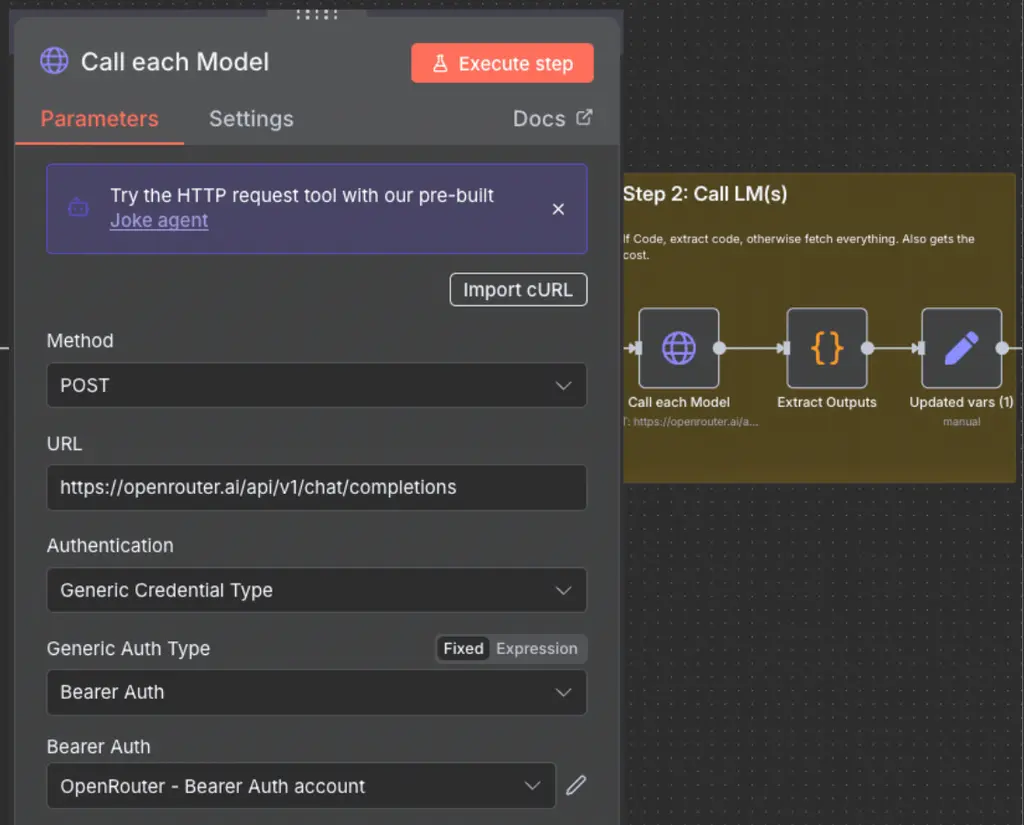
You also need to make sure you add your API key on the “Call each Model” node:
Once you run it, here are the highlights…
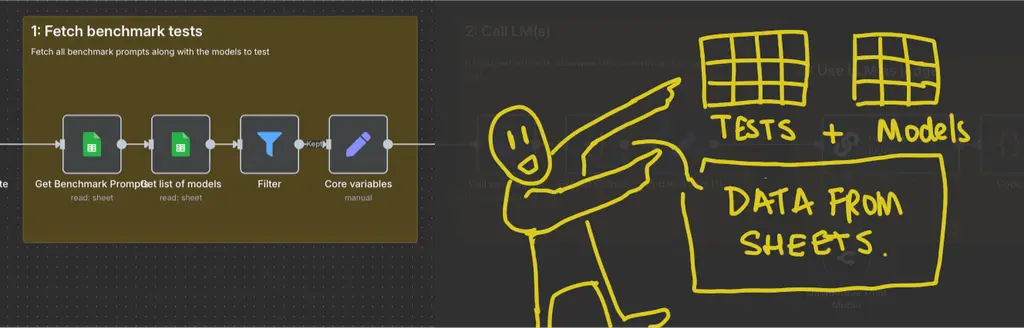
The first part fetches our prompts and the list of models to test, sanitises data, and sets the variables for the next part.
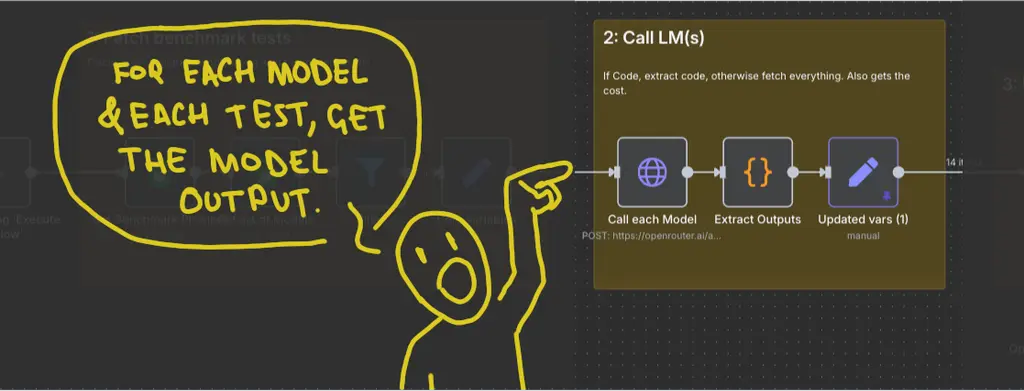
The second part calls each language model via an HTTP Request node. This is so it can capture the “Cost” for each model output from OpenRouter. It then sanitises and updates variables for the next step.
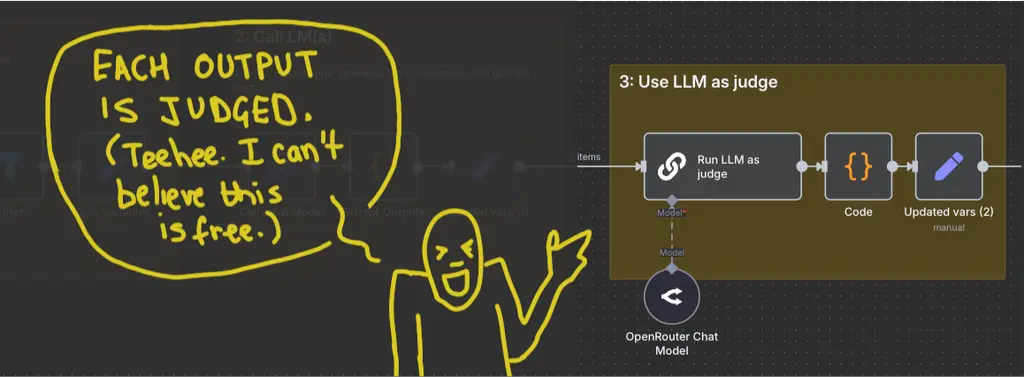
The third part is the LLM-as-a-Judge Evaluation. We set a “judge” model, then run the evaluation rubrics on each model response from OpenRouter. The workflow uses GLM 5.3 as the judge, but I also test my rubrics against Claude Sonnet 5.
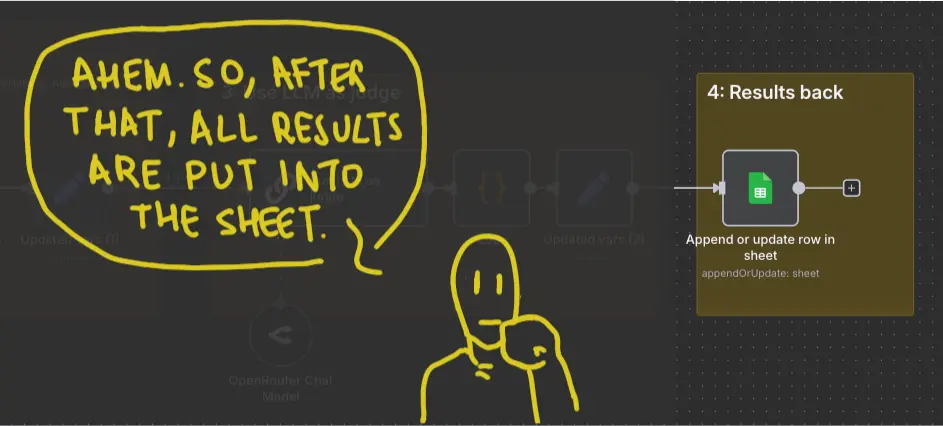
The final part updates the spreadsheet with the results.
In case you’re interested, here’s the prompt used for the “judge”:
You are a precise, objective Language Model Judge. Your sole purpose is to evaluate a Candidate Output against a specific Evaluation Rubric derived from the Original Prompt.
Evaluation Process:
Read the Original Prompt INPUT, Candidate OUTPUT, and Evaluation Rubric.
For each criterion in the rubric, systematically check whether the Candidate Output meets all specified pass_conditions.
Evaluate the output based purely on semantic fulfilment, factual accuracy, and alignment with the requirements. Do NOT penalise variations in formatting, phrasing, length, or style unless explicitly required by the rubric.
Perform a brief chain-of-thought analysis for each criterion before rendering a final verdict.
%INPUT%
Original Prompt:
{{ $json.Prompt }}
Candidate Output:
{{ $json.output }}
Evaluation Rubric:
{{ JSON.stringify($json[‘Evaluation Rubrics’]) }}
Output Format:
Return ONLY a JSON object with this exact structure:
JSON
{

  "evaluations": [

    {

      "criterion": "Criterion Name",

      "reasoning": "Brief explanation of how the candidate output meets or fails the pass conditions.",

      "status": "PASS" // or "FAIL"

    }

  ],

  "overall_passed": true, // false if any essential criterion failed

  "summary_feedback": "A concise summary explaining why the output passed or failed overall."

}
As you can see, we’re asking the judge to make a pass-or-fail decision for each rubric criterion, along with a summary to explain its decision.
Results & Calibration
When running this workflow (especially for the first time), it’s a good idea to do a manual spot-check to compare against the automated scores. This helps evaluate the rubrics’ effectiveness, showing how well they work and highlight where adjustments are needed. For instance, comparing the LLM judge’s top choices with my own (highlighted in green for winners and amber for runners-up)…
| Model | Test A | Test A (Manual) | Test B | Test B (Manual) |
| claude-fable-5.1 | 0.5 | 0.75 | 1.0 | 0.5 |
| claude-sonnet-5 | 0.75 | 0.75 | 1.0 | 0.5 |
| GLM 5.3 | 0.5 | 0.5 | 1.0 | 0.5 |
| GLM 5.3 Flash | 0.5 | 0.75 | 1.0 | 0.5 |
| Qwen3.8-27B | 0.5 | 0.5 | 1.0 | 0.5 |
| Qwen3.5-9B | 0.5 | 0.75 | 1.0 | 0.5 |
| Gemma4-31-bit | 0.75 | 0.75 | 1.0 | 0.75 |
…showed that while the scoring is close, some fine-tuning is needed. Specifically:
- Test A: The rubrics require slightly more specific constraints to capture more nuance.
- Test B: The criteria are currently too lenient (all models passed), so the rules need to be stricter to effectively differentiate high-quality outputs.
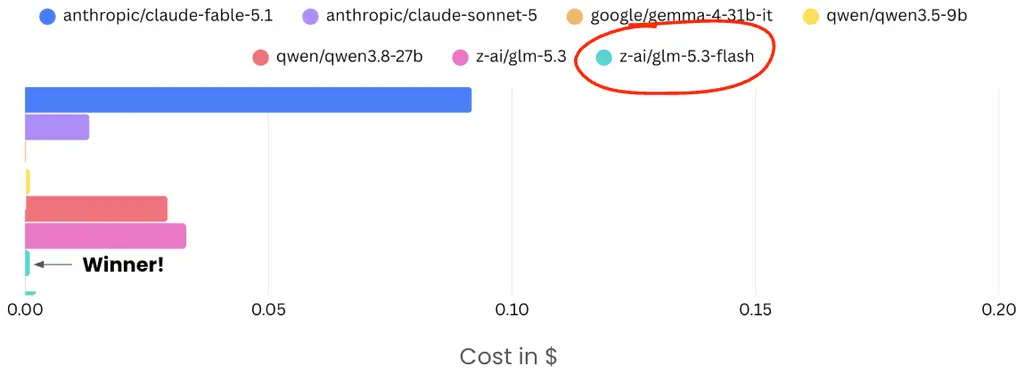
These iterations are worth doing. I mean, check out the cost difference, especially GLM 5.3 Flash (the winner), vs. Fable for Test A:
The cost breakdown for Test B was also interesting (Fable cost):
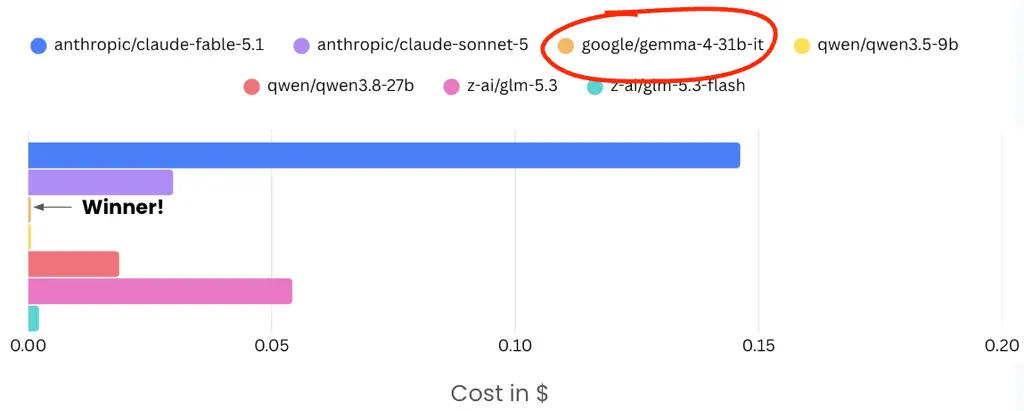
Worth mentioning that GLM 5.3 Flash and Gemma 4 are tiny models, small enough to run on local hardware!
Anyway, after I tweak my rubrics, I’ll be able to scale up my testing to include more models, more often. This way, I can be sure I’m optimising how I use my model.
So, now over to you. Grab the n8n workflow using the download link below, and start developing your own benchmarks. And be sure to let me know the results.
Editor’s note: This guide is part of a broader series on getting more out of small, open language models. It builds on Iqbal’s guide to benchmarking language models on your own prompts, which covers choosing benchmark tasks and models by hand. If you’d like to see these models at work, we’d recommend his guides on building an n8n workflow that verifies claims in your drafts, running A/B tests through Convert MCP with small models, and exposing your n8n workflows as MCP tools any AI chat can call.


Written By
Iqbal Ali
A/B Testing, Experimentation Program Coaching, UX Design +4 more
A/B Testing, Experimentation Program Coaching, UX Design, n8n Automation, Small Language Models, Model Context Protocol (MCP), Client-Side A/B Test JavaScript Show less
Edited By
Carmen Apostu