A/B Testing Tools That Get MCP Servers Right: The Best of AI-Assisted Testing


- An A/B testing tool’s MCP server lets an AI assistant, such as Claude or ChatGPT, read results and build or change experiments in your testing account.
- The servers differ most on who confirms a change before it goes live, whether it’s the server, the AI client, the agent’s instructions, or nobody.
- Convert Experiences creates tests as drafts, and its server rejects any activation, pause, or delete without explicit confirmation.
- This article compares seven tools: Convert Experiences, Optimizely, Wingify, GrowthBook, Intelligems, Omniconvert and Zoho PageSense.
Many A/B testing tools now have an MCP server. The harder part is figuring out what each one can do when connected to Claude, ChatGPT, or other AI tools.
In this article, we cover what the top tools in this space can build, report, and change in your experiments via MCP. You’ll also learn about the guardrails that are available to you as AI gets more capable and touches more layers in your experimentation program.
What is an MCP Server in A/B Testing Tools?
An A/B testing tool’s MCP server is a connector that lets AI assistants, such as Claude, ChatGPT, or Cursor, read and change your experimentation account through the Model Context Protocol (MCP). MCP is a standardized way for AI systems to connect to and share data with external tools, databases, and services.
When you connect your A/B testing tool to your AI assistant via the MCP server, the assistant can pull results, draft an experiment, pause a test, and more. The server does all of these within your account’s permissions.
What is an MCP Server?
An MCP server exposes a product’s data and actions to AI applications in one standard format. An MCP server offers 3 kinds of building blocks:
- Tools: These are actions the AI can call, such as “get experiment results”
- Prompts: Packaged workflows you pick from a menu, e.g., a weekly test review
- Resources: Reference material the AI can read, such as knowledge base articles or product documentation
How Does an A/B Testing Tool’s MCP Server Work?
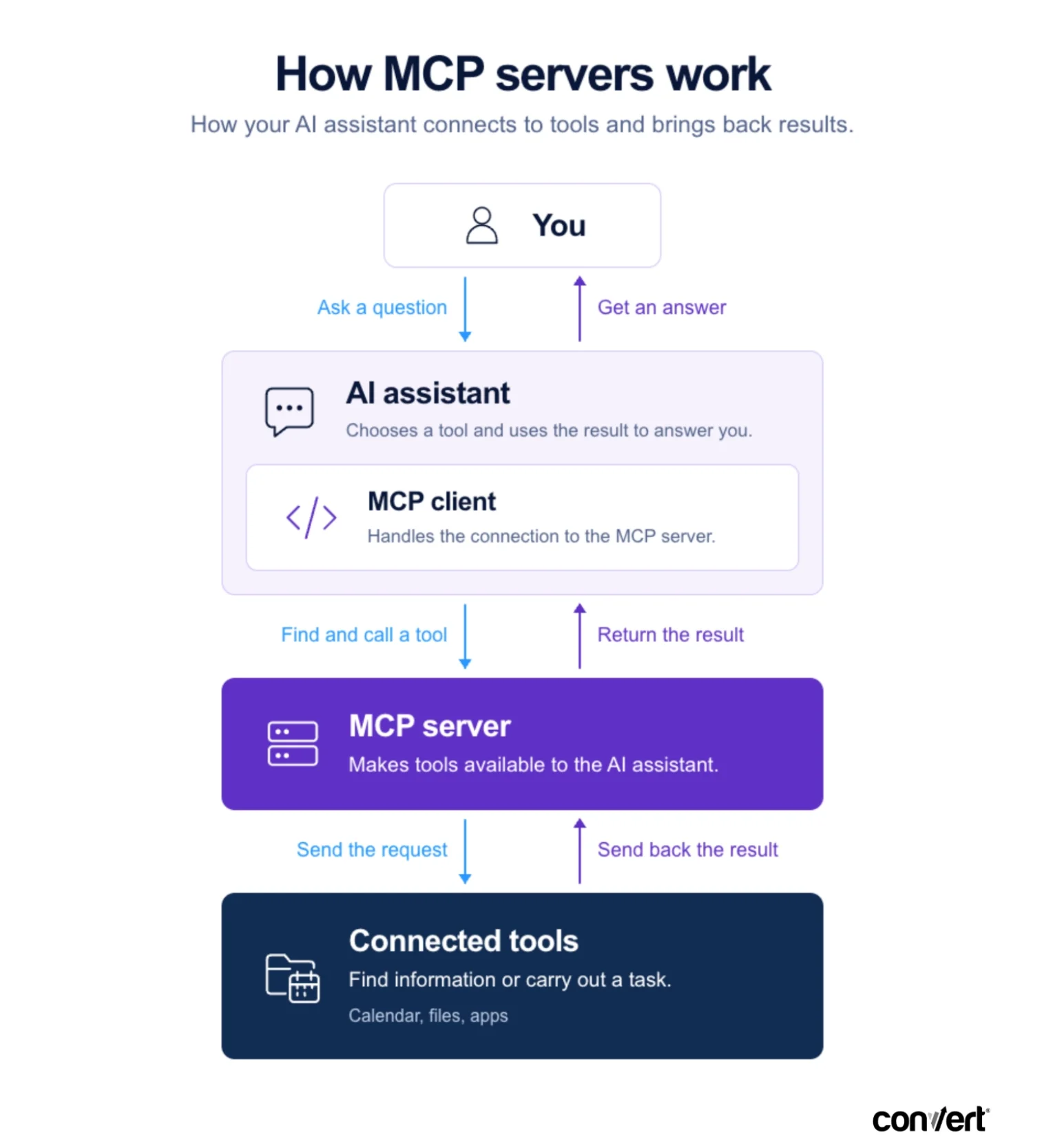
The server sits between your AI client and the testing tool’s API:
- You connect the server to your AI client by OAuth sign-in for a hosted server or an API key for a local one.
- You ask in plain language, such as Show me last week’s results for the checkout test.
- The AI picks a tool from the server’s catalog and fills in its parameters.
- The server checks your permissions, calls the API, and returns the result.
Users commonly use an A/B testing tool’s MCP server to report (pull results and spot data problems), build (draft experiments, goals, and audiences), and operate (start, pause, and archive tests).
These common uses also correspond to different levels of access the AI has within your testing tool account. While reporting only reads your account, building and operating change what visitors see. So it matters a lot how the server gates these levels of access.
What are the Pros and Cons of MCP Servers in A/B Testing?
MCP servers take build and admin work off your team, read results from the testing tool, and can package one tested process for everyone.
But they can also launch tests nobody approved, leave QA manual, and produce results that depend on each person’s prompting skill.
These findings come from Convert’s customer research and from hands-on tests by Iqbal Ali, Founder and Builder at Ressada, published on the Convert blog in 2026 alongside his articles on connecting AI to a calculator, MCP and n8n workflows, and building n8n workflows from MCP.
Pros of A/B Testing MCP Servers:
1. Takes the build off the developer queue
Building capacity is a top blocker for many optimization teams. In Convert’s May 2025 customer survey, 11 of 22 answers about roadblocks cited developers, people, or time. In the June 2026 survey, 11 of 29 named developer or engineering capacity.
With the MCP server, non-devs can build variations, goals, and audiences through an AI assistant. They can ask in natural language and get code edits they can test.
2. Handles the API plumbing behind admin work
Setup and housekeeping still take time. One agency practitioner in Convert’s January 2026 survey described “quite a lot of manual work to set things up, monitor results, export data to analyze further or present.”
An MCP server handles the API calls behind that work, errors included. In Iqbal Ali’s tests of Convert’s MCP server in Claude Code, the agent hit a missing parameter, fetched the account ID it needed, retried the call, and returned the list of experiences without his help.
3. Leaves the math to the tool
“Checking the performance of experiments” is on the jobs list from Convert’s 2024 customer interviews. With MCP, the AI reads results directly from your testing platform instead of calculating the findings for you (which can leave vital info in a black box). MCP servers ensure you see every call the AI makes.
4. Shows which steps you can automate and how
Running a task through MCP shows you exactly which API calls it takes. Iqbal Ali’s approach is to explore with MCP first, then rebuild those calls as a fixed n8n workflow so the whole team runs workflows the same way.
That matches what one program head asked for in Convert’s January 2026 survey: “More automated flow where people just ‘direct, check, correct & decide’.”
Cons of A/B Testing MCP Servers:
1. They can launch tests nobody approved
In Iqbal Ali’s March 2026 tests of Convert’s MCP server, both a small and a large model sometimes activated an experiment nobody had asked them to launch.
In production, that sends real traffic to an unchecked variation, and a less experienced operator may not catch it. Convert’s MCP server now rejects any activation without explicit confirmation. Other servers handle the risk differently, from server-side checks to none at all.
2. QA stays manual
QA is one of the most-mentioned pre-launch tasks in Convert’s customer survey report, and 6 of 29 answers in the June 2026 survey named it as a blocker.
In Iqbal’s test, “the element had moved outside of the project’s grid, so the JavaScript needed some tweaking,” and both models “produced inconsistent JavaScript quality across runs.”
Agencies report the same gap. In Convert’s 2026 agency research, Tasin Reza, CEO of EchoLogyx, said: “We are yet to find a way to utilize AI to increase QA efficiency.”
MCP servers can narrow the gap. Convert’s server, for example, runs a draft QA check for setup gaps in goals, variations, code, and URLs before launch. Checking how a variation renders on the live page still needs a human.
3. Chat-based use doesn’t scale to a team
Give a whole team access to chat and the gaps in prompting skills will be obvious. Does that mean you shouldn’t use chat? Nope. Use it, just for the right job. In his tests, Iqbal explored a task with MCP to learn which tool calls it makes, then fixed those calls in a deterministic n8n workflow. For teams that stay in chat, packaged prompts (Convert ships 20) at least give everyone the same starting instructions.
Which A/B Testing Tools Have MCP Servers?
This comparison covers 7 A/B testing tools whose MCP servers read or change experiments.
Trust in these servers depends on guardrails and scoping, so this is also included in the tool breakdown below.
- Convert Experiences: Best for teams that want an AI to build and launch tests behind a server-side confirmation check
- Optimizely: Best for teams managing feature flags across many SDKs
- Wingify: Best for teams that want test results next to heatmaps and session recordings
- GrowthBook: Best for teams that want an open-source, self-hosted MCP server
- Intelligems: Best for Shopify price and offer testing
- Omniconvert: Best for read-only AI analysis of test results
- Zoho PageSense: Best for admin-controlled MCP access with a log of every access
How Do A/B Testing MCP Servers Compare?
Six of the 7 tools document or advertise write access, and they differ most in who confirms a change before it goes live.
| Tool | Status and deployment | MCP tools | Write operations | Reporting | Starting |
| Convert Experiences | Hosted (OAuth) and local | 16 local, 45 hosted, 20 prompts | Experiments, variations, goals, audiences, feature flags, lifecycle | Aggregate and daily results, traffic allocation, integrity checks | $399/month billed monthly or $299/month billed yearly |
| Optimizely | Hosted | 8 | Flags, experiments, audiences, rules, rollouts; no variation code | Test results, program reporting, custom queries on finished tests | Custom pricing |
| Wingify | Hosted web server; local feature-flag (FME) server; open-source flag server | 14 web, 18 FME, 7 open source | A/B and split URL tests; feature flags; configurations from briefs | Campaign reports, heatmaps, session recordings | Custom pricing |
| GrowthBook | Open source; local, self-hosted or hosted | 4 | Anything the API allows, through passthrough | Anything the API allows, through passthrough | Free; Pro $40/seat/month |
| Intelligems | Hosted (Shopify) | 50 | Price, offer and content tests; prices, thresholds, lifecycle | Revenue per visitor, conversion, significance, sitewide, cross-store | From $69/month |
| Omniconvert | Hosted | 11 | None (read-only) | Performance overviews, reports, chart series | Free up to 50,000 tested users; paid from $350/month billed monthly or $245/month billed yearly |
| Zoho PageSense | Hosted | Chosen by an admin | A/B tests (marketed) | Analytics, funnels, heatmaps, recordings, A/B results | Free plan; A/B testing on Enterprise from $49/month billed monthly |
Source: Pricing from each vendor’s pricing page in October 2026.
How We Chose Each Tool
Convert publishes this article, and Convert Experiences is on the list. We judged every tool, including ours, on the same criteria. Between late September and October 2026, Convert’s developers reviewed Convert’s server at the source-code level and reviewed the others based on public documentation and source code for open-source servers. No live accounts were connected, so entries describe documented capabilities, and the tools aren’t ranked.
1. Convert Experiences

Convert Experiences (that’s us) is an A/B testing and experimentation platform for web and full-stack testing.
Who this tool is for: CRO teams, agencies and experimentation leads running tests across several sites or clients, for client-side A/B, split URL, multivariate and multi-page tests, and full-stack experiments with feature flags.
Pricing: Convert offers a 15-day free trial (no credit card required). Paid plans start at $399/month (billed monthly) or $299/month (billed yearly) for up to 100K tested users.
The Convert MCP is an essential part of my experiment building and monitoring workflow. What an MCP does is expose the different features and tools of a service in a way that can be easily used by AI tools. Think of it a bit like an API but much more flexible.
With an MCP as fully featured and well-built as the Convert MCP, I’ve been able to build proprietary CRO-focused expert technology for Another Web is Possible and plug it straight into the experimentation powerhouse that is Convert.
This lets me build and deliver effective and advanced experiments in a world-class tool in a fraction of the time it used to take writing the code by hand or using a WYSIWYG editor.
Jon Crowder, Founder & Director of Another Web Is Possible
What Can Convert’s MCP Server Do?
- Access: A hosted connector at mcp.ai.app.convert.com/mcp signs you in with Convert OAuth, so no API keys go into the AI client. A local server (npm package @convertcom/mcp-server) runs on your machine with API credentials.
- Scope: You grant selected projects or the whole account. Each call runs at the lower of that grant and your current Convert user role, so a later demotion also limits the AI. The local server offers 3 profiles: ‘reporting’ (default), ‘readOnly’ and ‘all’.
- Build: It creates and updates A/B, split URL, multivariate, and deploy experiences, plus variations, goals, audiences, and locations, and manages feature flags on FullStack projects. Guided workflows cover custom-code and split URL tests.
- Report: It pulls aggregate and daily results, traffic allocation, and report integrity checks. For troubleshooting, it returns a sanitized evidence summary first and opens raw debug logs only on an authorized drill-down.
- Activation and writes: New experiences start as drafts. The server rejects any activate or pause call without explicit confirmation, and deleting needs a second, exact confirmation that names the resource.
- Approvals and audit: On Pro and Enterprise, the Request Approval System (beta) can hold activations, pauses, and live edits until an Owner, Account Manager, or Admin approves. MCP changes appear in Change History as API changes.
- Catalog: 16 top-level tools locally and 45 hosted (40 actions plus 5 interactive views), with 20 curated prompts and documentation search. Since version beta.19, eligible entire-account grants also get notification reads.
- Clients: Any client that supports remote MCP over Streamable HTTP with OAuth, including Claude, Claude Desktop, Claude Code, ChatGPT (web), Cursor, Codex, and n8n. Its prompts appear in Claude’s connector menu. ChatGPT doesn’t expose MCP prompts as actions.
Limitations
- No organization-wide MCP switch or log of every MCP request is documented. Change History records changes, not what the AI read or what you asked it.
- Feature flags and Full Stack need the Pro plan or above.
Bottom line: Pick Convert if you want an MCP server that builds and launches tests but refuses unconfirmed launches and the absence of an organization-wide MCP kill switch isn’t a dealbreaker for your program.
2. Optimizely
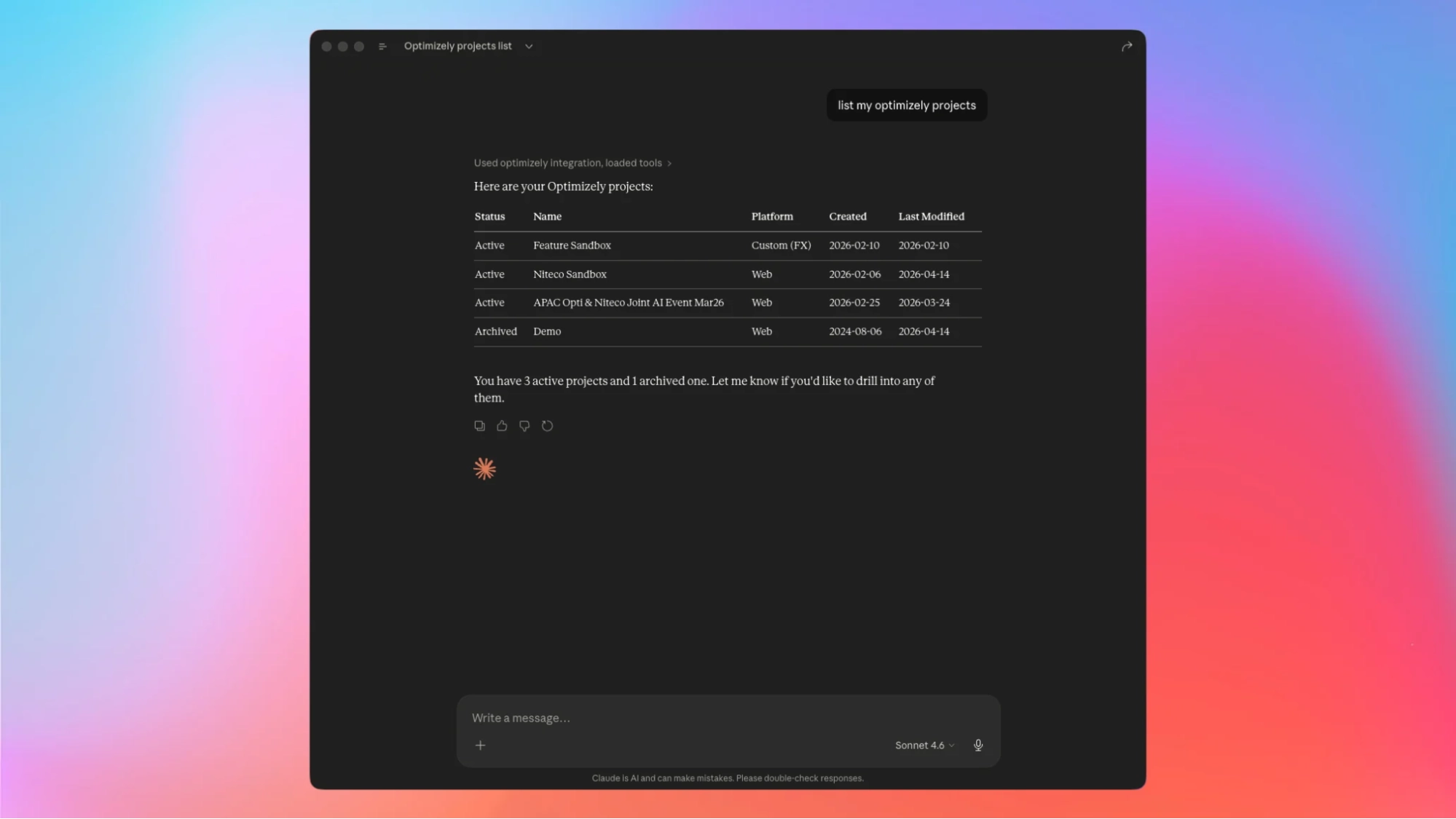
Optimizely is a digital experience platform whose experimentation products cover client-side web testing and server-side feature experimentation.
Who this tool is for: Enterprise product, engineering, and marketing teams, for visual-editor web experiments, feature flags and rollouts through SDKs, and program-level reporting.
Pricing: Optimizely doesn’t publish prices. Plans are quoted by sales.
What Can Optimizely’s MCP Server Do?
- Access: A hosted server signs you in through Opti ID. It needs the Optimizely Agent Platform enabled and connected to a Web or Feature Experimentation instance.
- Scope: It sees the projects, experiments, and data you see in Optimizely, so your existing roles set its limits.
- Build: It creates, updates, and archives flags, experiments, audiences, targeting rules, and rollouts, with a template tool that returns each object’s required fields.
- Report: It summarizes individual test results. For paused, concluded, and archived experiments, it returns top performers and runs custom queries on lift, significance, confidence intervals, conversion rates, and visitor counts.
- Implement: It searches documentation for 14 SDKs and frameworks and generates implementation code.
- Activation and writes: Optimizely’s documentation says the agent always confirms the target project, environment, and details before committing a change.
- Catalog: 8 tools (5 query, 1 implement, 2 manage).
- Clients: Claude Desktop, Claude.ai, Claude Code, Cursor, Codex, VS Code with Copilot, Windsurf, ChatGPT, and other remote MCP clients.
Limitations
- Confirmation depends on the agent’s behavior. No server-side check is documented.
- It can’t edit variation HTML, CSS, or JavaScript, which stays in the Visual Editor.
- Program-level reporting covers finished tests only.
Bottom line: Optimizely is a good fit if you manage feature flags across many SDKs and want an AI that writes implementation code inside your existing permissions and you’re okay with non-transparent pricing.
3. Wingify
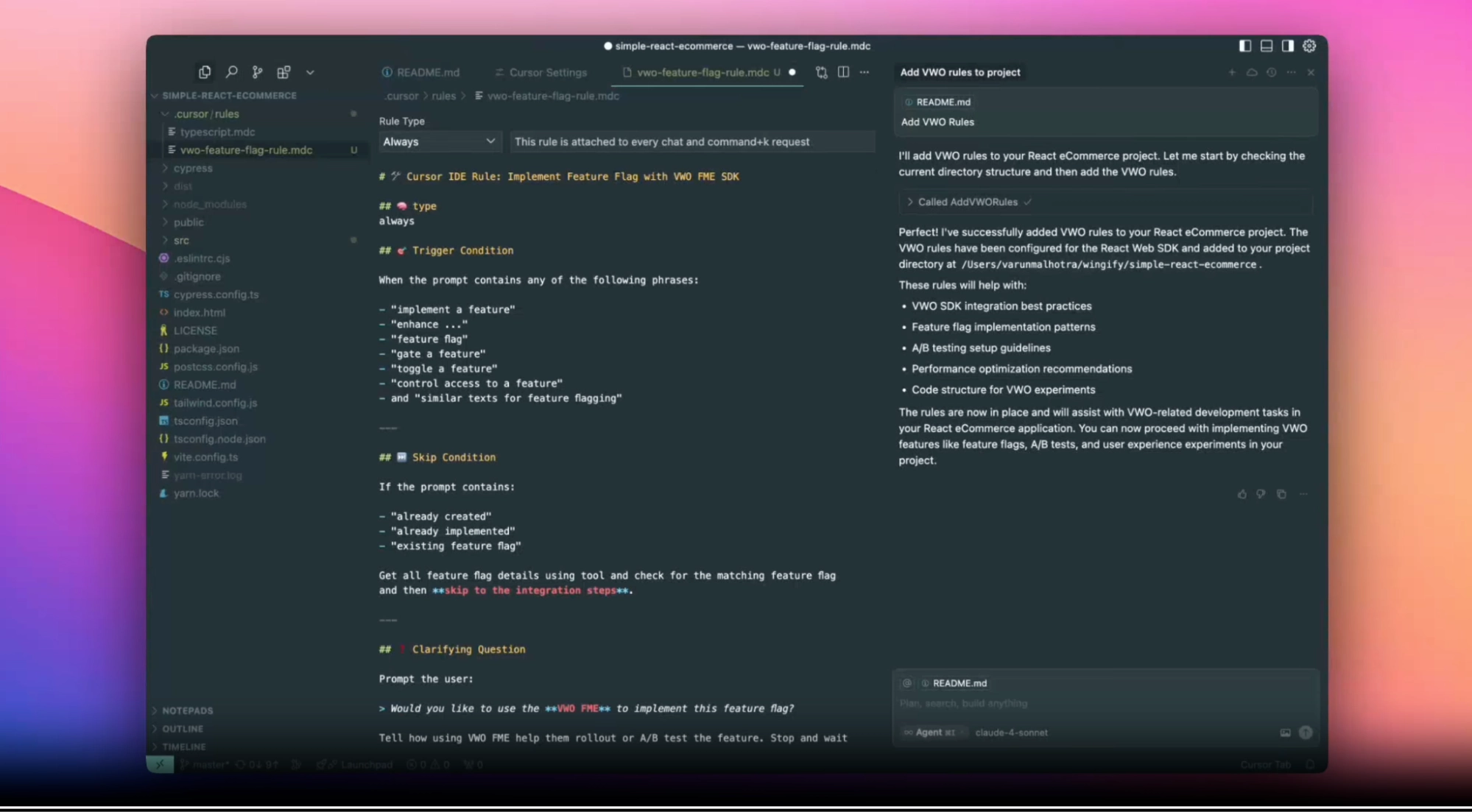
Wingify (which is VWO and AB Tasty merged together) is an experimentation and personalization company whose platform covers web testing, feature management, and behavior analytics.
Who this tool is for: Growth, marketing, product, and ecommerce teams, for web A/B and split URL tests, heatmaps and session recordings, and feature flags and rollouts.
Pricing: Wingify offers a 30-day free trial (no credit card required). Paid plans are quoted through a demo, and MCP access to behavior analytics data needs the paid Wingz Advanced tier.
What Can Wingify’s MCP Servers Do?
- Access: Wingify runs 3 servers. The hosted web testing server uses OAuth 2.0 with global, EU, and Asia endpoints. The Feature Management and Experimentation (FME) server runs locally with a developer token. An open-source server for the Feature Experimentation & Rollouts product that came from AB Tasty runs locally or self-hosted with an environment ID and API key.
- Scope: On the web server, you pick ‘Browse’ (read-only), ‘Design’ (create A/B or split URL tests), or ‘Publish/Admin’ (full control) at sign-in. The other 2 servers use one key per connection.
- Build: The web server creates, clones, configures, starts, and pauses A/B and split URL tests. The FME server manages the feature flag lifecycle, generates SDK bootstrap code, and writes rule files for Cursor and VS Code. The open-source server builds experiment configurations from plain-language briefs.
- Report: The web server returns campaign reports and daily data, reads multivariate test data, analyzes heatmaps and session recordings, and calculates sample sizes. The open-source server doesn’t have results tools.
- Activation and writes: The FME server’s “Create Feature Flag With Defaults” tool creates a flag with “automatic enablement”. The open-source server’s configuration tools make the caller choose ‘dry run’ or ‘live’ on every call, and its activate tool records a hit for one visitor without publishing a campaign.
- Catalog: 14 tools on the web server (9 read, 5 write), 18 on FME, and 7 open source.
- Clients: The web server lists ChatGPT (Developer Mode), Claude, Copilot Studio, n8n, and Zapier. The FME server runs in Cursor, VS Code, and Claude Desktop, and the open-source server in Claude Desktop and Cursor.
Limitations
- Neither the web nor the FME server documents a confirmation before an AI starts, pauses, deletes, or toggles a test or flag.
- Running 3 servers means 3 setups and 3 authentication models.
- MCP access to behavior analytics data needs the paid Wingz Advanced tier.
Bottom line: Wingify is great if you want AI connection that also reads heatmap and session-recording analysis next to test results, but you don’t mind not having a confirmation step before an AI starts, pauses, or enables a test or flag.
4. GrowthBook
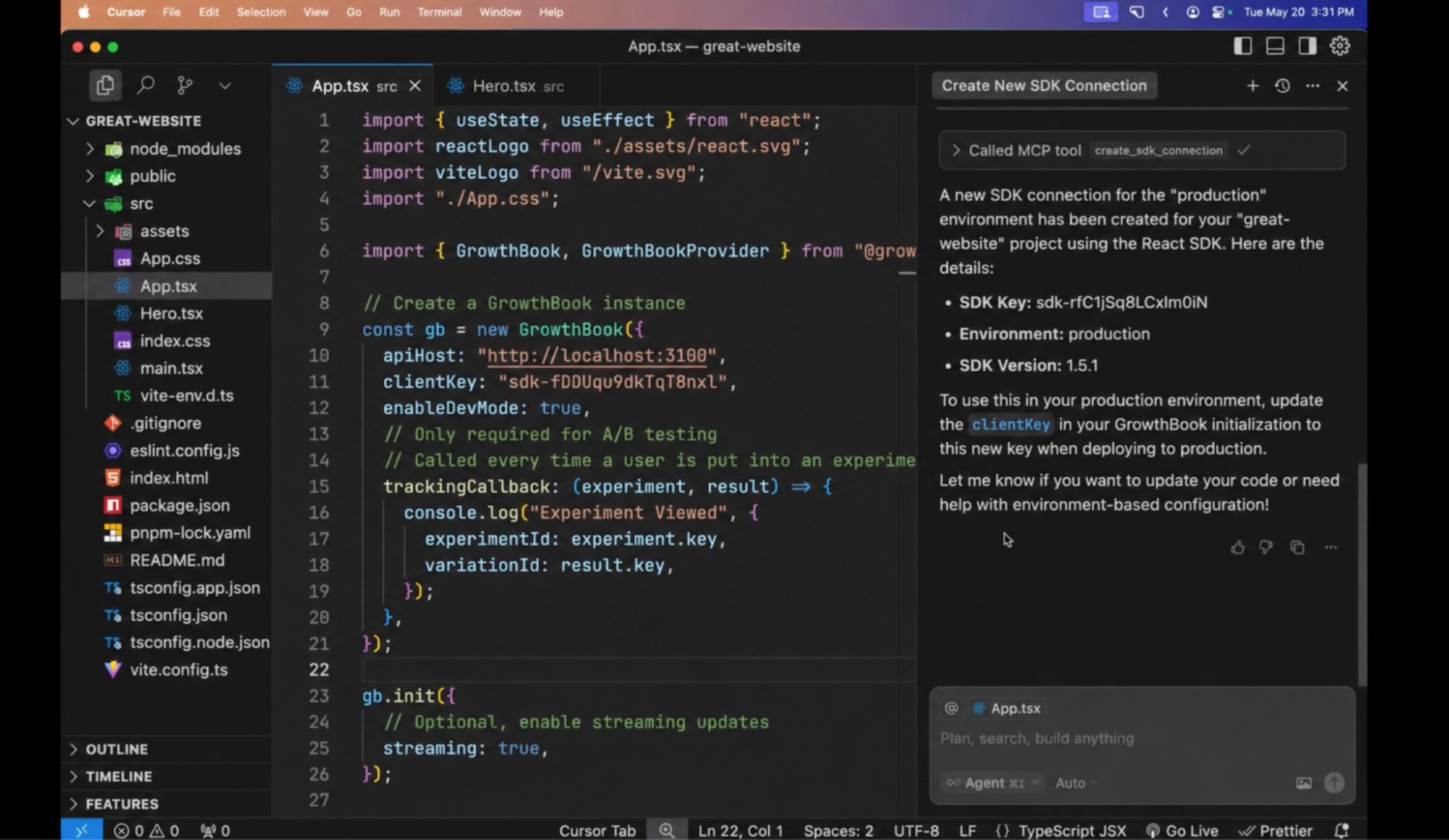
GrowthBook is an open-source, warehouse-native platform for feature flags, experimentation, and product analytics.
Who this tool is for: Product and engineering teams with event data in a data warehouse, for SDK-delivered feature flags, experiment analysis on their own warehouse data, and self-hosting.
Pricing: GrowthBook is free to self-host and free on Cloud for up to 3 users. Cloud Pro costs $40 per seat per month.
What Can GrowthBook’s MCP Server Do?
- Access: The server is open source. It runs locally, self-hosted over HTTP, or through a hosted endpoint via a Cursor plugin, against GrowthBook Cloud or a self-hosted instance.
- Scope: It uses an API key, personal access token, or OAuth, and inherits whatever that credential can do.
- Build and report: Its 2 passthrough tools reach the whole GrowthBook API, one for reads and one for creates, updates, and deletes. The AI chooses the endpoint and parameters, and the server doesn’t validate payloads.
- Packaged workflows: Its other 2 tools load 4 bundled skills with 27 workflows, such as creating flags and metrics, writing SQL queries, and building dashboards.
- Activation and writes: Each tool is labeled as read-only or able to change data, and your AI client decides whether to ask you before running the ones that change data. The bundled skills tell the AI to create flags disabled and confirm before changes.
- Catalog: 4 tools, or 2 with skills switched off.
- Clients: Claude Code, Cursor, Codex, Warp and Zed.
Limitations
- Version 2.1.0 removed the server’s own guidance to confirm changes, so confirmation depends on your AI client respecting those labels.
- The passthrough design gives the AI no endpoint-specific guidance, so request quality rests on the model and skill text.
Bottom line: Pick GrowthBook if you want an open-source MCP server you can self-host that reaches the entire API. It’s not a great fit if you want unconfirmed changes blocked at the server.
5. Intelligems
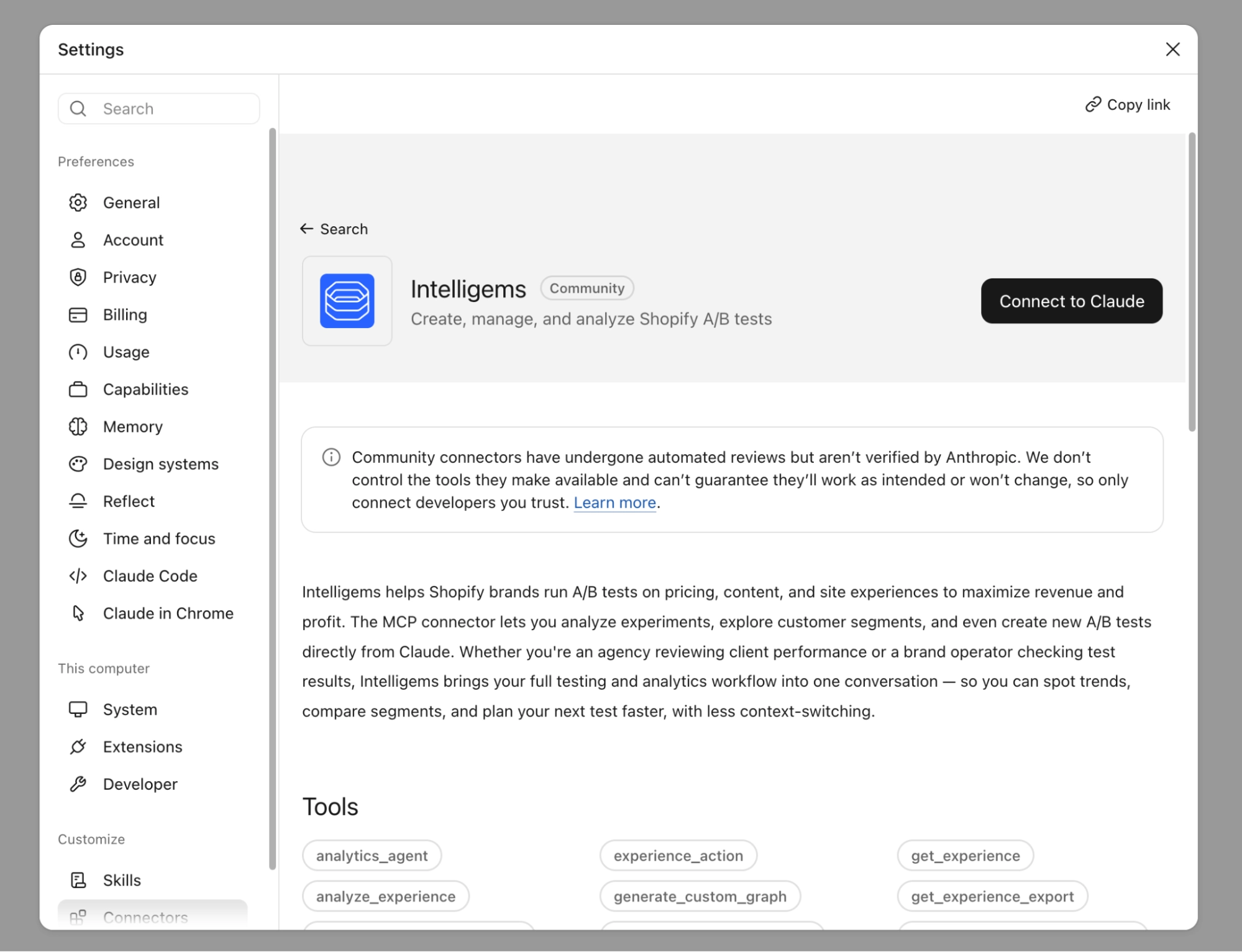
Intelligems is a testing and optimization platform for Shopify stores.
Who this tool is for: Shopify merchants, agencies, and multi-brand operators focused on profit per visitor, for price tests, shipping and discount offer tests, and content and checkout tests (checkout needs Shopify Plus).
Pricing: Intelligems offers a 14-day free trial. Plans start at $69/month per store, priced by monthly order volume.
What Can Intelligems’ MCP Server Do?
- Access: A hosted server signs you in with OAuth2 over HTTP, with SSE as an alternative. You need an active account and a connected Shopify store.
- Scope: Tools accept an organization parameter, so one connection can cover several stores or clients.
- Build: It creates and updates price, offer, and content experiences and changes variant prices, thresholds, settings, and lifecycle state. Checkout blocks still need a manual step in Shopify’s checkout editor.
- Report: It returns revenue per visitor, conversion and significance, sitewide analytics, cross-store comparisons, seasonal benchmarks (such as Black Friday) and Shopify sales data, including ShopifyQL queries.
- Activation and writes: New experiments start as drafts. Price changes go through prepare, review, and commit steps, and nothing is applied until the commit.
- Catalog: 50 tools across 12 groups, plus 10 skills that start read-only and ask for approval before each create, update, start, pause, end, or export.
- Clients: Claude (Desktop and Code), ChatGPT, Google Gemini, Grok, and other OAuth2 clients.
Limitations
- Intelligems works only with Shopify stores.
- Writes other than price changes rely on the AI client asking you to confirm.
- No MCP-specific roles or per-tool scopes are documented.
Bottom line: Intelligems works if you run price and offer tests on Shopify and want price changes held for review before they apply.
6. Omniconvert
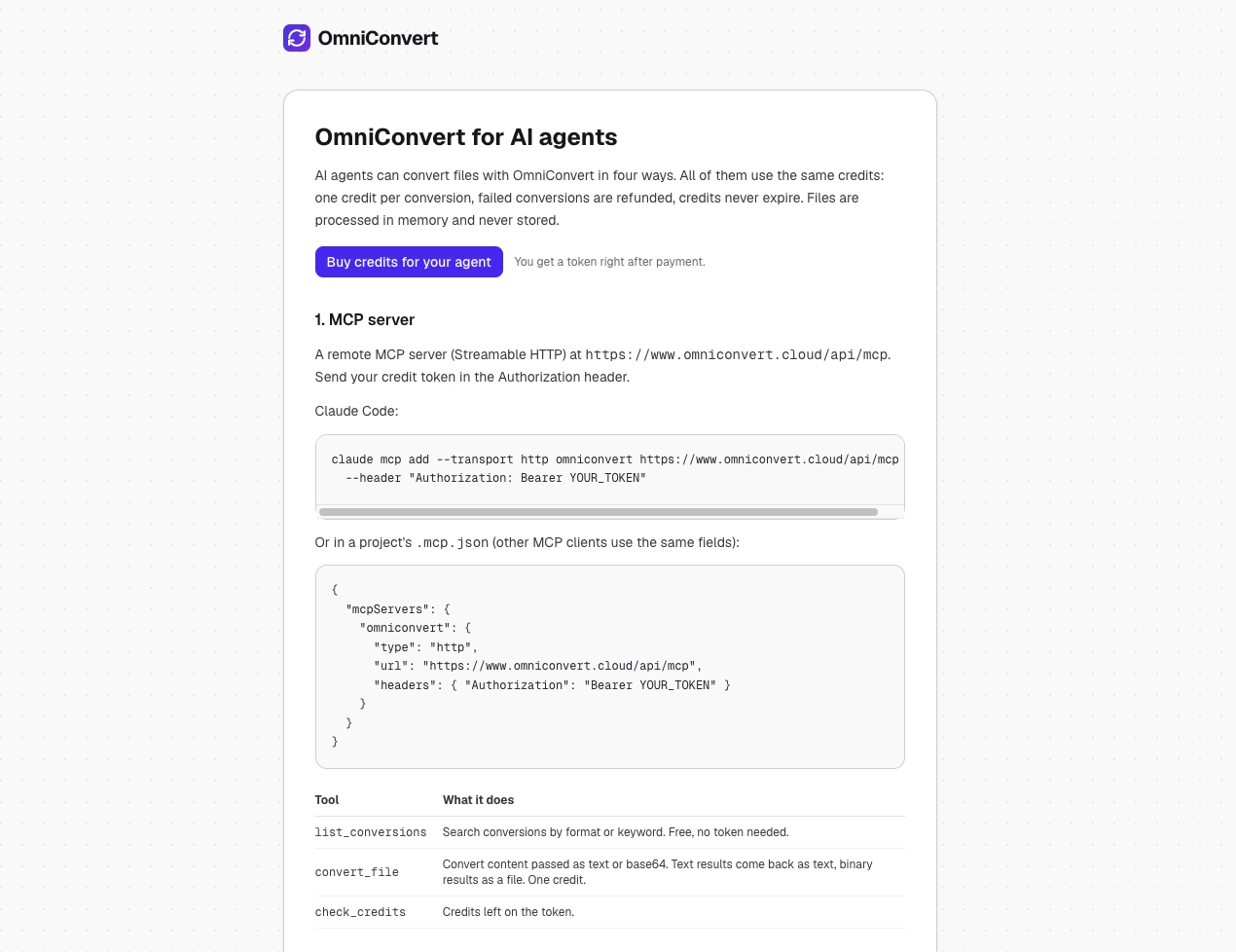
Omniconvert is a CRO platform whose Explore product covers A/B testing, personalization and on-site surveys.
Who this tool is for: CRO managers, growth leads, and agencies, mostly in ecommerce, for A/B and split URL tests, personalization with detailed segmentation (such as RFM segments and weather), and web surveys.
Pricing: Omniconvert Explore is free for up to 50,000 tested users. Paid plans start at $350/month (billed monthly) or $245/month (billed yearly) for up to 100K tested users.
What Can Omniconvert’s MCP Server Do?
- Access: A hosted server connects over Streamable HTTP. Claude and ChatGPT connect with OAuth 2.1 while other clients use an API key.
- Scope: A token covers every website on one Omniconvert account.
- Report: It lists websites and experiments, reads variations, goals, and segments, and returns performance overviews, reports, and chart series. Overviews cover users, conversion rate, revenue, leads, and survey respondents for up to 10 experiments over a date range.
- Build and writes: None. All 11 tools are read-only.
- Clients: Claude, ChatGPT, Cursor, Claude Code and Claude Desktop.
Limitations
- All test setup stays in the Omniconvert interface.
- Access is account-wide, with no documented way to limit a connection to one website.
Bottom line: If you want an AI to analyze test results with no way to change a live experiment, OmniConvert is a good fit. Don’t go for it if you want to build or launch tests via MCP.
7. Zoho PageSense
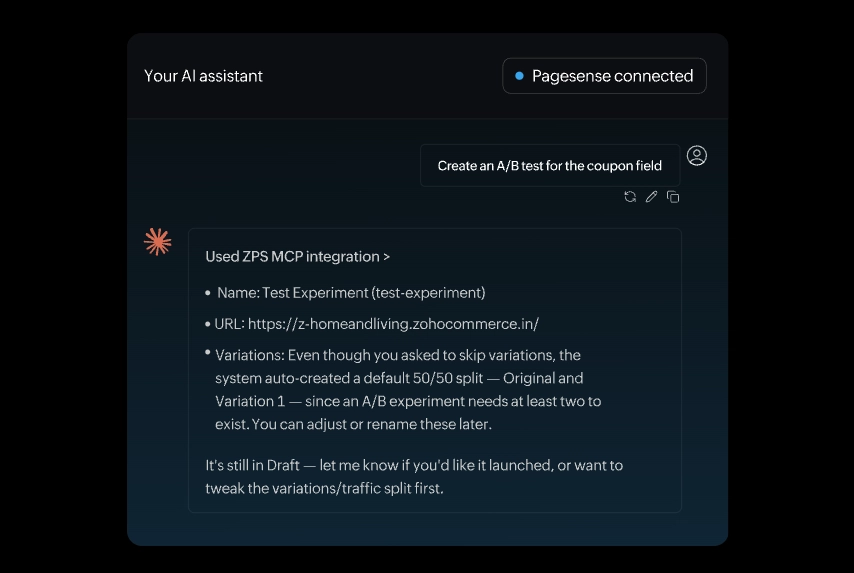
Zoho PageSense is a conversion optimization platform in Zoho’s suite that combines web analytics, heatmaps, session recordings, and testing.
Who this tool is for: Growth teams, including marketers, product engineers, and UX analysts, for heatmaps and session recordings, funnel and form analytics, and A/B, split URL, and full-stack tests on its Enterprise plan.
Pricing: Zoho PageSense offers a 15-day free trial. A/B testing needs the Enterprise plan, from $49/month (billed monthly) for 10K tracked users.
What Can Zoho PageSense’s MCP Server Do?
- Access: A hosted server runs through Zoho MCP, which added PageSense in 2026, with OAuth 2.1. By default, each user signs in with their own account, or a Super Admin shares one connection with the team.
- Scope: MCP is off for every project until an admin turns it on, grants access per user, and picks the exact tools exposed. View-only users can read data but not configure anything. The server URL contains an API key, so Zoho says to treat it like a password.
- Build: Zoho says the AI can build an A/B test for you to launch, depending on the tools an admin selects.
- Report: It reads web analytics, funnels, heatmaps, session recordings, form analytics, polls, goals, and A/B test results.
- Audit: Zoho MCP Logs record every MCP access for 30 days, with result codes, filterable by time and tool.
- Clients: Claude, ChatGPT, Gemini, Perplexity, Cursor, VS Code, and other Streamable HTTP clients.
Limitations
- Zoho doesn’t publish the PageSense MCP tool list, so you can’t check write capabilities before setup.
- No confirmation step before an AI change is documented beyond admin tool selection.
- A/B, split URL, and full-stack testing need the Enterprise plan.
Bottom line: Zoho PageSense fits situations where admins need to switch MCP on project by project and keep a 30-day log of every MCP access.
Which Other A/B Testing Tool Vendors Offer MCP Servers?
This list isn’t exhaustive, but here are four more vendors who offer MCP servers that touch experimentation:
- PostHog: PostHog’s MCP server creates experiments with their feature flags, launches, pauses, and ends them, ships winning variants, and reads results and an audit trail. Its documentation describes no confirmation or draft step.
- ABConvert: ABConvert is a Shopify A/B testing app whose hosted MCP server is in beta, opt-in through support, on Growth and above. It creates, launches, and ends price, shipping, theme, template, redirect, offer and checkout tests, one store per connection, and its documentation shows tests saved as drafts for you to confirm. As of October 2026, it’s still in beta access.
- Amplitude: Amplitude is an analytics platform first. Its MCP server covers experiments and flags alongside charts and dashboards, with an organization-wide MCP switch, separate read and write permissions per project, and a server-checked two-step delete for taxonomy events and properties.
- Mutiny: Mutiny’s MCP server builds and publishes marketing assets such as landing pages, with no tools for running experiments.
What Should You Look For in an A/B Testing Tool’s MCP Server?
Top of mind for you should be what the MCP server can change and who approves it. Other things to pay attention to are its:
- Build coverage: Which objects can it create, and which stay in the interface?
- Reporting depth: Does it return significance, daily data, and integrity checks? Heatmaps and session recordings come with only some servers and plans.
- Authentication and scope: Does it use OAuth, limit access to selected projects, and follow your current role?
- Write safeguards: Does confirmation happen on the server, in the AI client, in the agent’s instructions, or nowhere? Do new tests start as drafts?
- Team controls: Is there an organization-wide switch, per-user access, approvals, and an activity log?
- Client and model support: Does it list your team’s AI client, and does it run as a remote connector with OAuth or only as a local install?
- Plan availability: Which plans include it, and does any data need a paid add-on?
How Do A/B Testing MCP Servers Keep AI Agents in Check?
A/B testing MCP servers use three guardrails to make sure AI isn’t overstepping:
- Confirmation before a change goes live
- Limits on what a connection can touch, and
- Team controls that approve or record changes.
For the seven in this article, here are the safeguards available:
| Tool | Authentication | Permission scope | Write safeguard (who enforces it) | Org controls | MCP audit log | Packaged workflows |
| Convert Experiences | Hosted OAuth; local API key | Selected projects or whole account, capped at your current role | Drafts by default; unconfirmed activate, pause and delete rejected (server) | Request Approval System (beta, Pro and Enterprise) | Change History records MCP changes as API changes | 20 prompts |
| Optimizely | OAuth through Opti ID | Mirrors your Optimizely permissions | Agent confirms project, environment and details (agent) | Inherited permissions | Not documented | Example prompts |
| Wingify (VWO + AB Tasty) | OAuth 2.0 (web); developer token (FME); environment key (open source) | ‘Browse’, ‘Design’ or ‘Publish/Admin’ tier (web); one key per connection (others) | Tier only (web); ‘dry run’ choice (open source); none, plus one auto-enable tool (FME) | None documented | Not documented | Not documented |
| GrowthBook | API key, personal access token or OAuth | Whatever the credential allows | Tools labeled read-only or able to change data (AI client, if it respects the labels) | Server-side skill switch | Not documented | 4 skills, 27 workflows |
| Intelligems | OAuth2 | Organization parameter; no per-tool scopes | Drafts by default; price changes need a commit (server); other writes (AI client) | Not documented | Not documented | 10 skills |
| Omniconvert | API key or OAuth 2.1 | One token covers the whole account | No writes exposed | Account-wide token | Not documented | Not documented |
| Zoho PageSense | OAuth 2.1; server URL is a credential | Off by default per project; per-user access; admin picks each tool | Permission scope only | Admin controls | Zoho MCP Logs, 30 days | Example prompts |
Who Confirms a Change Before It Goes Live?
In this article’s list, only Convert Experiences (for launches, pauses, and deletes) and Intelligems (for price changes) enforce server-side confirmation checks. Other tools rely on the AI client, agent prompts, or role permissions, while Wingify’s FME server documents no pre-change checks.
However, server checks have a key limitation. Because the AI provides the required confirmation string, an uncooperative agent could bypass the prompt. Explicit permission scopes and approval workflows help close this gap.
Some servers also enable features automatically. For instance, Wingify’s FME server includes a tool that creates flags with automatic enablement. Similarly, GrowthBook originally created feature flags enabled by default across all environments before updating its default to disabled in August 2025.
What is MCP Elicitation, and Does It Help?
MCP elicitation lets a server pause a tool call and ask the person for input, such as a yes or no, through the AI client. The current specification as of October 2026 keeps it optional, and each client must declare support.
Claude Code, Cursor, and VS Code with Copilot officially support it. As of October 2026, Claude Desktop, Claude.ai, ChatGPT, and Codex had no official statement. None of the seven A/B testing tool MCP servers here document using elicitation to confirm writes.
How Do Team Controls Limit an AI Agent?
Convert’s Request Approval System (currently in beta) adds a human gate on activations, pauses, and live edits. This forces the action to wait for a reviewer, and once a change is approved, someone still has to run it again for it to take effect.
Another limiter is curated prompts and skills. They give every teammate the same tested starting point, whatever their prompting skill.
Organization-wide MCP switch is a great AI control tool. But no tool in our list documents having it. Zoho PageSense comes closest, with MCP off by default per project.
What Guardrails Should You Set Up Before Connecting an AI Agent?
Whichever tool you choose, set these up before an AI agent gets write access:
- Start read-only. Connect with a reporting or read-only scope first, and add write access once you trust the workflow.
- Grant selected projects instead of the whole account.
- Make sure new tests start as drafts and that a person confirms every launch, pause, and delete.
- Use an approval workflow for live changes where your tool offers one.
- Check and QA every AI-generated variation by hand before it goes live.
- Confirm that changes made through MCP show up in your tool’s change log or MCP access log.
- Test your model on writes first. In Iqbal’s tests, small and large models both made setup mistakes, so run a few draft builds before you trust any model with launches.
FAQ: A/B Testing Tools With MCP Servers
As of October 2026, at least nine A/B testing tools ship MCP servers, and this comparison covers seven of them, i.e., Convert Experiences, Optimizely, Wingify, GrowthBook, Intelligems, Omniconvert, and Zoho PageSense.
The best fit depends on the job. Convert Experiences rejects unconfirmed launches at the server, GrowthBook is open source, Intelligems serves Shopify, Omniconvert is read-only, and Zoho PageSense logs every MCP access.
You add the vendor’s MCP server to your AI client, then sign in or supply an API key. Hosted servers, such as the Convert Experiences connector, use OAuth from clients like Claude or ChatGPT. Local servers, such as GrowthBook’s, run on your machine with an API key. Some vendors, including Zoho PageSense, need an admin to enable MCP first.
Convert Intelligence is the AI assistant built into the Convert Experiences app, and the Convert MCP server connects your own AI client, such as Claude or ChatGPT, to your Convert account. Convert Intelligence reads the page you’re on and proposes changes you accept in the app. The MCP server lets your AI client pull reports, build drafts, and change tests through Convert’s API. Both respect your Convert role permissions.
For the tools compared here, the MCP server reads results through the testing tool’s own API, so they come from the same bucketing and statistics engine as the dashboard. The risk lies in what an AI changes, such as launching a test early or editing a live experiment.
An A/B testing MCP server is as secure as its authentication, permission scope, and write safeguards. OAuth keeps API keys out of the AI client, and scoped grants limit which projects a connection can touch. Before granting write access, check whether the server, the AI client, or only the agent confirms changes.
As of October 2026, prices run from free to custom enterprise contracts. GrowthBook’s self-hosted edition is free, MCP server included, and Omniconvert is free up to 50,000 tested users. Convert Experiences starts at $399/month billed monthly for 100,000 monthly tested users, while Optimizely and Wingify quote custom pricing. Convert, GrowthBook, Intelligems, and Zoho PageSense include MCP at no extra cost. Wingify charges for MCP access to behavior analytics data.
Of the seven tools compared, GrowthBook is the only open-source platform with an open-source MCP server under the MIT license, free to self-host. PostHog, also open source, offers an MCP server that creates and launches experiments. Wingify publishes an open-source MCP server for its Feature Experimentation & Rollouts product, though its platform is commercial.
Intelligems and ABConvert build their MCP servers for Shopify stores, with tools for price, offer, and checkout tests. Intelligems holds price changes for a commit step, and ABConvert’s server is in beta on Growth and above. General web testing tools, such as Convert Experiences and Omniconvert, also test ecommerce sites.
Written By
Uwemedimo Usa
Conversion Rate Optimization, Conversion Copywriting, B2B SaaS Content Marketing +3 more
Conversion Rate Optimization, Conversion Copywriting, B2B SaaS Content Marketing, A/B Testing Tools Evaluation, Generative Engine Optimization, A/B Testing Statistics Show less
Edited By
Carmen Apostu

How Was This Blog Written
This article was created by Uwemedimo Usa, Content Writer, and Ahmed Abbas, Full-Stack Developer at...
This article was created by Uwemedimo Usa, Content Writer, and Ahmed Abbas, Full-Stack Developer at Convert, with editorial review by Carmen Apostu, Editor at Convert.
To develop it, we used the following sources of input:
- Primary sources reviewed: Ahmed Abbas’s comparison of 11 vendors’ MCP servers (September to October 2026), Convert’s customer surveys (May 2025, January 2026 and June 2026), 2024 customer interviews and 2026 agency research, Iqbal Ali’s hands-on MCP articles on the Convert blog, the Convert MCP server’s source code and release records, official MCP documentation and pricing pages for 12 vendors, and the MCP specification.
- Internal expertise used: Convert’s engineering team (Ahmed Abbas) and data engineering (Karim Naufal).
AI assistance was used for: summarizing source notes, checking structure, editing for clarity and SEO optimization.
AI was not used for: writing, original expert judgment, final recommendations, product claims, or final editorial approval.
Every factual claim was reviewed by Uwemedimo Usa, Ahmed Abbas, and Carmen Apostu. Claims involving Convert product functionality were checked against Convert’s MCP server source code and documentation.