Personalization for Lean B2B Teams: Tools, Key Features, and Examples of 1:1 B2B Personalization


Key takeaways
- Personalization doesn’t mean the same thing for every team. Lean B2B teams typically personalize using known data and defined audiences, while enterprise teams often optimize at scale using large datasets and long learning cycles.
- Lean B2B teams need personalization tools that are fast to deploy and easy to operate. When platforms become too complex, lean teams spend more time managing tooling than shipping relevant experiences.
- 1:1 personalization works best with explicit data. CRM fields, account lists, lead scores, and campaign inputs are often enough to deliver highly relevant experiences, without relying on probabilistic signals or heavy modeling.
- Account-level personalization is central to B2B use cases. Many high-impact B2B personalization efforts focus on accounts rather than individuals, aligning messaging with industry, role, or deal context instead of short-term browsing behavior.
- Different tools support different personalization workflows. Some help teams test and refine messaging, others deliver fixed 1:1 experiences to known accounts, and some personalize conversations in real-time.
- Convert Nexus enables scalable 1:1 personalization without engineering effort. By syncing personalized data directly from workflow tools via API, or by simply uploading CSV files, lean teams can dynamically personalize page content for every lead or account. Convert Nexus helps them deliver tailored experiences across ABM, email, and sales campaigns without building or maintaining multiple landing pages.
The state of B2B personalization
Personalization has been central to B2B marketing for over a decade, yet the stakes are higher today than ever.
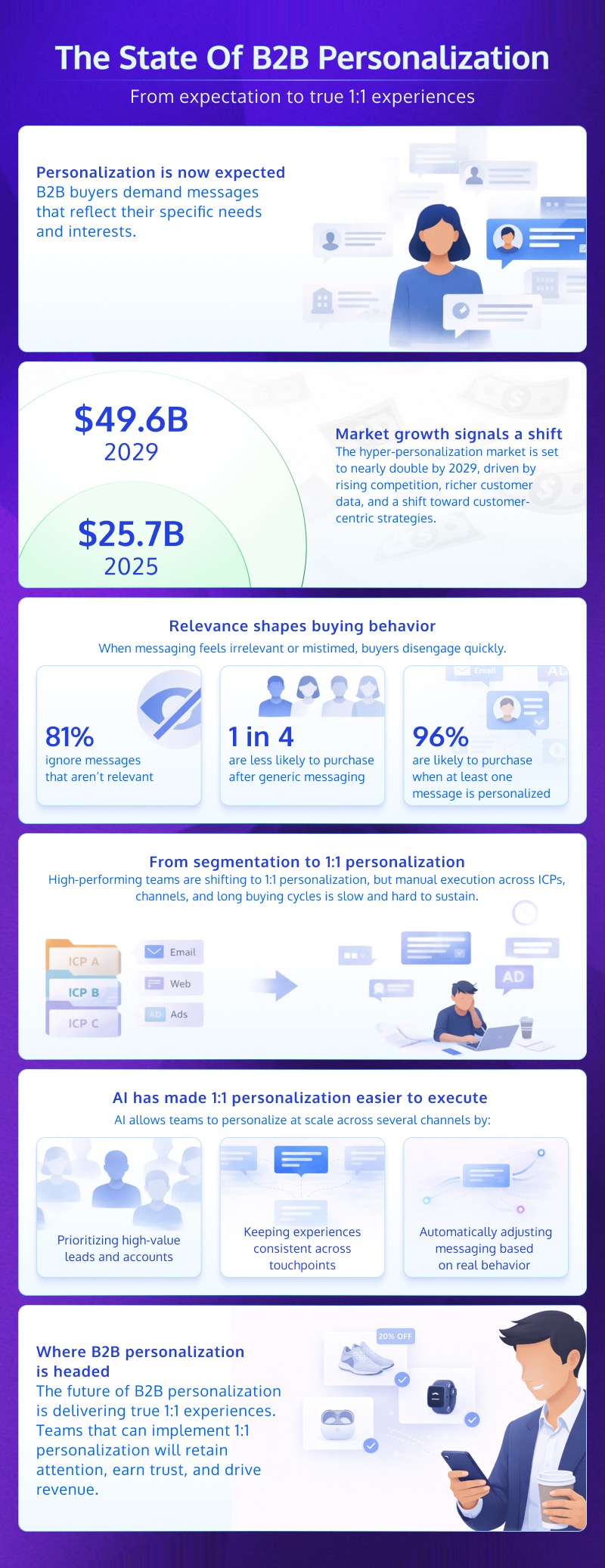
In 2025, the hyper-personalization market grew to $25.73 billion and is projected to reach $49.6 billion by 2029. This rapid growth is driven by rising competition, growing volume of customer data, and a stronger focus on customer-centric business models. Simply put, as more brands compete for attention across digital channels, generic messaging won’t cut it anymore.
Attentive’s 2025 Consumer Trends Report reveals that a third of shoppers are now trying new brands, which signals how fragile loyalty has become in crowded markets. While this data point focuses on e-commerce, the same dynamic plays out in B2B and SaaS markets, where buyers are constantly exposed to alternatives and can switch vendors without significant financial or operational loss.
So, if you want to keep your customers, you have to tailor your messaging to reflect their preferences and needs. If your messaging isn’t personalized, customers disengage. Over time, they stop paying attention altogether.
Attentive’s data supports this:
- 81% of consumers ignore messages that aren’t relevant to them
- 1 in 4 consumers are less likely to purchase after receiving generic or irrelevant messages
- 96% say they’re more likely to purchase if at least one message is personalized
With that in mind, it’s safe to say that broad segmentation alone is not enough. The future of B2B personalization points toward 1:1 experiences that reflect who the buyer is, what they care about, and where they are in their journey.
Anna Tankel, a fractional B2B Head of Growth, puts it this way:
“I still see a lot of personalisation done for the sake of it – ‘Hey Anna, I saw your LinkedIn post…’ followed by something completely irrelevant. The next step, and the real opportunity, is personalisation that genuinely increases relevance.
That means tailoring messages to the context that actually matters: the stage of the company, the role someone has, and the problems they’re trying to solve. Instead of random name-drops, we’ll see more messaging like ‘Built for mid-market teams’ or ‘How demand gen leaders use X to solve Y’.”
However, true 1:1 personalization is difficult to achieve manually. B2B companies serve multiple ICPs, use cases, and buying roles, often across channels like email, paid media, social platforms, and sales calls. Manually tailoring messaging across these touchpoints and segments is time-consuming and tedious. But more recently, advances in AI have made hyper-personalization far easier and more achievable.
Modern personalization tools now use AI to analyze data from CRMs, CDPs, product usage, and campaign interactions to tailor messages to individual contacts or accounts. This makes it possible for companies of all sizes, across different industries, to execute personalization consistently and at scale, without placing additional strain on their teams.
AI supports hyper-personalization by:
- Identifying high-value leads, visitors, or accounts most likely to convert, so teams can focus their efforts where they matter most
- Recognizing customers across devices and sessions, which improves targeting accuracy and experience continuity
- Dynamically adapting content and messaging based on customer behavior, product affinity, and revenue impact
This way, AI helps teams turn existing customer and campaign data into timely, relevant experiences that meet modern buyer expectations and drive stronger performance.
Personalization platforms for lean teams comparison table
The table below provides a quick side-by-side look at how the personalization platforms we cover stack up against one another.
| Tool | Starting price | 1:1 data-driven personalization (CSV/CRM) | Account-level (ABM) personalization |
No-code control over personalized content |
Conversational/chat personalization |
||||||||||||||||||||||||||||||
|---|---|---|---|---|---|---|---|---|---|---|---|---|---|---|---|---|---|---|---|---|---|---|---|---|---|---|---|---|---|---|---|---|---|---|---|
| Convert Nexus | 15-day free trial; $99/mo for up to 1,000 accounts | ✅ | ✅ | ✅ | ❌ | ||||||||||||||||||||||||||||||
| VWO | 30-day free trial. Contact sales. | ✅ | Yes, but it requires integrations like Demandbase to target accounts | ✅ | ❌ | ||||||||||||||||||||||||||||||
| Optimizely | Contact sales | ✅ | Yes, but it requires Optimizely Data Platform (ODP) or an integration (like Demandbase) to recognize company domains. | ✅ | ❌ | ||||||||||||||||||||||||||||||
| Dynamic Yield | Contact sales | ✅ | Its AI-driven personalization features can be used for ABM strategies, but it’s not specialized for ABM.) | ✅ | ❌ | ||||||||||||||||||||||||||||||
| ActiveCampaign | 14-day free trial. $15/mo (billed annually) | Yes, but it’s for 1:1 email personalization specifically | It has account-level CRM features, but web personalization is mostly limited to known individual contacts. | ✅ | ✅ (via ActiveCampaign Conversations) |
||||||||||||||||||||||||||||||
| HubSpot | $9-$15/mo per seat | Yes, but it’s limited to known contacts within the CRM. | ✅ | ✅ | ✅ (via Chatflows) |
||||||||||||||||||||||||||||||
| Mutiny | Contact sales | ✅ | ✅ | ✅ | ❌ | ||||||||||||||||||||||||||||||
| Demandbase | Contact sales | ❌ | ✅ | ✅ | ❌ | ||||||||||||||||||||||||||||||
| Webflow Optimize | Free plan available. $14/mo (billed annually) | ❌ | It has “Enhanced Match” for firmographic data, but is newer and less robust than dedicated ABM platforms | ✅ | ❌ | ||||||||||||||||||||||||||||||
| If-So | $5/mo (billed annually). $97 for lifetime access. | ❌ | ❌ | ✅ | ❌ | ||||||||||||||||||||||||||||||
| Chatbase | Free plan available. $32/mo (billed annually) | ❌ | ❌ | ✅ | ✅ | ||||||||||||||||||||||||||||||
| Drift (by Salesloft) | Contact sales | ❌ | ✅ | ✅ | ✅ | ||||||||||||||||||||||||||||||
| Unify AI Agents | $1,740/month per user (billed annually) | ✅ | ✅ | ✅ | ❌ |
13 personalization platforms for lean teams
- Convert Nexus
- VWO
- Optimizely
- Dynamic Yield
- ActiveCampaign
- HubSpot
- Mutiny
- Demandbase
- Webflow Optimize
- If-So
- Chatbase
- Drift (by Salesloft)
- Unify AI Agents
1. Convert Nexus
Best for: Lean growth, marketing, and revenue teams that want to deploy true 1:1 personalization across ABM, email, and sales enablement campaigns without engineering support or complex data infrastructure.
Convert Nexus is a 1:1 personalization engine specifically designed to deploy data-driven landing pages at scale. While Convert Experiences tests variations and optimizes performance through experimentation, Nexus is built to deliver final, tailored experiences to specific visitors, leads, accounts, or customers.
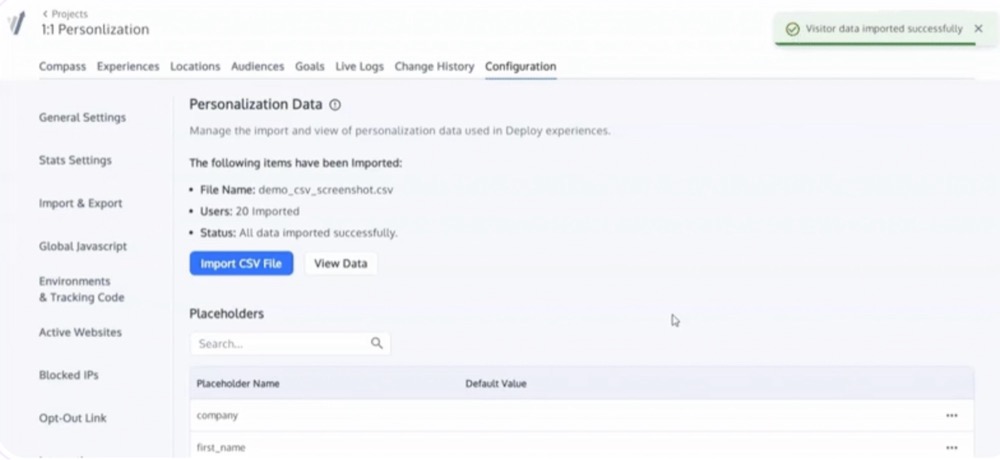
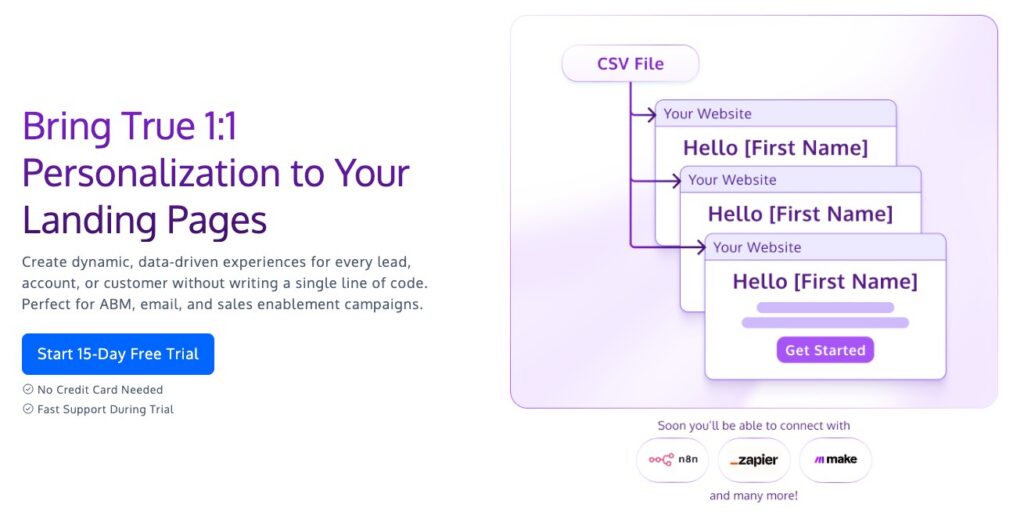
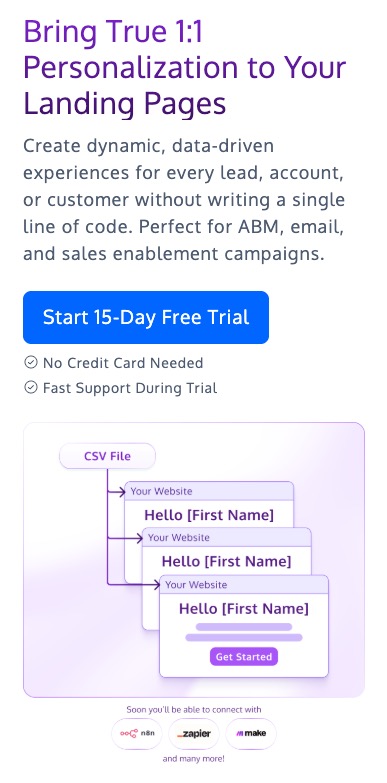
All you have to do is sync your personalized data from your preferred workflow tools—whether through Zapier, n8n, or direct API integrations—or upload a CSV containing user IDs and attributes, and Nexus automatically maps that data to page elements, without you having to write a single line of code.
It can dynamically adapt a page’s headline, copy, imagery, CTAs, and dynamic variables for different accounts or users, which makes it especially effective for ABM campaigns, personalized email landing pages, and sales enablement workflows where relevance and speed matter.
The fact that developers don’t have to create or maintain hundreds of page variants is the reason Tom Adeleaux, Lead CRO consultant at Station10, uses Convert Nexus for personalization:
“Where Convert.com has been a huge go-to for me is its agility. The out-of-the-box audience targeting allows us to set targeted personalisations live rapidly, without intense technical setup. Some of my favourite experiences is using Convert to personalise landing pages based on user attributes instead of creating 100s of them.”
Key features
- 1:1 personalization at scale: Nexus transforms static pages into dynamic experiences by automatically swapping headlines, body text, images, CTAs, and variables based on CSV data or integrated customer records.
- Flexible data integration: Sync personalized data directly from your CRM, marketing automation platform, or other tools using Zapier, n8n, or API connections, or simply upload a CSV file containing user or account IDs and attributes. Nexus generates unique, personalized experiences for every row in the dataset. This makes it especially effective for ABM lists, email-driven campaigns, and sales-led outreach.
- Custom popups: This allows teams to show their site visitors pop-ups that are more catered to their needs.
Pros
- Convert Nexus enables true 1:1 personalization without engineering support, which makes it accessible to lean teams with limited development resources.
- It scales personalized experiences efficiently, eliminating the need to create and maintain hundreds of separate landing pages.
- It works seamlessly for ABM, email, and sales enablement use cases, where personalization needs to be deterministic and data-driven.
- It keeps personalization logic transparent and controllable, since all mappings and rules are explicitly defined.
- There is a reusability aspect to Nexus’ Personalization that allows placeholders to be reused across multiple Deploy experiences once defined at the Project Level.
Cons
- Nexus relies on clean, well-structured input data, meaning personalization quality depends on the accuracy of uploaded or integrated datasets.
- There could be some learning curve for non-technical users.
Pricing: Offers a 15-day free trial. Paid plans start at $99/month for up to 1,000 accounts.
2. VWO
Best for: Lean growth or product teams that want to run on-site personalization and A/B tests without building a custom experimentation or targeting system from scratch.
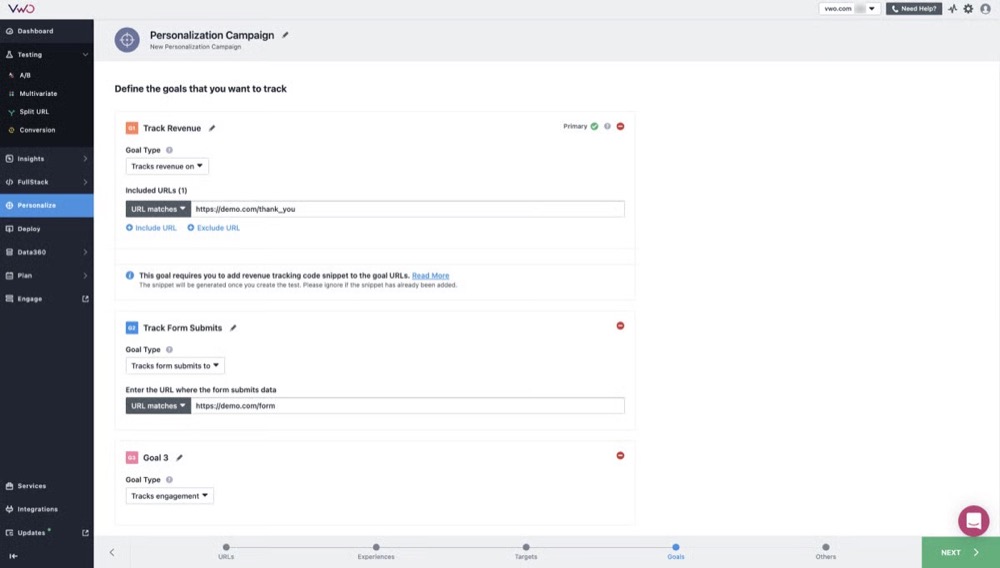
VWO is a conversion optimization platform that combines experimentation, on-site personalization, and behavioral targeting in a single tool. For lean teams, its main value lies in allowing personalization decisions to be tested (rather than assumed), using A/B tests, split URLs, and targeted experiences tied to observable user behavior.
Personalization in VWO is primarily rules-driven. Teams define segments based on attributes such as traffic source, device type, geography, cookies, or user behavior, then serve different variants or experiences to those segments.
While VWO includes automation and AI-assisted features, the core workflow still revolves around explicit hypotheses (if/then logic and custom segments) and controlled experiments, which makes it suitable for teams that want measurable personalization without relying on opaque models.
Key features
- Audience-based targeting and segmentation: VWO lets teams define audience segments using first-party data points like URL rules, referral source, device type, behavioral events, and cookies. These segments can then be used to personalize content or route users into specific experiment variants.
- Integrated A/B testing and personalization: With VWO, lean teams can personalize pages for specific segments while still running controlled tests to validate whether those changes improve conversions or engagement.
- Visual editor with code-level overrides: The visual editor allows non-engineers to make UI changes, while developers can inject custom JavaScript or CSS for more advanced use cases.
- Client-side deployment with performance controls: VWO primarily operates client-side, loading personalization and experiment logic through a JavaScript snippet. Features like asynchronous loading and flicker mitigation help reduce performance impact when configured correctly.
Pros
- VWO combines experimentation and personalization in one platform, which keeps the tech stack lean and prevents context-switching.
- It strongly supports rules-based targeting using observable user data.
- It supports both low-code and developer-led workflows, which is great for both teams that have developers and those that don’t.
Cons
- VWO is primarily client-side, which can limit control for server-rendered or edge use cases.
- It is less flexible for teams that want deep backend or data-warehouse-driven targeting.
- Some teams report frequent price increases and forced upgrades as they scale, which can complicate budgeting for lean teams.
Pricing: Offers a 30-day free trial. Contact VWO for a demo and custom quote.
3. Optimizely
Best for: Lean teams with some engineering support that want control over how experiments and personalized experiences are delivered across web, backend services, and feature flags.
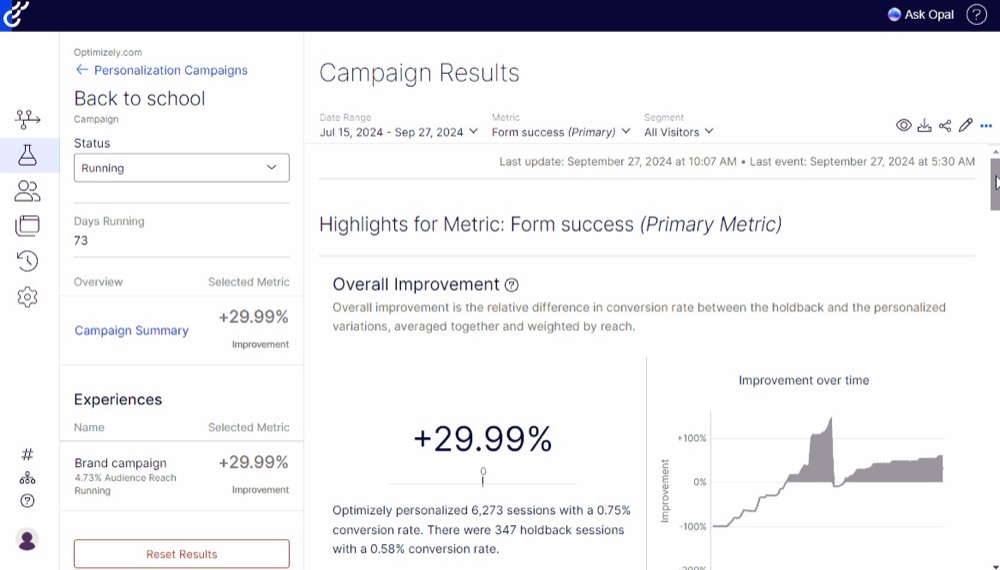
Optimizely is best known as an experimentation platform, but personalization is deeply embedded in how experiments are targeted, delivered, and evaluated. Rather than positioning personalization as a standalone layer, this platform treats it as an extension of experimentation, where different audiences are exposed to different experiences and the impact is measured systematically.
With Optimizely, teams can personalize experiences using server-side SDKs, feature flags, and audience attributes pulled from application logic or backend systems. This makes it a strong option for product-led teams that want to personalize onboarding flows, feature exposure, or pricing logic without building custom experimentation infrastructure.
Key features
- Audience targeting: Optimizely allows teams to define audiences using attributes like user properties, device data, location, or custom events, which determines who sees which variation in an experiment.
- Server-side experimentation and feature flags: Unlike purely client-side tools, Optimizely supports server-side SDKs that let teams personalize logic at the application level. This is especially useful for feature rollouts, gated functionality, or personalization that must happen before a page or response is rendered.
- Unified experimentation across web and product: Teams can run web experiments, feature flag tests, and personalization experiments under the same experimentation framework. This prevents lean teams from using too many tools when personalization spans both web pages and in-product experiences.
- Statistical rigor and experimentation controls: Optimizely emphasizes experiment design, statistical validity, and result interpretation, which helps teams avoid false positives when testing personalized experiences and ensures decisions are based on reliable data.
Pros
- Optimizely strongly supports server-side and feature-flag-based personalization.
- Personalization is tightly coupled with experimentation and measurement.
- This platform scales from simple audience targeting to complex application logic.
Cons
- It requires more technical involvement than purely visual personalization tools.
- Setting it up and configuring it can be time-intensive, especially for teams just getting started with experimentation.
- Pricing is at the top end of the range, which can limit accessibility for lean teams.
Pricing: Contact Optimizely for a demo and custom quote.
4. Dynamic Yield
Best for: Lean e-commerce or consumer-facing teams that want to personalize content, product recommendations, and messaging across the customer journey.
Dynamic Yield is a personalization platform that focuses heavily on experience orchestration: deciding what content, product, or message to show a user at a given moment based on context and behavior.
It’s commonly used in e-commerce, media, and consumer SaaS environments where personalization needs to happen across many touchpoints, from homepage banners to product recommendations.
For lean teams, Dynamic Yield’s value lies in how much personalization logic it abstracts away. Instead of manually defining every rule, teams use observed signals, such as browsing behavior, past purchases, device type, or location, to select experiences dynamically.

Key features
- Experience decisioning and targeting: Dynamic Yield uses a centralized decision engine to determine which content or experience to serve based on user attributes, behavior, and context.
- Product and content recommendations: The platform includes built-in recommendation models for products, content, and offers. These models adapt based on user interactions and can be constrained by custom rules.
- Templates for common use cases: Dynamic Yield provides prebuilt templates for banners, overlays, recommendations, and messaging, so lean teams can deploy common personalization patterns quickly without designing every experience from scratch.
- Testing and performance measurement: This platform allows teams to compare personalized experiences against baselines to understand whether personalization is actually driving incremental impact.
Pros
- Dynamic Yield has strong out-of-the-box support for recommendations and content decisioning.
- It provides centralized control over personalization logic across different touchpoints, like homepage banners, sales pages, and product recommendations.
- It’s designed to scale personalization without custom ML development.
Cons
- It requires a heavier setup than simple rules-based personalization tools.
- It requires consistent event tracking and clean behavioral data to perform well.
- It’s less flexible for teams that want low-level control over personalization logic.
Pricing: Contact Dynamic Yield for a demo and custom quote.
5. ActiveCampaign
Best for: Lean teams that want to personalize email, on-site messages, and follow-ups using behavioral data they already collect.
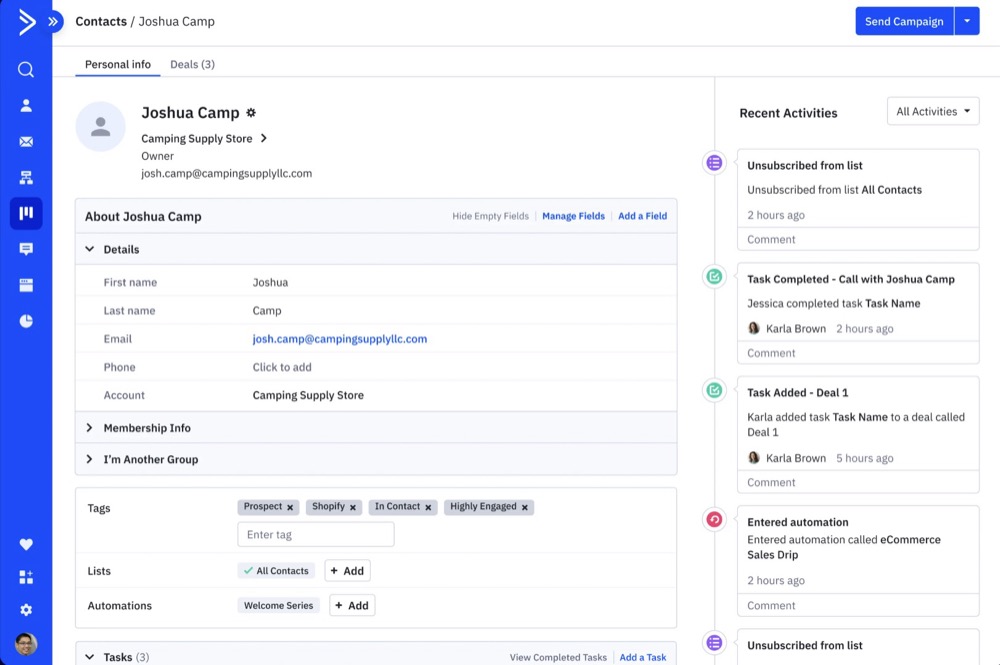
ActiveCampaign is primarily an email marketing platform, but personalization is baked into how automations, messaging, and segmentation work. Rather than focusing on web experiments or visual page changes, ActiveCampaign personalizes who gets what message, when, and through which channel based on observed user behavior.
For lean teams, the appeal is that personalization is driven by first-party data already flowing through the system, such as email interactions, site visits, form submissions, tags, and custom events.
Teams can tailor content dynamically inside emails, trigger different automations based on user actions, and even personalize on-site messages, all without building a custom data pipeline or rules engine.
Key features
- Dynamic content in emails: ActiveCampaign allows teams to conditionally show or hide sections of an email based on contact attributes, tags, or behaviors. This makes it possible to personalize a single campaign for multiple audience segments without duplicating emails.
- Behavior-driven automation paths: Personalization happens through automations that branch based on actions such as page visits, email engagement, or custom events. Users can be routed into different messaging flows depending on what they do, not just who they are.
- Segmentation using first-party behavioral data: Teams can build segments using a combination of profile data, tags, engagement history, and tracked site behavior. These segments power personalized campaigns and determine which experiences or messages a user receives.
- On-site message personalization: ActiveCampaign supports personalized on-site messages that appear based on visitor behavior or lifecycle stage. While it’s not full-page personalization, this feature allows teams to tailor prompts, offers, or CTAs to specific user segments.
Pros
- Personalization is tightly integrated with automation workflows, which helps teams tailor messages and flows without using a separate tool.
- It relies on first-party behavioral and engagement data, like email interactions and page visits, so personalization is grounded in observable user actions.
- It supports personalization across both email and on-site messaging using shared segmentation and conditional logic.
- Scales personalization with minimal ongoing effort, as rules and automations apply automatically to new and existing contacts.
Cons
- Personalization is limited to messaging and automation paths, rather than full-page or layout-level website experiences.
- ActiveCampaign doesn’t include a native experimentation framework, which makes it harder to quantify the incremental impact of personalization decisions.
- Personalization logic is not evaluated in real time at page load, which limits its use for server-side or application-level personalization.
Pricing: Offers a 14-day free trial. Paid plans start at $15/month (billed annually).
6. HubSpot
Best for: Lean teams that want to personalize website content, emails, and customer interactions using CRM data.
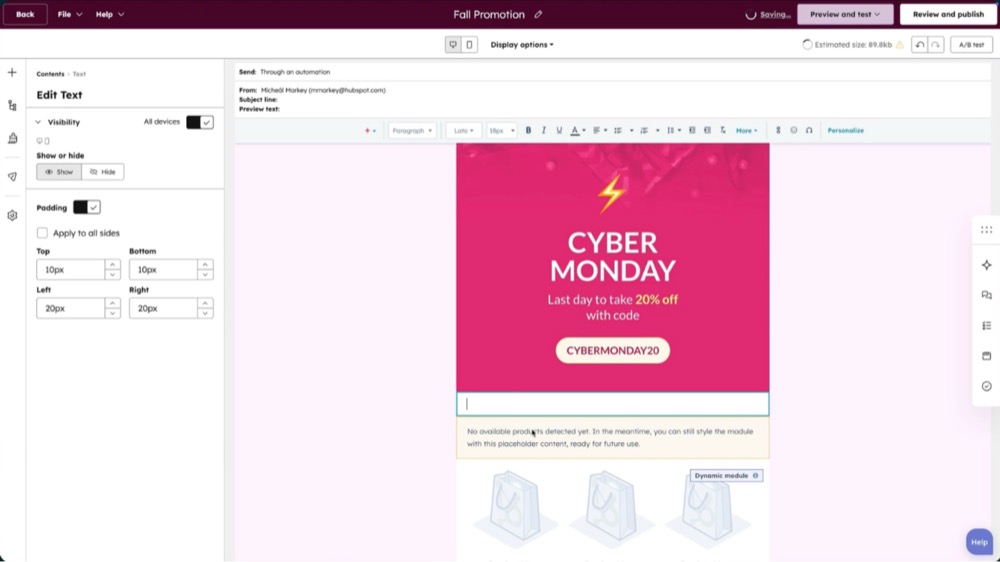
While HubSpot isn’t a dedicated personalization tool, personalization is woven into how contacts are segmented, how content is rendered, and how experiences are delivered across channels.
HubSpot’s personalization capabilities are most useful when personalization needs to be closely tied to known user context, such as company size, role, deal stage, or past interactions. This way, teams can adapt website content, emails, CTAs, and follow-ups based on who a visitor or contact is in the CRM.
Key features
- Smart content and personalized CTAs: HubSpot allows teams to swap website content, modules, or CTAs based on visitor attributes like lifecycle stage, device type, referral source, or CRM properties, enabling contextual web personalization without custom code.
- CRM-driven segmentation and targeting: Personalization logic is powered by CRM data, including contact properties, company attributes, deal stages, and engagement history. This ensures that personalization reflects real customer context rather than assumptions.
- Dynamic personalization in emails and campaigns: Teams can personalize email content using contact properties, behavioral triggers, and lifecycle stages, allowing messaging to adapt automatically as a contact progresses through the sales funnel.
- Personalized workflows across teams: HubSpot workflows enable conditional logic that personalizes follow-ups, notifications, and task routing for marketing, sales, and support teams based on user behavior and CRM state.
Pros
- Personalization is tightly integrated with CRM data, making it easy to tailor experiences based on lifecycle stage, account context, and engagement history.
- It supports personalization across web, email, and internal workflows, helping teams maintain consistent messaging across customer touchpoints.
- It keeps personalization aligned with sales and marketing activity, reducing the risk of disconnected or conflicting experiences.
Cons
- Web personalization is limited to predefined modules and rules, which can restrict flexibility for complex or highly custom experiences.
- Personalization logic depends heavily on CRM data quality, meaning gaps or inconsistencies in data directly affect experience accuracy.
- Lacks a native experimentation layer for personalization, making it harder to test and validate personalized experiences rigorously.
Pricing: HubSpot’s pricing varies by product (Marketing, Sales, Service, Content, Data, and Commerce Hubs). The Smart CRM is free and most Hubs have a free plan. Paid plans generally start low (e.g., Starter at ~$9-$15/month per seat, depending on commitment), but Professional and Enterprise tiers have higher base fees, user seats ($200-$500+/mo/seat), and extra costs for additional seats.
7. Mutiny
Best for: Lean B2B teams that want to personalize their website using firmographic and account-level data, without building a full ABM or data infrastructure.
Mutiny is a B2B-focused website personalization platform built around account-based marketing (ABM) use cases. Instead of personalizing for individual users, Mutiny personalizes experiences at the account level, tailoring headlines, messaging, CTAs, and page content based on company attributes such as industry, size, or target account lists.
Mutiny’s appeal for lean teams is its narrow focus. It doesn’t try to be a general-purpose experimentation or analytics platform; instead, it focuses specifically on helping B2B teams make their website feel relevant to high-value accounts.
Personalization is driven by firmographic data and account identification, allowing teams to deploy targeted experiences without relying on speculative intent signals or heavy engineering involvement.
Key features
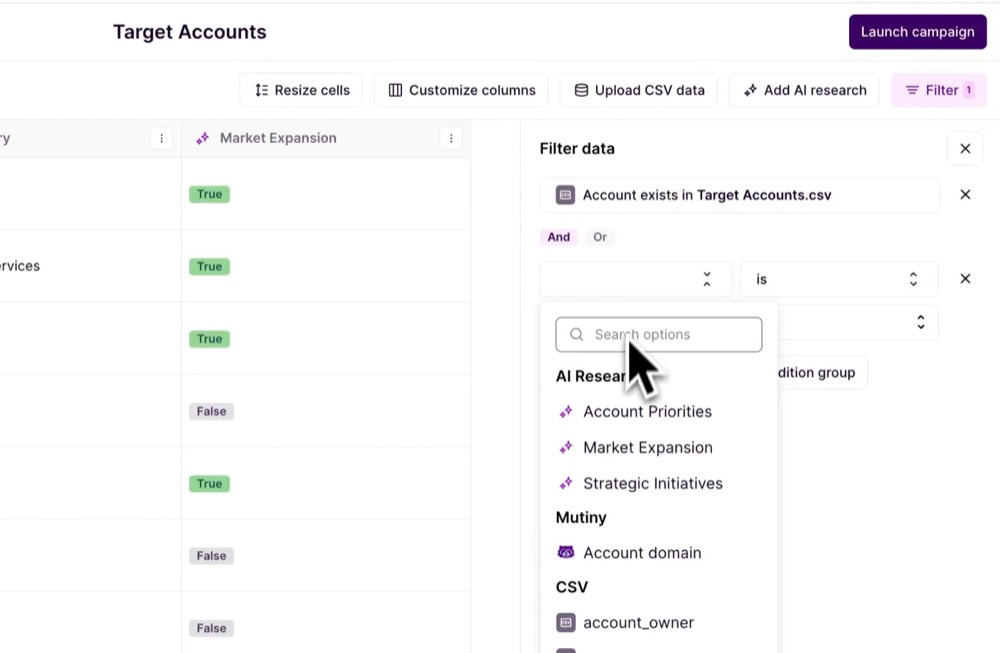
- Account-based website personalization: Mutiny identifies visiting accounts using firmographic data and matches them to predefined segments or target account lists, enabling teams to tailor on-site messaging for specific industries, companies, or account tiers.
- Visual editor for page-level personalization: Teams can modify headlines, copy, CTAs, and page sections using a visual editor, which makes it possible to launch personalized experiences without writing custom code.
- Integration with common B2B data tools: Mutiny integrates with CRMs and ABM data providers to sync account lists and attributes. This ensures that personalization logic reflects existing targeting strategies.
- Built-in measurement for personalized experiences: The platform provides reporting to compare performance across account segments. This helps teams understand how personalized pages perform for target accounts versus broader traffic.
Pros
- Mutiny is purpose-built for B2B account-level personalization, making it easy to tailor website messaging for high-value accounts and industries.
- It doesn’t require a custom data pipeline as firmographic data and account identification are handled within the platform or via integrations.
- It’s fast to deploy for common ABM use cases, especially homepage and landing page personalization.
- It keeps personalization focused on messaging relevance, rather than speculative or emotion-based targeting.
Cons
- Mutiny is less suitable for product-led or consumer use cases, where personalization needs to adapt to individual actions.
- Experimentation capabilities are more limited compared to platforms built primarily around A/B testing.
Pricing: Contact Mutiny for a demo and custom quote.
8. Demandbase
Best for: Lean B2B teams that want to personalize website experiences and messaging for target accounts using account-level data.
Demandbase is an ABM platform designed to help B2B teams identify, understand, and engage target accounts across various channels. It uses account-level data, such as firmographic data, account lists, and observed engagement signals to tailor website experiences and messaging.
Demandbase is most effective when personalization is part of a broader ABM strategy rather than a standalone conversion tactic. For example, website personalization should focus on adapting headlines, value propositions, CTAs, and content modules based on attributes like industry, company size, or buying stage.
Rather than optimizing for individual user behavior, Demandbase helps teams ensure their site is consistently relevant for priority accounts.

Key features
- Account-based website personalization: Demandbase enables teams to personalize web content for visiting accounts by matching traffic to known companies and account segments. This allows tailored messaging for different industries or account tiers.
- Firmographic and intent-driven targeting: Personalization rules can leverage firmographic data and engagement signals to determine which experiences accounts see.
- Unified account segmentation across channels: Account segments used for website personalization can be reused across advertising, email, and sales outreach, which keeps personalization logic consistent throughout the GTM motion.
- Performance reporting at the account level: Demandbase reports on engagement and performance by account segment, allowing teams to assess how personalized experiences influence target account behavior over time.
Pros
- With Demandbase, personalization logic aligns with ABM strategy, which ensures that website experiences reinforce broader account-based efforts across channels.
- It uses concrete firmographic and engagement data to determine who sees what (and when).
- It centralizes account segmentation, which reduces fragmentation between marketing, sales, and website personalization efforts.
Cons
- Personalization is scoped primarily to account-level messaging, not individual user behavior or fine-grained interaction patterns.
- It has a heavier platform footprint than point solutions, which can be more than very small teams need.
Pricing: Contact Demandbase for a custom quote.
9. Webflow Optimize (formerly Intellimize)
Best for: Lean teams building on Webflow that want to automate website optimization and personalization without manually defining segments or experiments.
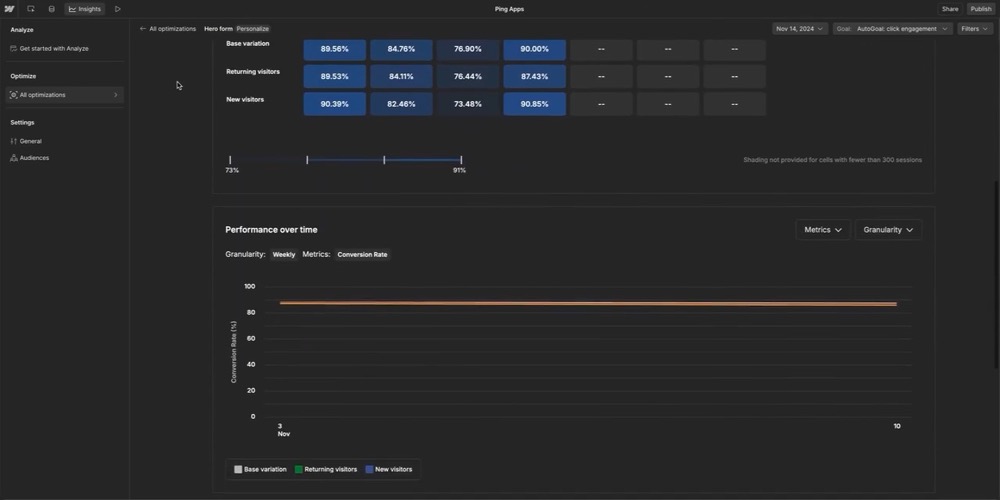
Webflow Optimize, previously known as Intellimize, is Webflow’s built-in website personalization tool that automatically personalizes page elements (e.g., headlines, layouts, visuals, and CTAs) by continuously testing variations and adapting experiences based on observed visitor context and behavior.
Rather than asking teams to define who should see what upfront, Webflow Optimize lets them specify which elements are eligible for variation, and then it dynamically learns which combinations perform best for different visitors over time.
Because Optimize is native to Webflow, personalization happens directly within the site’s design system, which reduces integration overhead for lean teams already committed to Webflow.
Key features
- Automated multi-variant personalization: Webflow Optimize tests and serves different combinations of page elements simultaneously, while continuously learning which variations perform best for different visitor contexts.
- Context-aware experience delivery: Personalization decisions are based on factors like device type, referral source, location, and recent browsing behavior, which allows page elements to adapt dynamically to how visitors arrive and interact with the site.
- Native integration with Webflow’s design system: Optimization is configured directly within Webflow, making it easy for teams to mark elements as testable and deploy personalized experiences without custom scripts or external tools.
- Continuous learning: While Webflow Optimize provides traditional A/B testing workflows that stop once a “winner” is found, its AI-optimized workflows continuously adjust experience delivery as new data is collected.
Pros
- Webflow Optimize eliminates the need for manual segmentation, allowing lean teams to launch personalization without defining complex targeting rules.
- It’s fully embedded within Webflow, which reduces setup complexity and keeps personalization aligned with site design and deployment workflows.
- It uses observable contextual and behavioral signals to determine which combination to deliver to specific segments.
- It’s well-suited for high-traffic pages where continuous optimization can meaningfully improve performance over time.
Cons
- Personalization and optimization are limited to Webflow-hosted sites.
- Webflow Optimize emphasizes AI-driven personalization, which makes it harder to apply strict experiment controls.
- The reporting is less detailed than dedicated CRO platforms, especially when analyzing how multiple page elements interact.
Pricing: Offers a free plan. Paid plans start at $14/month (billed annually).
10. If-So
Best for: Lean teams using WordPress who want to personalize on-site content through clear, predictable rules rather than automated optimization or AI-driven systems.
If-So is a rules-based website personalization plugin designed primarily for WordPress. It allows teams to change on-page content dynamically based on predefined conditions such as location, referral source, device type, URL parameters, cookies, or user behavior.
For lean teams, If-So’s value lies in its predictability and low operational overhead. There’s no optimization engine or automated decisioning layer, and personalization behaves exactly as configured.
This makes it especially useful for teams that want targeted messaging (such as geo-specific offers or campaign-based landing pages) without needing experimentation infrastructure or ongoing tuning.

Key features
- Rule-based content replacement: If-So allows teams to swap text, images, CTAs, or entire sections of a page based on conditions like location, referral source, device, or URL parameters
- Cookie- and behavior-based targeting: If-So can personalize content based on cookies and previous browsing behavior, allowing website experiences to stay consistent for returning visitors.
- Shortcode and block-based implementation: Personalized content can be added using WordPress shortcodes or blocks, making it easy to apply personalization to specific page sections without custom development.
- Fallback logic for non-matching visitors: Teams can define default content for visitors who don’t meet any personalization conditions, ensuring experiences degrade gracefully rather than breaking.
Pros
- If-So provides full control over personalization logic, since all targeting rules are explicitly defined.
- It’s lightweight and easy to deploy on WordPress, with no need for external scripts or complex integrations.
- It works well for campaign- and context-based personalization, such as geo-targeted messaging or referral-specific landing pages.
- Low operational complexity once rules are set, which makes it easy to maintain over time.
Cons
- Personalization is limited to predefined rules, with no automated optimization or learning over time.
- There’s no native experimentation or testing framework, which makes it difficult to validate the impact of personalization changes.
- Designed to work specifically for WordPress websites, which limits use for teams using other CMSs or custom stacks.
Pricing: Paid plans start at $5/month (billed annually). If-So also charges $97 for lifetime access.
11. Chatbase
Best for: Lean teams that want to personalize conversational experiences on their website without building a custom chatbot or maintaining complex dialogue logic.
Chatbase is a chatbot platform that lets teams deploy AI-powered chat experiences trained on their own content, e.g., documentation, help centers, product pages, or internal knowledge bases.
Instead of personalizing page layouts or messaging blocks, Chatbase personalizes responses, adapting what the chatbot says based on user questions, conversation context, and the underlying source material.

Key features
- Knowledge-base–driven responses: Chatbase allows teams to train a chatbot on specific documents, URLs, or content collections, ensuring responses stay grounded in known, controlled information.
- Context-aware conversational flow: The chatbot remembers earlier questions in a session, so responses can build on previous messages instead of starting from scratch each time.
- Website and app embedding: Chatbase provides embeddable widgets that can be added to websites or applications with minimal setup.
- Conversation-level analytics: Teams can review questions asked, response quality, and conversation patterns to understand where users need more guidance or where content gaps exist.
Pros
- Chatbase personalizes experiences through direct user input so interactions feel relevant.
- It’s simple to deploy and maintain, especially for teams without dedicated engineering or NLP expertise.
- It keeps responses grounded in approved content, reducing the risk of off-topic or unsupported answers.
Cons
- Personalization is limited to conversational interfaces, not broader on-site content or layout changes.
- The responses are only as good as the source content provided, so if the materials are outdated, the responses will be, too.
Pricing: Chatbase has a free plan. Paid plans start at $32/month (billed annually).
12. Drift (by Salesloft)
Best for: Lean B2B teams that want to personalize website conversations for high-intent visitors and route them to the right sales or support paths without building custom chat logic.
Drift is a conversational marketing platform designed to personalize how businesses engage website visitors in real-time, with a strong focus on sales qualification and routing. This platform decides what questions to ask, what information to surface, and where to route a visitor based on context and responses.
With Drift, teams can personalize chat experiences using firmographic data, visitor behavior, and explicit user inputs, then connect those conversations directly to sales workflows. As part of Salesloft, Drift also fits naturally into revenue-focused teams that want personalization to translate into faster qualification and handoff.

Key features
- Rule-based conversational routing: Drift lets teams define rules that determine how conversations progress based on visitor attributes, behavior, or answers to qualifying questions.
- Account- and intent-aware conversations: Conversations can adapt based on known company data, page context, and engagement signals, which helps teams tailor messaging for different account types or funnel stages.
- Playbooks for common sales and support scenarios: Drift provides structured conversation templates for use cases like lead qualification, meeting booking, and support triage, allowing lean teams to deploy personalized conversations quickly.
- CRM and sales tool integrations: Drift connects directly to CRMs and sales engagement tools, ensuring conversation context and personalization data flow into downstream sales workflows.
Pros
- Drift personalizes conversations in real-time, allowing teams to adapt messaging and routing based on how visitors interact during a session.
- It’s well-suited for sales-led personalization, where the goal is qualification, routing, or meeting booking.
- It uses a rule-based conversation design, which keeps personalization predictable and easy to reason about.
Cons
- Conversation design can become complex over time, especially as routing rules and playbooks expand.
- It’s less suitable for non-sales use cases, such as editorial or purely content-driven personalization.
Pricing: Contact Salesloft for a demo and custom quote.
13. Unify AI Agents
Best for: Lean B2B teams that want to automate account research, outbound personalization, and sales workflows without building custom AI agents or maintaining complex automations.
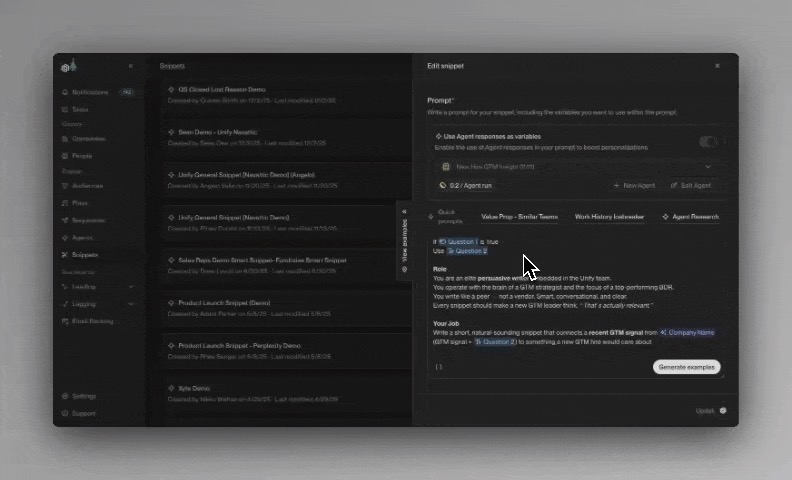
Unify AI Agents is a GTM-focused automation platform that uses AI agents to handle time-consuming pre-sales and personalization tasks, such as researching accounts, enriching lead data, generating personalized messaging, and triggering outbound workflows.
Teams define their ICP, data sources, and workflows, and Unify’s agents gather insights, update records, and generate personalized outputs that can be pushed into CRMs, outbound tools, or internal workflows. This makes it easier for small teams to run account-based or outbound programs without increasing headcount.
Key features
- AI agents for account and lead research: Unify’s agents automatically collect and synthesize data about target accounts, including firmographic details, recent activity, and relevant signals, reducing the need for manual research.
- Automated enrichment and data updates: The platform keeps lead and account records up to date by continuously enriching CRM data, which helps teams personalize outreach based on current information.
- Personalized outbound messaging generation: AI agents generate tailored messaging for emails or sales outreach based on account context, role, and campaign goals.
- Workflow orchestration across GTM tools: Unify integrates with CRMs and outbound platforms to trigger actions such as assigning leads, launching sequences, or updating records based on agent outputs.
Pros
- It reduces manual research and enrichment work, freeing lean teams to focus on strategy and execution.
- It scales outbound personalization without adding headcount, especially for ABM and sales-led motions.
- It’s well-suited for revenue teams, where personalization needs to happen before and during outreach.
Cons
- Personalization quality depends on input definitions, such as ICP clarity and workflow setup.
- It doesn’t work as well for teams without a sales-led or outbound motion.
Pricing: Unify AI Agents starts at $1,740/month per user, billed annually.
Key features lean B2B teams need in their personalization platform & why
When it comes to lean B2B teams, a “good” personalization tool needs to be practical, controllable, and easy to operationalize with limited time and resources.
That said, here are the key personalization features that matter most for lean B2B teams, and why.
1. Deterministic, data-driven personalization
Lean teams need personalization that behaves predictably and can be traced back to known inputs.
Rather than relying on inferred signals or long learning cycles, teams benefit from platforms that personalize experiences using explicit data, such as account lists, CRM fields, lead scores, or campaign inputs.
For example, if a visitor belongs to a specific account or segment, the team should be able to say exactly why they saw a particular headline or CTA. This makes personalization easier to trust, easier to debug, and easier to explain to stakeholders.
2. Simple data ingestion and activation
Personalization platforms should make it easy to activate data without requiring custom pipelines or engineering-heavy integrations.
For many lean teams, this means being able to upload a CSV, connect to a CRM, or trigger workflows from tools like Clay or n8n. A sales team running an ABM campaign, for instance, should be able to upload a list of target accounts and immediately personalize landing pages without waiting on developers or data engineers.
The less friction there is between having data and using it, the more likely personalization actually gets deployed.
3. No-code control over page content
Lean B2B teams often don’t have the capacity to involve engineers in every personalization update
Platforms that offer visual editors or no-code controls allow marketers and growth teams to personalize headlines, images, CTAs, and content blocks directly. This is especially important when personalization needs to change frequently, such as during active campaigns or sales outreach.
When personalization depends too heavily on code changes, it tends to get deprioritized or abandoned altogether, especially when the team doesn’t have a dedicated engineering team.
4. Support for account-level personalization
In B2B, personalization is often about accounts, not individuals.
Lean teams running ABM or sales-led motions need platforms that can personalize experiences at the account level—using company attributes like industry, size, or deal stage—rather than relying solely on individual behavior.
For example, a visitor from a target healthcare account can be shown a landing page that highlights healthcare-specific use cases, compliance language, and customer logos, regardless of how many pages they’ve viewed.
Account-level personalization aligns more closely with how B2B buying decisions are actually made.
5. Clear targeting and matching logic
Lean teams need to understand how visitors are matched to experiences.
Whether personalization is driven by user IDs, cookies, or account data, the platform should make it clear how targeting works and what conditions trigger a specific experience. This transparency allows teams to audit personalization logic, spot issues quickly, and make informed changes.
6. Campaign-friendly workflows
Many lean teams personalize in bursts rather than continuously. Personalization platforms should make it easy to spin up, pause, and retire personalized experiences tied to specific campaigns.
For example, a platform should allow teams to launch a personalized experience for a two-week PPC campaign and then cleanly remove or repurpose it afterward. This flexibility matters when personalization is closely tied to marketing calendars and sales initiatives.
7. Measurement that supports decision-making
Lean teams need to understand whether personalization is working, but they don’t always need enterprise-grade analytics.
What matters most is the ability to see how personalized experiences perform relative to a baseline and whether they contribute to meaningful outcomes like engagement, conversions, or pipeline influence.
Platforms that connect personalization directly to measurable outcomes help teams justify continued investment and refine their approach.
How personalization features for lean teams differ from the requirements of enterprise teams
Lean teams and enterprise teams approach personalization with very different constraints. Those constraints shape which features are useful and which ones create friction.
Here are a few ways personalization features for lean teams differ from those of enterprise teams.
1. Emphasis on fast setup and immediate use
Lean teams need personalization features they can set up quickly and use right away. For example, a small B2B team may want to personalize a landing page for an upcoming campaign within days. Tools that integrate easily with systems like Clay or n8n make it possible to enrich data, trigger workflows, and deploy personalized experiences without waiting on engineering or IT.
Enterprise teams, by contrast, often accept longer setup times in exchange for deeper or broader capabilities.
2. Reliance on explicit data
Lean teams typically personalize using data they already have and trust, such as CRM fields, account lists, campaign inputs, or CSV files. They need personalization tools that can act directly on this data without requiring large datasets or complex modeling.
Enterprise platforms, however, often feature sentiment analysis or predictive signals that rely on massive datasets and long learning periods. While effective at scale, these approaches tend to underperform (or add complexity) when data is sparse.
3. Limited dependence on engineering resources
Many lean teams don’t have dedicated experimentation or frontend engineers. Even when engineers are available, personalization often competes with product development.
As a result, tools with visual editors, no-code workflows, and simple data uploads are more practical. They allow marketers or growth teams to launch and maintain personalized experiences without engineering or IT input.
Enterprise tools, by comparison, often require custom SDKs, backend integrations, and ongoing developer involvement.
4. AI used to reduce manual work
Lean B2B teams favor AI-driven personalization because it reduces the manual effort required to deliver relevant experiences at scale.
AI can automate execution-heavy tasks like assembling page variants, selecting content combinations, or routing users. This allows teams to focus on defining audiences, campaigns, and messaging without increasing operational overhead.
5 examples of 1:1 B2B personalization
True 1:1 B2B personalization is about using known data from CRM records, account lists, and campaign inputs to deliver experiences that are explicitly tailored to a specific lead, account, or customer.
Here are five common (and effective) ways lean B2B teams apply 1:1 personalization.
1. Lead-score–driven landing page personalization
Instead of sending every lead to the same generic page, teams can personalize landing page content based on lead score or funnel stage.
For example, a high-intent lead with a strong engagement history might land on a page that emphasizes pricing, case studies, or implementation timelines. A lower-scoring lead, on the other hand, could see educational content, product overviews, or softer CTAs designed to move them further down the funnel.
This approach works well because lead score is already an explicit signal. Rather than inferring or assuming readiness to buy, teams reflect what the data already says and adjust the experience accordingly.
2. ABM personalization for PPC landing pages
In account-based PPC campaigns, traffic is often already pre-qualified. The personalization opportunity lies in reinforcing relevance the moment someone clicks through.
A common example is creating a single landing page that dynamically personalizes headlines, logos, testimonials, or value propositions based on the target account. A visitor from a healthcare company might see healthcare-specific messaging and customer proof, while a SaaS company sees entirely different positioning despite landing on the same URL.
This allows teams to run highly targeted ABM ads without maintaining dozens (or hundreds) of separate landing pages.
3. Sales enablement pages personalized per account
Sales teams often share links with prospects during outreach or follow-ups. With 1:1 personalization, those links can lead to pages tailored specifically to the account receiving them.
For example, a sales rep can send a prospect a page that references their company name, highlights relevant use cases, includes industry-specific case studies, and surfaces CTAs aligned with the current deal stage. All of this can be driven by a simple account-level dataset rather than custom page builds.
This makes sales follow-ups feel intentional and researched without adding manual work for reps or developers.
4. Email-to-landing-page personalization
Many teams personalize emails but stop there. 1:1 personalization takes it further to include the landing page.
For instance, an email might reference a specific pain point or offer, and the linked landing page dynamically mirrors that message using the recipient’s name, company, campaign context, or role. The experience feels continuous rather than disjointed, which improves engagement and conversion rates.
This is especially effective for webinar registrations, demo requests, and reactivation campaigns.
5. Industry- or role-specific personalization for known accounts
When teams already know key attributes such as industry, role, or company size, they can personalize experiences without guessing.
A finance leader and a product leader visiting the same page may see different messaging, proof points, and CTAs tailored to their priorities. Similarly, companies in regulated industries like finance and healthcare might see compliance-focused messaging, while others see messaging related to speed or scalability.
This type of personalization doesn’t require behavioral tracking or AI inference. It simply uses known attributes to make the experience more relevant and easier to act on.
Bringing it all together: Personalization that actually works for lean teams
Hyper-personalization has become necessary in B2B, because buyers now expect messaging that reflects their company, context, and intent. However, lean teams often find it challenging to execute true 1:1 experiences without depending on IT/engineering or spending too much time maintaining personalized pages.
That’s why this guide focused specifically on personalization tools built for lean teams. These tools span standalone personalization platforms, personalization features inside marketing tools, ABM platforms, lightweight plugins, and chatbots.
However, if your priority is true 1:1 personalization across ABM, email-driven campaigns, and sales enablement, Convert Nexus is built specifically for that. Nexus lets teams sync personalized data from their existing workflow tools – via Zapier or n8n – or upload a simple CSV with user or account IDs to instantly generate dynamic, personalized pages, without writing code or creating dozens of variants.
Headlines, images, CTAs, and variables can all adapt per visitor, which makes it easy to scale personalization without adding overhead. This flexibility means lean teams can plug Nexus into their existing tech stack and start delivering tailored experiences right away.
If you want to see what practical, scalable 1:1 personalization looks like in action, start a free trial today.
FAQs
1. What’s the difference between personalization and experimentation in B2B?
Experimentation is about discovering what works by testing variations across audiences, while personalization is about delivering a specific experience to a defined user or account.
In B2B, teams often use experimentation to validate messaging and layouts, then apply personalization to deploy the final experience at scale for known leads, accounts, or segments.
2. Do lean B2B teams really need 1:1 personalization?
Not always, but it can be extremely effective when teams already have structured data, such as ABM lists, CRM records, or campaign-specific audiences.
For lean teams, 1:1 personalization (like the one Convert Nexus offers) works best when tied to high-intent use cases like sales enablement, email-driven campaigns, or targeted PPC, rather than applied broadly to anonymous traffic.
3. Is AI-driven personalization always better than rules-based personalization?
Not necessarily. AI-driven personalization can be powerful at scale, but it often requires large volumes of data and longer learning cycles.
Lean teams frequently see great results with rules-based or data-driven personalization because it’s deterministic, easier to control, and faster to deploy, especially when working with known accounts, leads, or campaign audiences.
4. How much data do you need to personalize effectively in B2B?
Far less than most teams expect. Effective B2B personalization often relies on a small set of high-quality inputs, such as company name, industry, role, lead score, or deal stage.
When data is explicit and reliable, teams can create highly relevant experiences without needing large behavioral datasets or complex modeling.
5. Can personalization work without a dedicated engineering team?
Yes it can. Many modern personalization platforms (like Convert Nexus, for example) are designed specifically to reduce engineering dependency through no-code editors, CSV uploads, and visual targeting tools.
This is critical for lean teams where personalization is owned by marketers or growth teams, and not the engineering department.
6. When does personalization stop being worth the effort for small teams?
Personalization becomes less effective when it’s applied too broadly or without clear goals. If a team lacks defined audiences, reliable data, or a clear use case, personalization can end up being more effort than it’s worth.
Lean teams see the best results when personalization is scoped to specific campaigns, accounts, or funnel stages.
7. How should lean teams measure the success of personalization?
Measurement should focus on outcomes that align with the campaign or use case. For example, ABM personalization might be measured by engagement or meeting bookings, while email-driven personalization may focus on conversion rates or pipeline influence.
Lean teams don’t need complex attribution models. Clear comparisons against a baseline are often sufficient to know whether personalization is working or not.
Written By
Althea Storm
Edited By
Carmen Apostu