How to Run A/B Tests Through Meta Ads


And use ads as part of your CRO roadmap
For me, traffic has always felt like a luxury. I live in the startup world, where I’m lucky if we have enough traffic and conversions to run even a few A/B tests per month. Yet I’ve never let that stop me from testing. Instead, I’ve moved up the funnel and leaned into ads, particularly Meta ads.
Ads are an incredibly powerful tool for a CRO specialist, but there is a catch. One of the best people I know in ads (Cedric Yarish, co-founder admanage.ai) once told me, “Don’t wait for statistical significance.” And yes… that hurt a little.
But here’s the reality: ads aren’t like your website. The algorithm works differently. It has a massive amount of existing data to predict, early on, what will and won’t work.
So I’m happy to show you how to use ads to test, whether out of sheer traffic necessity or a desire to learn faster. Just promise me you won’t put your stats-police hat on too tight.
How Meta ads are structured
Before we get into test setups, here are the basics of Meta’s structuring. If you are familiar with Meta ads, skip to the next section.
So it’s similar to how you think about experiments:
Campaign → Ad Set → Ad
Campaign
- This is where you choose your optimisation goal (e.g., purchases, leads, click-throughs).
Ad Set
- This controls the targeting and budget.
- Think of it like deciding who enters your experiment and how many people each variant gets.
Ad
- This is the creative: image/video + copy + URL.
- This is the equivalent of your variant in an A/B test.
Two optimisation modes matter most:
1. ABO (Ad Budget Optimization)
- You control how much budget each ad set gets.
- Equivalent to manually splitting traffic 50/50 for a clean test.
2. Advantage+ (Meta’s automated optimization)
- Meta shifts spend toward whatever performs best.
- Equivalent to letting your experimentation tool dynamically allocate traffic to likely winners.
If you remember nothing else:
- ABO = clean, controlled tests
- Advantage+ = fast, messy learning
Ok, now how do you set up A/B tests in Meta?
Setting up A/B tests in Meta Ads Manager
One of the key ways that Meta supports experimentation is through its built-in A/B testing feature, which allows you to run ads against one another in a controlled and more robust way. It is slower, but more reliable.
I’ll show you when to use it and when not, but let’s first walk through how it works and how to set it up.
You can find Meta’s A/B testing tool under the Experiments feature:
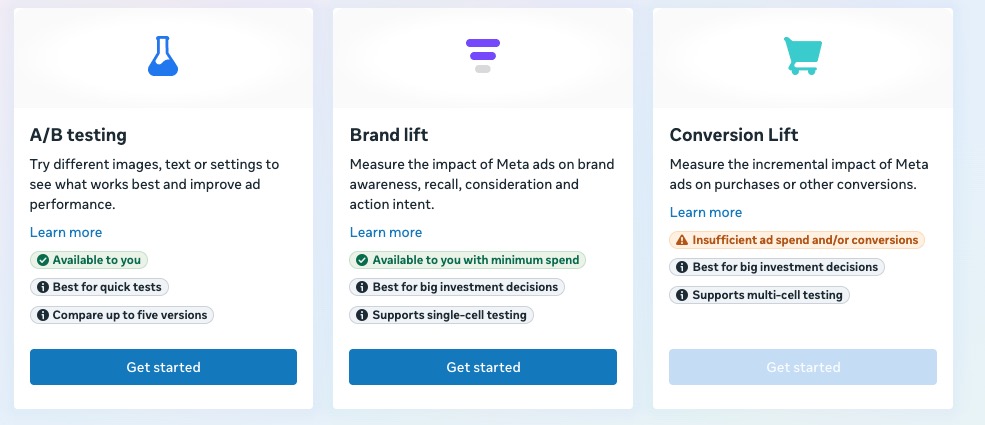
For a clean setup within Meta, I suggest using ad sets. I’ll show you how to set up your ad sets for different tests later on.
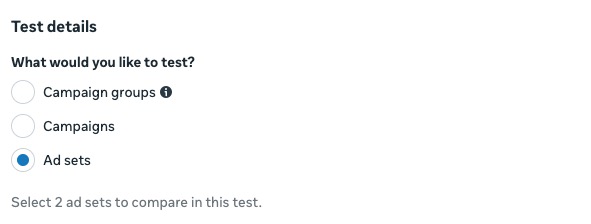
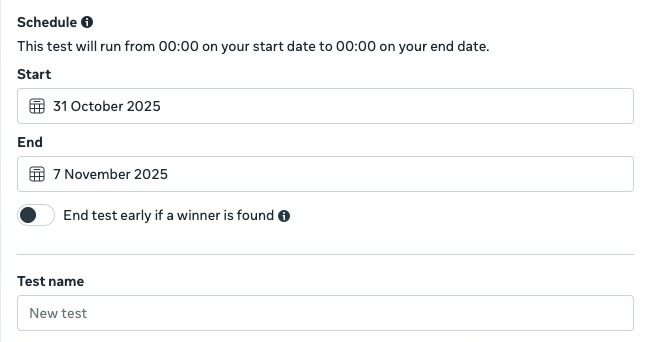
Meta defaults to 90% significance, probably because it optimizes for speed over precision, so you’ll get directional learnings faster, but it’s not suited for long-term validation.
In general, I would recommend avoiding the “End test early if a winner is found” option (especially once you read about the metrics issues) and also so that you can work with your own significance level:
You can set your goal under your key metric, but honestly, it’s pretty useless (pardon my Dutchness). Even with the additional metrics, you can only set up “Cost per…” — which isn’t exactly ideal.
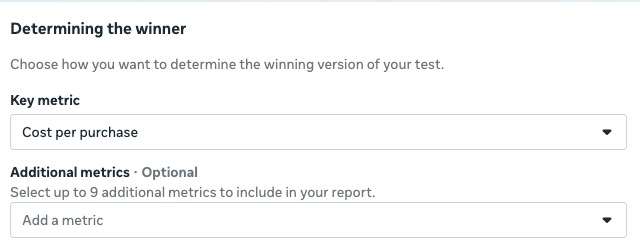
Don’t worry, though, you can still see all the other metrics in Meta, your Attribution tool, or Analytics tool (depending on what metric you are evaluating).
For conversion rate, it isn’t a standard metric in Meta; I usually set up a custom metric for it, defined as Purchases/Link Clicks. Using link clicks ensures you’re only counting clicks that actually reach your landing page.
That’s a quick rundown of the A/B testing feature. Now, let’s dive into some ways Meta can help you run tests more effectively.
Use ads to test copy angles
With an A/B test on your website, the more variants you add, the more traffic you need to reach statistical certainty and avoid that dreaded false positive. With ads, the volume is already there. You can test hundreds of angles before sending traffic to your site, learning quickly which copy drives the best conversion rates.
We did this at Heights when I was Head of Growth: we tested different angles repeatedly, focused on click-through rates, and then ran a smaller A/B test on the website. Our win rate was high because we’d already de-risked the ideas through ads and we could test faster than we could on site. The result? Testing those pre-tested propositions on the website resulted in three impactful experiments (95% significance):
- Updating both the homepage and product page copy – 29.7% lift
- Improving homepage pain point communication further – 27.6% lift
- Improving homepage pain point communication further – 25.0% lift
Now, it was a startup so they were huge swings, but before that, we were seeing 9.1% and 9.4% non-significant drops in conversion rate with copy tests that weren’t pre-validated via Meta. How do you do this? If you want high confidence and want to refine your initial angle, stick to the same image and vary only the copy. This avoids too many variables and lets you see which messaging truly resonates:

Then set it up as follows:
Campaign (ABO)
├─Ad Set A (same audience)
│ └─Ad 1
└─Ad Set B (same audience)
└─Ad 1
Then you use the Experiments feature we walked through. Since focusing on purchases doesn’t fully solve the traffic issue, I often use click-through rate (CTR) as a metric to speed up testing; it isolates how well your message resonates before any post-click factors come into play.
That said, this approach is still relatively slow because you need to set up each test round within the Experiments feature. There is an alternative method, though, one that might feel a bit uncomfortable for traditional experimenters.
Speeding up your testing of ad angles
If you are already bigger and want to test far more angles to really narrow down your language, I would suggest instead still using the exact visual and different copy, but this structure:
Campaign
└─Ad Set (Advantage+ Audience)
├─Ad 1
├─Ad 2
├─Ad 3
…
├─Ad 10
Some ads will hit minimum spend, but if you’ve run ads on Meta before, trust that the algorithm is deprioritizing them for a reason.
That said, if you suspect an ad has strong qualitative potential — for example, lots of positive comments — you can always break it out manually.
Use ads to test landing pages/journeys
Normally, if you want to test two different pages, you’d use a redirect test. The downside? Redirects strip UTMs from the URL, which can break your tracking.
This is particularly problematic for ad platforms that rely on UTMs for attribution, especially if you’re also using an attribution tool like TripleWhale that adds its own UTMs.
This is where Meta’s A/B testing feature comes in handy again. Here’s how you can set it up:
Campaign (ABO)
├─Ad Set A (same audience)
│ └─Ad 1 → Landing Page A
└─Ad Set B (same audience)
└─Ad 1 → Landing Page B
The great thing about Meta’s Experiments feature is that, while it can be clunky for running lots of ad tests, it’s excellent for controlling who sees your ad. Even if you’re targeting the same audience, Meta ensures that the people who see Landing Page 1 won’t see Landing Page 2.
You can apply the same approach to testing journeys, like leading with a quiz versus an educational page. This is slightly trickier on the ad side if you’re using only one ad, because you need the ad to match the page well enough to convert. In this case, you may also need to tweak the ad copy.
One thing to keep in mind: your A/B testing results will live in Meta (or your attribution tool) rather than your CRO tool, meaning you will need to be conscious of documenting and tracking what the results and tests were.
Use ads to test offers
Having too many offers or different pricing on your website can get messy. Ads are a great way to test multiple offers and see which incentives actually drive results.
For this, I’d use the experiment feature again with this structure:
Campaign (ABO)
├─Ad Set A (same audience)
│ └─Ad 1 → Offer A
└─Ad Set B (same audience)
└─Ad 1 → Offer B
How you can start using Meta to test
Ads are definitely messier to test than landing pages, but paired with CRO expertise, they can teach you a ton:
| If you want to… | Use this setup | What you’ll learn |
When it’s most useful |
||||||||||||||||||||
|---|---|---|---|---|---|---|---|---|---|---|---|---|---|---|---|---|---|---|---|---|---|---|---|
| Get clean, statistically fair comparisons | Meta A/B testing feature | Directional accuracy without overlap | Validating big bets (offers, pages, or funnels) | ||||||||||||||||||||
| Move fast and test lots of copy angles | Ad-level tests (same creative, different copy) | Which message drives clicks | Low-traffic CRO teams validating messaging | ||||||||||||||||||||
| Scale and learn quickly | Advantage+ campaign with multiple ads | Language and creative trends at scale | Larger accounts optimizing creative volume | ||||||||||||||||||||
| Test landing pages or pre-click journeys | Ad set split with same ad + different destinations | Which page/journey converts best | Comparing quizzes, educational pages, or product LPs | ||||||||||||||||||||
| Test different offers or incentives | Meta A/B feature with offer variations | Which incentive drives higher CTR or conversion | Testing discounts, free trials, bundles |
When shouldn’t you use ads? For testing small UX details or minor copy adjustments. Ads are better for spotting trends and testing overall direction, not for fine-grained precision.


Written By
Daphne Tideman
Edited By
Carmen Apostu