10 Best Feature Flag and Rollout Tools for Developers and Product Teams (2026)


- Feature flags let you deploy code hidden behind a toggle, then turn it on for specific users without a redeploy. Rollouts use the same flag to expand access step by step.
- Developers use flags for internal testing, percentage-based rollouts, and A/B testing against a control group.
- Feature flag and rollout tools primarily differ by SDK coverage, built-in experimentation, automatic rollback capabilities, and pricing models (seats, events, or users).
- This guide reviews 10 leading tools: Convert Experiences, LaunchDarkly, Harness FME, Amplitude Feature Experimentation, Statsig, Optimizely, PostHog, GrowthBook, Unleash, and Kameleoon.
Which feature flag and rollout tools hold up in day-to-day use and deliver the outcomes your team cares about? Whether that’s safer releases, faster experiments, or less back-and-forth between product and engineering?
To help you decide, we focused on the ten platforms that show up most often in team evaluations. We read the docs and pricing pages for these platforms, signed up for every free trial on offer, walked through each onboarding flow, and read 300+ G2 reviews from the people using them in their work.
Here’s how they compare, starting with a side-by-side table and followed by a closer look at each platform.
How Do the 10 Feature Flag Tools Compare?
| Tool | Best for | Free option | Pricing model | Open source | Built-in experimentation | SDK coverage | Metric-based auto-rollback | G2 rating* |
| Convert Experiences | Teams that want experimentation and feature flags in one tool | 15-day trial | Tested users; full-stack from $599/mo (Pro) | No | Yes (frequentist, Bayesian, sequential) | 6 SDKs, incl. iOS, Android and edge runtimes | No | 4.6 (98) |
| LaunchDarkly | Governed, high-volume releases | Free Developer plan; 14-day trial | Service connections + client-side MAU | No | Yes (100K experimentation MAU/mo included) | 40+ SDKs, incl. mobile and edge | Paid Guardian add-on (Enterprise | 4.5 (859) |
| Harness FME | Teams already on Harness CI/CD | Free plan | On request | No | Yes (sequential testing, guardrails, warehouse-native) | Java, Go, .NET, Python, Ruby, PHP, Node.js, Elixir, Flutter and more | Yes | 4.6 (330)** |
| Amplitude Feature Experimentation | Teams already on Amplitude Analytics | Free plan (2M events/mo) | Event volume | No | Yes (sequential testing, CUPED) | 6 server SDKs with local evaluation | Not documented | 4.1 (41) |
| Statsig | Flags, experiments and analytics on one SDK | Free Developer plan (2M events/mo) | Metered events; Pro $150/mo | SDKs only | Yes (sequential testing, holdouts, layers) | 30+ SDKs, incl. edge | Yes | 4.7 (348) |
| Optimizely Feature Experimentation | Rigorous stats and governance at scale | Free Rollouts plan (1 experiment at a time) | MAU; on request | No | Yes (sequential, Bayesian, frequentist) | 12 SDKs + Agent microservice | Not documented | 4.3 (117) |
| PostHog | Startups wanting flags, analytics and replay together | 1M flag requests/mo free | Usage (flag requests) | Yes | Yes (Bayesian or frequentist) | 9 server SDKs with local evaluation | Not documented | 4.5 (1,053) |
| GrowthBook | Warehouse-first teams who want open source | Free Starter (3 users); free self-hosted | Per seat ($40/mo) | Yes | Yes (CUPED, sequential testing, bandits) | 12+ SDKs, incl. edge | Yes (Safe Rollouts, Pro+) | 4.6 (26) |
| Unleash | Open-source flags with in-app evaluation | Free self-hosted; 14-day trial | Per seat ($75/mo) | Yes (AGPLv3) | Variants only; limited analysis | 17 SDKs (8 backend, 9 frontend) | Not documented | 4.7 (137) |
| Kameleoon | Marketing, product and engineering on one platform | 30-day trial | Monthly tracked users; on request | No | Yes (frequentist, Bayesian, CUPED) | 12+ SDKs, incl. edge | Yes | 4.5 (138) |
*G2 rating out of 5 (number of reviews), captured September 24, 2026. Pricing checked in September 2026 on each vendor’s pricing page.
**Harness Platform listing. FME has no separate G2 page.
Disclosure
Convert publishes this article, and Convert Experiences is on the list. We’ve used the same criteria for every tool, including our own.
1. Convert Experiences
Best for: Marketing and product teams that want web testing, feature flags, and full-stack experiments in one platform
Pricing: Full-stack and feature flags from $599/month on the Pro plan (monthly billing) for 100,000 tested users. 15-day free trial available.
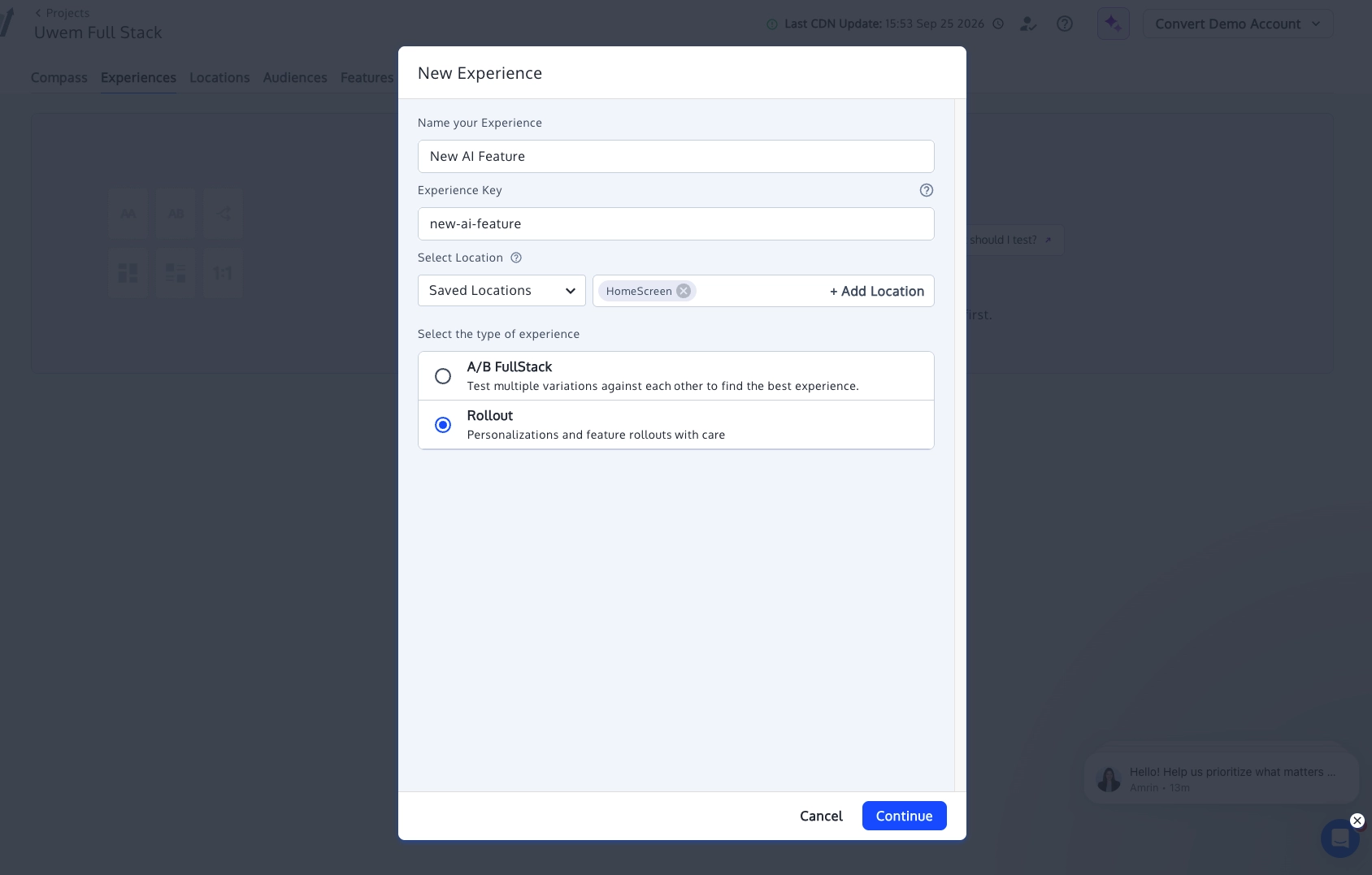
What is Convert Experiences?
Convert Experiences (that’s us) is an experimentation and personalization platform with client-side and server-side testing. Its server-side features include feature flags, rollouts and full-stack experiments, all run from one account.
Your team can ship a feature behind a flag, roll it out gradually, and test it against a control before a full launch. Teams pick Convert because marketing and product can run web tests and feature experiments on the same platform, using the same visitor data, backed by a reliable support team that users often praise.
Convert also supports privacy-sensitive operations with SOC Type II, GDPR, CCPA, and HIPAA compliance and ISO 27001 certified.
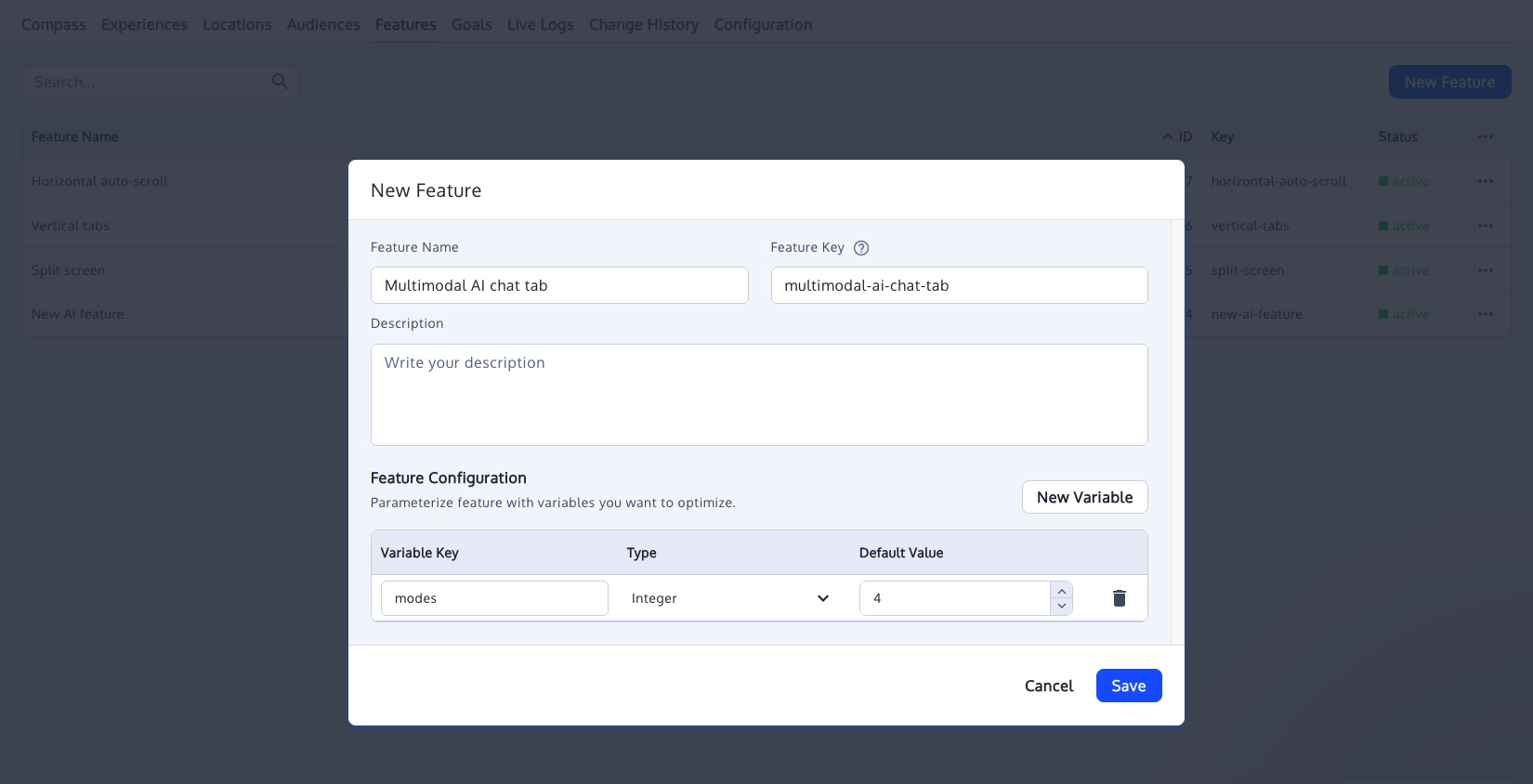
What Are Convert Experiences’ Full-Stack Pros?
- Six SDKs with one bucketing model: JavaScript, TypeScript, PHP, Python, Ruby, iOS, and Android share the same hashing algorithm and seed. This ensures a visitor receives the same variation regardless of which SDK evaluates them.
- Flicker-free server and edge delivery: Variations are evaluated on the server before content is sent to the client, eliminating flicker. The JavaScript SDK also runs natively on Node.js and edge runtimes like Cloudflare Workers.
- Typed flag variables: Beyond standard boolean toggles, SDKs return integer, float, string, or JSON variables. This allows you to dynamically update copy, thresholds, or configuration values without redeploying code.
- Seamless path from flag to experiment: Easily convert any flag into a gradual rollout or a full-stack A/B test with control groups and custom goals. Analyze results using frequentist or Bayesian statistics, with sequential testing available on Pro and Enterprise plans.
- API-first and AI-assisted workflows: Automate feature flag and experiment configurations via REST API. The Convert MCP server integrates with AI assistants like Claude, ChatGPT, and Cursor to read results and draft tests, while keeping full human control over live deployments.
What Are Convert Experiences’ Full-Stack Cons?
- Full-stack starts on Pro: The $399/month Growth plan covers web testing only, so feature flags and gradual rollouts need Pro at $599/month.
- No SDK for Go, Java or .NET: Teams running backends in those languages have no official SDK to integrate.
- No metric-based automatic rollback: Convert doesn’t roll a feature back on its own when error rates or conversions cross a threshold. You’d build that yourself with your monitoring tool and Convert’s REST API.
- Warehouse analysis runs through GA4: Convert sends experiment data to BigQuery through its GA4 and Google Tag Manager integrations, with no direct warehouse connection.
What Do G2 Reviewers Say About Convert Experiences?
Positive:
Being able to quickly come up with an iteration, put it together, and then test and validate the process before we spend time on the actual development is really valuable.
Melusi K. (Source: G2)
Critical:
I don’t think there’s a real direction or instruction with Convert Experiences on how we can start testing on app.
Eamonn W. (Source: G2)
2. LaunchDarkly
Best for: Engineering teams that need governed, high-volume releases across many languages and services
Pricing: Free Developer plan. The foundation plan starts at $10 per service connection plus $8.33 per 1,000 client-side MAU a month, with a 14-day trial.
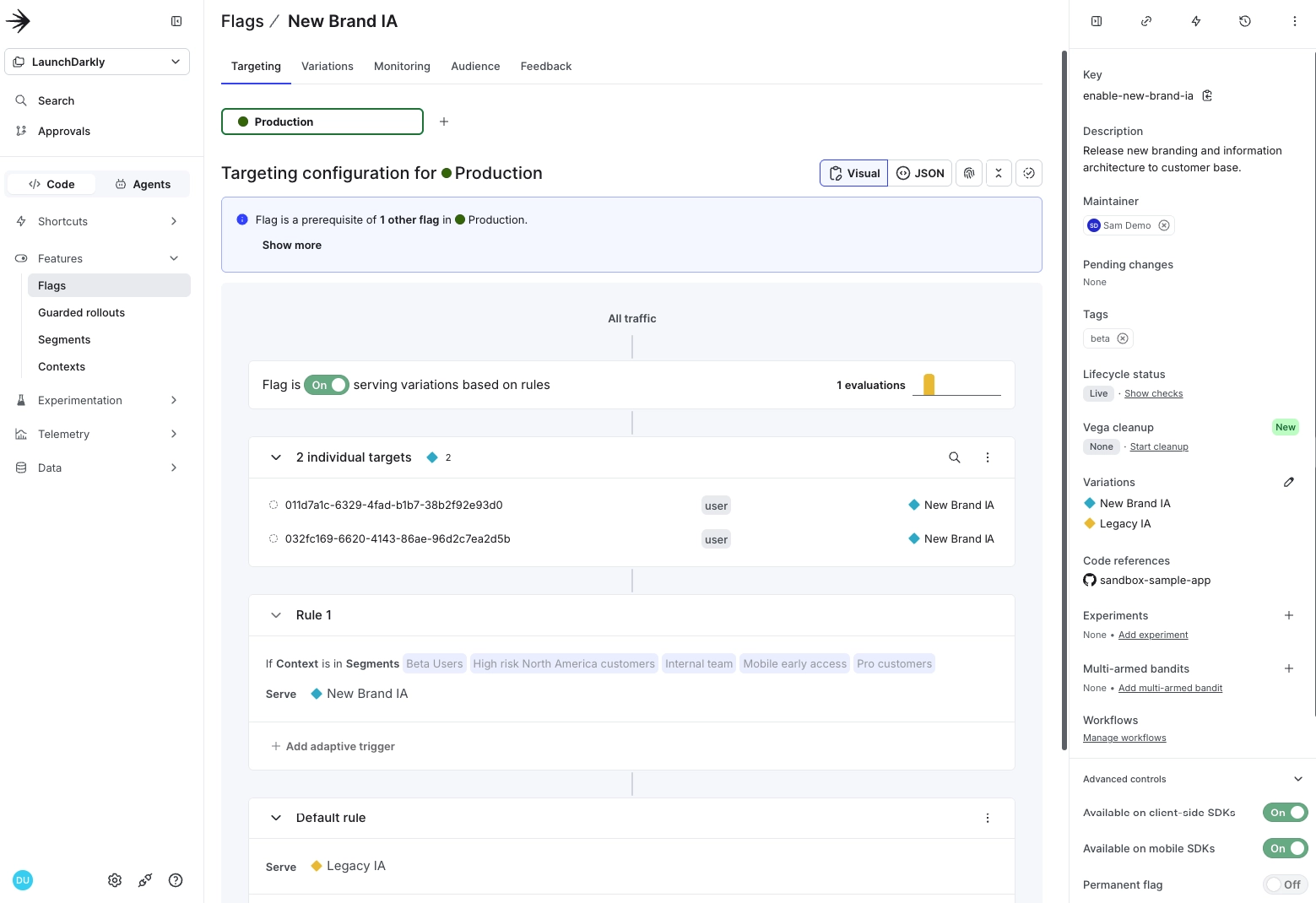
What Is LaunchDarkly?
LaunchDarkly is a feature management platform designed to give engineering teams precise control over releases. It unifies feature flags, audience targeting, progressive rollouts, and experimentation into a single workflow powered by shared SDKs.
With real-time flag updates, teams can modify feature behavior in live applications without redeploys. LaunchDarkly shines in high-volume environments across complex, multi-service architectures, backed by enterprise-grade security standards like SOC 2 Type II, ISO 27001, and FedRAMP authorization.
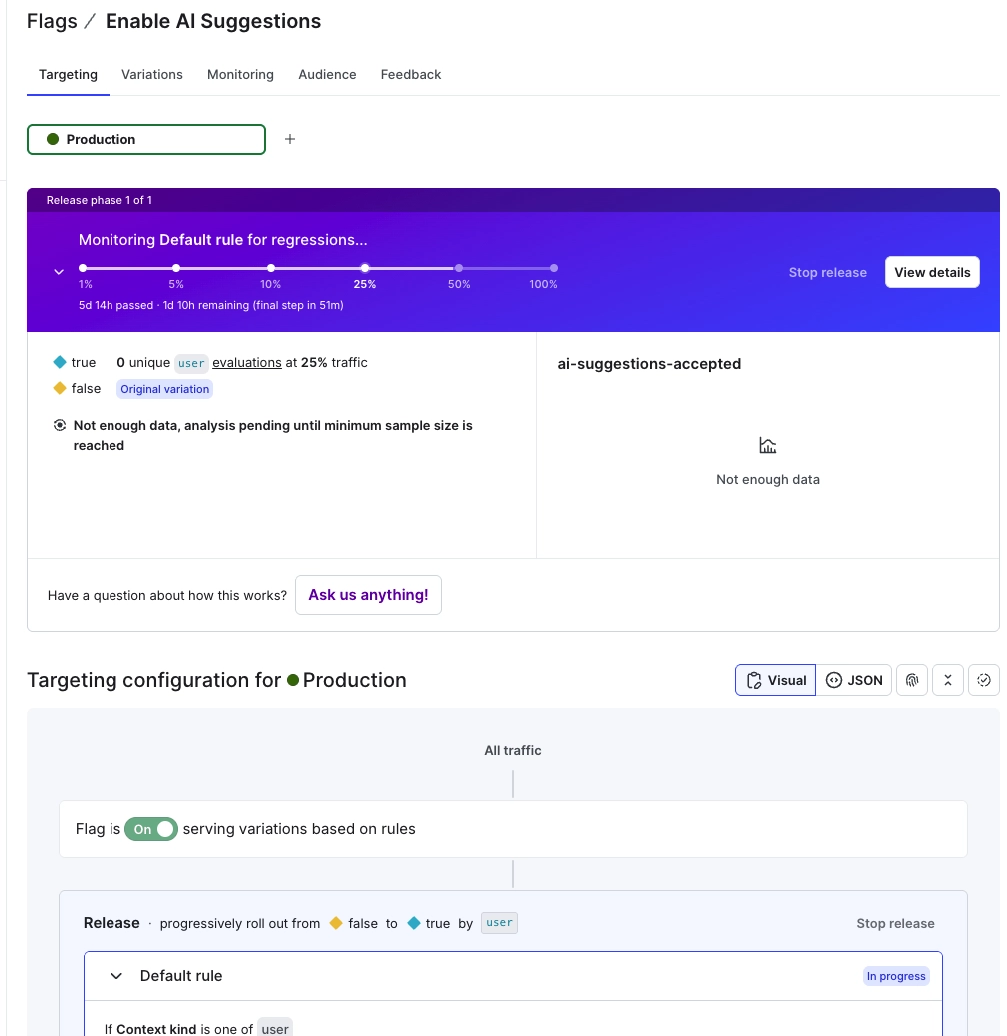
What Are LaunchDarkly’s Full-Stack Pros?
- More than 40 SDKs: Server-side SDKs cover Go, Java, .NET, Python, Ruby, PHP, Rust, and more. Mobile SDKs support iOS, Android, and Flutter. Edge SDKs cover Cloudflare, Fastly, Akamai, and Vercel, alongside OpenFeature providers.
- Local evaluation with streaming updates: Server-side SDKs evaluate flags directly in memory, avoiding network latency during checks. Any configuration updates arrive in real time over a streaming connection.
- Resilience built in: If a connection drops, SDKs serve the last cached flag values. If disconnected at startup, they safely fall back to code defaults. An optional Relay Proxy and persistent store provide extra caching.
- Experimentation included: Every plan includes 100,000 experimentation MAU per month at no extra cost, allowing you to run A/B tests without needing a separate tool.
- Automated flag cleanup: Vega, LaunchDarkly’s AI agent, automatically detects unused flags and creates GitHub pull requests to remove them from your codebase.
What Are LaunchDarkly’s Full-Stack Cons?
- Automatic rollback costs extra: Release monitoring, guardrail metrics and automatic rollback come in Guardian, a paid add-on on top of the Enterprise plan.
- Costs rise with client-side traffic: Foundation bills per 1,000 client-side monthly active users. Consumer apps with large audiences pay more as traffic grows, even with few flags in use.
- Flag debt still builds up: Stale flags are the most common complaint in recent G2 reviews (17 out of 50 we read). Teams still need a cleanup habit, with or without Vega.
What Do G2 Reviewers Say About LaunchDarkly?
Positive:
LaunchDarkly’s percentage-based progressive rollouts solved this by allowing me to roll out a new prompt or model update to just 5% or 10% of live claim extraction jobs rather than 100% at once. … The emergency kill switch is a major feature for me too; if an API starts failing, I can toggle the dashboard to instantly revert traffic back to our fallback logic without redeploying code.
Vikash K. (Source: G2)
Critical:
For the mobile part, the configuration has not been so simple because there is not much documentation about it, especially with libraries like React or Flutter.
Facundo D. (Source: G2)
3. Harness Feature Management & Experimentation (FME)
Best for: Engineering teams already on Harness CI/CD that want flags and experiments inside the same delivery pipeline
Pricing: Free plan (no credit card) is available. Paid pricing not published, but FME is sold as a module on Harness’s Enterprise plan
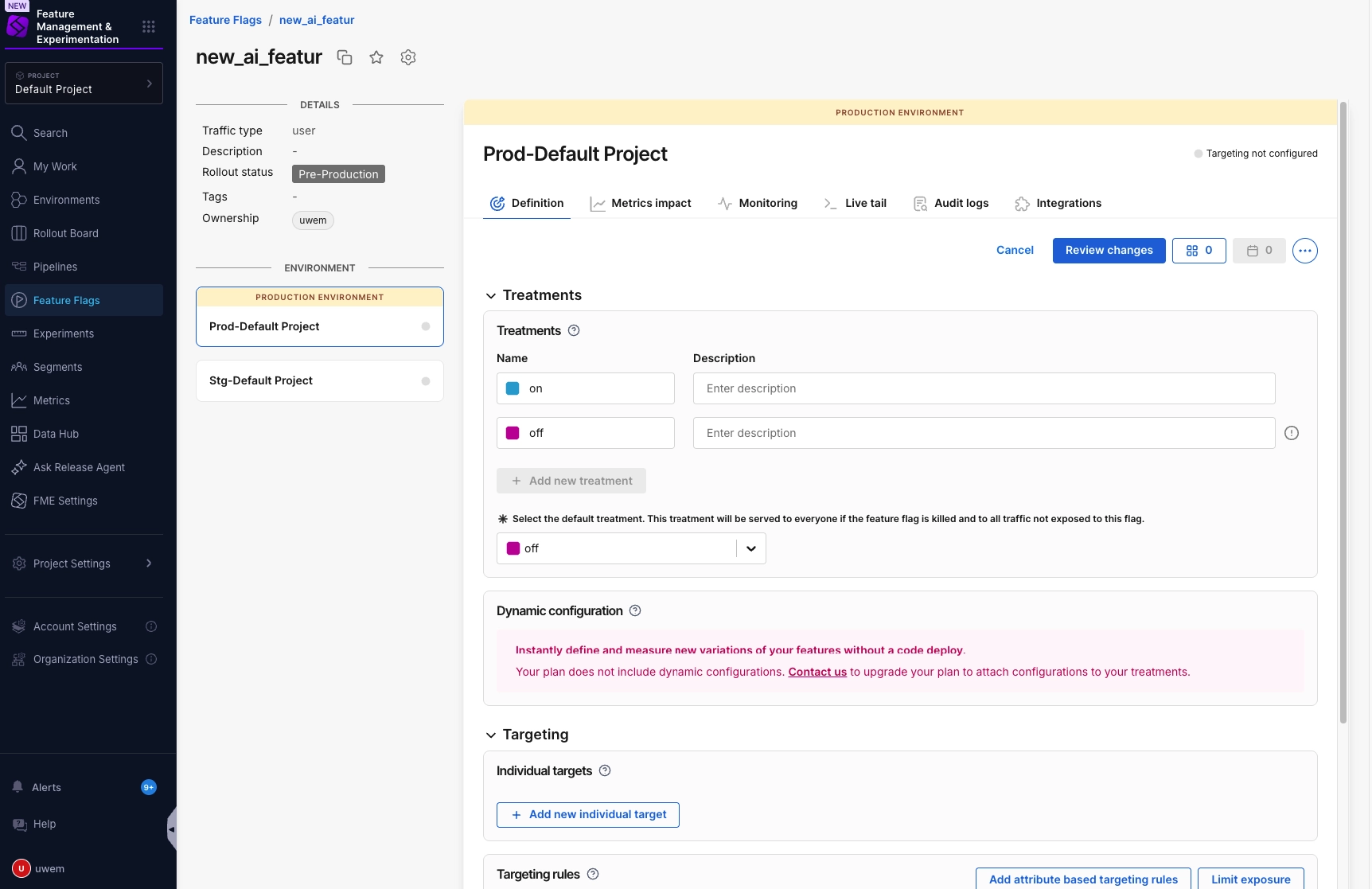
What is Harness FME?
Harness Feature Management & Experimentation (FME) is the feature flag and experimentation module of Harness’s software delivery platform. It’s built on Split, which Harness acquired in 2024. Its features include feature flags, rollouts and experiments, all sitting alongside Harness’s CI/CD pipelines.
With Harness FME, you can release a feature, watch its impact on your metrics, and roll back as needed. Besides having flags, deployment, and approval live in one delivery platform, Harness is also great for its SOC 2 and ISO 27001 certification.
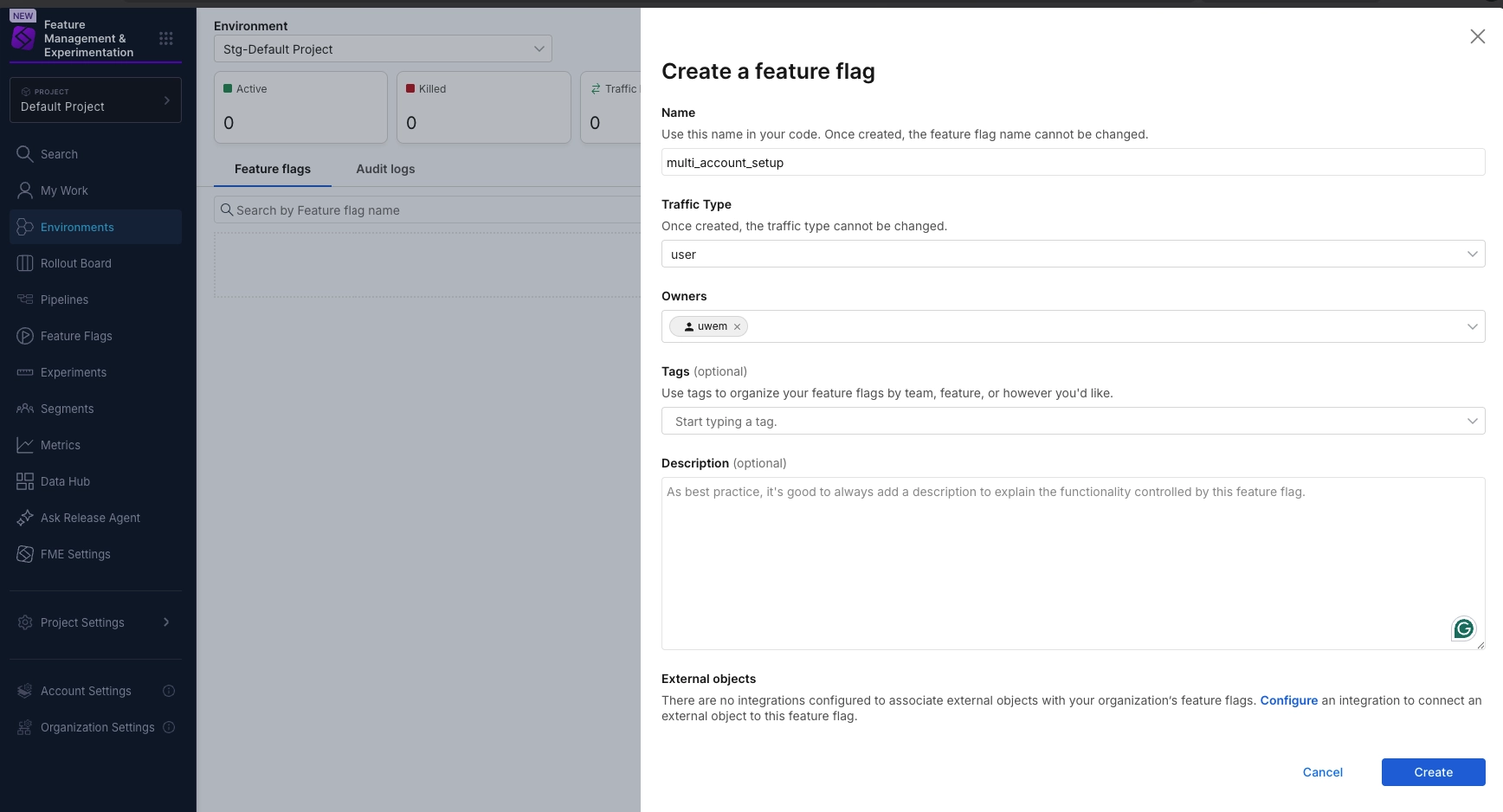
What Are Harness FME’s Full-Stack Pros?
- Local evaluation from a cached ruleset: The SDKs keep a local cache of flag and segment definitions. Once initialized, they don’t need to reach Harness to decide which treatment a user gets. Client-side SDKs can also start from a cache stored on the device.
- Wide SDK coverage: SDKs cover JavaScript, Node.js, Python, Java, Go, .NET, Ruby, PHP, Elixir and Flutter, across both client-side and server-side setups.
- Metric-triggered rollback: Harness advertises automated impact detection and rollback triggers, with auto-rollback in under 30 seconds. Sequential testing and guardrail metrics are built in.
- Warehouse-native experiments: You can run experiments in your own data warehouse using your existing metrics, so the data never leaves your infrastructure.
- Flags inside your pipelines: Flag activations run in Harness Pipelines alongside deployments, under the same approvals and OPA policies as production changes.
What Are Harness FME’s Full-Stack Cons?
- No public pricing: Beyond the free plan, you need a sales conversation to learn what FME costs.
- Costs grow as you add modules: Users say Harness pricing “adds up fast” once you combine modules, and that real savings take negotiation.
- Steep learning curve: According to reviewers, Harness’s configuration hierarchy and number of modules take time to learn.
- Pipeline integration brings infrastructure to run: Teams running Harness pipelines install Delegates in their own cluster, and those need monitoring, scaling and upgrades.
What Do G2 Reviewers Say About Harness FME?
Positive:
Harness consolidated our Continuous Integration, Continuous Delivery, and Feature Flags into a single control plane.
Raj C. (Source: G2)
Critical:
Establishing the initial role based access control (RBAC) and policy as code governance frameworks across multiple environments requires a steep learning curve and significant upfront configuration.
Yogesh S. (Source: G2)
4. Amplitude Feature Experimentation
Best for: Product teams already on Amplitude Analytics that want flags and experiments on the same behavioral data
Pricing: There’s a free plan (2M events a month, feature flags, limited experiments) and paid plans are priced by event volume
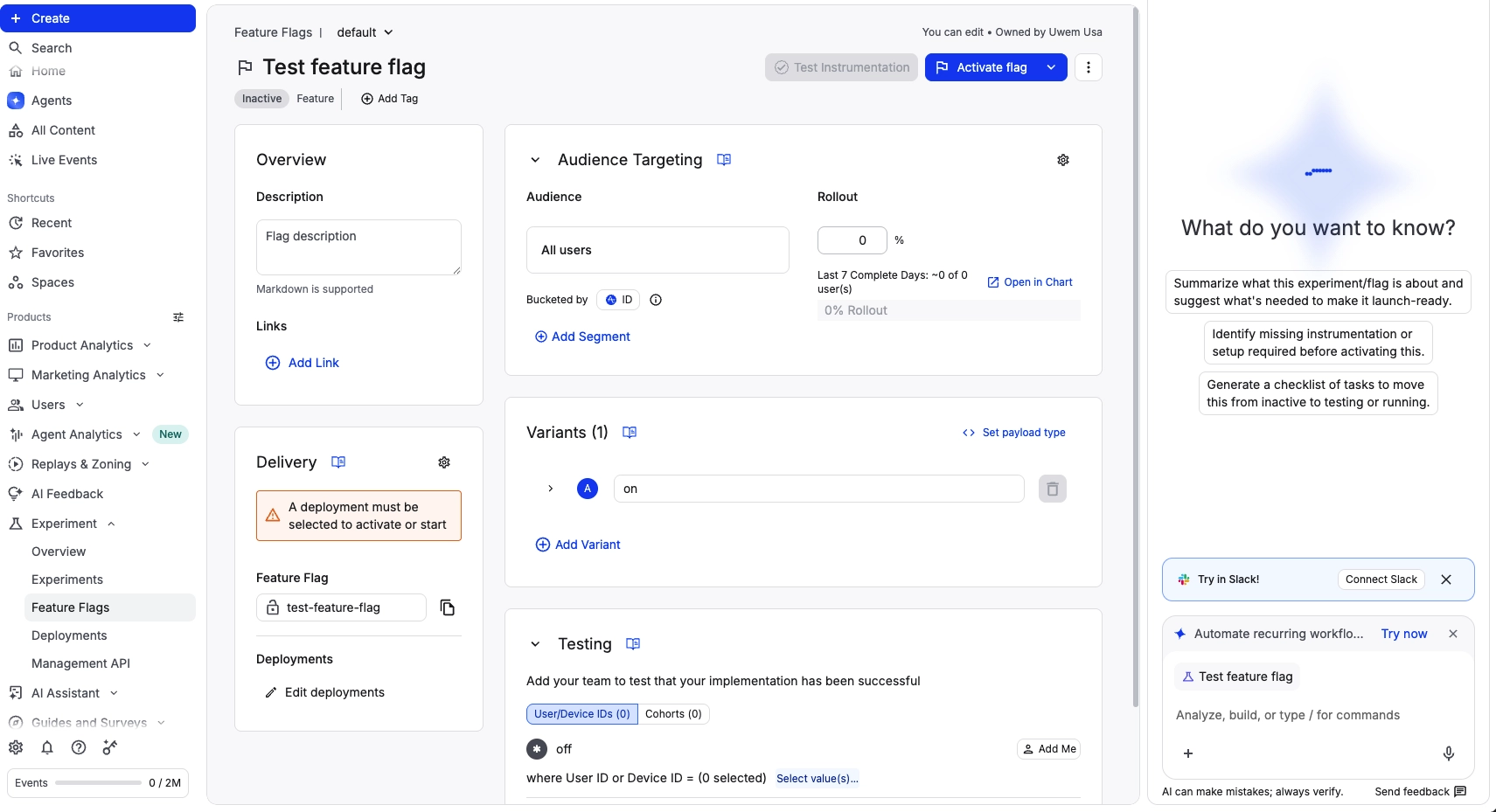
What is Amplitude Feature Experimentation?
Amplitude feature experimentation is the feature flag and experimentation period within Amplitude’s analytics platform. It comes with feature flags, rollout, and A/B testing within the same data model as Amplitude analytics.
In May 2026, Amplitude acquired Statsig’s brand and customers from OpenAI.
With Amplitude feature experimentation, your team can create and target flags at users based on various criteria and track metrics.
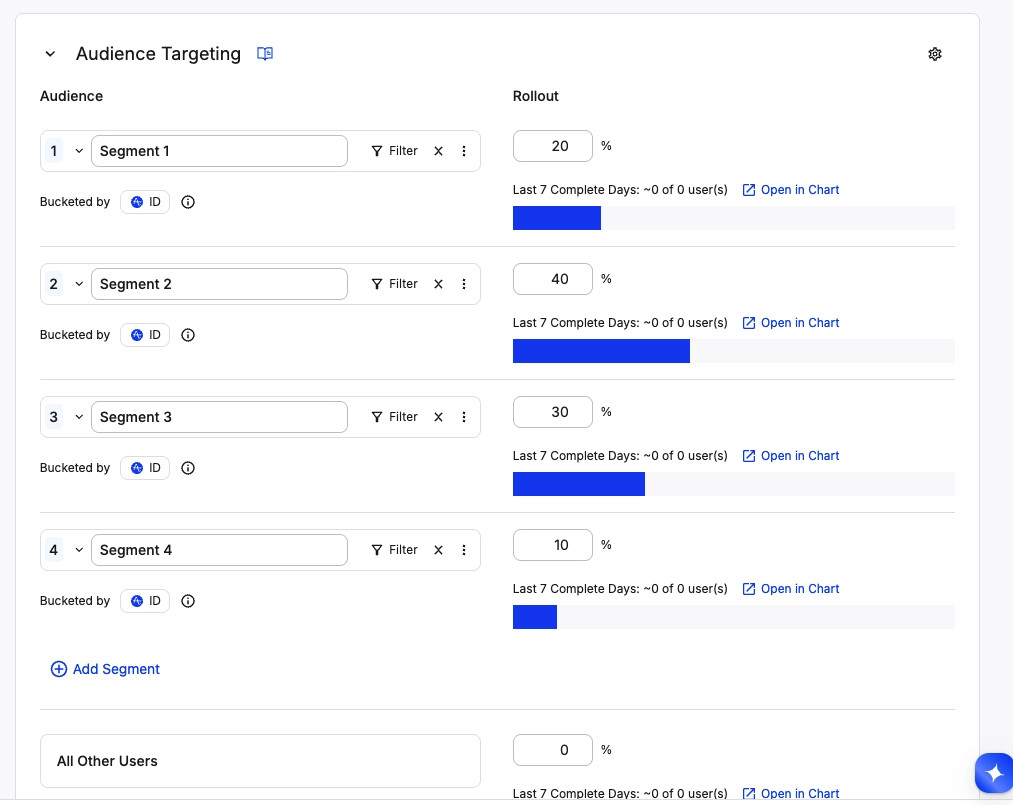
What Are Amplitude Feature Experimentation’s Full-Stack Pros?
- Fast local evaluation: Server-side SDKs for Node.js, Go, JVM, Ruby, Python and PHP evaluate flags in memory, with no network call per user. Amplitude’s docs report average evaluation times from 0.007 ms (JVM) to 0.098 ms (Go).
- Behavioral cohort targeting: Remote evaluation adds Amplitude ID resolution, user enrichment and sticky bucketing. That lets you target flags at cohorts built from product usage.
- Statistical rigor built in: Experiments support sequential testing and CUPED variance reduction to shorten run times.
- Unlimited feature flags on every plan: Flags themselves aren’t metered. The free plan includes them.
- Analysis without an export: Results sit next to funnels, retention charts and session replays, so you can check why a variant won without moving data between tools.
What Are Amplitude Feature Experimentation’s Full-Stack Cons?
- Active experiments are capped: You get 1 active experiment on Plus and 2 on Growth and Enterprise, with more available as an add-on.
- Cohort targeting is limited in local evaluation: Server-side cohort targeting with local evaluation works on user IDs only, and the PHP SDK doesn’t support it.
- Anonymous users can switch variants: A user reported “variant jumping” when anonymous users later log in, which skews results for those users.
What Do G2 Reviewers Say About Amplitude Feature Experimentation?
Positive:
I love that Amplitude Feature Experimentation gives full control over the rollout and lets me scale up or down or switch it off any time.
Julia O. (Source: G2)
Critical:
We had a hard time setting it up just because we didn’t have the technical know-how on how the background engine actually works.
Luis Fernando S. (Source: G2)
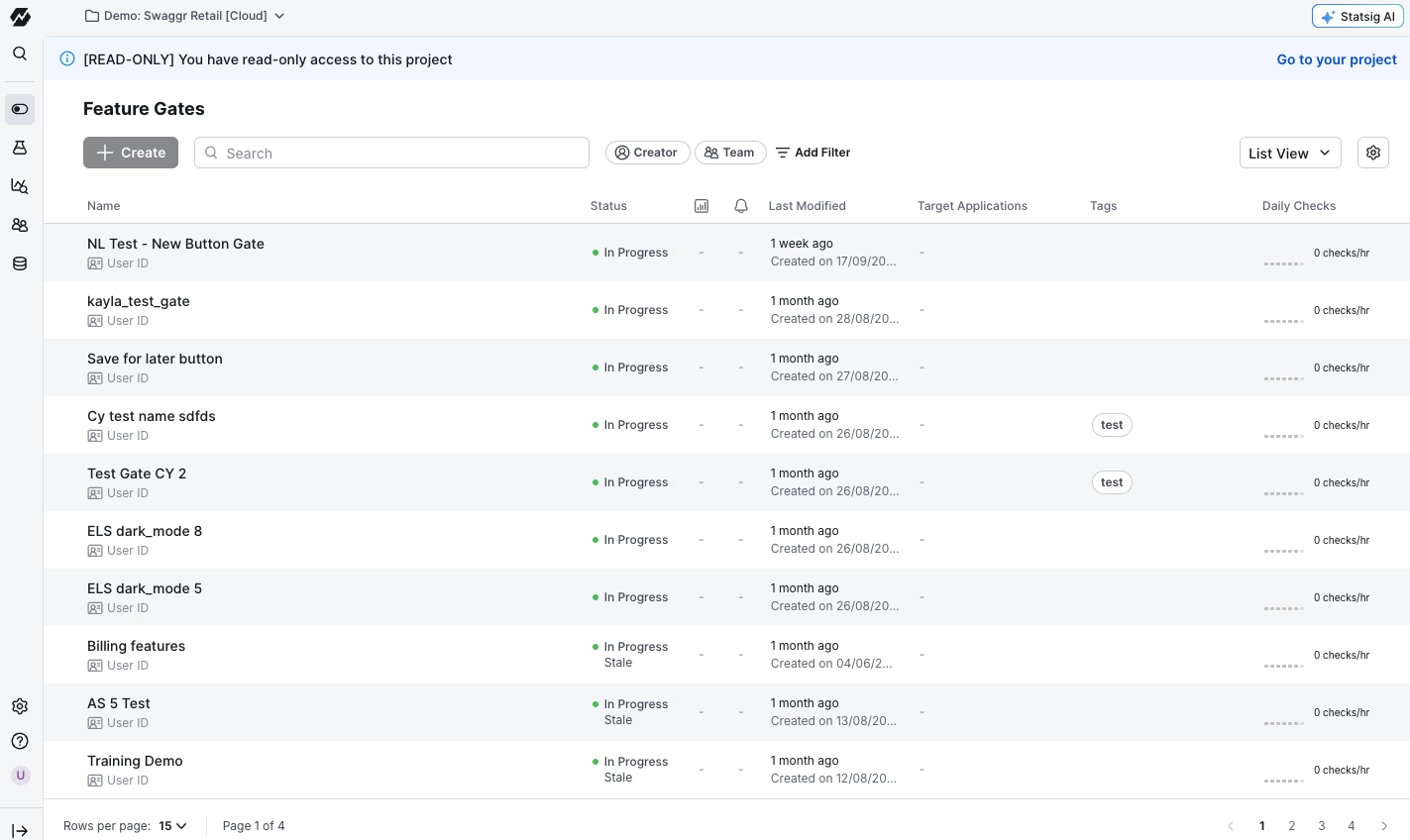
5. Statsig
Best for: Engineering and data teams that want flags, experiments and analytics on one SDK, with warehouse-native analysis available
Pricing: There’s a free Developer plan (2M metered events a month and unlimited flag checks), while Pro starts at $150/month with 5M events included, then its $0.05 per 1,000 events
What is Statsig?
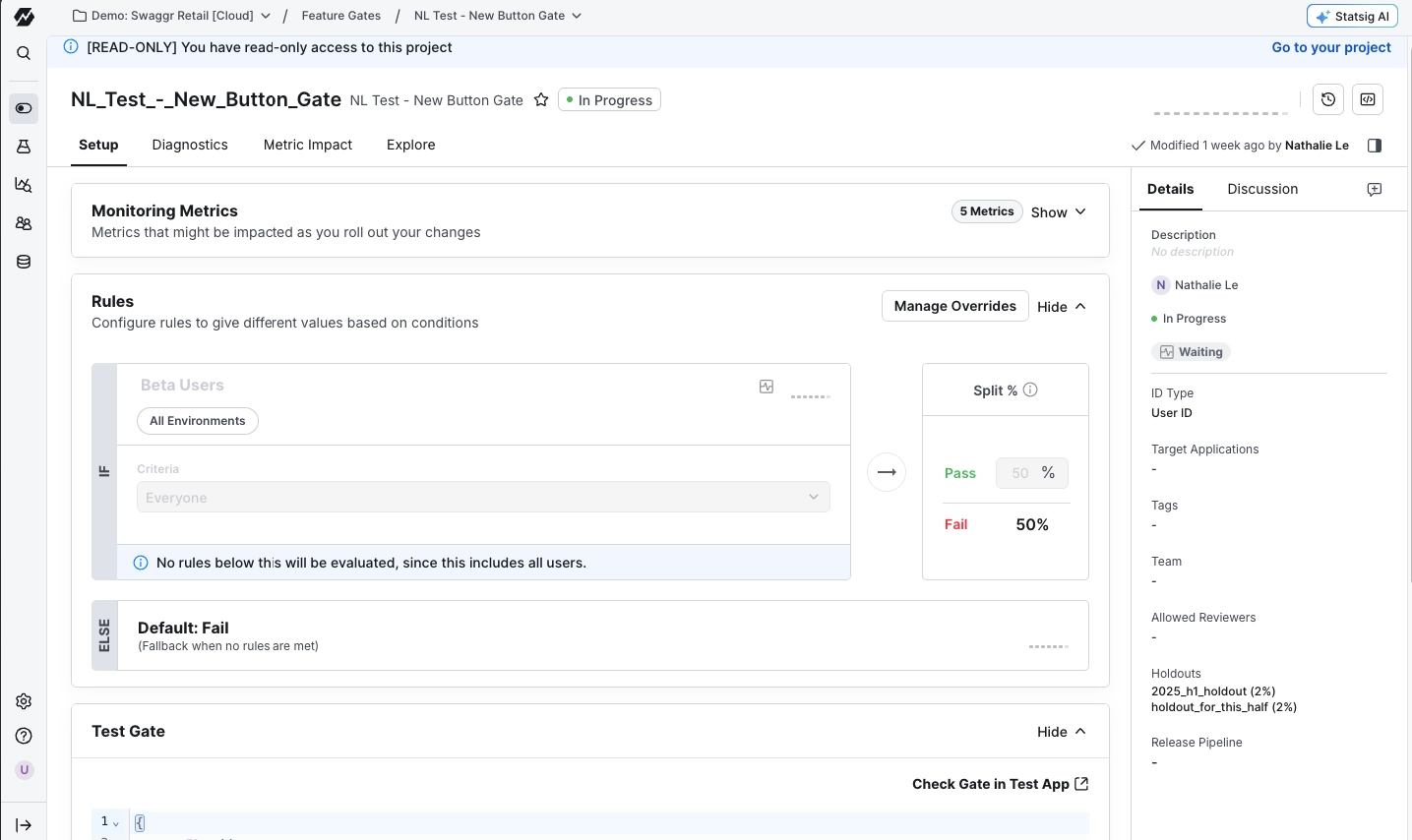
Statsig is a feature flag, experimentation, and product analytics platform. It has feature gates, rollouts, and experimentation features, all running on the same dataset.
In May 2026, Amplitude took over Statsig’s brand and customers and now maintains the platform. But the original Statsig engineering team still remains with OpenAI.
With Statsig, it’s straightforward to turn any flag into an experiment without adding new instrumentation. It also gives engineers bucketing, holdouts, and layers without having to build them in-house.
What Are Statsig’s Full-Stack Pros?
- Automatic rollback on metric drops: Guarded releases monitor the metrics you choose during a rollout and automatically roll the feature back if any cross a threshold you set.
- Local evaluation after startup: Once the server SDK initializes, nearly every call is synchronous. Rules sync in the background, and you can supply bootstrap values or a data adapter so the SDK can start when Statsig is unreachable.
- 30+ SDKs, including edge: Open-source SDKs cover languages from JavaScript to Rust, with edge SDK support for running flags at CDN nodes.
- Experiment tooling for engineers: The SDK handles bucketing, holdouts and layers. Experiments support sequential testing, and flags support automated, scheduled rollouts.
- Warehouse-native deployment: On Enterprise, Statsig can run inside your data warehouse (Snowflake, BigQuery or Databricks), so experiment data stays in your infrastructure.
What Are Statsig’s Full-Stack Cons?
- Warehouse-native is Enterprise-only: Teams on Free or Pro run on Statsig’s hosted cloud.
- Assignment is hard to debug: When gate rules, exclusions and experiment layers interact, the console doesn’t show which rule decided a user’s variant. Like most users, you’ll have to read SDK logs instead.
- Ad blockers can interfere: Ad blockers can catch Statsig’s endpoints, which led one team to build a custom proxy.
- Ownership in transition: Statsig’s roadmap is now set by Amplitude, which also sells its own experimentation product. Existing customers should watch for pricing and product changes at renewal.
- A steep learning curve. “Learning curve” and “steep learning curve” are the two most common complaint tags across Statsig’s G2 reviews.
What Do G2 Reviewers Say About Statsig?
Positive:
We run dozens of concurrent A/B tests on our search and service pages, and the SDK handles bucketing, holdouts and layers without us building any of that plumbing.
Nirav M. (Source: G2)
Critical:
If you want to deepdive into the results of experiments/user status/groups and etc, it is not easy to find certain definitions and examples in the official documentation
Dias J. (Source: G2)
6. Optimizely Feature Experimentation
Best for: Larger teams running experiments across web, mobile and server that need rigorous statistics and governance
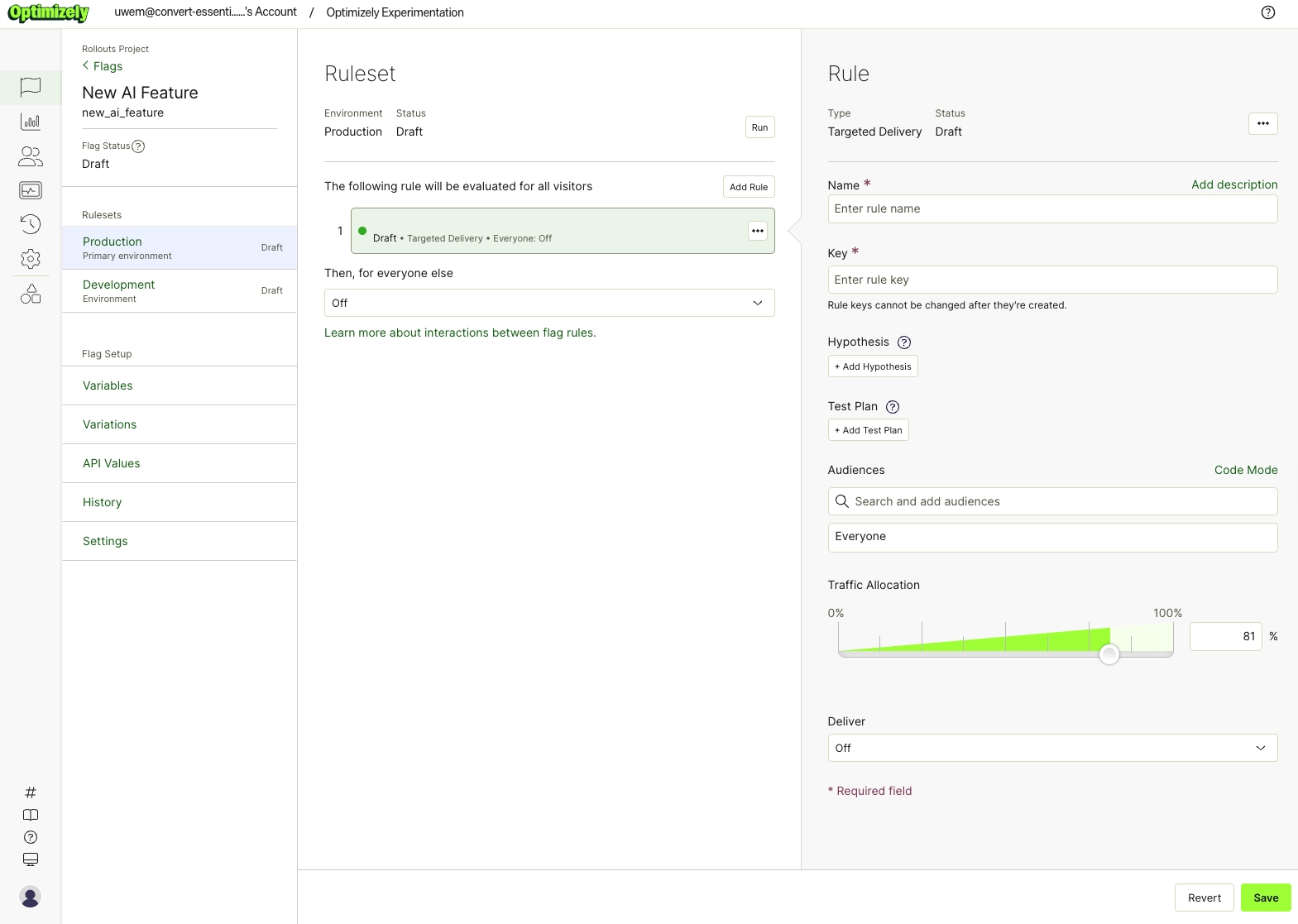
Pricing: There’s a free Rollouts plan (unlimited flags, one experiment at a time) while paid plans are billed by monthly active users (MAU) and require a sales call
What is Optimizely Feature Experimentation?
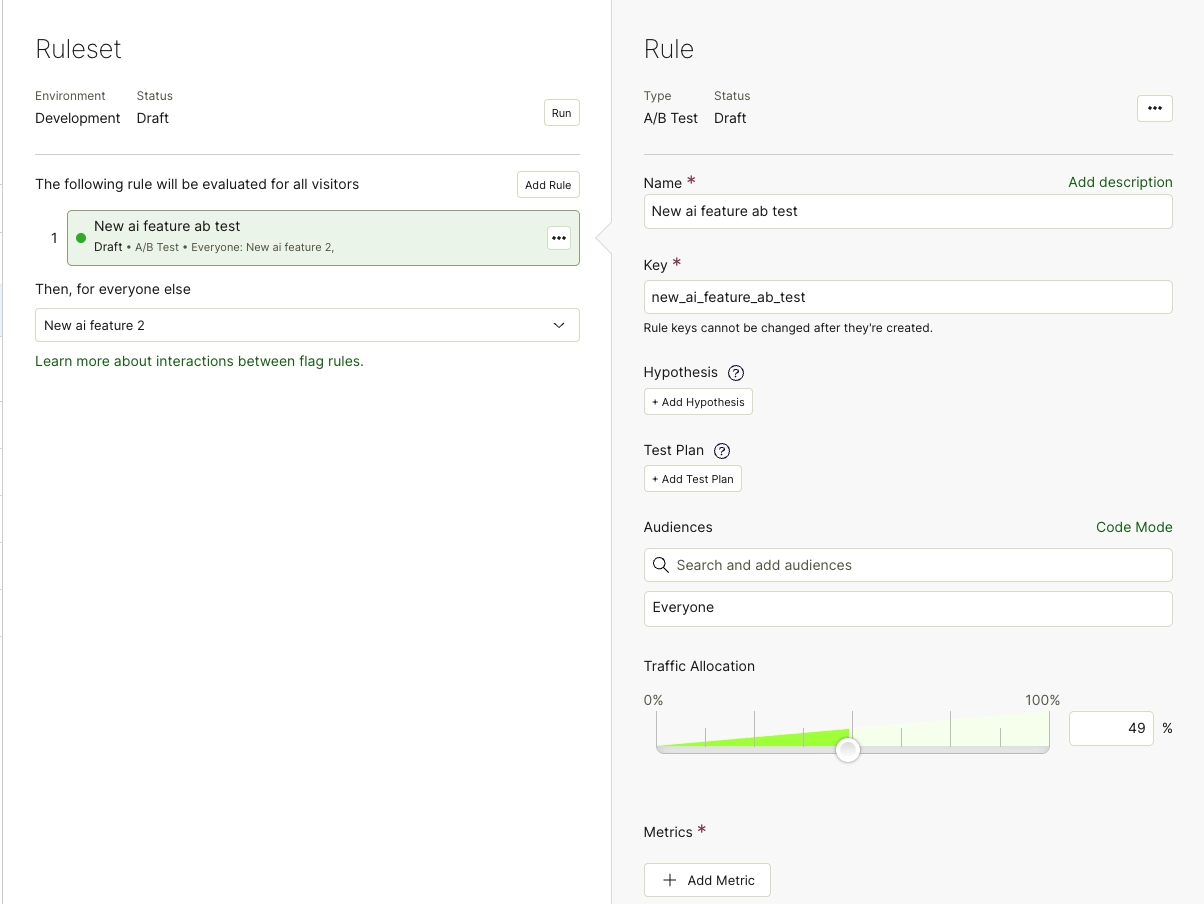
Optimizely Feature Experimentation is the full-stack flag and experimentation product in Optimizely’s digital experience platform, separate from Optimizely Web Experimentation. It includes feature flags, gradual rollouts, and A/B tests, all of which run through SDKs in web, mobile, and server code.
Your team can ramp a feature up, pause it, or switch it off from the dashboard, then test variations with Optimizely’s Stats Engine. Teams choose Optimizely because it provides larger organizations with rigorous analytics and governance, with Optimizely’s content management and commerce products on the same platform.
What Are Optimizely Feature Experimentation’s Full-Stack Pros?
- Local evaluation in procress: Every SDK evaluates flags in your application without a network call. Optimizely cites evaluation times under 1 ms and a 99.9% uptime SLA.
- SDKs for most stacks: Reference guides cover Android, C#, Flutter, Go, Java, JavaScript, PHP, Python, React, React Native, Ruby and Swift. For other languages, the Optimizely Agent microservice exposes flags over an API.
- Stats Engine options: Optimizely lists sequential, Bayesian, and frequentist (fixed-horizon) methods, with false discovery rate controls, outlier smoothing, and multi-armed bandits.
- Warehouse-native analysis: Optimizely Analytics can analyze Feature Experimentation tests directly in Snowflake, BigQuery, Databricks, or Amazon Redshift.
- Gradual rollouts with a kill switch: You can ramp a flag up, pause it, roll it back, or switch it off from the dashboard, with no redeploy.
What Are Optimizely Feature Experimentation’s Full-Stack Cons?
- No published pricing: Paid plans are billed by MAU, but you need a sales conversation to learn the cost. G2 reviewers at mid-sized companies call it expensive.
- The free plan runs one experiment at a time: Rollouts suits flag management, but running experiments at the same time needs a paid plan.
- Long implementation: Some users put the average time to implement at three months.
- Custom metrics take work: A 2026 G2 reviewer describes integrating in-house metrics as “painful”, and others report event counts that don’t match their own front-end tracking.
What Do G2 Reviewers Say About Optimizely Feature Experimentation?
Positive:
Through Optimizely you control the rollout of your features based on the parameters set i.e, country wise, some parameters defined within your system and many more.
Mayank P. (Source: G2)
Critical:
The only thing I didn’t like was the implementation, it’s true that the team was helping us a lot, but it took us a long time to implement it, first of all to understand the implementation and above all to be able to segment perfectly.
Giovanni L. (Source: G2)
7. PostHog
Best for: Startups and small engineering teams that want flags, experiments, analytics and session replay in one product
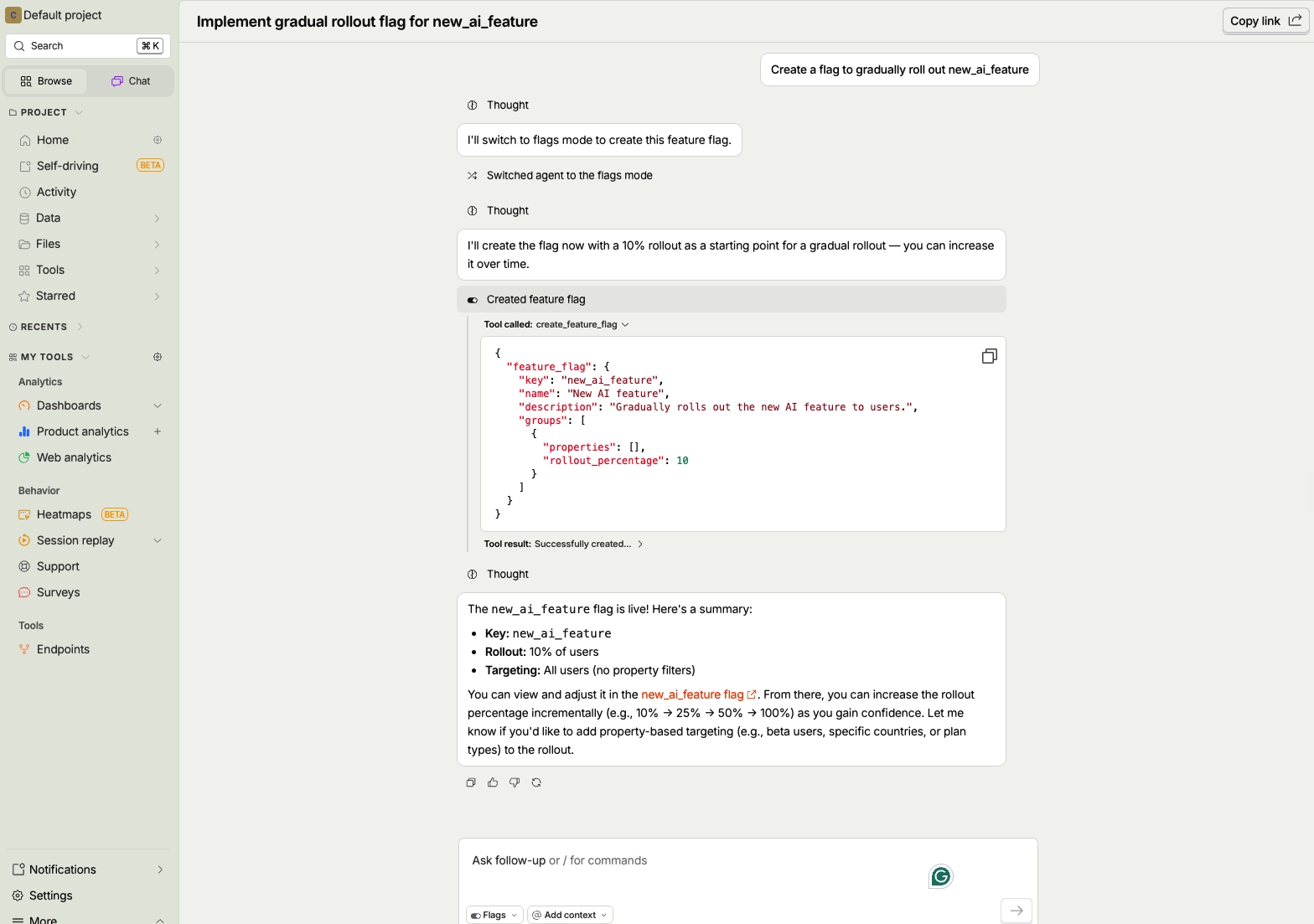
Pricing: Free 1M feature flag requests a month (resets monthly), then pricing moves to usage-based; experiments and feature flags are billed together
What is PostHog?
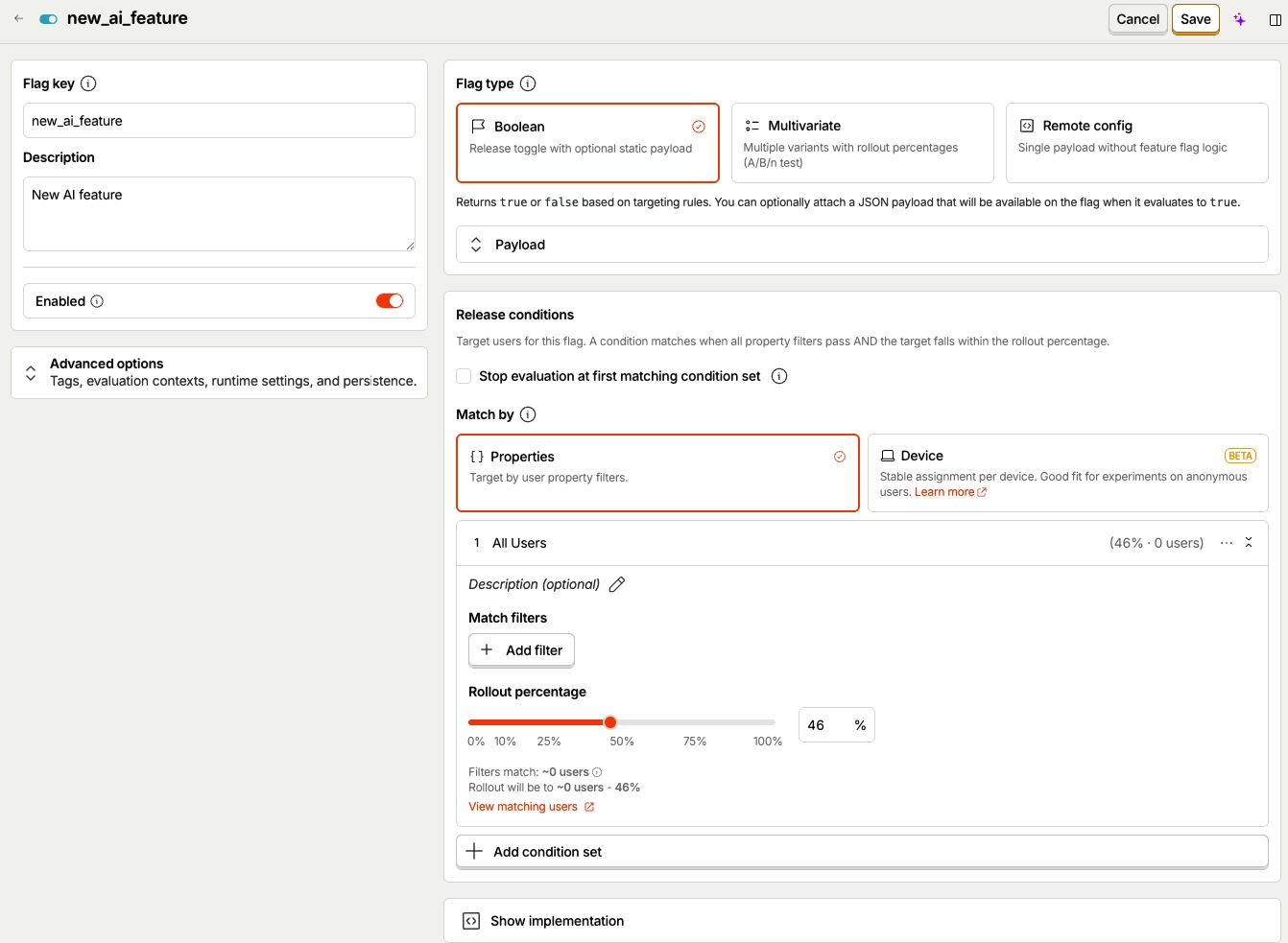
PostHog is an open-source product platform that combines feature flags, experiments, product analytics, session replay, and surveys. Its feature flags power both rollouts and experiments, so every test runs on events and flags you build.
With it, you can release a feature to a small group, watch the sessions behind the numbers, and widen the rollout when it’s ready. PostHog users like it because it is a single platform that replaces several and offers public usage-based pricing.
What Are PostHog’s Full-Stack Pros?
- Local evaluation on nine server SDKs: Node, Ruby, Go, Python, .NET, PHP, Java, Rust and Elixir can evaluate flags from cached definitions. The definitions refresh in the background every 30 seconds by default.
- Experiments run on the same flags: You don’t need new instrumentation to measure a result, and PostHog runs the statistics with either Bayesian or frequentist methods.
- Flags tied to analytics and replay: You can go from a variant’s funnel drop-off straight to the session replays behind it, then fix the issue under the same flag before widening the rollout.
- A generous free allowance: The first 1M flag requests each month are free, with no time limit.
- Managed through an API: Flags can be created and changed programmatically, and PostHog offers US or EU cloud hosting.
What Are PostHog’s Full-Stack Cons?
- Local evaluation has gaps: Flags using experience continuity or static cohorts can’t be evaluated locally, and dynamic cohort support varies by SDK version.
- Costs follow request volume: Flag requests beyond the free tier are billed by usage, so high-traffic apps pay as request volume grows.
- A crowded interface to learn: “Learning curve” and “steep learning curve” are the most common complaint tags across PostHog’s G2 reviews.
What Do G2 Reviewers Say About PostHog?
Positive:
Engineering fixed the layout under the same Feature Flag, marketing rewrote the message, and product added a short Survey for users who still abandoned that stage. … It let us improve the experience without rolling back the entire release, and it helped us expand the experiment based on a more complete view of user success instead of a single conversion number.
Phil J. (Source: G2)
Critical:
There was a memory leak issue in their SDK due to the Session Replay feature. When the user was on the same screen for long, our app was crashing due to high memory usage, killed by the operating system.
Yogesh M. (Source: G2)
8. GrowthBook
Best for: Teams with a data warehouse that want open-source flags and experiments they can self-host
Pricing: There’s a free Starter plan (up to 3 users) while Pro starts at $40 per seat per month (up to 30 users). The self-hosted open-source edition is completely free.
What is GrowthBook?
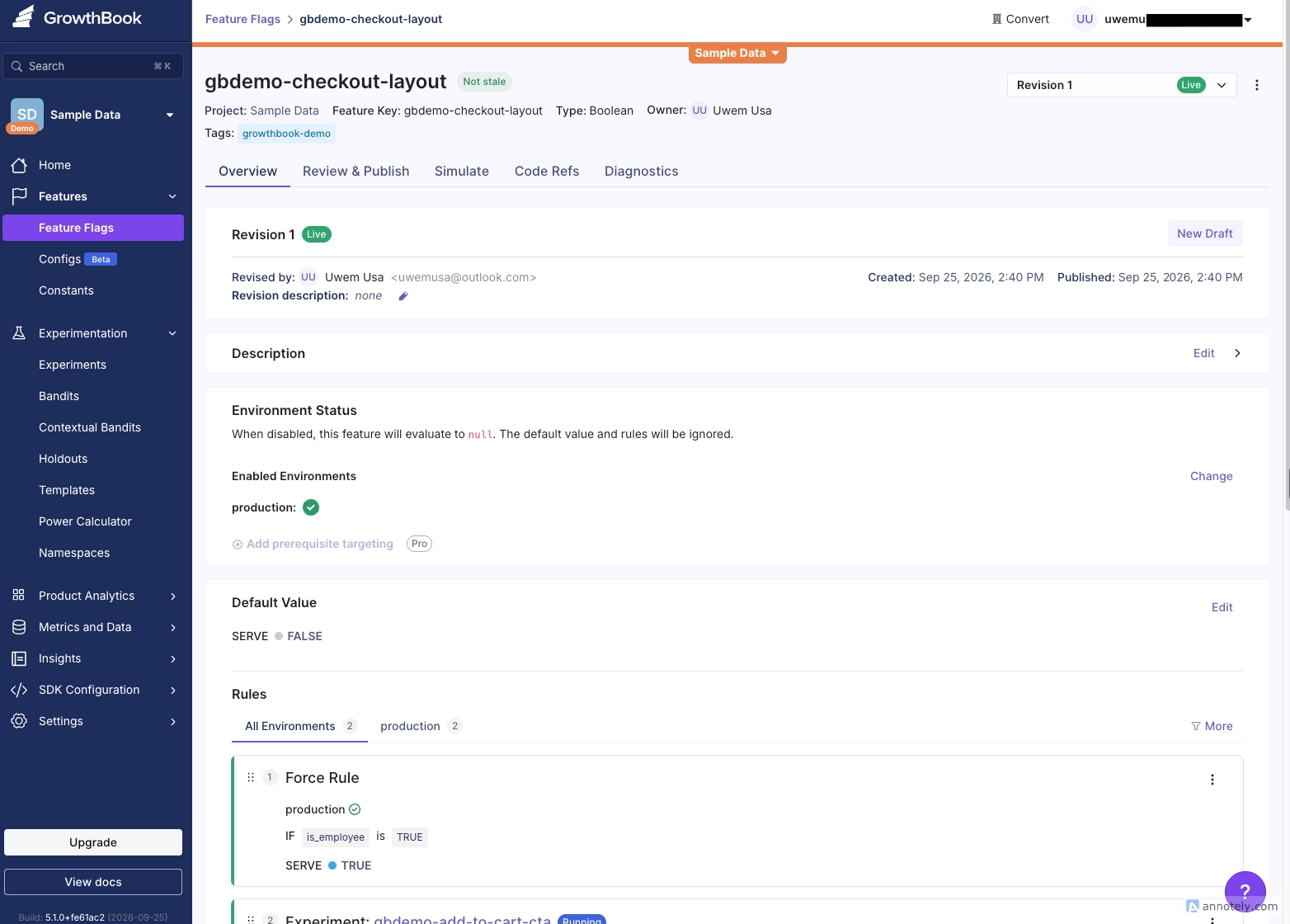
GrowthBook is an open-source feature flag and experimentation platform that runs in the cloud or on your own infrastructure. You choose. Its capabilities include feature flags, safe rollouts, product analytics, and experiments, with no limit on flags or experiments on any plan.
Teams use it to run experiment analysis against their own data warehouse and check the SQL behind each result. This is particularly attractive to users who want to keep all this data within their own environment.
What Are GrowthBook’s Full-Stack Pros?
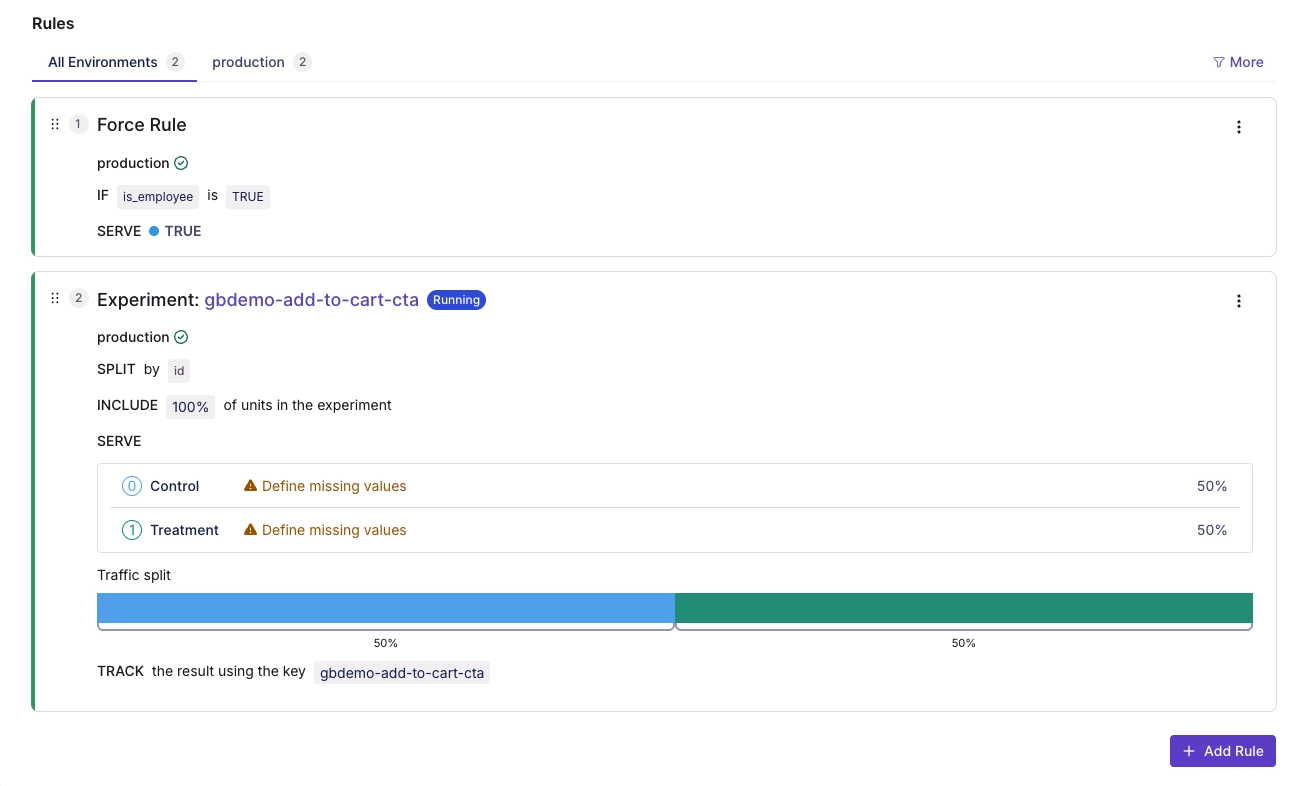
- Open source and self-hostable: You can run the whole platform on your own infrastructure, which keeps flag and experiment data inside your environment.
- Warehouse-native analysis: GrowthBook queries your existing warehouse to produce experiment results. Teams can see and check the SQL behind each metric.
- Automatic rollback on guardrails: Safe Rollouts release a feature to a subset of users and watch guardrail metrics using frequentist sequential testing. If a guardrail fails, GrowthBook rolls back and disables the rule.
- Statistical options: GrowthBook lists CUPED variance reduction, sequential testing, multi-armed bandits and contextual bandits.
- SDKs from backend to edge: SDKs cover JavaScript, React, Node.js, Python, PHP, Java, C#, Rust, Elixir, Kotlin, Swift and Flutter, with edge support for Cloudflare Workers, Fastly and Lambda@Edge.
What Are GrowthBook’s Full-Stack Cons?
- Safety features sit on paid plans: Safe Rollouts are Pro and Enterprise only, and G2 reviewers note that advanced permissions are also locked to paid tiers.
- Per-seat pricing grows with the team: Starter caps you at 3 users. Beyond that, Pro charges $40 per seat and caps at 30 users before Enterprise.
- Analysis depends on warehouse setup: Teams without a warehouse either take on new infrastructure or use the managed warehouse. The managed warehouse includes 1M events a month on Starter and 2M on Pro, then $30 per million.
- Setup needs technical comfort: G2 reviewers say configuring experiments and validating data inputs takes technical skill. They add that the product feels barebones for teams without a technical partner.
What Do G2 Reviewers Say About GrowthBook?
Positive:
The interface is generally clear, and it is useful to have experimentation, rollout control, and analysis connected in the same environment.
Arthur H. (Source: G2)
Critical:
It’s a bit barebones for someone just starting without either technical knowledge or having a technical partner.
Hampton L. (Source: G2)
9. Unleash
Best for: Engineering teams that want open-source feature flags, with evaluation that keeps user data inside their own backend
Pricing: Starts free on the open-source edition (self-hosted), pay-as-you-go costs $75 per seat per month with a 14-day trial
What is Unleash?
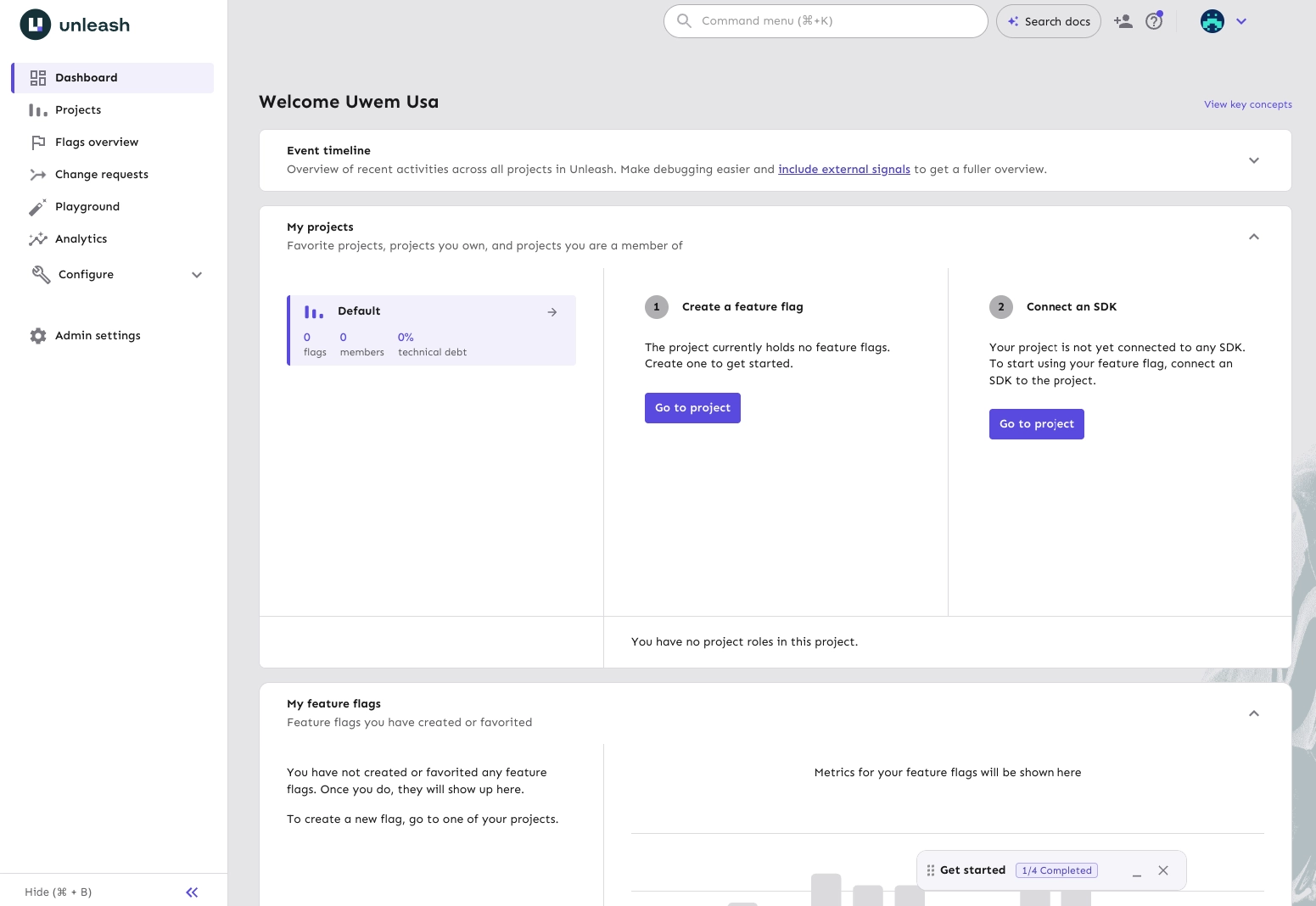
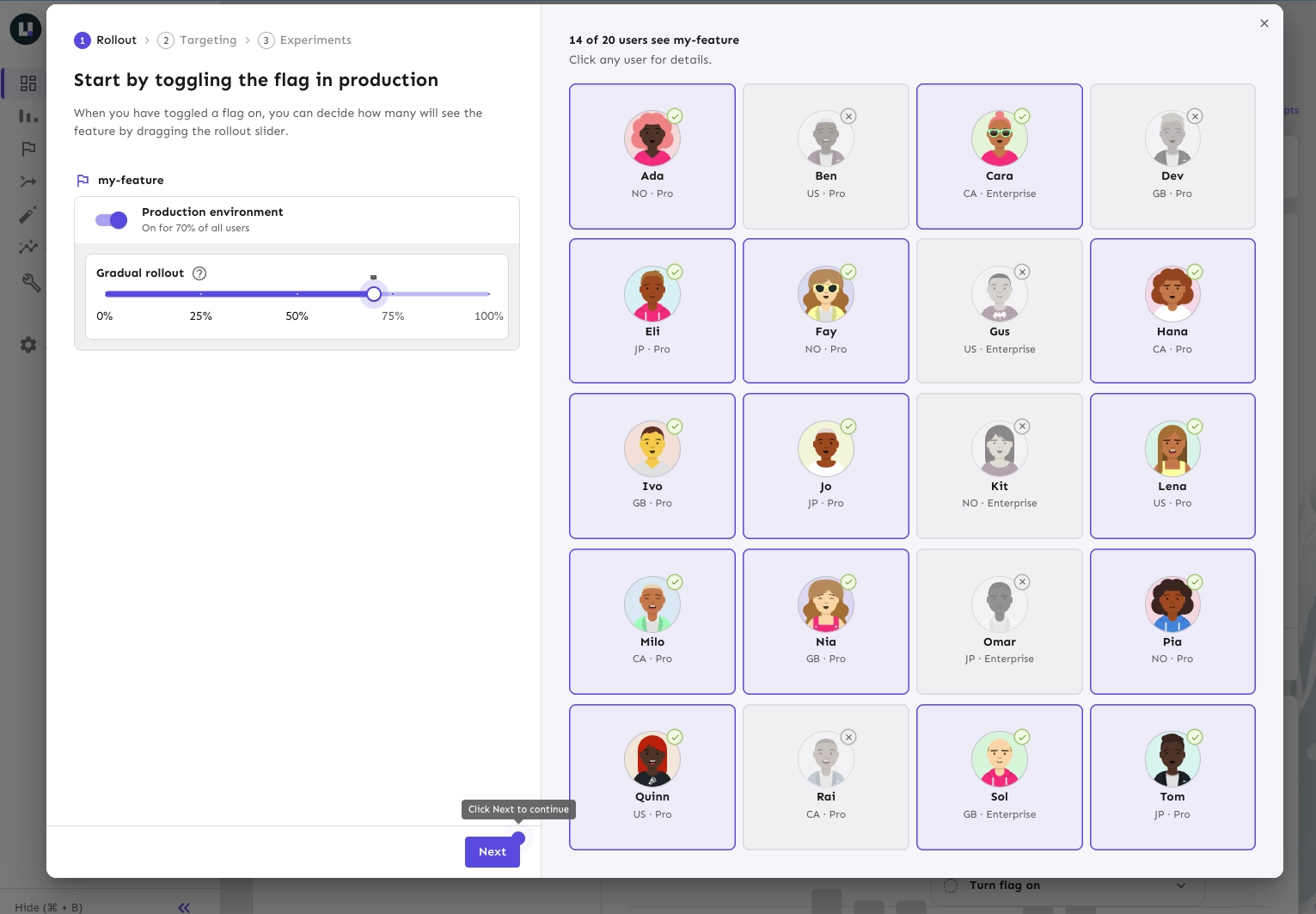
Unleash is an open-source feature management platform you can self-host or run in Unleash’s cloud. The flag feature in Unleash uses activation strategies (such as gradual rollout, user IDs, custom constraints) that can be combined per environment.
It allows you to roll out a feature to chosen users or a share of traffic, then switch it off instantly if something breaks. With this tool, engineering keeps full control over where flags run. And it comes with SOC 2 Type II compliance.
What Are Unleash’s Full-Stack Pros?
- Backend evaluation that keeps data in your app: Backend SDKs evaluate flags locally, so user data never leaves the SDK. They cache flag data in memory and refresh it every 15 seconds by default.
- 17 official SDKs: The backend SDKs are Go, Java, Node.js, PHP, Python, Ruby, Rust and .NET. The frontend SDKs are Android, Flutter, iOS, JavaScript, Next.js, React, React Native, Svelte and Vue.
- Works offline after startup: Once initialized, Unleash clients keep working without an internet connection. Most SDKs can also bootstrap flag configuration from a file or environment variables.
- Governance on every paid plan: SSO (SAML 2.0 or OpenID Connect), role-based access control, custom project roles and change-request workflows come with both paid plans.
- No caps on flags or structure: Paid plans include unlimited flags, projects, environments and experiments.
What Are Unleash’s Full-Stack Cons?
- Open-source Edge is ending: The open-source version of Unleash Edge, its low-latency evaluation layer, reaches end of life on December 31, 2026. Self-hosted teams that rely on it need to move to Enterprise Edge.
- Frontend flags depend on a server hop: Frontend SDKs fetch already-evaluated flags from Unleash Edge or the Unleash server. G2 reviewers warn that the client SDK’s default polling can burn through API request allowances.
- Limited experiment analysis: G2 reviewers describe the built-in analytics as limited. They say they need a separate metrics tool to judge experiment results.
- Per-seat pricing hits small teams: Pay-as-you-go costs $75 per seat, with a 5-seat minimum for self-hosted. A user called per-user pricing too high for what it includes.
What Do G2 Reviewers Say About Unleash?
Positive:
I use Unleash to feature flag our backend features, and I really appreciate being able to release with more confidence and test in production safely. The easy SDK that supports multiple languages is great because it covers our full stack.
Joao L. (Source: G2)
Critical:
The built-in analytics are fairly limited, so it feels like you need a separate metrics tool to get the insights you want.
Juan R. (Source: G2)
10. Kameleoon
Best for: Organizations where marketing, product and engineering want web experimentation, personalization and feature flags on one platform
Pricing: A 30-day free trial of feature management is available, but web experimentation starts at $495/month and is priced by monthly tracked users (MTUs)
What is Kameleoon?
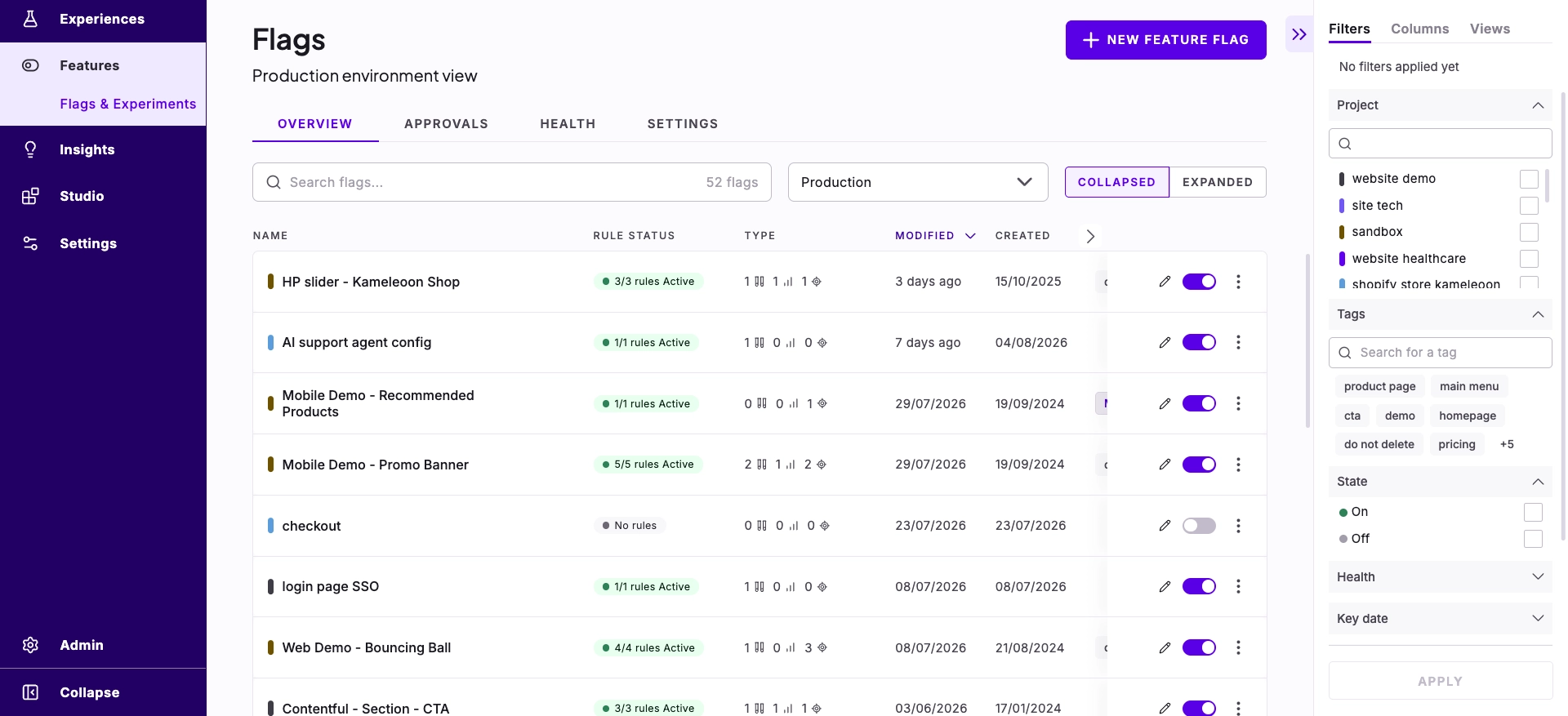
Kameleoon is an experimentation platform that combines web experimentation, personalization and feature management. Its feature management tools include feature flags, progressive rollouts and feature experiments, delivered through SDKs.
It supports running visual tests in marketing and shipping flags in engineering, with shared targeting and reporting. Teams in regulated industries pick Kameleoon because marketing, product and engineering work together on one platform, while being HIPAA, GDPR and CCPA compliant.
What Are Kameleoon’s Full-Stack Pros?
- 12+ SDKs, with OpenFeature support: SDKs cover web and mobile, and Kameleoon lists OpenFeature SDKs among its feature management capabilities.
- Experiments on cached and edge sites: SDKs for Nginx, Fastly, Cloudflare and Vercel let you run experiments on cached pages.
- Automatic rollback: Progressive delivery rules ramp a feature up, and Kameleoon rolls it back automatically when conditions you define are met.
- Developer controls built in: Feature management includes environments, approval workflows, dynamic variables, custom bucketing, a real-time streaming architecture and technical debt management.
- Statistical options: Kameleoon lists frequentist, Bayesian and CUPED methods for analyzing experiments.
What Are Kameleoon’s Full-Stack Cons?
- No public pricing for feature management: Kameleoon publishes a price only for its Starter web plan, so costing flags and full-stack experiments takes a sales conversation.
- Experiments stop at the traffic cap: Pricing is based on monthly tracked users, and Kameleoon’s plans page notes that when you reach 100% of your allowance, experiments stop running.
- Complex tests lean on developers: “Developer dependency” is one of the most common complaint tags across Kameleoon’s G2 reviews. Several reviewers say complex tests need developer help or Kameleoon’s own team.
What Do G2 Reviewers Say About Kameleoon?
Positive:
I can create customizations and A/B tests easily, stop them if necessary without needing to revert in the code, it’s a time saver.
Donovan D. (Source: G2)
Critical:
We ran into some difficulties during the initial integration because the documentation was lacking. As a result, our team wasn’t able to run a single A/B test during the first few weeks.
Emin U. (Source: G2)
What Are Feature Flags and Rollouts?
A feature flag is conditional logic in your code that switches a feature on or off at runtime, without a deploy. A rollout uses that flag to widen exposure in steps, for example from 5% of users to 20%, then 50%, then everyone.
Together, they decouple deploying code from releasing features. Your team ships the code with the flag off, then decides who sees the feature and when (for example, internal testers first, one market next, all users last). If something breaks, you switch the flag off in seconds, with no rollback.
You’ll also hear feature toggles (another name for flags), dark launches (code shipped with the flag off) and progressive delivery (releasing in stages) in this article.
For the full breakdown, including where feature testing fits in, read Feature Flags vs Rollouts vs Feature Testing.
How Do Feature Flags Help Product Teams?
Feature flags give product teams control over things they would’ve otherwise needed engineering for. Those are when a feature launches, how many people see it first, and who gets access to features.
This translates into use cases such as:
- Launch when the business is ready: Engineering can ship a feature weeks early with the flag off. The launch happens when support is briefed, the docs are live and the announcement is scheduled. Then the product manager flips the flag, with no deploy needed. A case in point is a redesigned pricing page that can sit in production for a week, then go live at 9 am on launch day.
- Release to a small group first, with a kill switch: Start by releasing to 5% of users or a single region. Track error rates and key metrics before expanding the rollout. If issues arise, turn off the flag immediately to protect other users while you fix the problem. For a mobile app, this will help you avoid negative reviews on app stores.
- Control who gets access: Flags work as permission gates without code changes, such as for beta programs, plan-based features, or early access for key accounts. Sales and support teams can grant or remove access themselves. For example, an enterprise customer can try a new reporting module before it is rolled out to other accounts.
Because everyone works from the same flag state, product, engineering, and QA can see what’s live, and for whom, at any moment.
How Do Developers Use Feature Flags in Experimentation?
Developers use feature flags to ship new code to production and then control, from a dashboard, who runs it. Joseph Samir, Senior Fullstack Developer at Convert, describes the setup as “a condition you set in the Convert dashboard, and an if in your code that guards a new feature or release with it.” When you change the condition, you change who gets the feature, and nobody has to redeploy.
Joseph’s example is a rebuilt checkout, taken through three stages.
Stage 1: Try it on your own team first
A feature flag uses a specific condition to decide who gets the feature (think: logged-in users, visitors from Canada, accounts on the Pro plan). For the new checkout, the condition is “email ends in @yourcompany.com.” For a week, your team places real orders on the new checkout while every customer stays on the old one. When you’re happy, you change the condition to everyone. If a bug turns up the next day, you set it back.
Stage 2: Roll it out to a percentage of visitors
A rollout uses a share of visitors instead of a condition. Convert Experiences chooses them with a hash of each visitor’s ID, so the same person always gets the same answer. The checkout goes to 10% of visitors while you watch errors and support tickets, then 50%, then 100%. Raising the percentage only ever adds people, so nobody who already has the new checkout loses it. As Joseph puts it, “A rollout doesn’t report anything, it limits how many people a bad release can reach.”
Stage 3: Run it as an A/B test
Once the question changes from “does it break?” to “does it sell more?”, the same flag runs as an A/B test with a control group and a goal. You can also stack the two, for example, 10% of logged-in users. On the server, your code has to report the conversion, because the browser isn’t tracking it for you.
What Do Teams Get Wrong When They Start Using Feature Flags?
Joseph names four mistakes teams make again and again:
#1. Inconsistent Identity
If the checkout page passes a session ID and the cart page passes a user ID, the hash sees two different people. The same customer then gets the new checkout on one page and the old one on the next. Pick one ID, pass it everywhere, and decide once per request.
#2. No Default
Flag settings have to be fetched, and one day the fetch may fail (caused by a network hiccup, an SDK that isn’t ready, or a stale cache). “Every flag needs a boring default, usually ‘off’, that the code takes without asking anyone.”
#3. Reading a Rollout as an Experiment
A rollout has no control group and no goal, so if you need to know whether a feature works, run it as an A/B test.
#4. Flags That Never Die (Flag Debt)
Six months in, there are 40 flags, half of them at 100%, and nobody remembers which ones still matter. “When a flag has been at 100% for a while, delete the old branch and the flag with it, that is the release actually finishing.”
How Do You Choose the Right Feature Flag Tool?
Start with the jobs your team needs done, then check each tool against these criteria. They’re the same criteria behind the comparison table above.
Must-haves
- Server-side SDKs for your stack: Check the languages you actually run. Look for local evaluation too, so a flag check doesn’t add a network call to every request.
- Safe defaults: When the SDK can’t reach the flag service, it should fall back to a value you set.
- Consistent bucketing: The same user should get the same variation across pages, sessions and SDKs.
- Targeting, percentage rollouts and a kill switch: You need to choose who sees a feature, widen it to a growing share of users, and switch it off in seconds if something breaks.
- Separate environments for dev, staging and production, plus role-based access control (RBAC) and audit logs.
Worth Paying For as You Scale
- Built-in experimentation with a control group, goals and clearly stated statistical methods (that is, frequentist, Bayesian, sequential testing, CUPED).
- Guardrail metrics and automated rollback: The platform watches metrics like error rates and conversion during a rollout and switches the feature off by itself if one crosses a threshold you set.
- Warehouse-native analysis, if your metrics already live in Snowflake or BigQuery.
- OpenFeature support: OpenFeature is an open standard for flag SDKs, and it makes switching vendors later less painful.
- Stale-flag cleanup, so old flags get noticed before they pile up.
One more important thing to note is match the pricing model to your traffic. Tools charge per monthly active user (MAU) per seat, per request or per tested user (also monthly tested user, MTU). MAU, MTU, and request pricing rise with traffic. Seat pricing rises with team size.
In a Nutshell
The question at the top of this article was which feature flag and rollout tools hold up in day-to-day use. From the trials and the reviews, what holds up are the SDKs that fall back safely, bucketing that stays consistent, pricing that fits your traffic, and a clear path from rollout to experiment.
Start with the job your team needs done this quarter. If it’s safer releases, pick a tool with strong server-side SDKs and a fast kill switch. If you need to know whether a feature moves revenue, pick one where the same flag runs as an A/B test with a control group and a goal.
Then test-drive the tool, put one real feature behind a flag, and see which tool becomes an accepted part of your team’s stack.
Frequently Asked Questions and Answers About Feature Flag and Rollout Tools
Pricing depends on the billing model more than on the tool. As of September 2026, PostHog and Statsig list free tiers. GrowthBook Pro costs $40 per seat per month and Unleash’s cloud plan $75 per seat per month. Convert Experiences includes feature flags and full-stack testing from its Pro plan, at $599 a month on monthly billing for 100,000 tested users. Enterprise platforms such as Optimizely and Kameleoon quote on request, so budget for a sales conversation there.
Support usually scales with the plan. Open-source and free tiers rely on community channels such as Slack groups and GitHub. Paid plans add email or chat support, and enterprise contracts add a dedicated customer success manager and response-time guarantees. G2 reviewers of Kameleoon, Statsig, and Convert Experiences single out the good quality of support in their reviews.
Expect weeks for basic flags and months for a full experimentation program. Average implementation time is about three months for Optimizely Feature Experimentation and the Harness Platform, and under a month for PostHog (as of September 2026, per G2 user reviews). “Learning curve” is one of the most common complaint tags for Statsig, PostHog, Harness and Optimizely Feature Experimentation.
At minimum, a server-side SDK for every language your backend runs, a JavaScript SDK for the browser, and iOS and Android SDKs (or Flutter and React Native) if you ship mobile apps. Look for local evaluation, so flag checks don’t add a network call to each request, and fallback defaults for when the flag service is unreachable. Support for OpenFeature, the open standard for flag SDKs, makes switching vendors later easier.
Separate environments for dev, staging, and production let you test a flag before customers see it. QA overrides let testers force themselves into a variation, and scheduling, approvals, and audit logs keep changes under control. Stale-flag reports, built-in experimentation, and integrations with your analytics and observability tools round out a platform that grows with you.
Startups usually do best with a free tier or an open-source edition they can grow into. PostHog and Statsig offer free tiers, and GrowthBook and Unleash offer open-source editions you can self-host. If your team plans to run A/B tests on those flags, pick a tool with experimentation built in, so you don’t pay for a second product later.
Choose LaunchDarkly if release management is your priority. Its 40+ SDKs stream flag changes to your apps in real time, and its free Developer plan includes 100,000 experimentation MAU a month. Choose Optimizely Feature Experimentation if experimentation comes first. Its Stats Engine supports sequential, Bayesian and frequentist methods, and it can analyze results directly in your data warehouse. Both have a free starting point. LaunchDarkly has the Developer plan, and Optimizely has its Rollouts plan, which runs one experiment at a time.
The biggest risk is flag debt. These are old flags nobody removes, leaving dead branches in your code. Your app also depends on the flag service and its SDK, so every flag needs a safe default for outages. Pricing tied to monthly active users or requests can rise quickly with traffic, even when you only use a handful of flags.

Written By
Uwemedimo Usa
Conversion Rate Optimization, Conversion Copywriting, B2B SaaS Content Marketing +3 more
Conversion Rate Optimization, Conversion Copywriting, B2B SaaS Content Marketing, A/B Testing Tools Evaluation, Generative Engine Optimization, A/B Testing Statistics Show less
Edited By
Carmen Apostu

How Was This Blog Written
To develop it, we used the following sources of input: Interviews with: Joseph Samir, Senior...
To develop it, we used the following sources of input:
- Interviews with: Joseph Samir, Senior Fullstack Developer at Convert; Ahmed Abbas, FullStack Developer at Convert
- Primary sources reviewed: official documentation and pricing pages for all 10 platforms (checked in September 2026); hands-on free trials of the platforms that offer one, with Kameleoon’s screenshots taken from its documentation because its trial doesn’t include feature management; 300 G2 reviews across the 10 platforms, captured on September 24, 2026; Convert’s full-stack documentation and pricing page
- Internal expertise used: Convert engineering team
- AI assistance was used for: SEO and AISO analyses, analyzing G2 review notes, planning article outline, grammar and clarity checks, transcription, and metadata alternatives
- AI was not used for: original expert judgment, final recommendations, expert quotes, statistical claims, writing and editing, source verification, product claims, or final editorial approval
Every factual claim was reviewed by Uwemedimo Usa and Carmen Apostu. Any claims involving product functionality or pricing were checked against each vendor’s official documentation and pricing pages, and Convert product claims were checked by Joseph Samir.