Use AI for Statistical Analysis Without Letting It Tamper With the Numbers


Are you one of those people using AI for analysis and statistical calculations? I know why you might be doing that. Convenience, right? Reducing friction.
But let’s consider the story of the data. That hard-earned data you spent time and effort ensuring robustness and accuracy. And then you throw it into a language model and hope the numerical data survives the trip? (By the way, I’ll be using “AI” and “language model” interchangeably.)
I mean, what calculations is the language model even doing? Is it doing calculations at all? If it is, is it doing it every time? How do we know it’s not “forgetting” numbers?

Language models are the epitome of a “black box.” We can never be certain what’s going on inside their “brain”.
Is there a better approach where we can benefit from the advantages AI provides, while ensuring the robustness of our data? Well, yes. It requires a bit of involvement from us, though. So, if that’s okay with you, let’s take a look at what a workflow like this would look like.
Note: there is a link to download the n8n workflow at the end of the article.
The example scenario
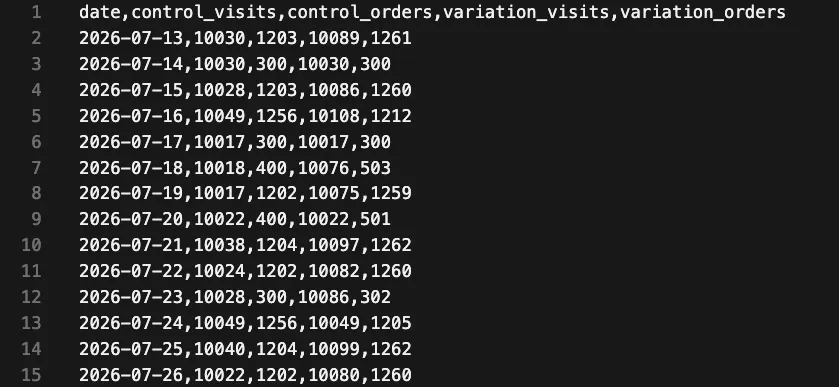
I have a CSV of experiment results, and I want to do some analysis that isn’t catered for within the experimentation tool. I have my data broken down by day, and have columns for visitors and orders (for control and variation). Here’s an example of what that data looks like:
What I’d like to do is chart the risk of picking one variation over another. The calculation I’m looking for is called Expected Loss, and Convert’s tool provides us a view of this, but I want to look at things cumulatively. Because viewing the cumulative Expected Loss gives me a sense of the “noise” level of the results.
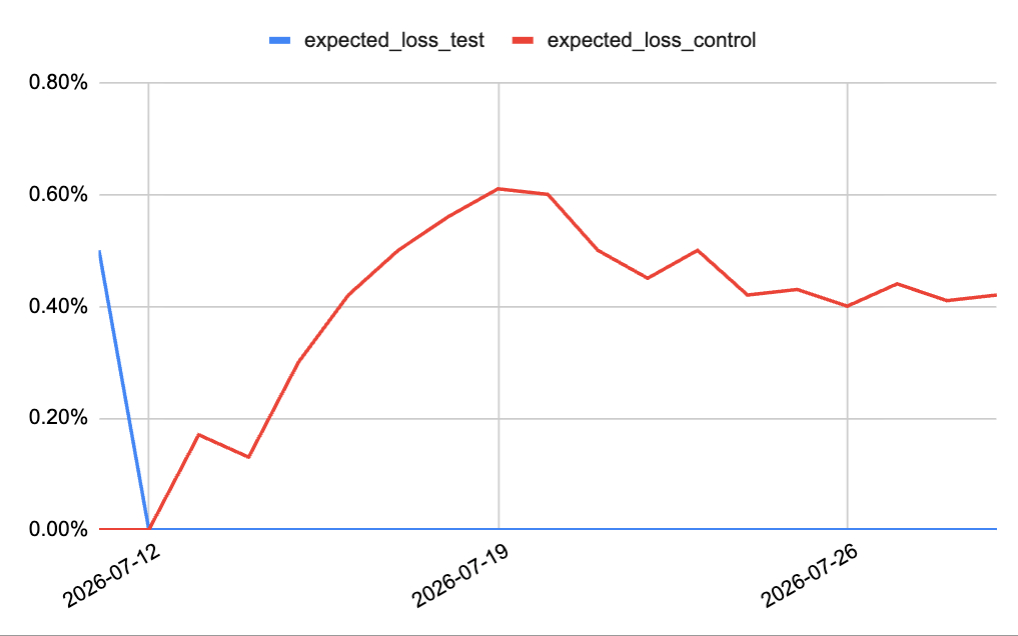
You might have different goals and different things you want to do; that’s okay. This process will largely be the same. The key thing is to find a tool that does all the necessary calculations. There are lots out there, with great APIs to interface with.
For my case, I’ll use a tool I developed to solve this particular problem for me (abdecisions.com). It’s free and has an API I can pass data into.
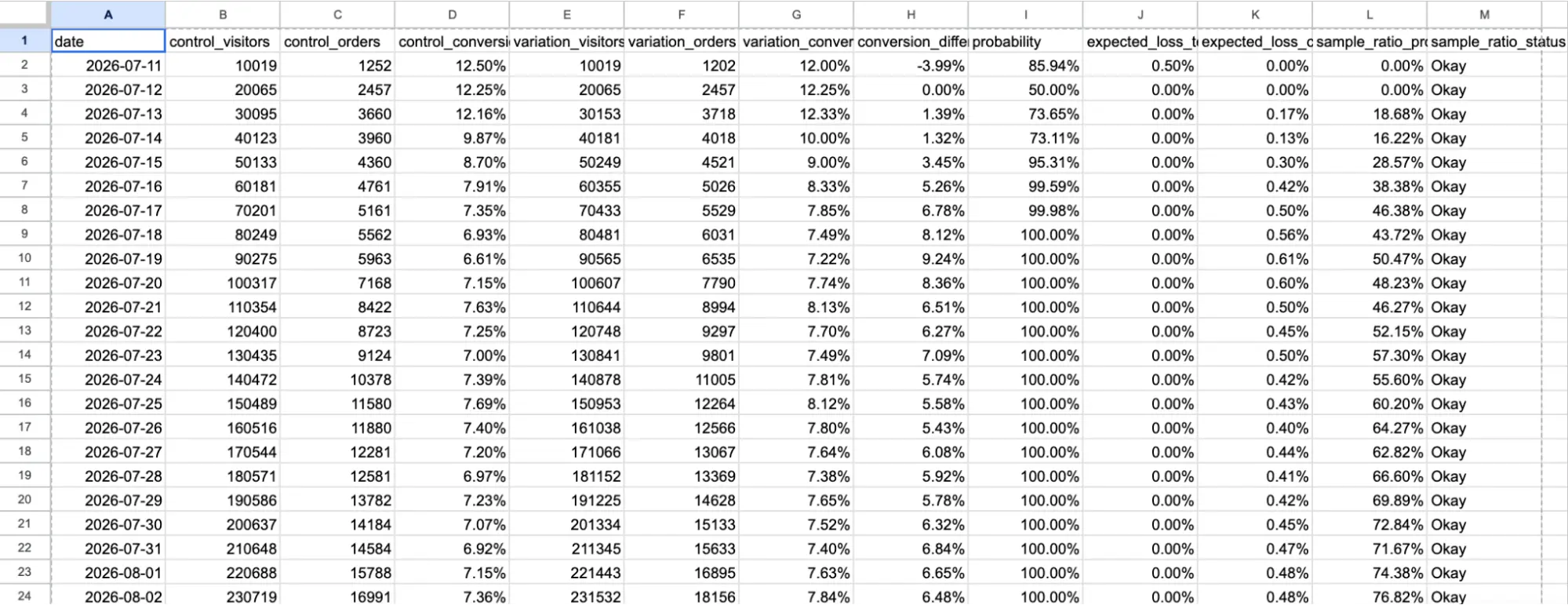
A/B Decisions outputs the following data:
Notes and caveats: I’m no statistician, so you might want to verify the calculations with a trusted statistician or analyst if you wanted to use the tool. The code is open source (see GitHub repo), so you can interrogate things any way you like. I’m using it because I needed something I can control that is free and open source (feel free to make this tool your own).
The perfect workflow
Here’s what an “idealised” workflow would look like in n8n:
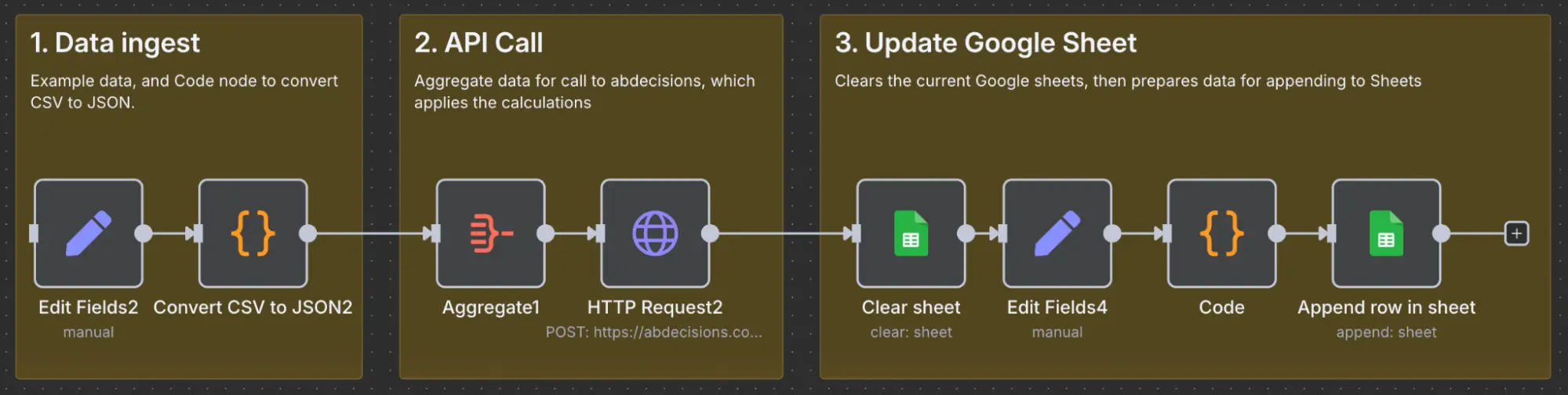
Data ingest ensures my CSV data is formatted correctly (more on this later). That data is converted to JSON, and the API call node returns the results. I then push the results into a spreadsheet, where I can build my nice visualisations.
As you can see, no AI is required for this automation. We’re building around a deterministic tool, i.e., a tool that gives us the same answer in the same format every time. But as you can also see, there’s a problem with this approach. We have to ensure the CSV is formatted correctly before using the workflow. And this is often the biggest point of friction to implementing and using the idealised flow.
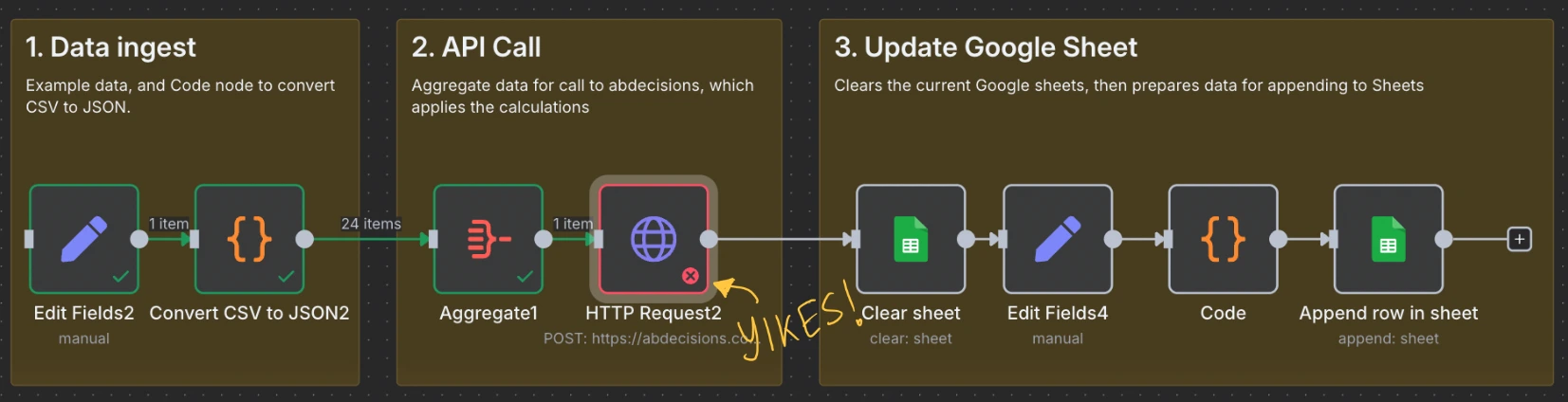
Let’s see how a language model can help.

A workflow that ensures data format
Some of you may now be thinking: the solution is simple. Create an AI agent, and give it your CSV to ensure correct format. Or you may be thinking: give your AI interface access to the tool and let it figure things out.
But we’ve already established that we don’t want to feed all our data into a language model. We want to protect our data from any sort of transformations. We want a workflow where the language model purely identifies and fixes problems with the data structure only. It shouldn’t even need to see all the data.
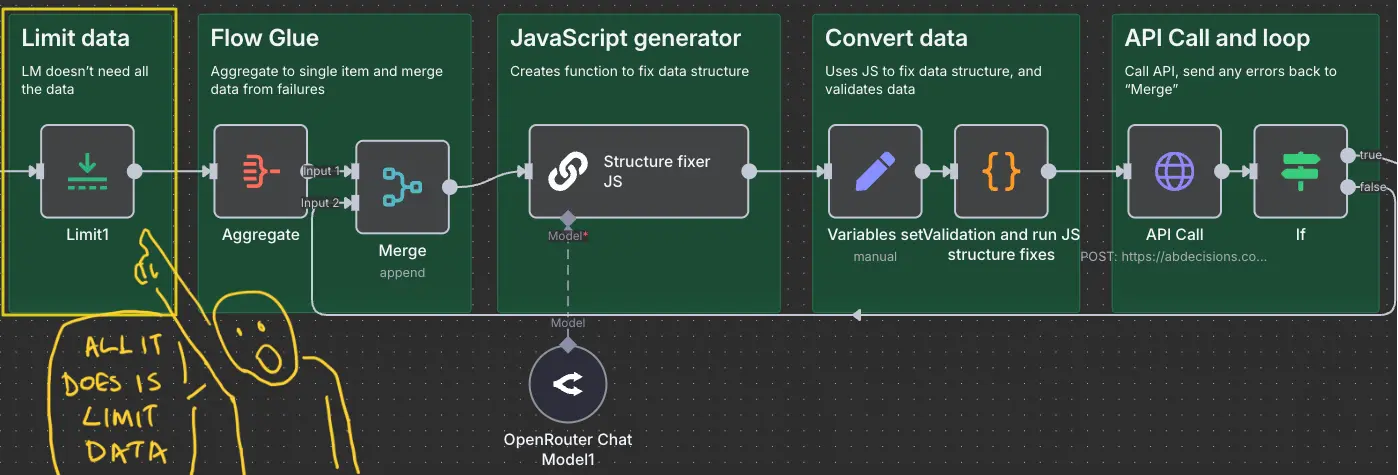
Here’s what this final workflow looks like:

Don’t worry if this looks complicated. We’ll go through it now step by step, covering the new parts of the workflow (shown in green).
Step one: Limit the data
We start by limiting the data that gets fed into the AI. The AI doesn’t need to see all of it, just enough to understand the structure. I’ve limited the data to four rows.
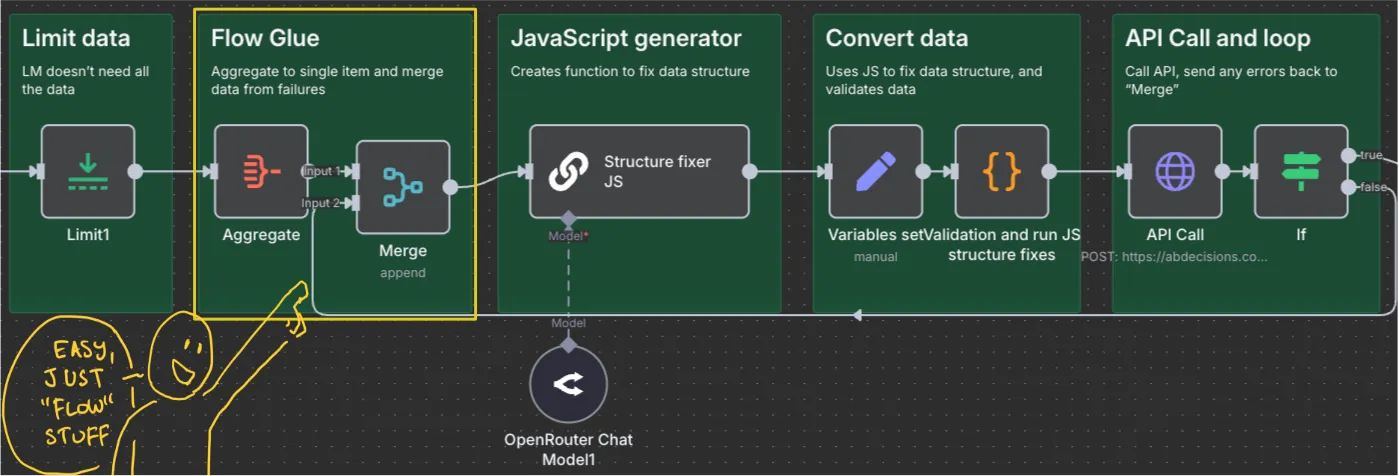
Step two: Just “flow glue”
The next two steps are “flow glue”. The first takes the row of data and aggregates it into a single “item”. Without this step, our workflow will trigger for each row in the dataset, and we don’t want that.
Merge: I’ll cover later. For now, all you need to know is that we need a retry mechanism that appends the error messages.
Step three: Create JavaScript to fix the data structure
Next is the “AI” step, which will write us a JavaScript function to ensure the data structure is in the expected format.
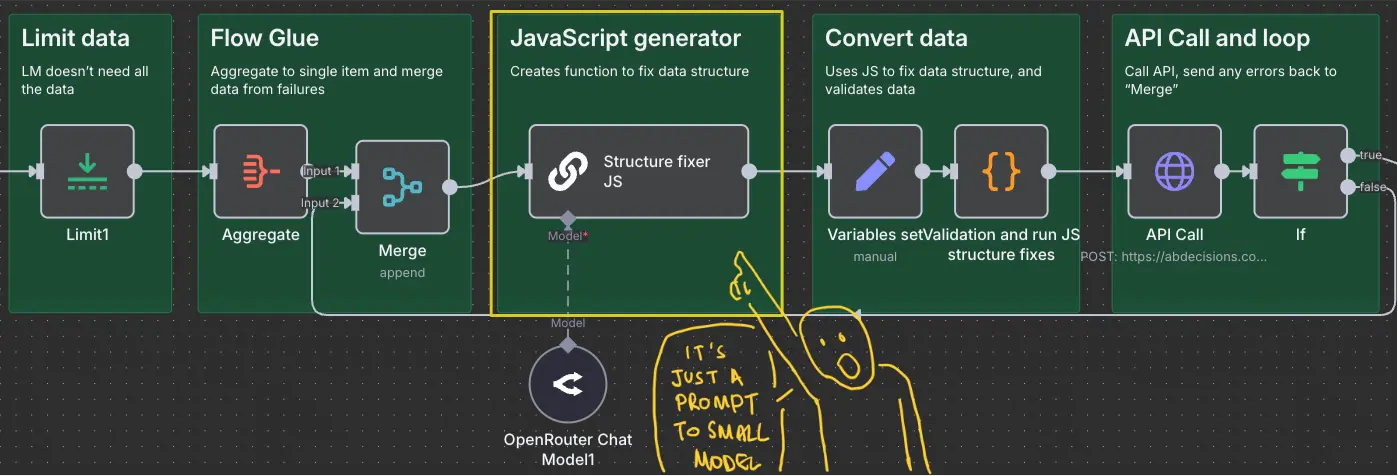
Here’s the prompt:
%INPUT% {{ JSON.stringify($input.all()) }}

You are a JavaScript expert. Write a function named convertData that transforms any input data into a fixed output structure.

Input: The function receives a single argument data, which can be in any of the following formats:

- An array of objects with a json key (e.g., [{ json: { date, control_visitors, control_orders, variation_visitors, variation_orders } }]).

- An array of plain objects (e.g., [{ date, control_visitors, ... }]).

- A single object with a data array (e.g., { data: [...] }).

- A single object with a json key containing a data array (e.g., { json: { data: [...] } }).

Output: Always return an array of objects, each having:

- json: an object with the keys date, control_visitors, control_orders, variation_visitors, variation_orders.

- pairedItem: an object with item (index) and input (always 0).

%PREVIOUS_ERRORS% Error: {{ $json.error }} Details: {{ $json.details }} Expected: {{ $json.expected }}

Rules:

1. NEVER embed concrete data values (e.g., specific dates, numbers, or strings) in the code – only use the input data dynamically.

2. Handle field name variations (e.g., cntrol_visitors, cntl_visitors) by remapping them to the required keys.

3. Re-index pairedItem.item to match the output array position.

4. If the input is already in the correct format, return it as-is (after re-indexing).

5. If the input is empty or cannot be transformed, return an empty array.

Write only the function convertData – no additional code or comments.

```javascript

//Code
The gist of this is that we tell the language model what structure the API needs for the data. We then give instructions to generate a JavaScript function (called convertData) that converts our data to match the API supported data structure.
I’ve kept these instructions basic; feel free to update as needed. There’s other stuff you can do too, like fixing the date structure if it’s in an incorrect format. Treat this prompt as a starting point.
Remember, the language model doesn’t see all of the data. It just needs enough context to do its task. We’re also using a tiny model for this. We don’t need to fund Tech-Bro annihilist fantasies by using their “frontier” models.

Step four: Convert the data and validate!
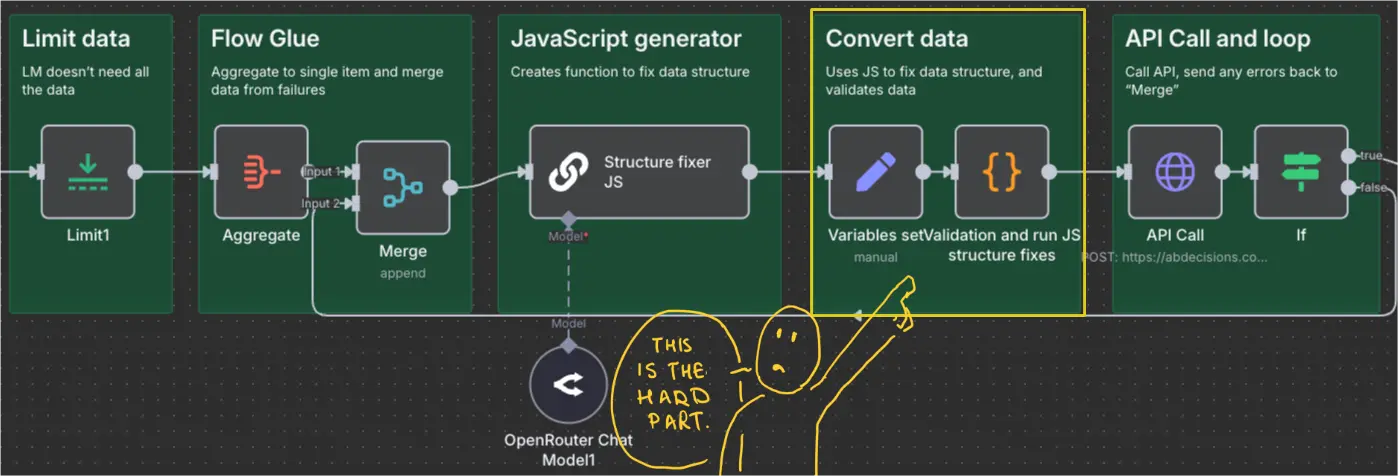
The next step is a Code node that does two things.
First, it runs the JavaScript created by the previous step and transforms the data. The key here is the JavaScript eval function, which turns text-based code into an actual function.
Second, there’s validation of the data. This ensures that the data hasn’t been inadvertently transformed. This follows the pattern of ensuring every language model use is followed by a step to validate the output.
The key validation rules are to:
- ensure that the row count in the data remains unchanged and…
- that there is no numerical data in the converted JavaScript, so we know it’s just doing structural modifications.
Feel free to add more. As with previous workflows, treat this as a scaffold to build your own validation rules for your specific use case. You can just feed the code into a language model if you’re not familiar with coding. Validation is important as it reduces the risk of inconsistent and unreliable output.
Step five: The tool call and loop
After this, it makes the API call to my tool, and if there are errors, it sends the details back to the merge node to use it as context for the language model to try and generate the convertData function again.
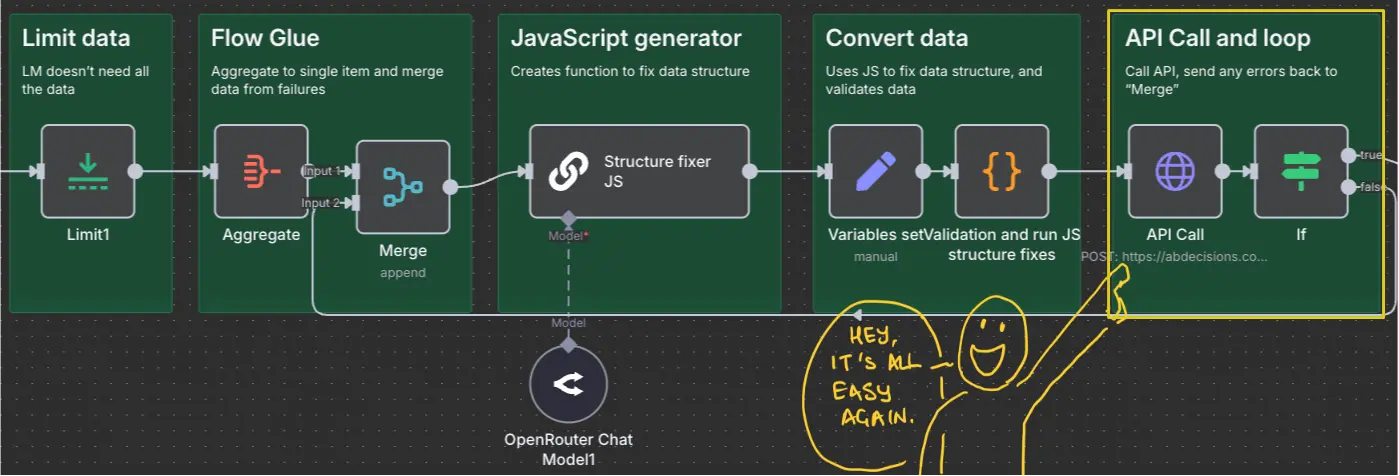
The workflow continues to loop until it succeeds. But you could put some max limit in the ‘if’ node if you want, like ten or twenty or whatever it is. Because we’re using a tiny model here, it’s not like it’s going to cost that much. But even so, it’s a good idea to be efficient.
Step six: Do what you want with the data!
After that, the flow is the same as our idealised version: the data is pushed into Google Sheets to visualise. But that’s just my example; you can obviously do whatever else you need to do with the data.
Why do all of this?
Isn’t all this more work? Yes. But this is the one-off price to pay for long-term reliability. All we’re doing is being laser-focused on the specific part of the problem that language models can help with. And just to be clear, this isn’t about n8n. n8n just happens to provide us with a nice UI to demonstrate the techniques and principles to use.
You can implement this approach in any tool; even encoding it into scripts if that’s more convenient. The point here is that this workflow is specifically designed to ensure transparency and confidence in data processing, matching the standards of data collection. What we have as a result is output more accurate than even the largest, most expensive, most “frontier-ry” model can ever promise.
Editor’s note: This guide is part of a broader series on building practical AI systems. If you’re just getting started, we’d recommend our guides on getting started with AI automation in n8n, building your first AI agent, connecting chat interfaces to other tools using MCP, and setting up MCP servers in n8n.
Here’s your download, and I hope you enjoy it.


Written By
Iqbal Ali
A/B Testing, Experimentation Program Coaching, UX Design +4 more
A/B Testing, Experimentation Program Coaching, UX Design, n8n Automation, Small Language Models, Model Context Protocol (MCP), Client-Side A/B Test JavaScript Show less
Edited By
Carmen Apostu