


Multivariate Testing in Convert Experiences

Test multiple page
elements at once.

Find the highest-converting combination in a single experiment — instead of running sequential A/B tests.

Define the elements you want to test. Convert generates every combination, splits traffic evenly, and reports at the combination level.

  • No credit card
  • 15-day trial
  • Full features
Available on Pro & Enterprise plans
Statistical correction Bonferroni, Šidák, or none
Setup Visual Editor — no code
Combinations Full factorial, auto-generated
Trusted by teams worldwide
Certified
ISO 27001 SOC 2 Type 2 GDPR HIPAA

What teams accomplish

What teams accomplish with multivariate testing

The same engine, three different jobs — depending on who's running the program.

Ecommerce CRO managers

Test the whole page, not one element at a time

Test headline, hero image, and CTA combinations simultaneously on product detail and checkout pages — and identify the highest-converting full-page combination without running sequential A/B tests on each element in isolation.


CRO agencies managing multiple client programs

Compress quarterly roadmaps into single experiments

Compress quarterly test roadmaps into single experiments, shipping more validated recommendations per client per month than a sequential A/B testing schedule would allow on the same traffic.

Technical CRO teams optimizing high-traffic pages

Statistical methods you can defend in any meeting

Use configurable Bonferroni or Šidák correction, Chi-square Sample Ratio Mismatch detection, and Asymptotic Confidence Sequences for anytime-valid stopping — validating element interactions a sequence of separate A/B tests cannot reveal.

How it works

You define the elements. Convert handles the combinations, the stats, and the reporting.

Define each element as a section and add its variations. Convert generates every combination with a full-factorial design — two sections with three variations each make six combinations; three make twenty-seven — names them, and splits traffic evenly by default.

1 · Full factorial generation

Define elements in the Visual Editor

Define each element as a section and add its variations. Convert generates every combination automatically — full factorial, auto-named, with traffic split evenly by default.

Stats & Settings
Statistics Settings
Type of stats ?
Frequentist Bayesian Sequential
Confidence
95 %
Correction
Šidák
Sample Ratio Mismatch detection · Chi-square at 99% on every plan
7 named methods Anytime-valid · ACS Outlier-safe

2 · Configurable statistical engine

Statistics that match how you decide

Bonferroni, Šidák, or no correction on a Frequentist, Bayesian, or Sequential engine — switchable on a running test, with SRM detection built in.

3 · Combination-level reporting

See which combination wins

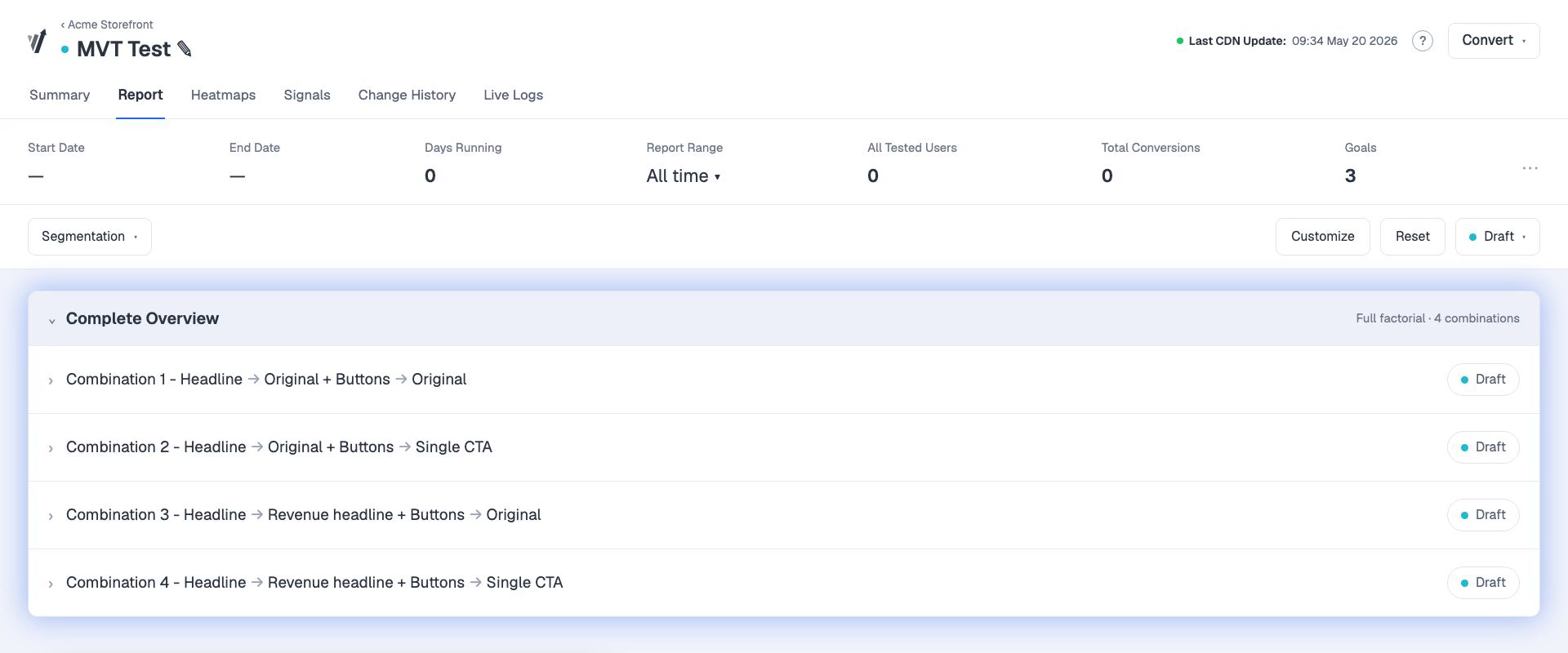
Every combination gets its own conversion rate, lift over control, and confidence interval — with Smart Recommendations on which combinations to ship.

Convert Experience Report showing the Complete Overview with every combination — Combination 1–4, each Headline × Buttons, with status.

Try it · variations per section

Section 1 · Headline 2
Section 2 · CTA 3
Section 3 · Hero image 1
6
combinations
Good fit — low traffic requirements

2 × 3 = 6 · full factorial

≈ 6,000 users / week minimum

4 · Traffic-aware sizing

Know if your page has the traffic

More combinations split traffic more thinly. Size the test up front — a documented rule of thumb is 1,000 users and 100 conversions per combination.

Why it works

Most multivariate tests skip statistical rigor. Convert applies four safeguards.

Every safeguard is documented and grounded in Convert's published statistical methods — not a black box.

Multiple comparisons

Configurable correction

Convert supports Bonferroni, Šidák, or no correction as user-configurable options on the Frequentist report. Šidák is the documented recommendation for mission-critical experiments — it controls the family-wise error rate while retaining more statistical power than Bonferroni.

Statistical methods used
Data integrity

Chi-square SRM detection at 99%

Sample Ratio Mismatch detection runs a Chi-square goodness-of-fit test against the configured allocation and warns when splits diverge at the 99% confidence threshold. SRM tags appear in the Experience Report during the test — not only at completion — so compromised data is caught before you act on it.

What is SRM?
Anytime-valid stopping

Asymptotic Confidence Sequences

Sequential testing uses Asymptotic Confidence Sequences — a methodology grounded in Waudby-Smith et al. (2023) and aligned with Generalized Anytime Valid Inference (Howard et al., 2022). Results can be evaluated at any point during the test while keeping the false-positive rate under control.

Statistical methods used
Significance method

t-test significance

All new experiences use t-tests for significance, replacing z-tests for every experiment started after October 13, 2023. The t-test produces more accurate results than the z-test at the sample sizes typical of CRO experimentation.

Statistical methods used

How to get started

How to set up a multivariate test in Convert Experiences

Watch the full setup

Creating a multivariate experiment

Convert's Values

ISO 27001
SOC 2
GDPR
CCPA
HIPAA
Zero Data Breach

Privacy is architecture

Convert Experiences uses first-party cookies only and stores experiment data on servers in Frankfurt, Germany. Compliance is built into the development lifecycle, not bolted on after launch.

Plans from
$299/mo
Flat-rate · annual billing · published

Experimentation should be accessible

Convert Experiences publishes its pricing in full on a single pricing page, with flat-rate plans and no per-module add-on charges. Every paid Convert Experiences customer can self-serve from day one.

Convert
‹ ProjectsPricing Page · Q3 Experiments
Compass Experiences Locations Audiences Goals
Search…
+ Add Filter

Lean platform, not bloated suite

Convert Experiences is an experimentation platform. Not a CMS, not a personalization-only product, not an analytics suite. Convert ships what experimentation needs and stops there.

Convert team cleaning up the Kotor Bay beach, together.

Conscious business

Convert Experiences is operated by a Climate Neutral Certified business. Convert runs on carbon-neutral servers in Frankfurt, donates 1% of revenue to Stripe Climate and 1% to conservation initiatives, and uses 8% of every plan fee to plant trees through TIST, totaling over 93985 trees planted as of May 2026.

Multivariate testing in Convert Experiences: frequently asked questions

What is multivariate testing in Convert Experiences?

Multivariate testing in Convert Experiences is an experimentation method that tests multiple page-element variations simultaneously to identify the highest-converting combination. Convert uses a full factorial design that automatically generates every combination of the sections and variations you define, then reports performance at the combination level inside the Experience Report. It is available on the Convert Experiences Pro and Enterprise plans as of 2026.

When should I use multivariate testing instead of A/B testing?

Multivariate testing is the right choice when a page already converts, when you want to understand how elements interact, and when you have sufficient traffic to split across combinations. A/B testing is the right choice when you are exploring a major directional change, when traffic is limited (under roughly five thousand visits per month), or when you have a single clear hypothesis to validate. Multivariate testing answers which combination wins; A/B testing answers which version wins.

Which Convert Experiences plans include multivariate testing?

Multivariate testing is included in the Convert Experiences Pro and Enterprise plans as of 2026, and is not included in the Growth plan. It is part of the included feature set on Pro and Enterprise rather than a paid add-on.

What multiple-comparison correction does Convert apply to multivariate tests?

Convert offers three multiple-comparison correction options on the Frequentist report — Bonferroni, Šidák, or none — and the choice is user-configurable rather than automatic. Convert’s documentation recommends Šidák for mission-critical experiments because it controls the family-wise error rate while preserving more statistical power than Bonferroni.

How much traffic do I need for a multivariate test in Convert Experiences?

There is no single fixed minimum, because the real requirement depends on baseline conversion rate, expected lift, number of combinations, and the statistical model used. A documented rule of thumb in Convert’s analysis guidance is at least 1,000 users and at least 100 conversions per combination, over at least one to two weeks. A 2-section × 3-variation test produces six combinations, which translates to roughly 6,000 minimum weekly users as a starting point.

Can I build a multivariate test in Convert Experiences without writing code?

Yes. For typical content, design, and copy changes, a multivariate test can be built end-to-end inside the Visual Editor without writing code. The Convert tracking snippet must be installed on the site to enable testing. Custom JavaScript components, single-page application setups, and full-stack experiments may require additional code beyond the snippet.

Does Convert Experiences support server-side multivariate testing?

The native multivariate experience type in Convert Experiences is client-side and built in the Visual Editor. Convert supports server-side experimentation through the JavaScript/Node.js SDK as a Full-Stack experiment type, enabling explicit modeling of combinations in backend variation logic. Server-side multivariate testing through the SDK is possible by design, but is not a native UI workflow equivalent to the Visual Editor experience.

Can I switch between Frequentist and Bayesian analysis on a running test?

Yes. Convert allows switching the statistical model on a running experiment via the Stats and Settings menu. Switching from Bayesian to Frequentist removes the Bayesian-only columns (Risk and Expected Uplift) from the report. For multivariate tests using Auto-Allocation (multi-armed bandit) on the Frequentist model, Sequential testing is required.

Does Convert automatically deploy the winning combination?

Convert surfaces winning combinations through Smart Recommendations in the Experience Report — for example, identifying which variation is currently winning and by how much — but Smart Recommendations are not enabled by default and must be turned on in Project Configuration. Convert does not auto-deploy a winning combination by itself: you can keep the winning variation running after the experiment ends, or create a Deploy from that variation through the Experience Report.

What support do I get when running multivariate tests in Convert Experiences?

Convert support is staffed by experimentation specialists rather than generic ticket handlers. The team works directly on statistical questions, targeting logic, implementation trade-offs, and experiment QA, and collaborates with agency teams instead of forcing a single onboarding workflow. The median first-response time is 7 minutes as of 2025.

Get started

Run multivariate tests you can defend

Pick the elements you want to test. Convert handles the combinations, the traffic split, and the statistics — and gives you a report that tells you which combination to ship.

  • No credit card
  • 15-day trial
  • Full features

Editorial Disclosure This page is reviewed quarterly. The next scheduled review is August 2026. Written by Uwem (freelance copywriter, working with Convert). Reviewed by Carmen Apostu, Editor, and Trina Moitra, Chief Marketing Officer at Convert.

Start your 15-day free trial now.
  • No credit card needed
  • Access to premium features
You can always change your preferences later.
You're Almost Done.
What Job(s) Do You Do at Work? * (Choose Up to 2 Options):
Convert is committed to protecting your privacy.

Important. Please Read.

  • Check your inbox for the password to Convert’s trial account.
  • Log in using the link provided in that email.
  • To ensure you receive your 30-day trial from our ambassador, please use the same browser to claim your account.

This sign up flow is built for maximum security. You’re worth it!