Top A/B Testing Tools with Good Customer Support


A/B testing tools can get complex, and when you’re running live experiments, you need a support team that can help you figure things out quickly, whether that’s resolving an issue, clarifying a setup, or troubleshooting an unexpected result.
Unfortunately, many A/B testing tools on the market fall short. Instead of helpful human support, you often get bot chats that go in circles, scripted responses that don’t address your question, or endless ticket ping-pong between different “specialists.” Sometimes, you send a support request and never hear back. If you’re working on live experiments, that kind of delay can throw off timelines and slow down growth.
At Convert, we prioritize good customer support—and by that, we mean ensuring you always have someone on the other end who can give you clear, actionable help when you need it.
Our support team consists entirely of human experts who are deeply knowledgeable about experimentation. Instead of bots or canned responses, you get real people who can help you navigate tests, QA, and edge cases. And most importantly, you never have to wait long to get the answers you need.
In this article, we’ll explore the top A/B testing tools with good customer support, starting with Convert. You’ll learn:
- What to look for in excellent customer support for A/B testing tools
- How customer support works at Convert
- Other A/B testing tools that also offer strong customer support
- How to use support quality as a decision filter when choosing your next platform
💡How we chose these tools:
We selected these tools based on verified user reviews from G2 and TrustRadius, published support metrics like customer satisfaction and first response times, and the transparency of each company’s support process.
What to look for in excellent customer support for A/B testing tools
When evaluating A/B testing platforms, features and pricing often take center stage. But it’s the quality of customer support that often determines how smoothly your tests actually run. Here’s what to look for when assessing a platform’s support quality:
1. Fast First Response Time (FRT)
When you reach out for help, you shouldn’t have to wait hours for a reply. A good support team responds quickly (ideally within an hour) to acknowledge your message and start troubleshooting right away.
According to Zendesk’s Customer Experience Trends report, long wait times are the top indicator of bad customer service. And they have real consequences: half of customers say they’d switch to a competitor after just one bad customer support experience, and that number jumps to 80% after more than one.
In A/B testing, those stakes are even higher. A delayed response can stop your experiment, interrupt data collection, and hold up campaign decisions. The faster you get a reply, the sooner you can resolve issues and keep your testing schedule on track.
2. Real human expertise
Bots and scripted replies might be fine for resetting a password, but they do little to solve real A/B testing issues.
When a test breaks or a variation behaves differently than expected, you don’t need a copy-paste or AI-generated response. You need access to real people who understand A/B testing, experiment design, and technical implementation.
These experts will walk you through debugging complex issues, help validate your results, and share best-practice advice drawn from real testing experience. That kind of human insight saves you hours of frustration and helps you avoid costly testing mistakes.
3. Clear ownership and accountability
Good support means knowing exactly who’s handling your issue. So, look for an A/B testing tool where each ticket has a single owner responsible for driving it to resolution, not one that passes tickets from one agent to another.
When one person takes full ownership from start to finish, they keep communication clear, maintain steady progress, and resolve problems faster.
This matters even more in teams that offer 24-hour coverage. When support shifts change, strong ownership ensures your issue doesn’t get lost in handoff. The next person who picks it up will have full context, so you don’t have to repeat yourself or wait while they “get up to speed.”
4. Reasonable time to resolution
A fast first response sets the tone, but you should also pay attention to how long it takes to fully resolve an issue. The best support teams don’t just reply quickly; they stay with you until everything works as it should, and then they close the ticket.
Ideally, that should happen within 24 hours. Anything longer will slow down your testing schedule, especially if you’re trying to iterate quickly.
5. 24-hour coverage (or close to it)
If you run tests across time zones or work with a global team, round-the-clock support coverage can make a big difference. Issues don’t always happen during regular office hours, and when they do, you shouldn’t have to wait until the next business day to get help.
Even if a tool doesn’t offer full 24/7/365 service, the best support teams have coverage that overlaps key time zones and ensures someone is available when you need them. That kind of availability keeps experiments moving and prevents small issues from escalating into long delays.
6. Smooth escalation process
Some issues need a deeper level of expertise. When that happens, you want a support system with a clear and reliable escalation process. So, look for an A/B testing tool where complex tickets are handed off quickly to specialists who can resolve them without unnecessary delays.
A good escalation process also keeps you informed every step of the way. You should always know who’s handling your issue, what’s being done, and when to expect an update. Proactive communication like this builds trust and ensures your request never gets lost in the shuffle.
Top A/B testing tools with great customer support
With so many capable A/B testing tools on the market, customer support can be the deciding factor. The table below provides a quick side-by-side look at how each platform we cover performs in key areas like response time, resolution time, and support availability.
| Tool | Median First Response Time | Median Time to Resolution | 24/7/365 support |
Educational support resources |
Pricing |
||||||||||||||||||||||||||||||
|---|---|---|---|---|---|---|---|---|---|---|---|---|---|---|---|---|---|---|---|---|---|---|---|---|---|---|---|---|---|---|---|---|---|---|---|
| Convert | ~5 minutes | 17–22 hours (most tickets closed in <24 hrs) | ✅ (24-hour coverage except weekends) |
Yes — Documentation, onboarding guidance, and human-led expert support | 15-day free trial. Paid plans start around $299/month (billed annually) | ||||||||||||||||||||||||||||||
| VWO | 40–45 minutes | Not publicly available | ✅ | Yes — Knowledge base, blog, webinars, and CSMs for enterprise plans | 30-day free trial. Paid plans start around $598/month (billed annually) | ||||||||||||||||||||||||||||||
| AB Tasty | ~3 minutes | Not publicly available | ✅ | Yes — Dedicated CSMs, KAMs, and technical training resources | Not publicly available | ||||||||||||||||||||||||||||||
| Kameleoon | Not publicly available | Not publicly available | ✅ | Yes — Kameleoon Academy (50+ courses), certifications, tutorials | 30-day free trial. Paid plans start around $495/month (billed annually) | ||||||||||||||||||||||||||||||
| Optimizely | Not publicly available | Not publicly available | ✅ | Yes — Documentation, certifications, events, and partner-led training | Not publicly available | ||||||||||||||||||||||||||||||
| SiteSpect | ≤15 minutes (acknowledgment) | Priority-based: 1–30 business days | ✅ | Yes — Knowledge base, guided onboarding | Not publicly available | ||||||||||||||||||||||||||||||
| Statsig | Real-time (Slack-based human support) | Not available | ✅ (on-call via Slack) |
Yes — Public documentation portal, Slack community, onboarding support | Free tier. Paid plans start at $150/month. |
1. Convert

Convert (also known as Convert Experiences) is an experimentation and personalization platform that allows businesses to run a variety of tests (including A/B, split URL, and multivariate tests) across their websites, mobile apps, and server-side functions.
We help growth teams and marketers make data-driven decisions by comparing different versions of content or features to determine which performs better against specific goals like conversion rates or engagement metrics.
Key features
- Advanced targeting & goals engine: Run highly precise experiments using over 40 targeting filters, including location, device type, traffic source, and even custom JavaScript conditions. Convert’s goals engine tracks multiple KPIs per test, helping you see what works, for whom, and why.
- MCP (Model Context Protocol) Server: This acts as a specialized bridge that allows AI agents to access and manage A/B test data within Convert. These agents can create, edit, or pause experiments, summarize A/B test results, update traffic allocations, and analyze experiment performance, all without manual input.
- Full-stack experimentation: Supports both client-side (front-end) and server-side (back-end) testing, so teams can experiment with UI/UX changes as well as backend logic, pricing algorithms, and feature flags.
- Personalization engine: Deliver tailored experiences to different audience segments by modifying messaging, layouts, or offers in real-time based on visitor behavior and intent. Personalization helps boost engagement and conversions by tweaking the user experience to meet each visitor’s specific needs.
Convert’s support overview
- Median First Response Time: Our FRT is less than 5 minutes (compared to the industry average of 2.6 hours). Our customers don’t wait long to be acknowledged or get help.
- Median Time to Close: We typically resolve issues and close tickets within 17 to 22 hours, with some months seeing an average as low as 14 hours.
- Human-first approach: Convert’s support is entirely handled by real people—no bots or scripted replies. Every customer gets help from someone who understands experimentation, QA, and data analysis.
- Clear ticket ownership policy: Every ticket is handled from start to finish by a single agent. The agent takes full responsibility for resolving the issue, following our defined processes for escalation and follow-up.
- 24-hour coverage (except weekends): Our support team operates under a rotating coverage model, so customers get help around the clock, even when one agent’s shift ends.
- Smooth handoffs: Our agents reassign/transfer tickets only when necessary. This prevents customers from bouncing between agents without a clear resolution path.
Why support at Convert stands out
When customers talk about Convert, one theme comes up again and again—exceptional support.
Across both G2, TrustRadius, and our own Testimonials page, reviewers consistently highlight responsiveness, genuine care, and the hands-on help they receive from our support experts.
“Great platform and easy to use, especially for newbies,” writes Olivia M. on G2. “The onboarding process was smooth, and the support team is excellent, especially because you can talk to them on live chat and get your issue instantly resolved. They are also happy to jump on a call if the issue is more complicated.”
Agency partners echo this sentiment, especially those managing client accounts and complex setups. Sean Clanchy from Swanky Agency notes: “Convert’s support team is awesome—whether we’re sanity checking with George or Claudiu, or discussing audience configurations with Dionysia or Alex, we always get the support we and our clients need.”
This personal touch—knowing the names and faces behind support—is something customers mention often. Convert’s support isn’t a faceless queue; it’s a team that learns your setup, understands your goals, and sticks with you until the issue is solved.
On TrustRadius, the praise is just as strong. Scott Chandler calls our support team “awesome,” noting their “responsiveness and willingness to dig in and review my test setup if I encounter any issues.” Phil Weaver adds, “Customer service is phenomenally fast and helpful. Best of all, they care. They want to see their customers succeed.”
These reviews tell a consistent story: Convert’s support team builds relationships, offers expert advice, and takes ownership until every problem is solved. That human connection, backed by quick response times and deep product knowledge, is what makes Convert stand out in a crowded market of A/B testing tools.
What our support process looks like
When a support ticket is created, it’s immediately routed to our Shared Common Inbox, where it’s acknowledged and assigned to an agent right away. Every agent monitors this shared space proactively to ensure customers receive a prompt first response (usually within 5 minutes) and know that someone is already working on their issue.
We use a system called Inbox Views to make sure no conversation falls through the cracks. Every support member can see:
- Conversations waiting without a reply for over 15 minutes
- Tickets approaching an SLA breach within 40 minutes
This setup has significantly reduced long wait times and eliminated the “ghosted” feeling customers sometimes experience.
Once an agent starts working on a ticket, they become its owner. Our agents only reassign a ticket if they are taking full responsibility for meaningful progress (not just following up). But if it’s a simple nudge or reminder, the original owner retains control of the ticket
Because Convert offers near 24-hour coverage, smooth handoffs are essential. So we divided our support team into two groups: Premium Support and Customer Support Magicians. This keeps responses quick and ensures that specialized issues go to the right people without unnecessary transfers.
Thanks to this process, around 90% of our tickets are closed within 24 hours.
Best for: Marketing leaders and growth teams who care equally about a powerful experimentation feature set and fast, human-centered support.
Pricing: Convert offers a 15-day free trial (no credit card required). Our paid plans start at $299/month (billed annually)
2. VWO
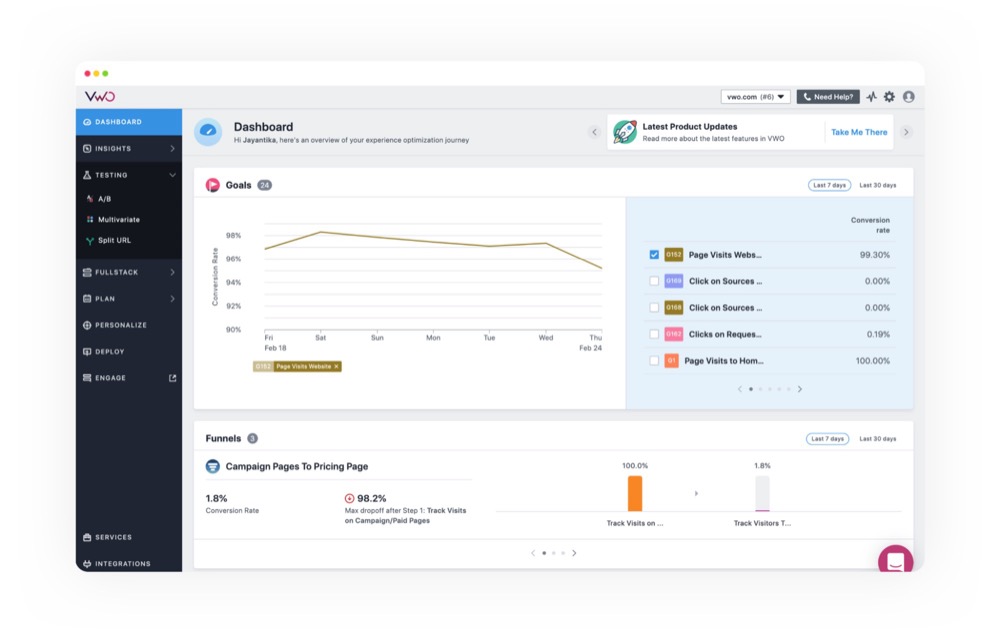
VWO (Visual Website Optimizer) is an all-in-one experimentation and conversion rate optimization (CRO) platform that allows businesses to test, personalize, and analyze digital experiences across websites, mobile apps, and server-side functionality.
It’s designed to help product teams and marketers understand user behavior, identify friction points, and test hypotheses that drive measurable growth.
Key features
- Experimentation & testing: Supports A/B, split URL, and multivariate testing to compare different versions of pages, user flows, or app features and measure their performance.
- Multi-device and server-side testing: Enables tests across desktop, tablet, and mobile, as well as server-side environments, so teams can experiment with algorithms, APIs, or backend logic.
- Visual and code editors: Offers a no-code visual editor for marketers who want simplicity, and a code editor (HTML, CSS, JavaScript) for developers who need deeper control.
- Audience targeting & segmentation: Provides detailed targeting options based on user behavior, device type, cookies, location, or custom data to ensure experiments reach the right audience.
VWO’s support overview
- Customer satisfaction score: VWO reports a 99% customer satisfaction score, which is higher than the industry average of 94%.
- First Response Time: The platform maintains an average first response time of 40–45 minutes, faster than the industry average of 2.6 hours.
- Availability: Offers 24/7/365 support to customers across all pricing tiers.
- Support channels: Provides multiple ways to reach their team, including email, phone, and live chat (which is accessible within the VWO app).
- Screen-sharing assistance: Users can request screen-sharing sessions through tools like GoToMeeting or Google Meet to resolve complex issues directly with a specialist.
Customer feedback
“…What sets VWO apart is their outstanding customer support. They meet with us monthly to answer questions, share ideas, and plan new tests—always going the extra mile to help us hit our goals. Paired with their powerful technology, this partnership makes VWO a top choice for any organization looking to level up their experimentation program.” – Laura M.
Note: While VWO’s overall support performance is strong, dedicated customer success managers (CSMs) are available only for enterprise-level accounts.
Best for: Enterprises and mid-sized businesses that want a robust experimentation platform with solid customer support and AI-powered features to scale optimization efforts.
Pricing: VWO offers a 30-day free trial. The paid plans for 100,000 monthly tracked users (MTUs) start at $598/month (billed annually).
3. AB Tasty

AB Tasty is a global digital experience optimization platform that enables marketing, product, and engineering teams to experiment, personalize, and manage features across their websites and applications to drive conversions and revenue.
The platform helps teams test hypotheses, understand user behavior, and deploy winning variations to improve key metrics like conversion rates, engagement, and average order value.
Key features
- Server-side experimentation: Allows testing within the backend of applications, so teams can optimize algorithms, logic, or pricing structures safely.
- Advanced audience targeting: Provides detailed segmentation based on geolocation, device type, traffic source, weather, cart content, and even data imported from DMPs or CDPs.
- Feature management: Lets teams release new features safely using feature flags, which enable controlled rollouts, gradual releases, and the ability to turn features on or off instantly without requiring new code deployments.
- AI-powered personalization: Uses machine learning to automatically tailor content, recommendations, and offers in real-time based on individual user behavior and profiles.
AB Tasty support overview
- Response time: AB Tasty reports an impressive average response time of just over 3 minutes, meaning help is available almost instantly when you need it.
- Support quality: The platform holds a 9.3/10 quality of support rating on G2, which reflects consistently positive feedback from users.
- Dedicated support roles: Every customer gets access to CSMs and Key Account Managers (KAMs) who provide ongoing strategic and technical guidance.
- Technical Support Engineers: AB Tasty assigns specialized engineers to help customers set up and troubleshoot experiments.
- Global support teams: With offices and support teams spread across multiple regions, AB Tasty provides reliable assistance around the clock, so time zones and language differences never slow you down.
Customer feedback
“What I appreciate most about AB Tasty is the dual strength of the tool and the support… At the same time, the quality of support is remarkable: our Product Specialist, Shane, is extremely responsive and often helps us to overcome obstacles, just like the support team, which is consistently responsive and a great help in ensuring the success of our projects.” – Kelthoum H.
Best for: Organizations that want reliable experimentation tools with highly responsive support, dedicated account management, and hands-on technical guidance.
Pricing: AB Tasty’s pricing information is not publicly available.
4. Kameleoon
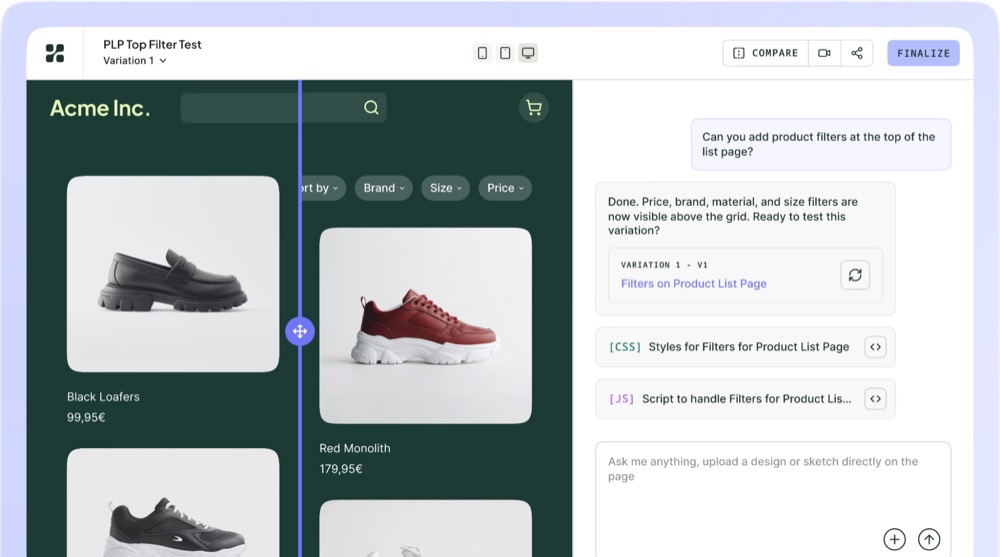
Kameleoon is a comprehensive, enterprise-grade platform for AI-driven experimentation and personalization across web, mobile, and server-side channels. It helps product and marketing teams accelerate business growth by running A/B tests, gathering user insights, and delivering customized experiences based on a deep understanding of customer behavior.
Key features
- Experimentation: Run a variety of tests, including A/B, split URL, and multivariate tests, across web, mobile, and backend environments. Supports both client-side and server-side testing for complete flexibility.
- AI-powered personalization: Uses machine learning to predict visitor intent and deliver dynamic, personalized experiences based on user behavior, demographics, and real-time context.
- Feature management and feature flags: Separates code deployment from feature releases, allowing for progressive rollouts, controlled live testing, and instant rollbacks to minimize risk.
- Mobile app testing: Supports Android (Kotlin/Java), iOS (Swift), Flutter, and React Native. With feature variables, teams can deploy mobile app experiments instantly without needing to resubmit to the app store or marketplace.
Kameleoon support overview
- Dedicated onboarding and setup: Kameleoon assigns a dedicated team from day one to help users configure their first experiments and validate their data setup.
- Customer Support Manager: Each account is paired with a Customer Support Manager who provides regular check-ins, CRO guidance, and insights to help improve experiment performance over time.
- Educational resources: The Kameleoon Academy offers more than 50 online courses and video tutorials, allowing users to master the platform and earn product certifications.
Customer feedback
“Kameleoon allows you to easily set up A/B tests and personalized displays, thanks to a user-friendly interface. The customer support is responsive and guides you from creation to analysis of the results, including implementation.” — Julien D.
Best for: Mid-sized to large organizations that need a highly customizable, AI-powered experimentation platform with hands-on customer support and comprehensive training resources.
Pricing: Kameleoon offers a 30-day free trial. The paid plans start at $495/month.
5. Optimizely

Optimizely is a leading Digital Experience Platform (DXP) that helps organizations create, manage, and optimize digital content and customer experiences across multiple channels.
It combines experimentation, content management, and digital commerce tools into one unified suite, enabling businesses to make data-driven decisions and deliver personalized experiences at scale.
Key features
- A/B testing & multivariate testing: Allows you to compare different versions of web pages, app interfaces, or marketing messages to see which garners the most engagement and conversion rates.
- Feature experimentation & feature flags: Lets developers gradually roll out new features to selected user segments, run backend experiments, and roll back instantly if needed.
- AI-powered personalization: Uses Opal, Optimizely’s AI engine, to deliver personalized content and product suggestions based on real user behavior and preferences.
- Marketing automation: Includes tools for building and automating multi-channel campaigns through email, SMS, and mobile notifications.
Optimizely support overview
- Global 24/7/365 support: Optimizely provides continuous monitoring and operations support for all cloud customers through a dedicated global managed services team.
- Multiple contact channels: Customers can reach support via email, phone, or by submitting a ticket directly through an online form.
- Performance reviews and advisory: Optimizely’s advisors work closely with users, reviewing experiment and infrastructure performance after tests and providing recommendations for improvement.
- Education and training: Optimizely offers a rich library of guides, certifications, events, and partner-led training programs to help teams master the platform and stay current with new features.
Customer feedback
“You have absolute control over the page you are testing (it’s URL-specific, copy & paste), and the results come in almost real-time. There are options at the top to inject CSS and JavaScript, which can help immensely! The support team is incredible with their feedback—usually taking around 24 hours or less! Highly recommend!” — Tim S.
Best for: Organizations that need a full DXP with advanced experimentation, CMS, marketing automation, and around-the-clock global support.
Pricing: Optimizely’s pricing information isn’t publicly available.
Read: Optimizely Alternatives: Top A/B Testing Platforms to Consider for 2025
6. SiteSpect

SiteSpect is a digital optimization platform that allows businesses to improve their websites, mobile apps, and other digital experiences through A/B testing, multivariate testing, and personalization.
Its unique, patented architecture sits in the flow of traffic (as a reverse proxy), enabling both client-side and server-side testing without the “flicker” effect or performance lag common in traditional JavaScript tag-based solutions.
Key features
- Client-side and server-side optimization: Supports various optimization techniques, from front-end “look and feel” changes using a visual editor (or “Find and Replace” tool) to back-end functionality and platform changes (known as Origin Experiments)
- Feature management and rollouts: Enables controlled releases and safe experimentation with new features, infrastructure updates, or services. Teams can test with a percentage of users before a full rollout and instantly disable features if needed using a built-in “kill switch.”
- AI-driven recommendations: Uses pre-made or custom machine learning algorithms to offer personalized product and content recommendations anywhere on a page without additional coding.
- Mobile testing: Lets teams instantly modify mobile, OTT, and IoT apps without SDKs or resubmitting to app stores.
SiteSpect support overview
- Multiple contact options: Customers can reach SiteSpect’s support team through phone or email, depending on urgency.
- Quick initial response: For reported system errors, SiteSpect aims to provide an initial acknowledgment within 15 minutes of receiving the report.
- 24/7/365 emergency coverage: Phone lines are manned around the clock for Priority 1 (urgent) issues, with real humans available to respond immediately.
- Tiered support model:
- Priority 1: Emergency issues are typically resolved within 1 business day.
- Priority 2: Campaign-related bugs (like an inability to save a campaign element) are addressed within 2 business days.
- Priority 3: Minor or nuisance issues (like broken links) may take up to 30 days to repair.
- Operating hours: Priority 2 and 3 incidents are handled between 4:00 and 20:00 U.S. Eastern Time, ensuring responsive weekday coverage while prioritizing critical cases.
Customer feedback
“I have worked with SiteSpect for many years now and have worked with multiple A/B testing tools, but I always prefer SiteSpect. It is a powerful tool that can manage our complex tests and setups. The customer service is also great. They are friendly and quick in their replies and proactively try to come up with solutions.” — Verified G2 user
Best for: Enterprises and large-scale businesses that need a fast, stable testing environment with 24/7 human support and priority-based issue management.
Pricing: SiteSpect’s pricing information isn’t publicly available.
7. Statsig

Statsig is a robust feature management and experimentation platform designed to help engineering and product teams build better products faster. It allows companies to manage the full lifecycle of new features—from conducting controlled rollouts using feature flags to measuring their impact through A/B testing and analytics.
Built on an SDK-based architecture, Statsig integrates directly into your application code, ensuring accurate data collection and minimal latency.
Key features
- Feature Gates (feature flags): Provides a mechanism to remotely turn features on or off without deploying new code. This enables controlled rollouts, instant “kill switches”, and conditional visibility based on user segments or environments.
- Dynamic configs: Allows engineers to adjust configuration values (like text, images, or variables) instantly without redeployment so they can iterate quickly between test cycles.
- Session replays: Allows teams to watch how users interact with new features, providing visual context that complements experiment metrics.
- SDKs and integrations: Offers lightweight SDKs for various languages and platforms (like iOS, Android, React, Python, and Java) that integrate directly into the application codebase, ensuring minimal latency and reliable feature delivery.
Statsig support overview
- Slack-based real-time support: Statsig runs a dedicated Slack channel where customers can interact directly with real human support agents—not bots. The team responds in real time and is always on-call to handle questions or issues.
- Private and public channels: Each customer can have a private Slack channel to directly communicate with the support team. There are also public channels for broader topics like experimentation best practices, product updates, and general support, where users can get help from both the Statsig team and the community.
- Transparent documentation: Every time a new feature launches, the team responsible for it publishes detailed documentation in Statsig’s public support portal. This ensures customers can self-serve, troubleshoot, and learn new capabilities as they’re released.
- Community-driven support: Statsig’s Slack ecosystem encourages collaboration and shared learning among users, helping teams learn faster and improve experimentation outcomes together.
Customer feedback
“I appreciate how easy it is to set up experiments and have all our business metrics in one place. The Statsig team has also been incredibly helpful during the onboarding process and is always available to answer any questions we have.” — Paulo M.
Best for: Engineering and product teams that value developer-friendly workflows, transparent documentation, and real-time human support within a community setting.
Pricing: Statsig offers a free plan with 2M events per month, 50,000 session replays per month, and unlimited flag & config checks. The paid plans start at $150/month.
How to check if an A/B testing tool has good customer support quality
When you’re choosing an A/B testing tool, support should be part of your evaluation—not an afterthought. Here are three simple ways to assess a tool’s customer support before committing:
1. Check for published support stats.
Some companies, like Convert (that’s us!), publish their customer support performance metrics publicly, showing stats like first response time, resolution time, and customer satisfaction scores. This is the easiest way to gauge how responsive and reliable a team really is.
However, not every platform has a dedicated page for these metrics. A lack of published stats doesn’t automatically mean their support isn’t good. It may just mean they don’t make those numbers public. If that’s the case, you can use the next two methods to get a clearer picture.
2. Reach out to the support team directly.
One of the most effective ways to test a company’s support is to contact them yourself. Send a question or two and see how long it takes to get a reply.
If you’re not yet a customer, your message might be routed to sales first, and that’s fine. Use the opportunity to observe how quickly they respond and how they handle your inquiry.
When you do speak with sales (or support), ask specific questions like:
- What is your median first response time?
- What is your median time to resolution or close?
- Do I get a dedicated human, or do you use bots?
- What happens if my issue needs escalation?
- Are there separate tiers of support, and how does my tier fit in?
Their answers will tell you a lot about the company’s internal process and how seriously they take customer experience.
3. Try the product firsthand.
If the platform offers a free trial (like Convert does), take advantage of it.
Use the product, run a small test, and contact support to ask a question or report a minor issue. Observe how long it takes for them to respond and how effectively they handle your request. This hands-on approach gives you a real sense of what it’s like to be a customer.
When you’re weighing your options, don’t just compare features and pricing. Factor in the quality of support as well. A tool with fewer features but exceptional, responsive support may be the better choice, especially if you value speed, reliability, and guidance as you scale your experimentation efforts.
Choosing an A/B testing tool that supports you
Customer support can make or break your experimentation cadence. When support is fast and dependable, tests stay on schedule, results are reliable, and your team keeps its momentum.
The A/B testing tools we covered above offer different approaches to support: some focus on dedicated account management, while others emphasize speed or global coverage. Depending on your team’s size, needs, and budget, the right choice will look different for everyone.
However, if you’re looking for a platform that balances powerful experimentation features with fast, human-driven, and accountable support, Convert leads the pack. Our median first response time is under 5 minutes, and we close most tickets in under 24 hours, ensuring that our customers aren’t kept waiting.
If you’d like to see what that level of support looks like in action, start your 15-day free trial today. Ask your questions, test the process, and experience how responsive support from actual human experts can keep your optimization work moving smoothly.
Frequently Asked Questions (FAQs)
1. What is a “good” first response time for customer support in A/B testing tools?
A good first response time is usually under an hour. The best support teams—like Convert’s—reply within minutes. Fast responses help you resolve issues before they interrupt live tests or delay campaign launches.
2. Does faster support guarantee better testing outcomes?
Not directly, but it has a strong influence. When support teams respond quickly and with real expertise, you spend less time troubleshooting (and sending follow-up messages) and more time analyzing results and launching new experiments.
3. Are dedicated customer success managers worth the extra cost?
Yes, especially if you run frequent or complex experiments. A dedicated CSM provides continuity, knows your setup inside out, and can help you prioritize high-impact tests. It may not be essential for smaller teams, but for enterprise or high-volume testing, it’s often a worthwhile investment.
4. If a vendor has good features but weak support, can I still make it work?
You can, but it’ll likely cost you time. Good features become counterintuitive if you’re always stuck waiting on help or troubleshooting alone. If your team doesn’t have deep technical expertise, weak support can turn even a powerful platform into a frustrating experience.
5. How do I test a vendor’s support before committing?
Reach out directly before you buy. Send a few questions to their sales or support team and note how long it takes to hear back. If they offer a free trial, use it to test both the product and the responsiveness of the support team. Quick, helpful, and human responses are a strong sign of good long-term service.
Written By
Althea Storm
Edited By
Carmen Apostu

Fact-Checked By
Poonam
